Declare
is a UI language for you and your AI.
Just as SQL is a domain-specific language for database queries, Declare is a DSL for user interfaces — for taking the custom, fluid experience you have in mind beyond a prototype, into a real app: structured, verifiable, and with the design written plainly in its code.
Expressive. And verifiable.
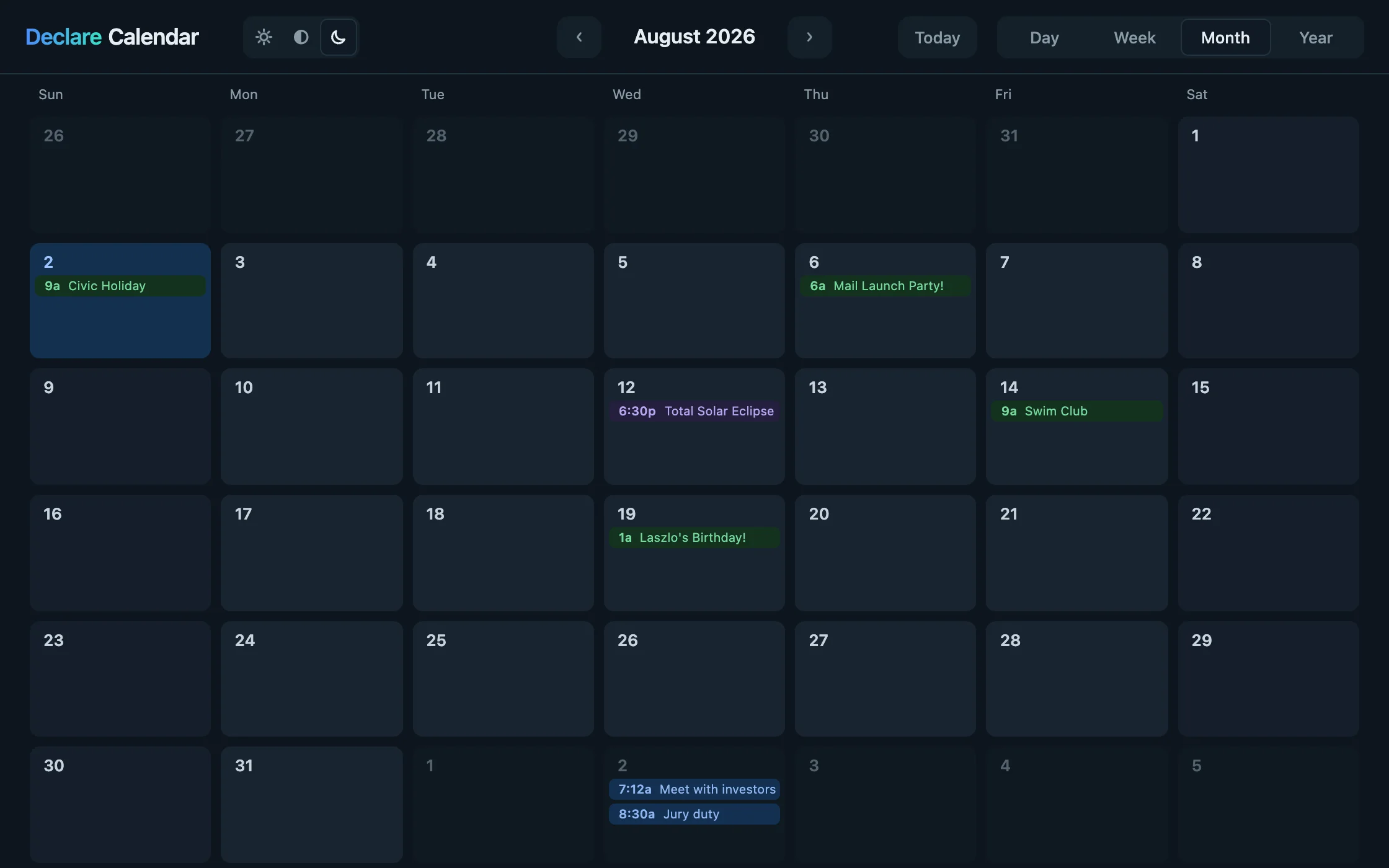
A calendar that zooms through time, a desktop with real windows: complete programs, each readable end to end and checked by the compiler. Open one, or edit it live in the browser you’re using.
Day, week, month and year views are one surface, zooming continuously; a view doesn’t switch so much as become the next one, and every motion can be interrupted. It runs on real data: drag an event to another day, and it’s moved.
lines of code, plus 228 of comments — four views, zoom, drag and edit
over the wire, gzipped — app (structure, logic, styling) and runtime
lines typed by hand — human-designed and directed, built with AI
The acid test for a UI language: multiple applications, windows that drag, resize, layer and minimize into live thumbnails, a magnifying dock, menus that follow focus, and separately loaded apps running inside its windows. Elsewhere that is a project assembled from several libraries; here it is one program.
3529 lines — 2011 code, 939 comment · 264 KB over the wire · every pixel drawn from shapes, no image assets
1,000,000 issues · search as you type · edit in place, with undo · not one line of virtualization code
1508 lines — 983 code, 251 comment · 194 KB over the wire, before its data · no dependencies
Say what you mean. Exactly.
Declare was designed first for the people who make interfaces. Layout, motion, states, theming and drawing are the language itself, not libraries bolted on — so the experience you have in mind is something you can write down directly, and read back later as it was meant.
Three things follow one value: the number, the bar’s length and its color. Click to change v — all three update together, because each is a relationship that stays true, not a step someone remembered to run.
Your AI can write the code. Can it tell when it’s wrong?
In Declare, yes. A small language gets it started; these four tools let it catch its mistakes, fix them, and finish.
One installable skill: the language, the library, the conventions, the working loop — nothing to reconstruct from a repository. And declare-help answers any name or error code on demand.
Every diagnostic names the broken rule and the valid rewrite. Try it: change textColor to color in the panel above and read what comes back.
The Inspector can tell you or an agent why a live value is what it is, what it depends on, and what happens if you change it — live, in the running program, not guessed from source.
A formal six-rung ladder, from parse to pixels, is how an app is shown to be correct. Your AI climbs it one rung at a time, and every rung reports what it proved — and what it cannot see.
Measured: given the same brief, the same agent built a ticket-buying app twice. The Declare app was 1,279 lines to React’s 2,666, and its first build that ran passed all eleven hidden checks; React’s passed six. Single runs, not yet a benchmark — every run is in the repository.
The calendar above was built this way: human-designed and directed, built with AI, and kept honest by the compiler.
Small enough to know. Strict enough to trust.
Why a new language, now?
Start with the obvious objection. AI writes most code now, and it is best at the languages it has seen the most — so the sensible move is to use whatever has the biggest corpus and let the model figure it out. By that logic the era of new programming languages is over.
That argument gets its facts right and its conclusion backwards. Writing code is now nearly free; trusting it costs what it always did. An AI writing React verifies its work by resemblance — this looks like the billion lines it trained on — and resemblance is not correctness. Meanwhile less and less code passes under human eyes, which leaves the language and its compiler as the one reviewer that is always present. Handing the writing to a machine doesn’t make the language irrelevant. It makes it load-bearing.
Two aims
Declare set out to be two things at once.
Expressive. A language that can say what a real interface is — not just data entry screens, but fast, polished, custom software designed to be used, even enjoyed: views that become the next view, motion that carries meaning, layouts that answer to content and to the screen they are on.
Verifiable. A language that can be learned, written, debugged and tested by an AI, and whose programs a compiler can check rather than guess at.
Most attempts to make code safe for machines make it duller for people. Declare refuses that tradeoff. Every feature that makes a program checkable — one tree for structure, style and behavior; every dependency visible to the compiler; one decider for each value — is also what makes it short, and readable to the person who has to judge it.
Made for the people who make interfaces
A well-designed experience is a set of decisions — how it should look, how it should move, what should feel inevitable — and those decisions are yours. An AI can produce a standard-looking app easily, and in Declare it can produce one verifiably. What it cannot supply is a custom-crafted design.
That is why layout, motion, states, theming and drawing are part of the language itself rather than libraries: a Spring on an attribute, a layout as a value a view holds, a mode as a state you are in or not. The continuous version of an interface is often less code than the discrete one. And because a Declare program is one complete description — no separate stylesheet, no framework lifecycle, no build of a dozen files — the design you meant is written plainly in the code, where you, a colleague or an AI can read it back and see that it is still what you meant.
Verifiable, by design
What an AI gets from a mainstream stack is corpus leverage: fluency by imitation — broad, shallow, self-contradictory, unverifiable. The other kind is comprehension leverage: a language small enough to hand to a model whole, regular enough that its programs can be analyzed rather than pattern-matched, and backed by a compiler that turns each mistake into a precise correction. Corpus leverage arrives free with popularity. Comprehension leverage has to be designed in, and it is the only kind a new language can compete on.
It is a measured bet: a small language handed to a model in context has beaten the same model writing Python ( study → ), and a compiler that explains its errors measurably improves a model’s repairs ( study → ).
Declare was built the same way it is meant to be used: eval by eval. An agent that had never seen the language was given a written application spec and the Declare download, and built the app while I watched — how long it took, what it tripped on, what it found missing, how well its code read, how well the app worked. Another agent built the same spec in React. Over a hundred runs, what improved was not the model but the language: the same ticket-buying app went from 48 minutes to 24, compiler errors per build from 32 to 6. In the latest pair the Declare app was 1,279 lines to React’s 2,666, and its first build that ran passed all eleven hidden checks; React’s passed six. Single runs, not yet a benchmark. The runs, in full →
What it’s for
The most prized quality of a great interface — the continuity you feel in the best native apps — has always been bespoke: specialist craft, one interaction at a time, locked to a platform, and wrong in ways nothing catches. Declare makes that continuity the grain of the language, and puts it where a compiler can check it. The calendar is the proof: four views as one zooming surface, about 600 lines, human-designed and directed, and built with AI.
There is another generation of experiences beyond today’s hand-crafted best — built on a foundation with continuity at its core, deployed as widely as a URL, and shaped by people with an idea of how software should feel, working with an AI at their side. Declare is built to find out what they make.
Further: the FAQ · how it works · the whole language, in one file
I co-founded Laszlo Systems and led the team behind OpenLaszlo — a declarative UI language, first shipped in 2002, that pushed right to the edge of what that era’s web browsers could handle.
What brought me back to UI development was Mesa , a zoomable canvas app I built without using a browser framework, toolkit, or higher-level language. Mesa renders a thousand live objects at a 60fps floor, even on a phone. It’s been positively amazing to see how fast today’s browsers have become — and how powerful and flexible today’s web platform is.
And yet the web as it actually stands is still, mostly, slow and clunky. Even brand-new sites. How can that be?
It turns out the browser isn’t what makes the web feel worse than a good native app. It’s what we’ve built on top of it. A lot of accumulated code — and a lot of accumulated habits — take their toll, and the interfaces that do escape them are hand-crafted, one at a time, by specialists.
In June I handed the original OpenLaszlo compiler to an LLM and got back a modern port that compiles any OpenLaszlo program perfectly, byte-for-byte.
Seeing those programs again through fresh eyes — and seeing how small and how fast the sites built with them are — I decided the language deserved to be modernized. Declare is what came out of that: a direct descendant of OpenLaszlo, with the core ideas intact, built on an entirely new foundation, and shaped to be written with an LLM.
Declare — the language, in one file, for you and your LLM
Declare is a language for building application interfaces. This file is the language: every form the grammar accepts and every rule the compiler enforces. The compiler completes it — every error carries a code, a position, and the rewrite that resolves it (§12), so nothing here needs to enumerate edge cases.
Declare is new, and no LLM has been trained on it. It resembles React, CSS, and HTML in places, and this file is where those resemblances stop. Every complete program below is compiled by the test suite, so the examples are current by construction; where this file and the compiler disagree, the compiler is right.
The classes and their attributes are in the reference — npx declare-help <name> answers any of them by name. How to work with Declare, and where everything else is, starts at skill/SKILL.md .
One boundary makes the rest of this file readable. Every capitalized tag is a class — View , Text , and Image , but equally Dataset , State , Spring , and KeyListener . The language is the grammar that declares, instantiates, configures, and relates them, and that grammar is what follows.
1. The model
A Declare program is a tree of nodes whose attributes are related to each other by standing expressions the runtime keeps true.
A constraint is a relationship, not a callback. Read a reactive value inside one and you are subscribed to it; assign to that value and everything that reads it updates. There is no re-render, no diffing, no dependency array, and no hook, because nothing was ever a render.
App [ width = 400, height = 140, fill = darkslategray, textColor = whitesmoke, count: number = 0, // reactive state col: View [ x = center, y = center, layout: SimpleLayout [ axis = y, spacing = 14, align = center ], Button [ label = "Add one", primary = true, onClick() { app.count = app.count + 1 } ], Text [ text = { `Clicked ${app.count} times` } ] ] ]
Click the button and the label updates; resize the window and it stays centered. You wrote no update logic for either, and there is nowhere to put any. Every section below is this same idea applied to structure, space, data, style, and time.
Seven differences
{ } is TypeScript, and only TypeScript. Bare values have their own literal vocabulary, and it stops at the brace: width = { 100% } is a syntax error, and a color inside braces is "#4169E1" or 0x4169E1 , never bare #4169E1 . (§2)
Assignment is the whole update model. count = count + 1 sets and notifies. There is no setState , no setAttribute , and no way to change a value without the cascade. (§5)
Dependencies are extracted by the compiler, and what it cannot follow is refused. This is the sharpest break from every reactive system you know. (§5)
Children come from data, not from code. The [ ] tree never generates children from an expression, so React's {items.map(…)} and {cond && …} have no equivalent there: a collection comes from replication over a datapath, and conditional presence is visible . (Both are ordinary TypeScript inside { } , and a handler can build views with createView , just not in the tree.) (§7)
There is no CSS, and no DOM to program. No selectors, cascade, specificity, media queries, z-index, flexbox, or grid. Style is attributes, stacking is declaration order, and responsiveness is constraints on app.width . The renderer makes what the browser's own features need (the tree a screen reader reads, the fields autofill fills) from what you declare: a role, a name, a purpose . Its elements are not an interface. (§6, §9)
Events do not bubble. A handler fires on the node that declares it, and a child reports to its owner by calling a method. What reaches up the tree is always a declared lookup: provided(…) finds the nearest value an ancestor provides (§9), and a key the nearest binding a view declares (§8).
Nothing waits. A program never polls: readiness is a value to constrain on, completion an event to take ( onLoad , onArrive , afterSettle ). Time is only ever an input — a duration to animate over, a frame step to integrate by. (§5, §10)
2. Two delimiters
Two brackets carry the entire syntax. [ … ] holds a node's members — attributes, declarations, methods, children — and the bracket nesting is the tree. { … } is TypeScript , type-checked against every class's real API.
An attribute's value takes four forms, and the spelling tells you which:
A bare literal is the value itself, so a name is not one: fill = accent fails as a bare value. Reach a named value through braces — fill = { provided("theme").accent } .
The vocabulary stops at the brace
Bare values have a small literal vocabulary the compiler owns: Lengths ( 100% ), colors ( navy , #336699 ), and keywords ( center , x ). Inside { } none of it exists. You are in plain TypeScript, an identifier means what TypeScript says it means, and the compiler never reinterprets it.
fill = cornflowerblue, // ✓ bare value, a named color fill = { hovered ? 0x6495ED : 0x4169E1 }, // ✓ in braces, TypeScript number fill = { hovered ? #6495ED : 0x4169E1 }, // ✗ no such syntax in TypeScript: "#6495ED" width = 100%, // ✓ bare value, Length literal width = { 100% }, // ✗ compute it instead: width = { parent.width - 40 } // ✓
A body is TypeScript, written as TypeScript writes it: ternaries, template literals, array chains, closures, casts ( x as T , x! ), annotations on locals and parameters, generics, and a method body's own type , interface , enum and class declarations. Everything type-level is checked, then stripped; what TypeScript compiles (an enum, a class's parameter properties), the compiler compiles. One limit, a compile error naming the rewrite: a value body is a single expression — statements live in methods.
A :path may also appear inside a { } body , and this is central rather than exotic: it is how anything conditional over replicated data gets written. text = { :on ? :title : "—" } reads the datapath exactly as the bare form does, then computes with it in TypeScript. Read { } as "TypeScript, plus datapath reads."
Two lexical notes. A "…" string ends at its line, in a bare value as in a { } body; a """ block is the form for long text. And a Dataset 's literal body is strict JSON (§7) — the one place { } is not TypeScript at all.
3. Members and scope
Everything inside [ ] is a member, in one of five shapes. Two of them look nearly identical and mean different things.
width = 100%, // SET an attribute that already exists x = { parent.width - 40 }, // SET it live — a constraint text = :title, // SET it from bound data label: string = "", // DECLARE a new reactive attribute selected: boolean = false, tint: Color = navy, // any value type, bare-literal default count: number, // no default — undefined until written rows: number[] = [], // an array, element-typed panel: Menu? = null, // a class — the attribute holds an instance, or null select() { selected = !selected }, // a METHOD onClick() { count = count + 1 }, // a HANDLER — `on` + an event this node fires onPointerMove(e: PointerEvent) { x = e.x }, // pointer handlers get a typed payload draw(d: DrawContext) { d.fillStyle = "#4169E1" // a METHOD the view calls to paint itself — see below d.fillRect(0, 0, 12, 12) }, bg: View [ fill = midnightblue ], // a CHILD, named — reachable as `bg` Text [ text = "OK" ] // a CHILD, anonymous
Any view can paint itself by defining draw(d: DrawContext) — graphs, gauges, iconography, marks no fill or font gives you. It is an ordinary method: View calls it from a constraint of its own ( drawing = { record(draw) } ), so it runs on invalidation and re-runs when what it read changes, never per frame — the same rule as any method a constraint calls. d takes the Canvas2D drawing calls ( fillStyle , beginPath , moveTo , stroke , …); what it records, every renderer paints.
name = value sets an attribute that exists; name: Type = value declares a new one. Declaring is how reactive state enters a program; setting is how it is wired. A declaration's type is a TypeScript type — number , string[] , "idle" | "busy" , Map<string, Row> , { x: number; y: number } , [number, number] , (id: string) => void , Row | null — naming TypeScript's built-ins, Declare's own ( Color , Length , …), your classes, your schemas (§7), or a type a script block declares; object / array stand for a record or list of no declared shape, in a cast too. T? is Declare's shorthand for T | null , and takes ?. 's undefined as null . A type that a declaration cannot hold in place (a conditional or template-literal type) is named once in a script block and used by name. The one place a type meets the member syntax is a [ after it: glued and empty it is an array ( w: Window[] ); after a space it opens a named child ( w: Window [ … ] ).
A method's signature is typed, name-first : select() { … } , commit(v: boolean) { … } , quant(v: number) -> number { … } . Every parameter carries a written type — any type a declaration takes, an event payload among them ( onPointerUp(e: PointerUpEvent) ); c?: Menu , or Declare's c: Menu? , says the value may be absent, and the body must check. The return is written -> Ret or TypeScript's : Ret — a type's name ( -> Week , -> Session[] ), not a record written out in place: give a returned record a schema and return that. Omit it for a