Every time a Model Context Protocol (MCP) server published in the AWS Agent Registry, a capability of Amazon Bedrock AgentCore, gains a new tool or updates its schema, the registry record must be updated too. Without automated push-based sync, consumers discover stale metadata. For organizations managing multiple MCP servers across accounts, such a sync keeps catalog records current within an existing governance workflow.
In most enterprise deployments, a catalog’s value depends on its freshness. If a developer deploys a new tool on Monday, but the registry record still reflects last week’s schema, consumers lose trust in the catalog. Stale metadata directly reduces registry reliability, leading teams to inadvertently build dependencies on inaccurate information.
When an engineer adds a tool to an MCP server but forgets to update the catalog:
- Consumers miss out on the new capability entirely.
- Applications might call the tool using an outdated schema, causing unexpected runtime behavior or silent workflow deviations.
Multiplied across teams, this lack of automation erodes trust in the registry. Organizations ultimately fall back on ad hoc discovery mechanisms like hardcoded endpoints, informal knowledge sharing, and stale documentation.
In this post, we outline an event-driven architecture that automates these updates using AWS CloudTrail, Amazon EventBridge, and AWS Lambda.
Architecture overview
The following solution brings these services together into an event-driven pipeline that detects runtime changes and synchronizes them to the registry automatically.
The architecture supports both multi-account and single-account environments:
- Single-account setup: For straightforward deployments, all components reside within Account A. Cross-account forwarding setup isn’t needed as events flow directly within Account A.
- Multi-account setup: This involves two accounts where runtime events from Account B are securely forwarded to Account A.
- Account A (registry account) owns the AWS Agent Registry, the Amazon EventBridge rule, the push-sync Lambda function, and CloudTrail logs.
- Account B (MCP server account) hosts the MCP server runtime and the Amazon Cognito OAuth provider used for authentication.
The sample uses two accounts, but you can scale the architecture for multiple accounts, with Account A as the registry account and multiple AWS accounts similar to Account B for different MCP servers.
The following diagram shows the end-to-end event flow for an update to an MCP server in Account B. The captured event is forwarded to Account A, where a Lambda function queries the MCP server for its tools and updates the matching registry record.
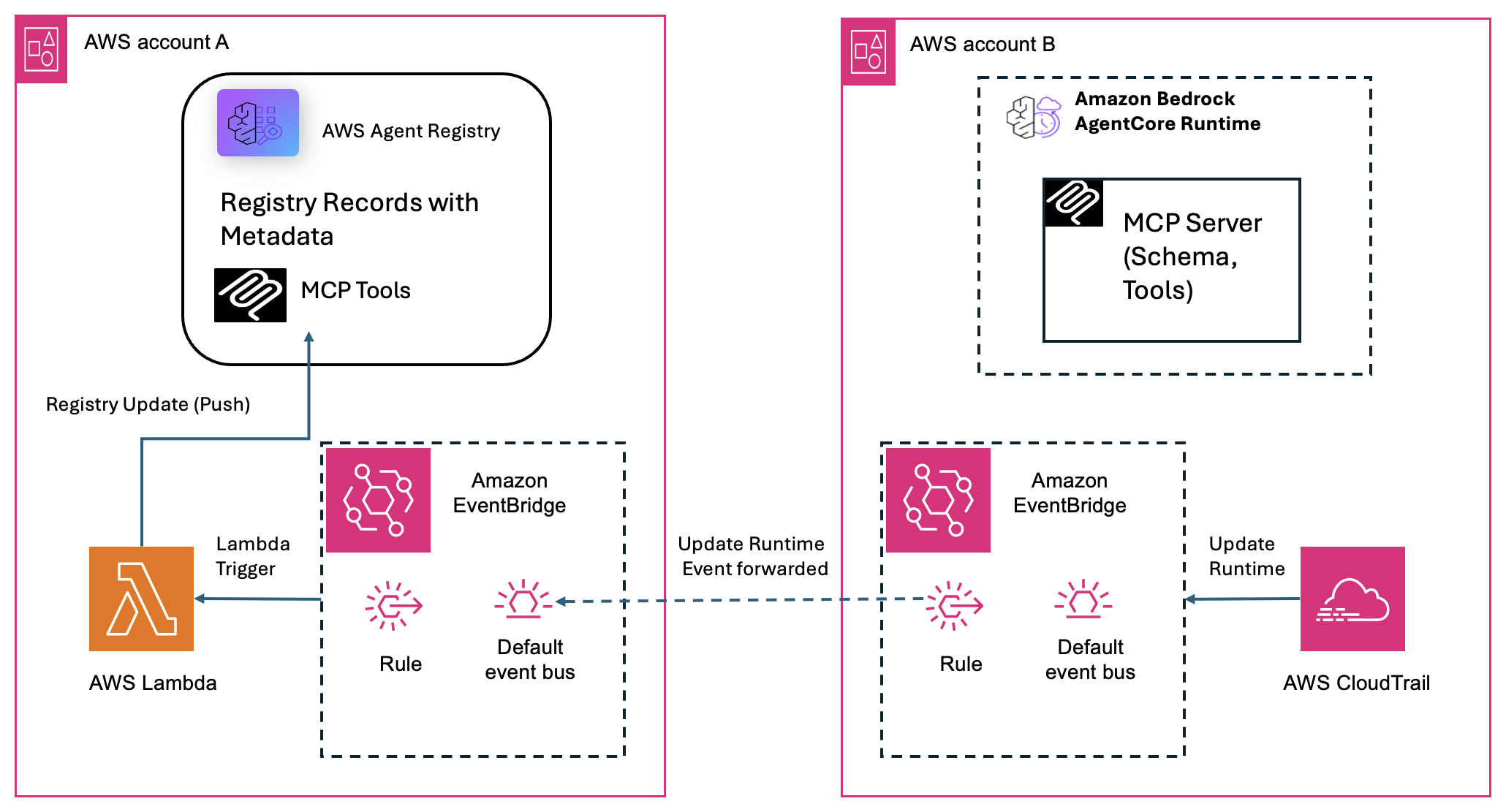
Figure 1: End-to-end event flow for a cross-account MCP server update, from the CloudTrail event in Account B to the registry record update in Account A.
The architecture uses five AWS services:
- AWS CloudTrail captures
UpdateAgentRuntimeAPI calls as management events. - Amazon EventBridge routes matching events to the Lambda function, with cross-account forwarding supported.
- AWS Lambda queries the MCP server for its current tools, diffs against the registry, and updates the record if changed.
- AWS Agent Registry stores MCP server records and their tool schemas as the central source of truth.
- AgentCore Identity, a capability of Amazon Bedrock AgentCore, brokers OAuth token exchanges securely, so the Lambda authenticates without storing secrets.
How it works: business logic flow
After it’s deployed, the pipeline runs the following end-to-end workflow:
- Trigger: A developer in Account B updates an MCP server, which calls the
UpdateAgentRuntimeAPI in Amazon Bedrock AgentCore, and AWS CloudTrail captures the event. - Route: Amazon EventBridge catches the CloudTrail event and forwards it to the central event bus in Account A.
- Parse: The sync Lambda in Account A extracts the runtime Amazon Resource Name (ARN) from the event payload and dynamically constructs the MCP server’s invocation URL. This is how it knows which server in Account B to query.
- Authenticate: The Lambda generates a secure OAuth bearer token through AgentCore Identity.
- Fetch: The Lambda calls the MCP server (
initialize, thentools/list) to retrieve the latest tools information. - Sync: The Lambda finds the matching registry record by its ARN, evaluates the differences, and updates the registry if the schema has changed.
This flow assumes that the Agent Registry in Account A already contains a pre-registered record for the MCP server (created during initial onboarding). The Lambda function in this sample updates existing records only. It doesn’t generate new ones.
This same flow works in a single-account setup where all resources (registry, Lambda, Amazon EventBridge rule, and MCP server) reside in one account. In that case, skip the cross-account forwarding step. Events flow directly within the same account’s Amazon EventBridge bus.
Technical walkthrough
This section walks through the workflow for a single MCP server update with two accounts as depicted in the architecture diagram.
The same flow executes independently for each server that emits an UpdateAgentRuntime event. The Lambda handles one event at a time, scaling naturally with the Amazon EventBridge invocation model.
Step 1: Event capture and routing for cross-account setup
When a developer deploys or updates an MCP server, the UpdateAgentRuntime API is called, either by the AgentCore CLI (agentcore deploy) or directly.
AWS CloudTrail records this as a management event in Account B, with a delivery delay of approximately 5–15 minutes. The event is then delivered to Account A’s default Amazon EventBridge bus.
For a cross-account setup, Account B’s Amazon EventBridge forwards matching events to Account A’s event bus through a cross-account rule.
The Amazon EventBridge rule target in Account A invokes the sync Lambda, passing the full CloudTrail event JSON as the input payload.
The Amazon EventBridge rule pattern:
{
  "source": ["aws.bedrock-agentcore"],
  "detail-type": ["API Call via AWS CloudTrail"],
  "detail": { "eventName": ["UpdateAgentRuntime"] }
}
Step 2: Extract the MCP server URL
The Lambda parses the runtime ARN from the event. It extracts the hosting Account ID and AWS Region to dynamically construct the target MCP server’s URL-encoded invocation endpoint.
# Extract the runtime ARN from the AWS CloudTrail event payload
def _extract_mcp_url(event):
    detail = event.get("detail", {})
    runtime_arn = detail.get("responseElements", {}).get("agentRuntimeArn", "")
    if not runtime_arn:
        return None, None
    # Parse the account ID from the ARN (5th colon-separated segment)
    arn_parts = runtime_arn.split(":")
    account_id = arn_parts[4] if len(arn_parts) > 4 else None
    region = detail.get("awsRegion", "us-west-2")
    # URL-encode the ARN and build the MCP invocation endpoint
    encoded_arn = runtime_arn.replace(":", "%3A").replace("/", "%2F")
    mcp_url = (f"https://bedrock-agentcore.{region}.amazonaws.com"
               f"/runtimes/{encoded_arn}/invocations?qualifier=DEFAULT")
    return mcp_url, account_id
Step 3: Secure authentication with AgentCore Identity
The Lambda authenticates using a two-step identity flow. It exchanges its execution identity for a temporary workload token. The Lambda then trades this token for a scoped OAuth bearer token through the target account’s credential provider.
def get_bearer_token(account_id=None):
    """Get OAuth bearer token via AgentCore Identity credential provider.

    Two-step process:
    1. Get a workload access token from AgentCore Identity (identifies this Lambda)
    2. Use it to fetch an OAuth token from the credential provider (M2M flow)

    The credential provider stores the Cognito/OAuth config securely in AgentCore
    Identity, so no client secrets are needed in Lambda env vars.
    """
    acct = account_id or ""
    provider_name = os.environ.get(f"CREDENTIAL_PROVIDER_{acct}") or os.environ.get("CREDENTIAL_PROVIDER", "")
    scope_str = os.environ.get(f"CREDENTIAL_SCOPE_{acct}") or os.environ.get("CREDENTIAL_SCOPE", "")
    scopes = [s.strip() for s in scope_str.split(",") if s.strip()] if scope_str else []
    workload_name = os.environ.get("WORKLOAD_IDENTITY_NAME", "")
    if not provider_name:
        raise ValueError(f"No CREDENTIAL_PROVIDER configured for account {acct}")
    if not workload_name:
        raise ValueError("WORKLOAD_IDENTITY_NAME env var not set")
    region = os.environ.get("AWS_REGION", "us-west-2")
    client = boto3.client("bedrock-agentcore", region_name=region)
    # Step 1: Get workload access token (identifies this Lambda as a trusted workload)
    wat_response = client.get_workload_access_token(
        workloadName=workload_name,
    )
    print(f"Workload access token response keys: {list(wat_response.keys())}")
    workload_token = wat_response.get("workloadAccessToken") or wat_response.get("accessToken", "")
    if not workload_token:
        raise ValueError(f"No access token in workload response: {list(wat_response.keys())}")
    # Step 2: Use workload token to get OAuth token from the credential provider
    response = client.get_resource_oauth2_token(
        workloadIdentityToken=workload_token,
        resourceCredentialProviderName=provider_name,
        oauth2Flow="M2M",
        scopes=scopes,
    )
    return response["accessToken"]
Credential providers are per-account (CREDENTIAL_PROVIDER_{ACCT_ID}), so one Lambda authenticates MCP servers across multiple accounts.
Step 4: Query the MCP server
Using standard MCP streamable-HTTP mechanics, the Lambda establishes an active session through an initialize request. After the session is active, it calls tools/list to fetch the complete array of currently exposed tools and schemas.
def call_tools_list(mcp_url, token):
    """Call the MCP server's initialize + tools/list methods and return the result.

    MCP streamable-http requires initialize before tools/list.
    The session_id from initialize is passed to tools/list if the server uses sessions.
    """
    # Validate URL scheme to prevent file:// or custom scheme access
    if not mcp_url.startswith("https://"):
        raise ValueError(f"Only HTTPS URLs are allowed, got: {mcp_url[:50]}")
    # Step 1: Initialize MCP session
    init_payload = {
        "jsonrpc": "2.0",
        "id": "init-1",
        "method": "initialize",
        "params": {
            "protocolVersion": "2025-03-26",
            "capabilities": {},
            "clientInfo": {"name": "tool-sync-lambda", "version": "1.0.0"},
        },
    }
    init_resp = requests.post(
        mcp_url,
        json=init_payload,
        headers=_mcp_headers(token),
        timeout=30,
    )
    init_resp.raise_for_status()
    session_id = init_resp.headers.get("Mcp-Session-Id")
    init_result = _parse_sse_json(init_resp.text)
    print(f"MCP session initialized, session_id={session_id}")
    # Step 2: Call tools/list
    list_payload = {
        "jsonrpc": "2.0",
        "id": "list-1",
        "method": "tools/list",
        "params": {},
    }
    list_resp = requests.post(
        mcp_url,
        json=list_payload,
        headers=_mcp_headers(token, session_id),
        timeout=30,
    )
    list_resp.raise_for_status()
    return _parse_sse_json(list_resp.text)
Step 5: Find the matching registry record
The Lambda queries the central Agent Registry to locate the corresponding record. It searches APPROVED records for one whose mcpServer.data contains the runtime ARN embedded during record creation (see the Deployment section).
# Decode the runtime ARN from the MCP URL for matching
def _find_record_by_mcp_url(client, registry_id, mcp_url):
    """Search registry records to find one whose server schema contains the runtime ARN.

    Tries three matching strategies:
    1. Decoded ARN (e.g. arn:aws:bedrock-agentcore:...:runtime/TrimMCP-xxx)
    2. URL-encoded ARN (e.g. arn%3Aaws%3Abedrock-agentcore%3A...%2FTrimMCP-xxx)
    3. Full MCP URL match

    Returns:
        (record_id, full_record) tuple. Both None if no match found.
    """
    # Extract the runtime ARN from the MCP URL for matching
    # URL format: .../runtimes/arn%3A...%2Fruntime%2F<id>/invocations...
    # Decode to get: arn:aws:bedrock-agentcore:region:account:runtime/id
    try:
        decoded_url = urllib.parse.unquote(mcp_url)
        # Extract just the runtime path: arn:aws:bedrock-agentcore:...:runtime/xxx
        runtime_marker = "/runtimes/"
        idx = decoded_url.find(runtime_marker)
        if idx >= 0:
            runtime_arn = decoded_url[idx + len(runtime_marker) :].split("/invocations")[0]
        else:
            runtime_arn = None
    except Exception:  # noqa: BLE001
        runtime_arn = None
    records = client.list_registry_records(registryId=registry_id)
    record_list = records.get("registryRecords", [])
    print(f"Found {len(record_list)} registry records")
    for rec in record_list:
        record_id = rec.get("registryRecordId") or rec.get("recordId") or rec.get("id", "")
        record_name = rec.get("name", "?")
        record_status = rec.get("status", "?")
        print(f" Record: {record_id} | {record_name} | status={record_status} | keys={list(rec.keys())}")
        if not record_id:
            print(f" Warning: could not get record ID from: {list(rec.keys())}")
            continue
        if record_status == "DRAFT":
            print(f" Skipping DRAFT record {record_id} ({record_name}) — must be APPROVED first")
            continue
        try:
            full = client.get_registry_record(
                registryId=registry_id,
                recordId=record_id,
            )
            descriptors = full.get("descriptors", {})
            mcp_desc = descriptors.get("mcpServer", {})
            inline = mcp_desc.get("data", "")
            # Match on runtime ARN (decoded or encoded) in the server schema
            if runtime_arn and runtime_arn in inline:
                print(f"Found matching record (by ARN): {record_id} ({rec.get('name', '?')})")
                return record_id, full
            # Also check URL-encoded ARN
            encoded_arn = runtime_arn.replace(":", "%3A").replace("/", "%2F") if runtime_arn else None
            if encoded_arn and encoded_arn in inline:
                print(f"Found matching record (by encoded ARN): {record_id} ({rec.get('name', '?')})")
                return record_id, full
            if mcp_url in inline or urllib.parse.unquote(mcp_url).replace("?qualifier=DEFAULT", "") in inline:
                print(f"Found matching record (by URL): {record_id} ({rec.get('name', '?')})")
                return record_id, full
        except Exception as e:  # noqa: BLE001
            print(f"Error checking record {record_id}: {e}")
            continue
    print(f"No matching record found among {len(record_list)} records.")
    print(f" Looking for runtime ARN: {runtime_arn}")
    print(f" Looking for MCP URL: {mcp_url}")
    return None, None
Step 6: Diff and update
To minimize unnecessary writes, tool lists are normalized (sorted by name, compared using name + description + inputSchema). The registry update only fires when a change is detected. If the schemas differ, the Lambda logs the exact additions or removals and pushes the fresh definitions to the registry record.
# Normalize tool definitions for comparison (sort by name, extract key fields)
def _normalize_tools(tools):
    """Normalize tool list for comparison — extract name, description, inputSchema."""
    normalized = []
    for t in sorted(tools, key=lambda x: x.get("name", "")):
        normalized.append(
            {
                "name": t.get("name", ""),
                "description": t.get("description", ""),
                "inputSchema": t.get("inputSchema", {}),
            }
        )
    return normalized

def _normalize_tools(tools):
    """Normalize tool list for comparison — extract name, description, inputSchema."""
    normalized = []
    for t in sorted(tools, key=lambda x: x.get("name", "")):
        normalized.append(
            {
                "name": t.get("name", ""),
                "description": t.get("description", ""),
                "inputSchema": t.get("inputSchema", {}),
            }
        )
    return normalized

def sync_registry_if_changed(mcp_tools, mcp_url):
    """Compare MCP server tools with AWS Agent Registry record tools. Update only if different.

    Steps:
    1. Find the AWS Agent Registry record matching this MCP server's URL
    2. Extract existing tools from the record's tools.inlineContent
    3. Normalize both tool lists (sort by name, compare name/description/inputSchema)
    4. If identical → skip update
    5. If different → log the diff and update the registry record

    Returns:
        dict with 'action' key: 'no_change', 'updated', or 'skipped'
    """
    registry_id = os.environ["REGISTRY_ID"]
    client = _get_registry_client()
    # Find the matching record
    record_id, full_record = _find_record_by_mcp_url(client, registry_id, mcp_url)
    if not record_id:
        print(f"No matching registry record found for {mcp_url}")
        return {"action": "skipped", "reason": "no matching record"}
    # Get current tools from registry
    registry_tools = _get_registry_tools_from_record(full_record)
    # Compare normalized tool lists
    mcp_normalized = _normalize_tools(mcp_tools)
    registry_no