Java teams have established JVM tooling, continuous integration and continuous delivery (CI/CD) pipelines, and operational patterns, yet taking AI agents from prototype to production is hard: agent frameworks do not solve scalability, governance, security, and operational concerns by default. Amazon Bedrock and Spring AI close those gaps, so Java teams can build autonomous AI agents that plan, call tools and APIs, and maintain context across multi-turn conversations. Agentic AI is moving beyond prompt-response interactions toward autonomous systems that execute complex multi-step tasks.
Java remains one of the widely used programming languages in enterprise software. Teams have existing CI/CD pipelines, operational expertise, and established patterns built around the JVM. Spring AI brings AI capabilities to the JVM through familiar Spring patterns: auto-configuration, dependency injection, and composable advisors. Developers can build AI agents using the same idioms they use for REST APIs, security, and data access.
Amazon Bedrock AgentCore is a platform to build, connect, and optimize agents at scale, with any framework or model. With AgentCore, you can build, deploy, and operate AI agents at scale. It is framework-agnostic and model-agnostic: you bring your preferred agent framework and foundation model (FM). With AgentCore, you can access the production infrastructure you need: managed runtime, memory, browser automation, code execution, and identity management.
In this post, we show you how to build autonomous AI agents in Java using Spring AI and Amazon Bedrock with spring-ai-agentcore. We explore the key implementation patterns for two systems. The first is a single-agent travel assistant that demonstrates tool calling and memory. The second is a multi-agent intelligent document processing (IDP) system that shows how specialist agents, a rules engine, and alerting work together.
Prerequisites
To follow along with this walkthrough, you need the following:
- Java – JDK 21 (required)
- Spring Boot – 4.1 (with Spring AI 2.0 and spring-ai-agentcore 2.0)
- Maven – 3.9+.
- Node.js – 18+ (for the React frontend)
- Terraform – 1.5+.
- Docker – with Buildx for multi-architecture builds.
- AWS Command Line Interface (AWS CLI) – v2, configured with credentials.
- An AWS account.
What makes a system an agent
A chat completion call can generate text, but it can’t decide what to do next, reach into external systems, or remember what happened yesterday. An agent can, because it unites three capabilities:
- Planning – Given a goal, the model breaks it into steps, prioritizes them, and revises the plan as new information arrives.
- Tool use – Beyond generating text, the model can select and invoke external functions such as APIs, databases, and code interpreters to act in the world.
- Memory – Context carries across turns (short-term) and across sessions (long-term), so each decision builds on what came before.
A Retrieval Augmented Generation (RAG) application has limited tool use (retrieval) but no planning loop. An agent has all three, operating in a goal-directed loop until the task is complete or it determines it cannot proceed.
The following diagram shows these capabilities in an end-to-end agentic pipeline, from request to grounded answer.
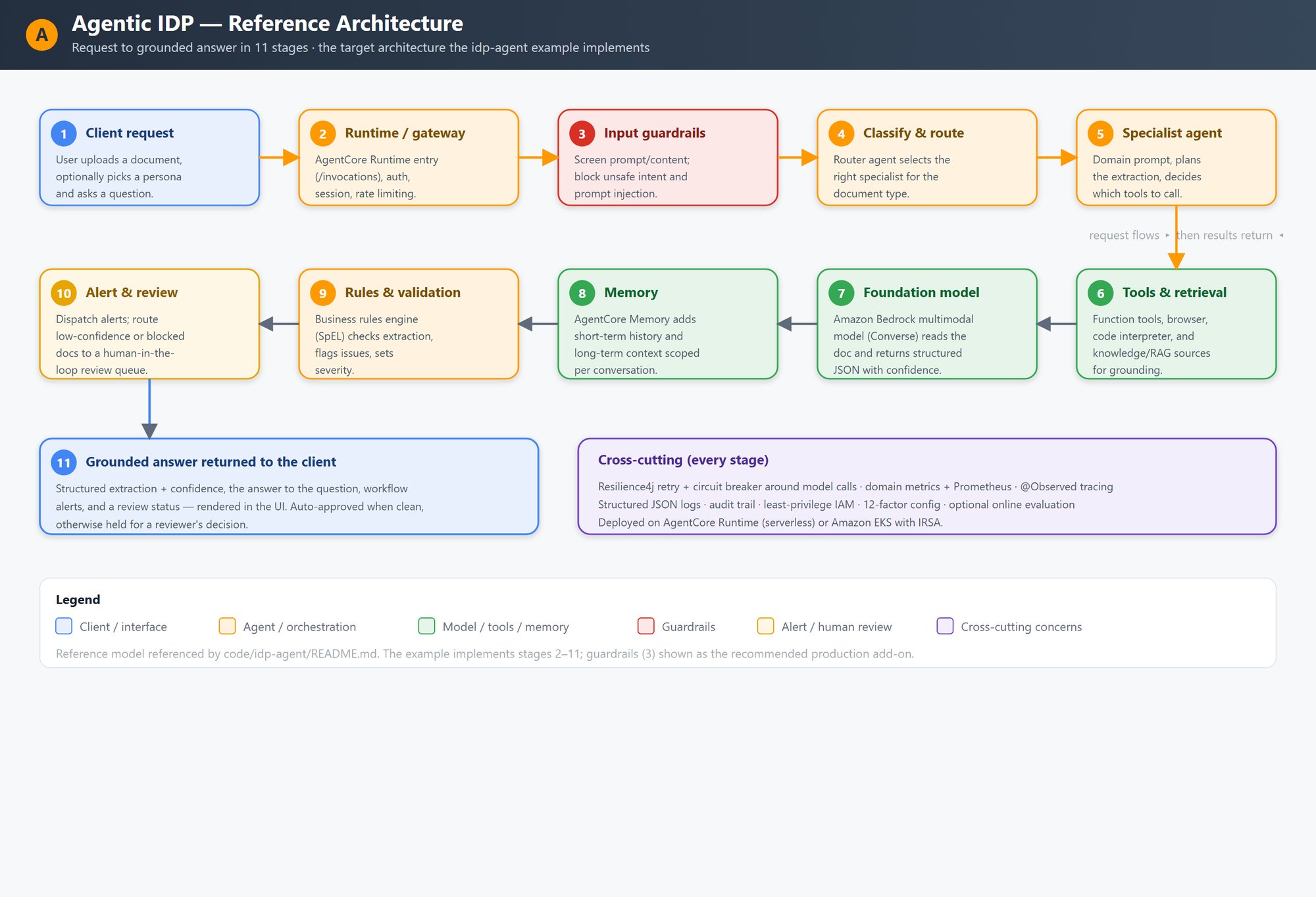
Figure 1: Agentic reference architecture. A request flows through the runtime, guardrails, classification, a specialist agent, tools, the foundation model, memory, rules, and human review to a grounded answer, with resilience and observability as cross-cutting concerns
The pipeline has 11 stages. A client submits a document and question. The request passes through a runtime gateway for authentication and rate limiting, then input guardrails screen for harmful content. A router classifies the document and routes it to a specialist agent, which plans its workflow and calls tools, the Amazon Bedrock foundation model, memory, and a rules engine as needed. Low-confidence or flagged results go to a human review queue before the grounded answer returns to the client. Resilience, observability, logging, and least-privilege AWS Identity and Access Management (IAM) apply across all stages.
Solution overview
The solution consists of two deployable systems that share common patterns:
- Travel agent – A single autonomous agent with tool calling (weather lookups, itinerary search), streaming responses, conversation memory, and resilience patterns. This is the recommended starting point.
- IDP multi-agent system – A multi-agent intelligent document processing platform with five specialist agents (Lawyer, Mortgage, Insurance, Tax, General), rules and workflow engine, alerting, and observability. This demonstrates production patterns at a scale.
Both systems share the following architecture:
- Spring Boot application with Spring AI ChatClient, Spring AI agentcore and Amazon Bedrock Converse API.
- AgentCore runtime, a capability of Amazon Bedrock AgentCore, defines the contract (POST
/invocations, GET/ping) for managed deployment. - Conversation memory through AgentCore memory, a capability of Amazon Bedrock AgentCore, for both short-term and long-term context.
- Tool calling with
@Toolannotated methods. - Structured output mapped to Java records.
- ARM64 container image optimized for AWS Graviton.
- Modular Terraform for infrastructure provisioning.
The travel assistant is the recommended starting point. The following diagram illustrates how a Spring Boot agent interacts with AgentCore runtime, tools, memory, and models available on Amazon Bedrock.
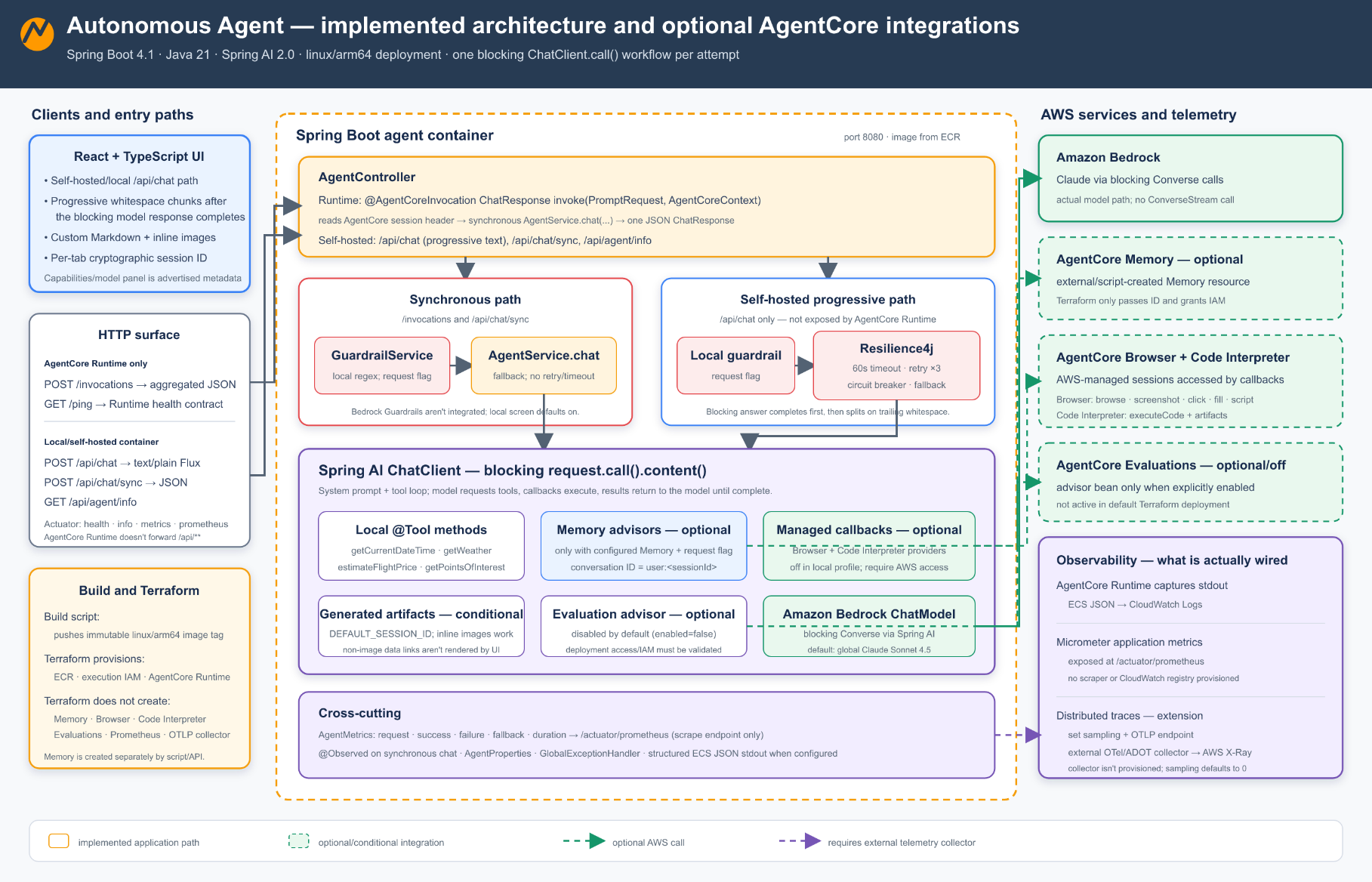
Figure 2: Single-agent travel assistant. The Spring Boot application exposes both REST endpoints for the React UI and the AgentCore runtime contract, calling Amazon Bedrock through the Converse API while tool calling, streaming, and memory run inside one code base.
The travel assistant runs a single Spring Boot application with two entry points, the /invocations and /ping contract required by AgentCore runtime. Spring AI orchestrates calls to Amazon Bedrock through the Converse API and resolves tool invocations locally inside the same process. Server-Sent Events stream tokens to the client as they are generated. AgentCore memory supplies both short-term context within a session and long-term context across sessions, so the agent retains conversation history without external state management.
The following diagram shows the architecture for the IDP multi-agent system.
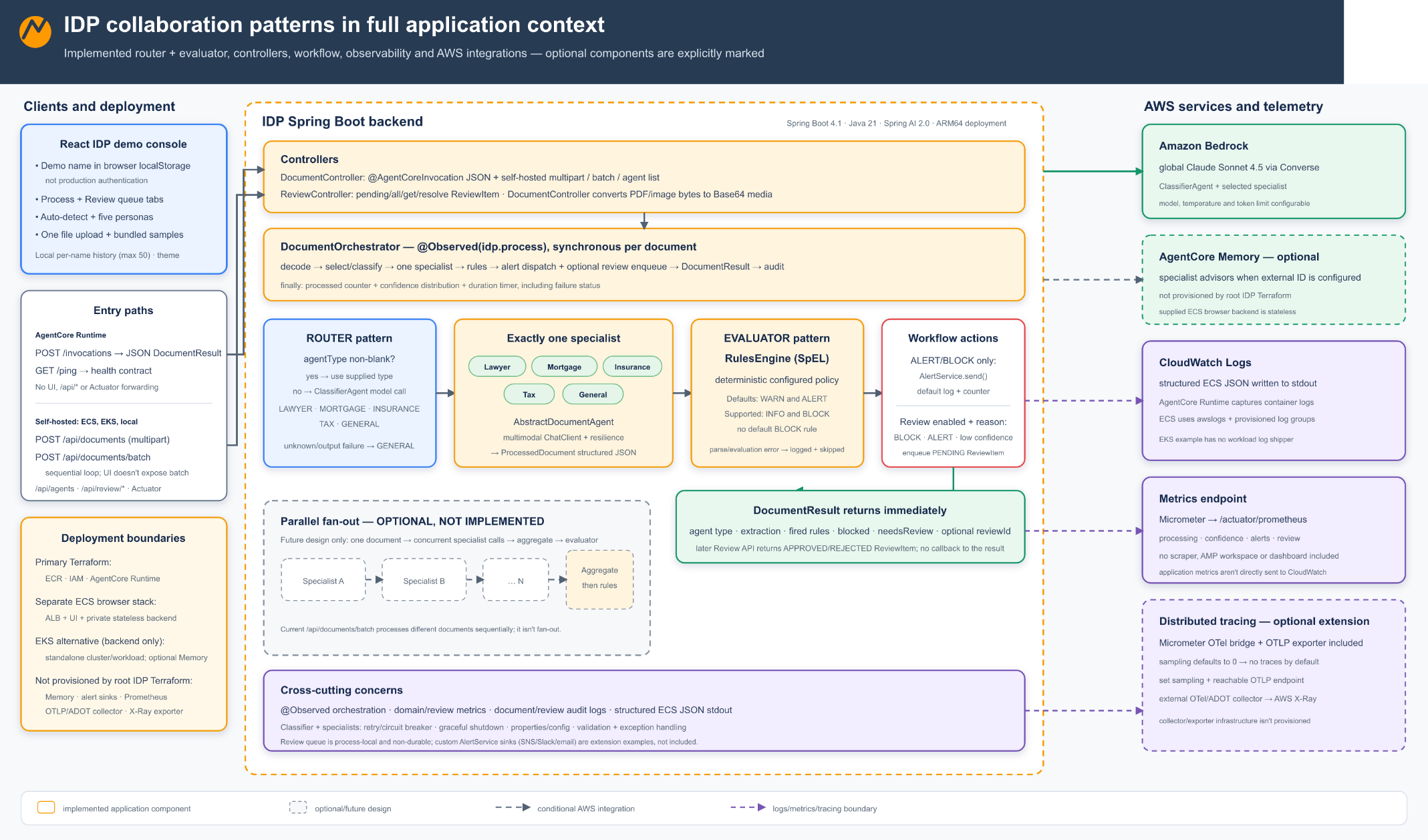
Figure 3: IDP multi-agent system architecture. Specialist agents process documents through a shared ChatClient pattern, with results flowing through a rules engine and alert service.
The IDP multi-agent system routes documents through five specialist agents (Lawyer, Mortgage, Insurance, Tax, and General), each built on a shared AbstractDocumentAgent template. A ClassifierAgent reads each document and forwards it to the appropriate specialist. The specialist extracts structured JSON with confidence scores using the multimodal Converse API of Amazon Bedrock. A rules engine evaluates Spring Expression Language (SpEL) expressions from application.yml against the extraction. ALERT or BLOCK severity rules dispatch through the AlertService. Low-confidence documents go to human review. Metrics, audit trail, resilience, and observability apply across all stages.
Agent collaboration patterns
When multiple agents work together, how they coordinate determines system behavior. This solution uses three patterns:
The following diagram compares the three coordination patterns used in this solution.
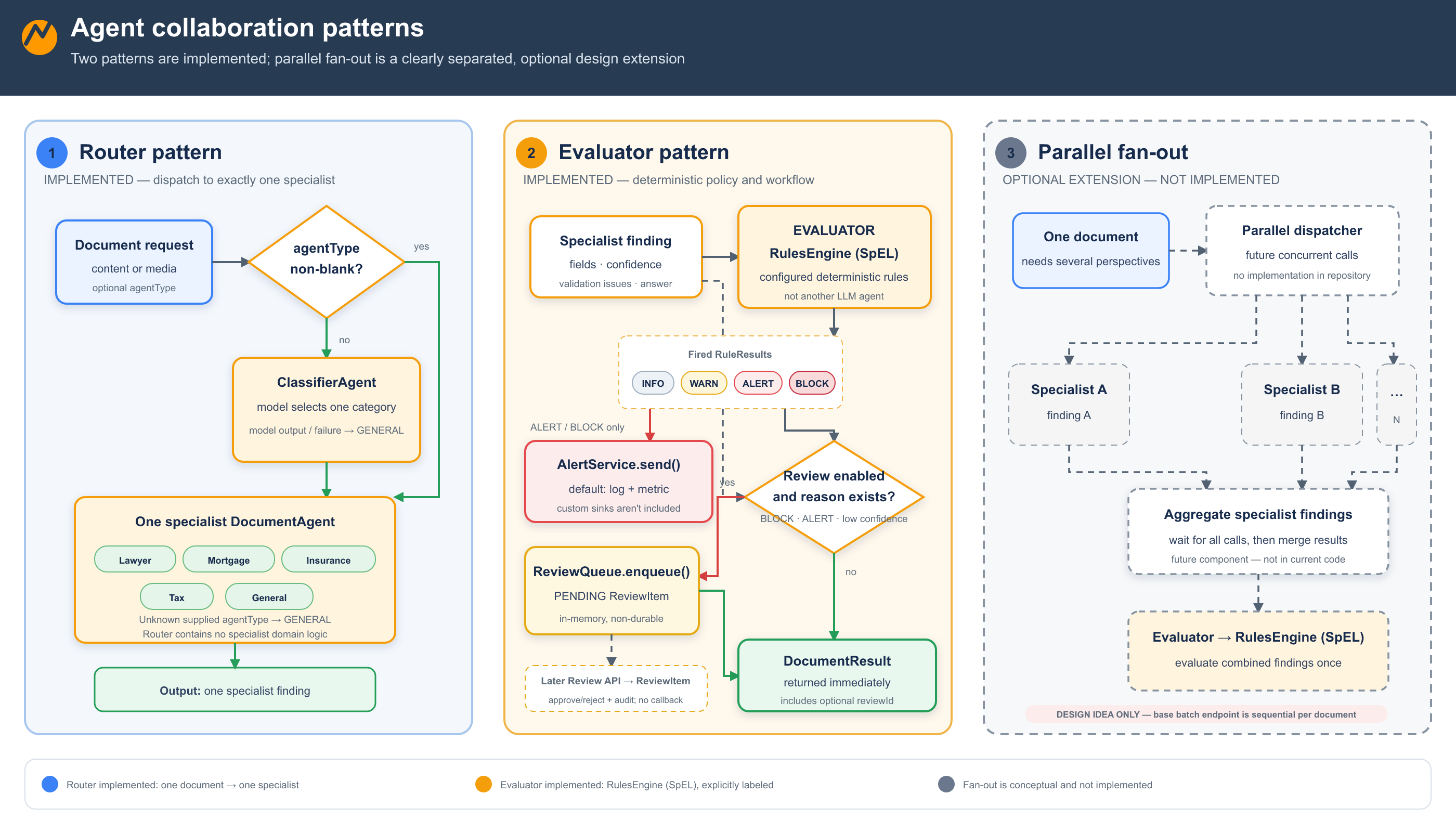
Figure 4: Agent collaboration patterns
Three patterns shown side by side. The router dispatches each request to one specialist by document type. The evaluator passes specialist findings through a rules engine that applies to severity levels and dispatches alerts or blocks for human review. The parallel fan-out sends one request to multiple specialists concurrently and aggregates results before the rules engine runs.
Router pattern: A lightweight orchestrator examines the incoming request and routes it to the appropriate specialist. In the IDP multi-agent system, the router inspects document type metadata and forwards it to the Lawyer, Mortgage, Insurance, Tax, or General agent. The router holds no domain logic. It is a dispatch layer only.
Parallel fan-out (optional extension): The base solution implements the router and evaluator patterns. The batch endpoint processes documents sequentially. When a document needs several perspectives at once, you can add a parallel fan-out as a drop-in extension. Dispatch to specialists concurrently and aggregate their results before the rules engine runs. Wall-clock time for the combined analysis is then bounded by the slowest single agent call rather than the sum of all calls.
Evaluator pattern: After specialists return their findings, a rules engine evaluates the combined output against configurable business rules. Rules that trigger ALERT or BLOCK severity dispatch through a pluggable AlertService for human review.
Walkthrough
The following sections walk you through the key implementation patterns, starting with the AgentCore runtime contract and progressing through tool calling, memory, resilience, and multi-agent orchestration.
Fulfilling the AgentCore runtime contract
Amazon Bedrock AgentCore runtime manages agent lifecycle and scaling. For current rates, see Amazon Bedrock AgentCore pricing and Amazon Bedrock pricing. The runtime routes incoming requests to your agent and monitors its health. Your agent must expose two endpoints:
- POST
/invocations– Receives requests and returns responses as JSON or Server-Sent Events (SSE) streaming. - GET
/ping– Reports health status (HealthyorHealthyBusy). Long-running tasks must signal busy status, or the runtime might scale down the agent.
The following diagram shows how the Spring AI developer model maps onto AgentCore runtime, Memory, Browser, Code Interpreter, and Evaluations.
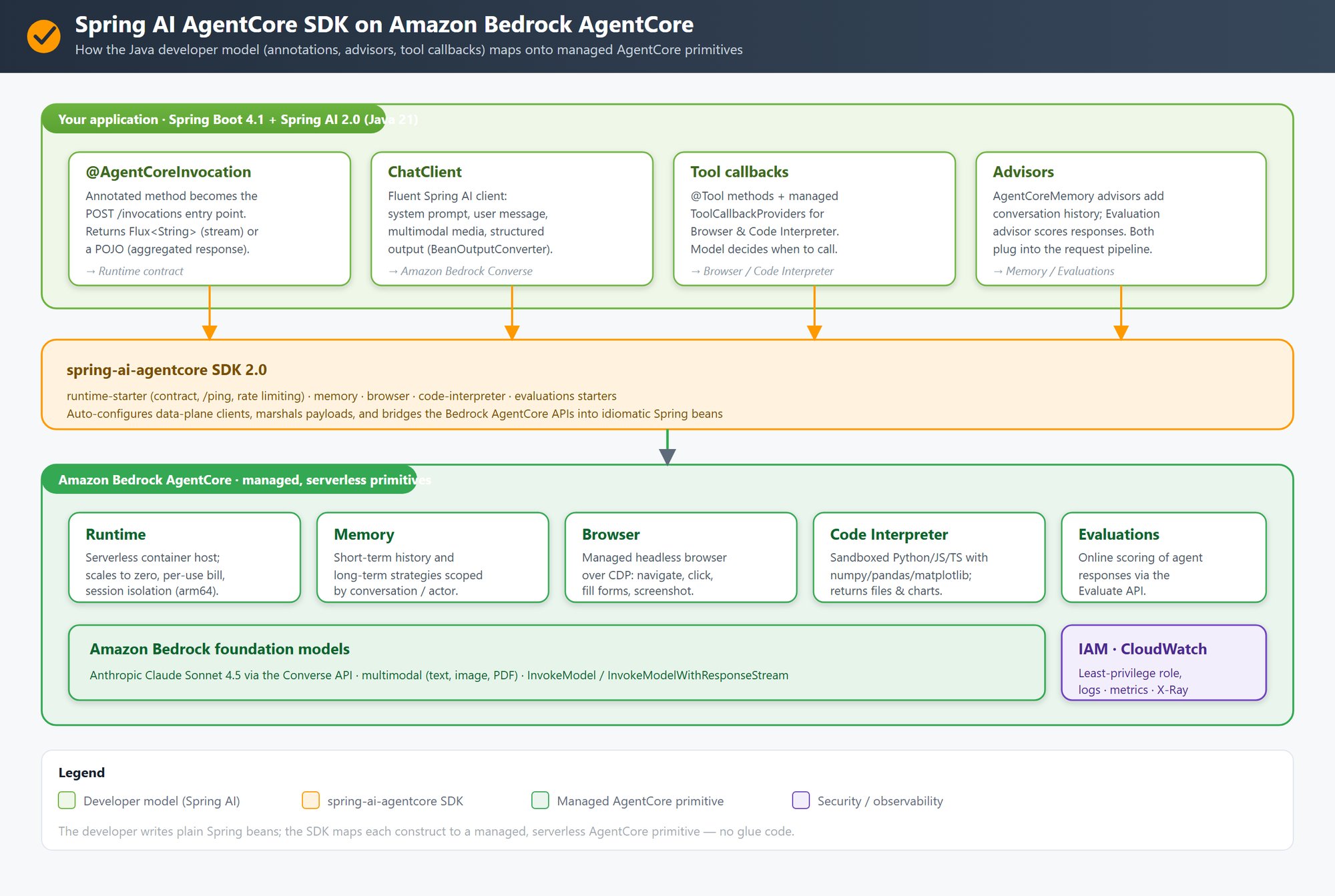
Figure 5: Spring AI AgentCore SDK on Amazon Bedrock AgentCore. Annotations, the ChatClient, tool callbacks, and advisors map through the spring-ai-agentcore SDK onto AgentCore runtime, AgentCore memory, AgentCore Browser, AgentCore Code Interpreter, and AgentCore Evaluations.
Two layers connected by the spring-ai-agentcore SDK. The application layer uses Spring AI components: @AgentCoreInvocation for endpoint wiring, ChatClient for model interaction, @Tool callbacks, and advisors for memory and guardrails. The infrastructure layer provides AgentCore runtime, AgentCore memory, AgentCore Browser, AgentCore Code Interpreter, and AgentCore Evaluations, all capabilities of Amazon Bedrock AgentCore. The SDK bridges both, so developers write standard Spring AI code while AgentCore handles production infrastructure.
With the Spring AI AgentCore SDK, a single annotation handles this contract automatically:
@Service
public class TravelAgent {
    private final ChatClient chatClient;

    public TravelAgent(ChatClient.Builder builder) {
        this.chatClient = builder.build();
    }

    @AgentCoreInvocation
    public Flux<String> chat(PromptRequest request) {
        return chatClient.prompt()
                .user(request.prompt())
                .stream()
                .content();
    }
}
The @AgentCoreInvocation annotation auto-configures the /invocations and /ping endpoints, handles JSON serialization, manages SSE framing for streaming responses, and reports health status. The same project also exposes REST endpoints for the React UI, so the agent serves both AgentCore runtime and a browser from one code base.
A note on streaming: the preceding minimal example returns the model stream directly, which is ideal for a chat UI. When an agent makes multi-argument tool calls, assemble the response with a blocking call() and then chunk the result for streaming, so the tool arguments bind reliably. The travel assistant serves both the AgentCore runtime and the React UI from one service method:
@RestController
public class AgentController {
    private final AgentService agentService;

    public AgentController(AgentService agentService) {
        this.agentService = agentService;
    }

    // One annotation wires up POST /invocations + GET /ping, JSON/SSE framing, and health.
    @AgentCoreInvocation
    public Flux<String> invoke(PromptRequest request, AgentCoreContext context) {
        String sessionId = context.getHeader(AgentCoreHeaders.SESSION_ID);
        return agentService.streamChat(request.prompt(), sessionId,
                request.guardrailsEnabled(), request.memoryEnabled());
    }

    // The same app also serves the React UI from the same code base.
    @PostMapping(value = "/api/chat", produces = MediaType.TEXT_PLAIN_VALUE + ";charset=UTF-8")
    public Flux<String> chatStream(@Valid @RequestBody PromptRequest request) {
        return agentService.streamChat(request.prompt(), request.sessionId(),
                request.guardrailsEnabled(), request.memoryEnabled());
    }
}
Implementing tool calling
With tool calling, the model can invoke external functions during reasoning. In Spring AI, you annotate a method with @Tool and the model decides when to call it and with what arguments:
@Tool(description = "Get a short weather forecast for a city")
public String getWeather(
        @ToolParam(description = "City name") String city) {
    return forecastService.lookup(city);
}
You register tools on the ChatClient, and the model decides when to call them:
ChatClient chatClient = chatClientBuilder
        .defaultSystem(properties.getSystemPrompt())
        .defaultTools(new DateTimeTools(), new TravelTools())
        .build();
For structured output, request a Java record type. For multimodal input, attach media to the user message:
ProcessedDocument review = chatClient.prompt()
        .system(personaSystemPrompt)
        .user(u -> u.text(question).media(mimeType, fileResource))
        .call()
        .entity(ProcessedDocument.class);
Note: We verified this example with Anthropic Claude Sonnet 4.5 on Amazon Bedrock. Spring AI adds the record’s schema to the prompt and parses the reply back into the Java type. Behavior can differ for other model families, so refer to the Spring AI structured output documentation and the Amazon Bedrock documentation for current support. It is best-effort, meaning that models can occasionally return output that does not match the schema. For stricter results, use a provider with native schema enforcement or Spring AI validation and retry.
The model receives the tool definitions as part of its context, reasons about when a tool call would help satisfy the user request, and returns a structured tool call response. Spring AI intercepts this, invokes the annotated method, and feeds the result back to the model for further reasoning.
Adding conversation memory
Real-world agents must remember what users said earlier in a conversation (working memory) and what they have learned over time (persistent memory). The Spring AI AgentCore SDK integrates with AgentCore memory through the advisor pattern: interceptors that enrich prompts with context before they reach the model.
chatClient.prompt()
        .advisors(agentCoreMemory.advisors)
        .advisors(a -> a.param(
                ChatMemory.CONVERSATION_ID, "user:" + sessionId))
        .user(prompt)
        .stream()
        .