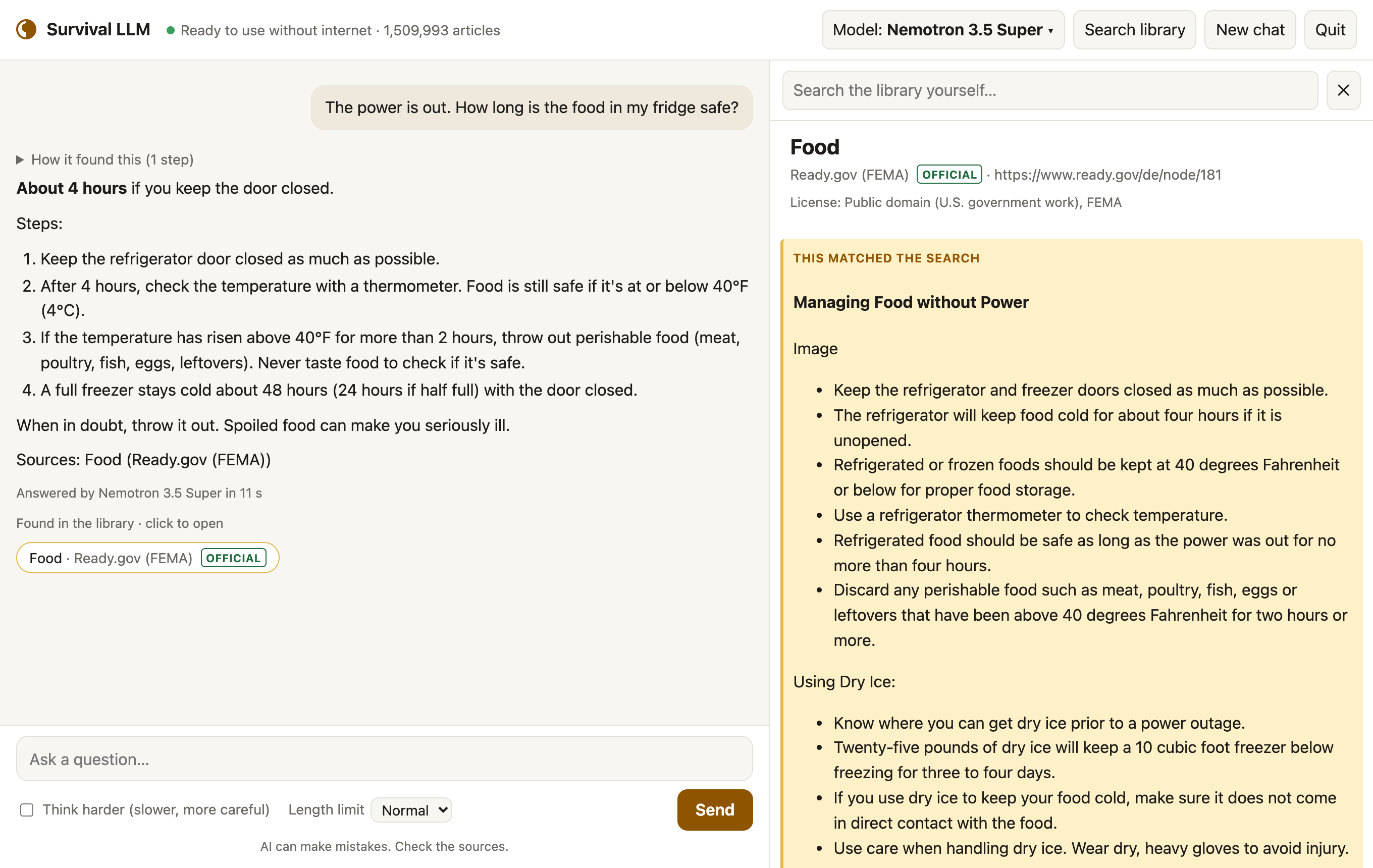
An AI that still works when the internet doesn't.
Survival LLM is a free AI assistant and emergency library that runs entirely on your own computer. Ask it how to keep food safe in a blackout, treat a burn, or purify water, and it answers from trusted sources and shows you exactly where each answer came from.
Free and open source. Set it up while you have internet; after that it needs none.
What it does
Works with no internet
The AI model and the library live on your computer. Nothing you ask leaves it.
Shows its sources
Every answer lists the articles it read. Click one to read it yourself, with the exact passage highlighted.
Made for emergencies
Medical references, FEMA and CDC guidance, survival manuals, how-to guides, repair guides and about 930,000 Wikipedia articles.
Pick your version
The app is the same everywhere. When it opens, it checks your computer's memory and downloads the AI model that fits. More memory means a smarter model.
"Right" means it got the main point of official guidance right on 22 blackout and first-aid questions, graded blind, in our tests on an earlier build of the library ( how we tested ). Smaller models make more mistakes, so the app always shows the source to check.
Plus the library: a 9 GB download for everything (19 GB once installed), or 1.3 GB (3 GB installed) without Wikipedia and iFixit. Free disk space needed: the model's size plus 5 GB, plus about 27 GB while the full library installs (10 GB for the smaller one). Apple Silicon Macs (M1 or newer) with macOS 14 Sonoma or newer, and 64-bit Windows 10 or 11.
Set it up in three steps
Setup takes 20 minutes to about 2½ hours, depending on your computer and your internet speed. You only click for about 5 minutes; the rest is downloading.
Download Survival LLM for Mac or Windows and unzip it. On Windows, right-click the zip and choose Extract All .
Open it. On a Mac, double-click Survival LLM . On Windows, open the extracted folder and double-click Survival LLM.bat .
Follow the setup. The app opens in its own window and downloads the AI engine (built into the Mac app), the AI model that fits your computer, and the library. Let it finish while you're online.
What's in the library
Plain-text copies of openly licensed (some for non-commercial use only) and public-domain references, searchable in a fraction of a second:
About 930,000 of Wikipedia's most-read articles
MedlinePlus (U.S. National Library of Medicine)
UK Medicines A to Z (public sector information)
Ready.gov (FEMA) emergency guides
U.S. military medicine and survival manuals
Risk references for estimating micromorts: life tables and U.S. death rates
Appropedia (appropriate technology)
Q&A on home repair, cooking, gardening, the outdoors and ham radio (Stack Exchange)
Each source keeps its own license, shown with every article; see the full list with licenses .
Good to know
It can be wrong
AI models make mistakes, the small ones more often. Every answer shows the articles it used, so you can check.
Private
No account, no tracking. Your questions never leave your computer, and once set up it works with the internet off.
Your own files
Add PDFs, Word documents, ebooks and notes, like your generator's manual or your family's emergency plan, and the AI searches them too. They stay on your computer.
Updates
Check for updates, at the bottom of the app, installs a new version in one click and keeps your models, library and files.
Battery
On a MacBook Pro we measured about 100 W while it answers, for 5 to 40 seconds per question: a full battery answers roughly 100 to 300. A small generator or power station runs it easily.