GPU sharing is not new: Multi-Instance GPU (MIG), time-slicing, and Multi-Process Service (MPS) address different isolation and utilization needs. NVIDIA Run:ai GPU Fractioning builds on MPS with Kubernetes-integrated scheduling, per-Pod memory contracts, enforcement, and metrics.
NVIDIA Run:ai is AI workload orchestration software for Kubernetes. Its GPU Fractioning Operator can help several teams share one or two GPUs on Amazon Elastic Kubernetes Service (Amazon EKS). Notebooks, model evaluations, and small inference services can leave teams waiting even when GPU memory remains available. In this walkthrough’s baseline, the NVIDIA device plugin exposes the single GPU as one nvidia.com/gpu resource, with GPU sharing disabled. Two Pods each requesting nvidia.com/gpu: 1 cannot run concurrently on that node, even when their combined GPU-memory demand fits.
NVIDIA Run:ai GPU Fractioning adds Kubernetes scheduling integration, enforced GPU-memory limits, and per-Pod metrics to software-based sharing. The approach applies to NVIDIA GPUs that meet the GPU Fractioning Operator’s hardware and software requirements, including GPUs without MIG. We use one Amazon Elastic Compute Cloud (Amazon EC2) g5.xlarge instance with an NVIDIA A10G Tensor Core GPU as the validated example. Other configurations require compatibility checks and validation.
NVIDIA announced the open source release of NVIDIA Run:ai on October 13, 2026. This example uses two of its four modular components: KAI Scheduler and GPU Fractioning Operator. KAI Resource Management and Workload Map address organizational governance and additional workload types, outside this walkthrough’s scope.
In this post, we show how to build a custom Amazon Linux 2023 (AL2023) image and configure GPU-memory sharing on Amazon EKS. In the validated G5/A10G example, you establish a whole-GPU baseline, give each Pod an 8 GiB memory contract, and verify 6 GiB allocations. You then inspect per-Pod metrics, test rejection of a 9 GiB allocation, and clean up the disposable environment.
Choose a GPU sharing approach
MIG provides hardware partitions on supported GPUs. Device-plugin time-slicing shares a GPU without replica memory or fault isolation. MPS permits concurrent CUDA processes. Fault containment depends on configuration. NVIDIA Run:ai GPU Fractioning adds enforced per-container memory limits and supports time-slicing (default) or sm-sharing compute modes. NVIDIA documents separate workload error domains for its default mode and a shared error domain for sm-sharing. These are not security guarantees. This walkthrough tests memory limits, not fault containment or compute performance. A memory limit does not reserve proportional compute.
Amazon EKS documents several GPU sharing options: MIG, time-slicing with the NVIDIA device plugin, and time-slicing with the NVIDIA DRA driver and Karpenter. For guidance on choosing among them, see the GPU sharing guidance in the Amazon EKS Best Practices Guide. Choose GPU fractioning when you need enforced per-Pod GPU-memory limits on GPUs without MIG and can run fixed-size GPU node groups.
Dynamic Resource Allocation (DRA) provides Kubernetes APIs for requesting and allocating devices. GPU sharing and isolation depend on the device driver’s implementation and enabled features. KAI Scheduler and GPU Operator support DRA. This walkthrough uses NvFractions annotations, not DRA.
GPU fractioning can help interactive notebooks with idle periods, short evaluation jobs, GPU compatibility tests, and small inference services. Choose each GPU-memory request from measured peak usage plus overhead, then test latency under concurrent load. The demonstrated density improvement does not establish a throughput gain or a universal cost reduction.
Solution overview
The following diagram shows the validated single-GPU environment in the US East (Ohio) Region (us-east-2). You use the AWS Command Line Interface (AWS CLI), eksctl, Helm, and Packer to build and operate it. The Amazon EKS control plane runs Kubernetes version 1.36 in an AWS managed Amazon Virtual Private Cloud (Amazon VPC), separate from the customer VPC. It connects to EC2 workers in private subnets of the customer VPC.
An m7i.large system node hosts the operator controllers and KAI Scheduler. KAI Scheduler places both Pods on a tainted g5.xlarge with one A10G containing 23,028 MiB of GPU memory.
Each Pod has an 8 GiB GPU-memory limit and allocates 6 GiB of GPU memory. The GPU worker uses custom AL2023 with the NVIDIA R615 driver branch, NVIDIA Container Toolkit, and containerd. It runs fractiond with Node Resource Interface (NRI) integration and MPS for sharing. The metricsd daemon exports per-Pod GPU-memory metrics.
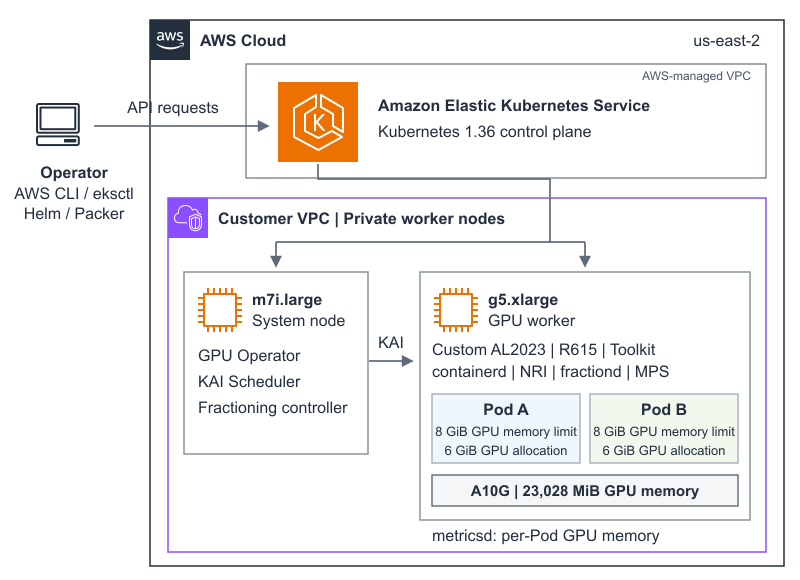
Figure 1: Validated example of two GPU-memory contracts on one A10G in Amazon EKS
Implementation walkthrough
The walkthrough uses the AWS Samples repository. Confirm the prerequisites and validated component versions, then complete Steps 1 through 10.
Prerequisites
Use an AWS account with permissions for Amazon EKS, AWS CloudFormation, Amazon VPC, Amazon EC2, Amazon Elastic Block Store (Amazon EBS), AWS Identity and Access Management (IAM), and AWS Systems Manager for Amazon Machine Image (AMI) discovery. Confirm quota and capacity for g5.xlarge, the system node, and a temporary m5.xlarge image builder. Install AWS CLI v2, eksctl, kubectl, Helm, Packer, Git, jq, and curl.
Use your normal AWS credential provider: a named profile, AWS IAM Identity Center, an assumed role, or access-key environment variables. Prefer temporary credentials. AWS_SESSION_TOKEN is required when using temporary access keys. The examples use us-east-2. Another Region must support the selected Amazon EKS version and instance types.
Before choosing another GPU, check NVIDIA’s GPU Operator hardware list, the selected driver’s hardware support, and the GPU Fractioning Operator prerequisites. Hardware support alone does not establish fractioning compatibility. This walkthrough validates the G5/A10G configuration only. The AMI build targets x86_64. Check CUDA compatibility and memory headroom: The two 8 GiB contracts require room for both contracts and runtime overhead. Smaller devices need smaller contracts and adjusted probes.
The walkthrough creates billable resources, including an Amazon EKS control plane, a NAT gateway, instances, volumes, and an AMI snapshot. Use a disposable environment and complete cleanup when validation finishes.
Use the validated AL2023 stack
At the time of validation, the EKS-optimized AL2023 NVIDIA image provided R580 and R595 driver branches. GPU Fractioning Operator v0.1.7 requires R615 or newer. R615 is short-lived and is not the GPU Operator default. This example builds a custom standard Amazon EKS 1.36 AL2023 image with AMI-owned driver and toolkit. It does not use an operator-managed driver container on another OS. The table records lab validation, not vendor support certification.
| Component | Validated version |
| Amazon EKS | 1.36 |
| GPU | NVIDIA A10G, 23,028 MiB |
| NVIDIA driver / Container Toolkit | 615.71.10 / 1.20.1-1 |
| containerd | 2.3.5 with NRI |
| GPU Operator / device plugin | 26.7.1 / 0.20.1 |
| KAI Scheduler / Fractioning Operator | 0.18.5 / 0.1.7 |
We validated this walkthrough on October 22, 2026, using NVIDIA driver 615.71.10. On November 18, 2026, after updating the GPU node taint, we repeated every step except the Step 3 image build, using an image with the same driver. The results matched. The table lists the tested component versions, not a permanent support matrix. Recheck the Amazon EKS AMI documentation and NVIDIA prerequisites before changing any component.
Step 1: Clone and configure
Clone the repository, then create a local configuration file from the provided example and restrict its permissions:
git clone https://github.com/aws-samples/sample-code-for-gpu-fractioning-on-eks.git
cd sample-code-for-gpu-fractioning-on-eks
cp walkthrough.env.example walkthrough.env
chmod 600 walkthrough.env
After cloning, use walkthrough.env for configuration and run.sh for each stage. Generated files and kubeconfig stay in the ignored .state directory. GPU_INSTANCE_TYPE selects the instance type. Changing it alone does not establish compatibility.
Defaults and optional authentication settings in walkthrough.env
AWS_REGION=us-east-2
CLUSTER_NAME=runai-fractioning-blog
EKS_VERSION=1.36
GPU_INSTANCE_TYPE=g5.xlarge
NVIDIA_DRIVER_VERSION=615.71.10

# Choose a profile or access-key variables, not both.
# AWS_PROFILE=my-profile
# AWS_ACCESS_KEY_ID=YOUR_ACCESS_KEY_ID
# AWS_SECRET_ACCESS_KEY=YOUR_SECRET_ACCESS_KEY
# AWS_SESSION_TOKEN=YOUR_SESSION_TOKEN
Never commit credentials. The local configuration file is ignored by Git. Confirm the active identity before provisioning:
./run.sh checkRun stages separately to inspect results, or use ./run.sh walkthrough to run through the memory-limit test. Cleanup is always a separate action.
Step 2: Create the disposable cluster
Run the following command to create the disposable Amazon EKS cluster and its system node:
./run.sh create-clusterThe command provisions an Amazon EKS cluster running Kubernetes version 1.36, a dedicated VPC with one NAT gateway, OpenID Connect (OIDC) integration, and a private m7i.large managed node.
Selected fields from config/eksctl-cluster.yaml.tpl
iam:
  withOIDC: true
vpc:
  nat:
    gateway: Single
managedNodeGroups:
  - name: system-ondemand
    instanceType: m7i.large
    desiredCapacity: 1
    privateNetworking: true
Step 3: Build the custom AL2023 image
Run the following command to build the custom AL2023 image with the R615 driver branch:
./run.sh build-amiThe script discovers a public builder subnet and the recommended standard Amazon EKS AMI for Kubernetes 1.36 on AL2023. Packer installs the current patch release from the R615 driver branch and the toolkit, configures the NVIDIA runtime, checks package state, and creates an encrypted image. The Region-specific AMI ID is stored in .state/ami-id.
NVIDIA_DRIVER_VERSION selects the R615 branch. It is not an exact patch pin. The workflow records the discovered driver version with the AMI ID and uses that version in AMI and node-group tags. Read .state/installed-driver-version for the version observed in your build. For production, pin exact packages and the base image in your own build and validate a supported driver-branch upgrade.
You need this step only because the EKS-optimized AL2023 NVIDIA AMI did not include the R615 driver branch at the time of validation. Prefer an EKS-optimized NVIDIA AMI once the driver that it selects for your GPU and the remaining host prerequisites meet the GPU Fractioning Operator requirements. Check the driver versions in the Amazon EKS AMI releases on GitHub. The sample’s scripts currently require the R615 driver and metadata from the image build, so using a stock AMI also requires script changes.
Relevant Packer settings from ami/eks-al2023-r615.pkr.hcl
source "amazon-ebs" "eks_al2023_r615" {
  source_ami = var.source_ami_id
  region = var.aws_region
  encrypt_boot = true
  metadata_options {
    http_tokens = "required"
  }
}
SOURCE_AMI_ID and PACKER_SUBNET_ID are optional overrides for an approved base image or builder subnet. Rebuild and test images when the operating system or GPU stack changes.
Step 4: Add the GPU worker
Run the following command to add a GPU managed node group that uses the custom image:
./run.sh add-gpu-nodeBy default, the managed node group uses the custom image and stays at one On-Demand g5.xlarge, the validated GPU worker. A GPU taint excludes ordinary workloads. The script disables eksctl’s NVIDIA device-plugin installation because GPU Operator manages that component.
Selected fields from config/eksctl-gpu-nodegroup.yaml.tpl
managedNodeGroups:
  - name: gpu-g5-r615-ondemand
    instanceType: g5.xlarge
    ami: <generated-ami-id>
    amiFamily: AmazonLinux2023
    desiredCapacity: 1
    minSize: 1
    maxSize: 1
    privateNetworking: true
    taints:
      - key: nvidia.com/gpu
        effect: NoSchedule
Step 5: Install GPU Operator and inspect the host
Run the following command to install GPU Operator and inspect the GPU worker’s host configuration:
./run.sh install-gpu-operatorGPU Operator 26.7.1 supplies the device plugin and Kubernetes integrations. Its configuration preserves the image-owned driver and toolkit:
driver:
  enabled: false
toolkit:
  enabled: false
The same command runs a temporary privileged inspection Pod on the GPU worker, prints the host configuration, and removes the Pod. The validated node reports:
Observed host configuration
GPU: NVIDIA A10G, 23028 MiB
Driver: 615.71.10
NVIDIA Container Toolkit: 1.20.1-1
containerd: 2.3.5
cgroup filesystem: cgroup2fs
NRI socket paths:
  /var/run/nri/nri.sock
  /run/nri/nri.sock
On this AL2023 node, /var/run is a symbolic link to /run. Both paths identify the same socket. Limit privileged inspection to the disposable environment and confirm the Pod is removed.
Step 6: Establish the whole-GPU baseline
Run the following command to test whole-GPU scheduling before fractioning is installed: