Serving a model from more than one AWS Region is a well-established pattern for highly available inference: when one Region runs short of GPU capacity, requests move to another. The pattern is simple to describe and hard to operate. Until now, if you served models on Amazon SageMaker AI managed endpoints, cross-Region routing was a piece you still had to build yourself.
Today, we’re introducing cross-Region inference routing in Amazon SageMaker AI. It uses a new resource, the inference router, that gives your application one invocation path across the endpoints and inference components you already run, in one or more AWS Regions and AWS accounts. You register the destinations that serve a model, and your application invokes the router instead of a specific endpoint. The router keeps requests in its own Region while the local destination is healthy, shifts new requests to another registered destination when it isn’t, and returns traffic gradually after recovery.
In this post, we explain how cross-Region inference routing decides where each request runs, walk through an example with one model in two Regions, and cover monitoring, limits, and what you pay. For a cross-account deployment that serves several models, see How Salesforce is advancing global-scale model serving with cross-Region inference routing in Amazon SageMaker AI.
When one Region runs short of capacity
A SageMaker AI endpoint runs in one AWS Region and one account. When autoscaling can’t add instances of the type your endpoint needs, requests throttle and time out, even when the same model has spare capacity in another Region. To use that capacity, your application must detect a struggling endpoint and switch Regions, decide which errors are safe to retry without running the model twice, move traffic back after recovery without flapping, and manage access to endpoints in other accounts. That code sits on the critical path of every request, and every team serving models across Regions maintains its own version of it.
How cross-Region inference routing works
Cross-Region inference routing is based on a few core ideas:
- You decide where your model might run – For each model, you choose which endpoints and inference components the router might use.
- SageMaker AI decides which destination serves each request – The router prefers its own Region and shifts new requests to another destination only when the local one can’t serve reliably.
- Your endpoints stay the same – You deploy endpoints as you do today, with the same models, configurations, instance pools, and autoscaling. Direct
InvokeEndpointcalls keep working, and the router passesInferenceIdandCustomAttributesthrough, asInvokeEndpointdoes. - You can see every decision – Each real-time response tells you which destination served the request and why.
A few terms describe the pieces:
- Inference router – A Regional SageMaker AI resource in your account that your application invokes.
- Routing target – A name for one logical model on a router, such as
fraud-model. A router can hold many routing targets, and each fails over independently of the others. - Destination – A real-time endpoint, inference component, or asynchronous endpoint registered under a routing target, identified by its full Amazon Resource Name (ARN), which tells the router its Region and account. A routing target holds either real-time destinations, which can mix endpoints and inference components across Regions and accounts, or asynchronous endpoints only.
- Local destination – A destination in the router’s Region, preferred while it’s healthy.
- Routing reason – A value returned with each real-time response that explains where the request went and why.
The Region you create the router in is its local Region. To prefer a different Region, create a router there. The router doesn’t create capacity, scale your endpoints, deploy models, or copy model artifacts and container images. Each destination must already be running in its Region.
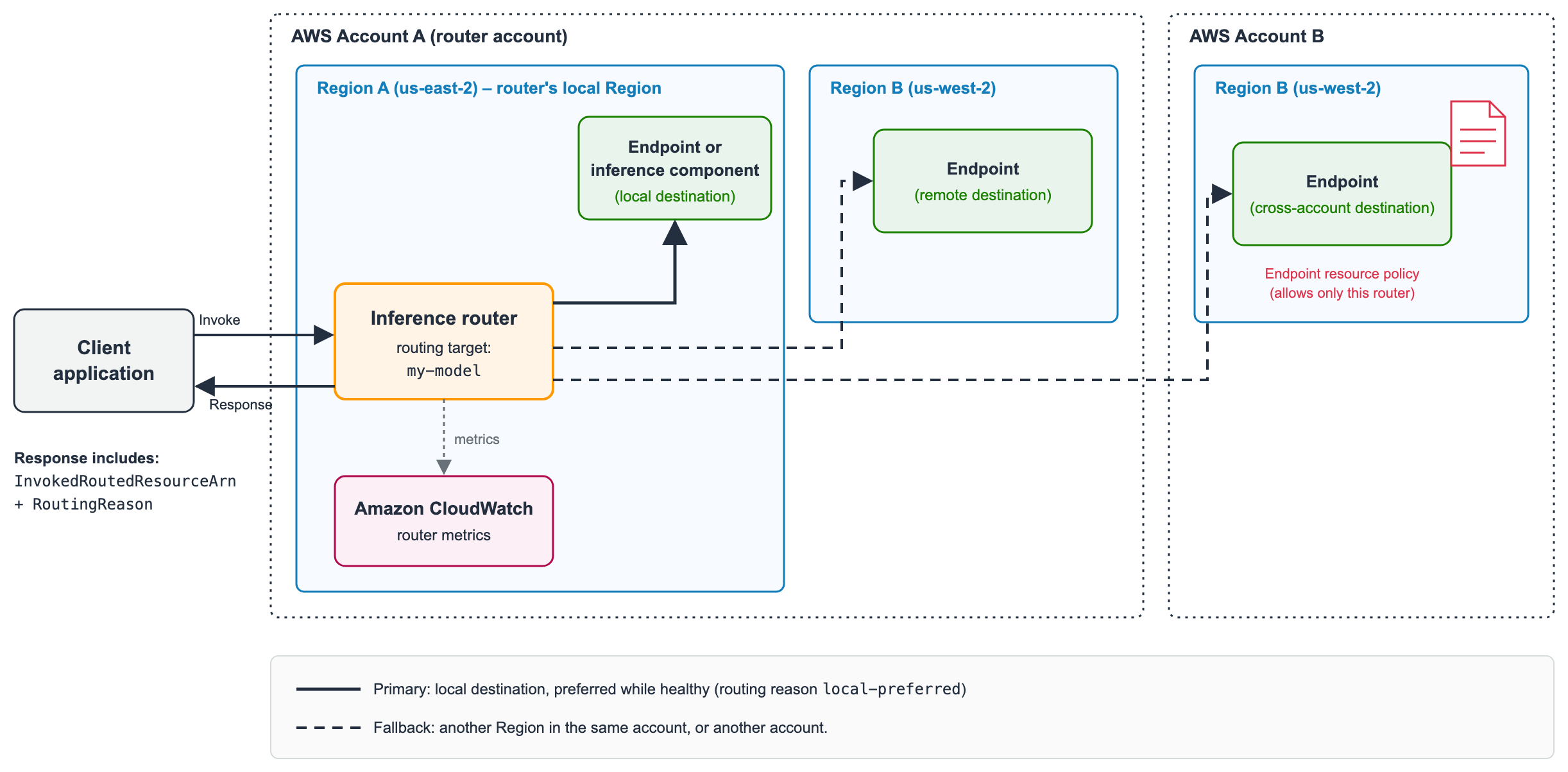
Figure 1: Each request goes to a healthy destination, with the router preferring destinations in its own Region
How routing decisions are made
The router considers only destinations that are registered on the routing target and that it’s authorized to invoke. Among those, it prefers destinations in its own Region, and when more than one local destination is healthy, it spreads requests across them evenly. Requests leave the Region only when local destinations can’t serve reliably. To detect that, SageMaker AI calculates a health score for each destination from its recent requests, measured in the destination’s own Region. Server errors (5xx), throttles, and timeouts lower the score. Errors from the SageMaker AI platform (for example, failed health check) lower it the most. Errors caused by the request itself, such as invalid input, don’t lower it, because the same request would fail in any Region. Model latency isn’t an input, so an endpoint that keeps returning successful responses keeps its traffic. Signals such as failed instance launches or an endpoint running fewer instances than its autoscaling target make the router react faster, but only after the destination starts failing requests.
The router evaluates each destination’s health and publishes it to Amazon CloudWatch as one of three states. A healthy destination serves normally. An overloaded destination still serves, and the router moves part of its traffic away. A degraded destination is failing or can’t serve, so the router moves most of its traffic away and keeps a small share to detect recovery.

Figure 2: How each destination health state changes the traffic the router sends to it
SageMaker AI manages failover thresholds and timing, so you don’t need to tune any thresholds. If health information for remote destinations goes stale, the router keeps traffic in its own Region, so a gap in monitoring never moves traffic on its own.
When traffic moves, and when it comes back
The more requests fail, the more traffic moves, so a destination need not fail outright first. Traffic starts to move within about a minute of sustained errors, or longer for a destination with little traffic. Traffic that leaves the local Region is spread across the healthy remote destinations in proportion to their health. You can’t set weights or a fallback order. After recovery, traffic returns over several minutes, more slowly than it left. Requests in progress aren’t interrupted.
When a destination fails a real-time request without running the model, the router retries that request once on a different destination. This covers, for example, a throttle, a 503 error, a model that isn’t ready, a rejection by a cross-Region traffic cap, or access denied by the destination. The router never retries timeouts, 500 errors, or model errors.
For asynchronous requests, the router tries each eligible destination once, local destinations first, until one accepts the request.
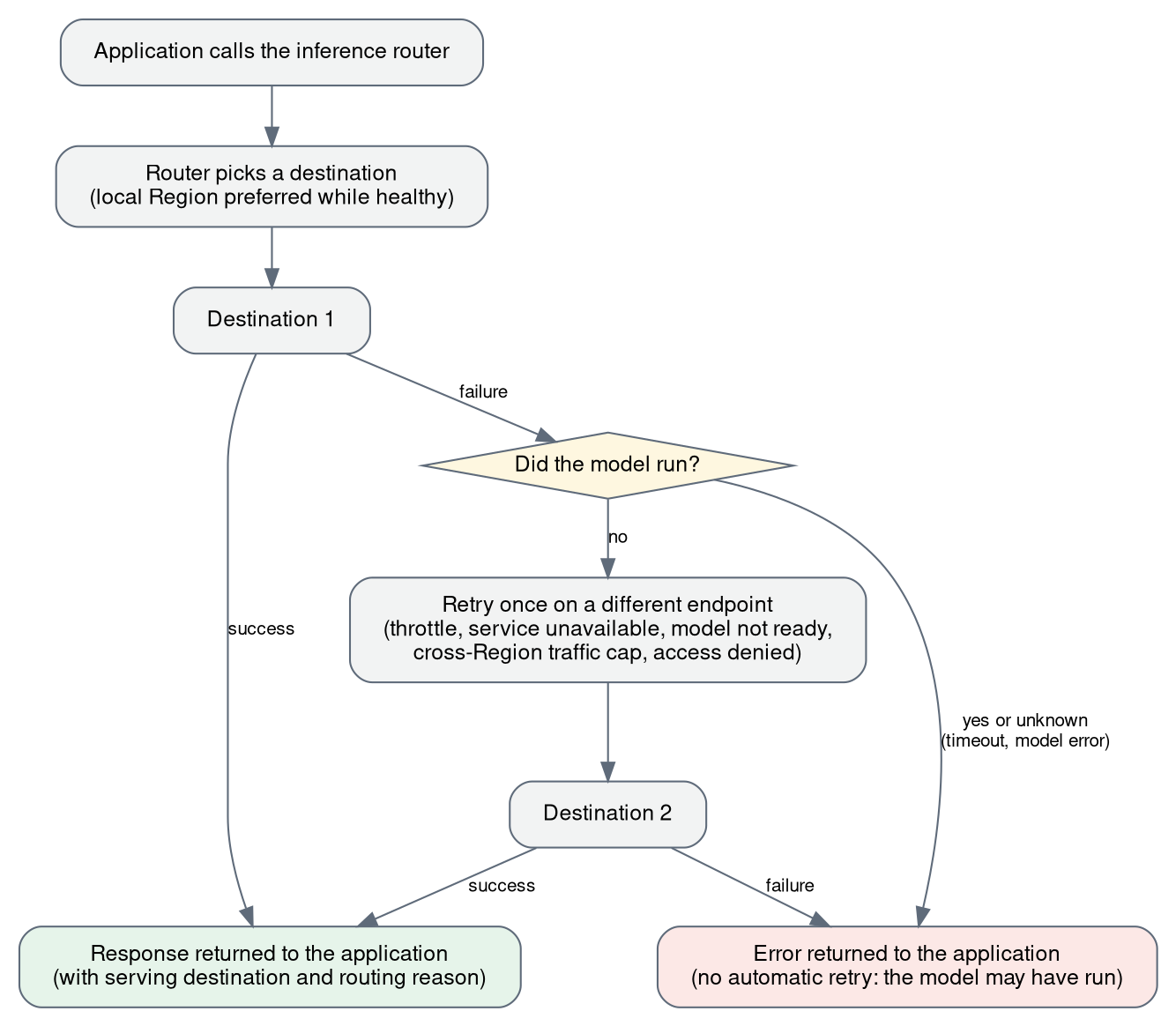
Figure 3: The router retries a real-time request once on another destination, and only when the model didn’t run
Figure 4 shows where requests were served in one of our tests with a test model.
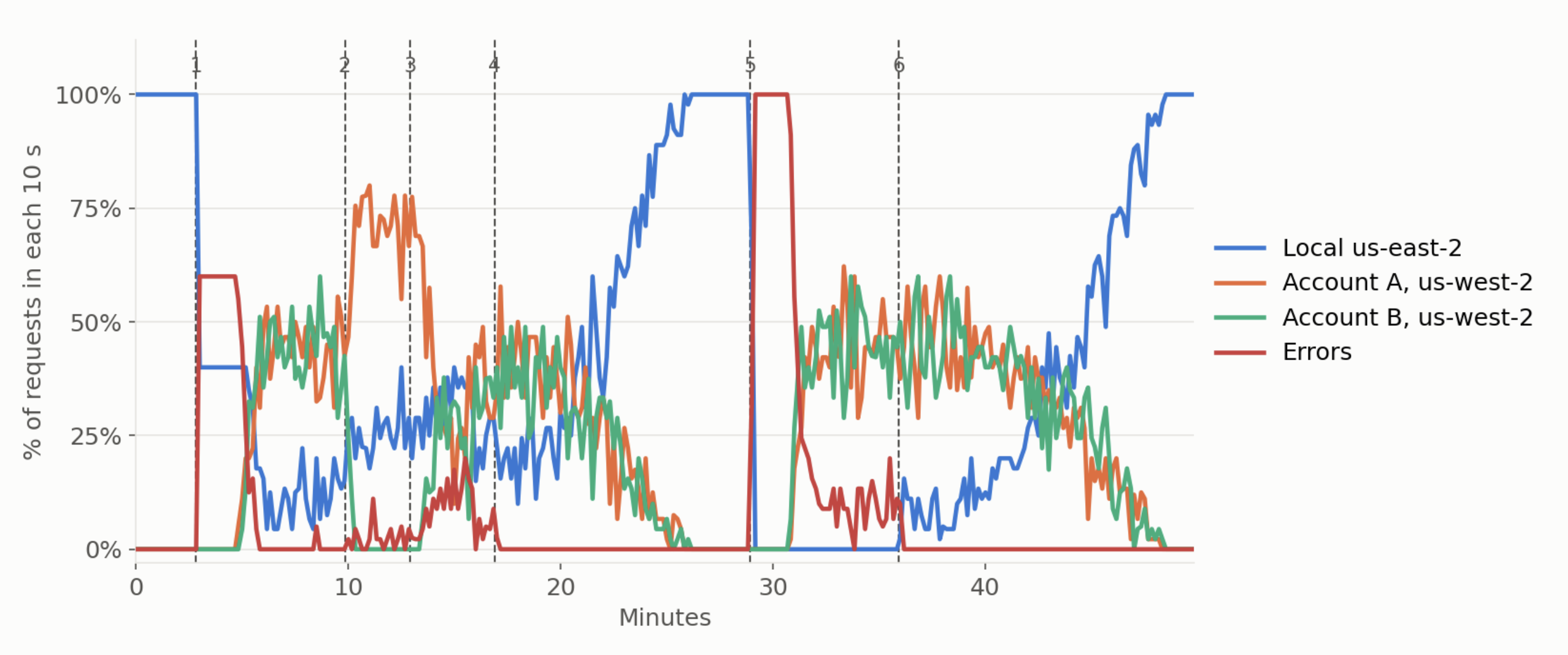
Figure 4: Where requests were served as the local endpoint was overloaded, a destination in another account lost and regained access, and the local endpoint recovered
What you can route
The following use cases show common ways to use cross-Region inference routing in Amazon SageMaker AI.
- Keep serving when one Region runs short of GPU capacity. When your G-series instance type runs short in US East (Ohio) during peak traffic and requests start to throttle, the router shifts new requests to the same model in US West (Oregon), where autoscaling absorbs the overflow, and moves traffic back gradually after US East (Ohio) recovers.
- Route across endpoints owned by separate AWS accounts. When a central platform account owns the router and other accounts own the endpoints, each endpoint owner grants access to one named router, and requests reach those endpoints only through that router. We cover the setup after this list.
- Serve many models from one router. Create one router with one routing target per model, each listing that model’s destinations, and pass the routing target name on each request. Each model fails over independently.
- Put the router behind your own gateway. If you operate an API or model gateway, you can point its SageMaker AI integration at the router, so SageMaker AI handles Region selection for SageMaker-hosted models while your gateway decides when to use a different provider. For example, see the Salesforce post.
- Route asynchronous requests. Asynchronous endpoints, in the router’s account or in other accounts, can be destinations. Your application calls
InvokeInferenceRouterAsyncwith the routing target name and the Amazon Simple Storage Service (Amazon S3) input location, and gets back anInferenceIdand the output and failure locations, as withInvokeEndpointAsync. - Protect a receiving endpoint from other Regions’ overflow. On a real-time endpoint, you can set an optional cross-Region traffic cap so that requests from other Regions can use only part of its capacity. Your endpoint’s local callers keep the rest. We cover the details later in this section.
When a destination belongs to a different account than the router, both accounts must allow each request. On the endpoint side, the owner attaches a resource-based policy that allows the router account to invoke the endpoint, and the sagemaker:SourceInferenceRouterArn condition key limits that access to one named router. The following policy allows only my-router in account 444455556666 to invoke the endpoint. Its second statement has no router condition and lets the router account read the endpoint’s status. Without that statement, the destination shows its status as unknown.
{
  "Version": "2012-10-17",
  "Statement": [
    {
      "Sid": "AllowOneRouter",
      "Effect": "Allow",
      "Principal": {"AWS": "arn:aws:iam::444455556666:root"},
      "Action": ["sagemaker:InvokeEndpoint", "sagemaker:InvokeEndpointAsync"],
      "Resource": "arn:aws:sagemaker:us-west-2:111122223333:endpoint/my-endpoint",
      "Condition": {"ArnEquals": {
        "sagemaker:SourceInferenceRouterArn": "arn:aws:sagemaker:us-east-2:444455556666:inference-router/my-router"}}
    },
    {
      "Sid": "AllowStatusVisibility",
      "Effect": "Allow",
      "Principal": {"AWS": "arn:aws:iam::444455556666:root"},
      "Action": "sagemaker:DescribeEndpoint",
      "Resource": "arn:aws:sagemaker:us-west-2:111122223333:endpoint/my-endpoint"
    }
  ]
}
In the router account, callers need sagemaker:InvokeInferenceRouter (or sagemaker:InvokeInferenceRouterAsync) on the router and sagemaker:InvokeEndpoint (or sagemaker:InvokeEndpointAsync) on every destination, because the router invokes each destination on the caller’s behalf. A router never gives a caller access to an endpoint they couldn’t call directly. For DescribeInferenceRouter to report each destination’s status, callers also need sagemaker:DescribeEndpoint on endpoints and sagemaker:DescribeInferenceComponent on inference components. Applications in other accounts call the router by assuming a role in the router account. For a walkthrough, see How Salesforce is advancing global-scale model serving with cross-Region inference routing in Amazon SageMaker AI and User Guide on cross-account destinations.
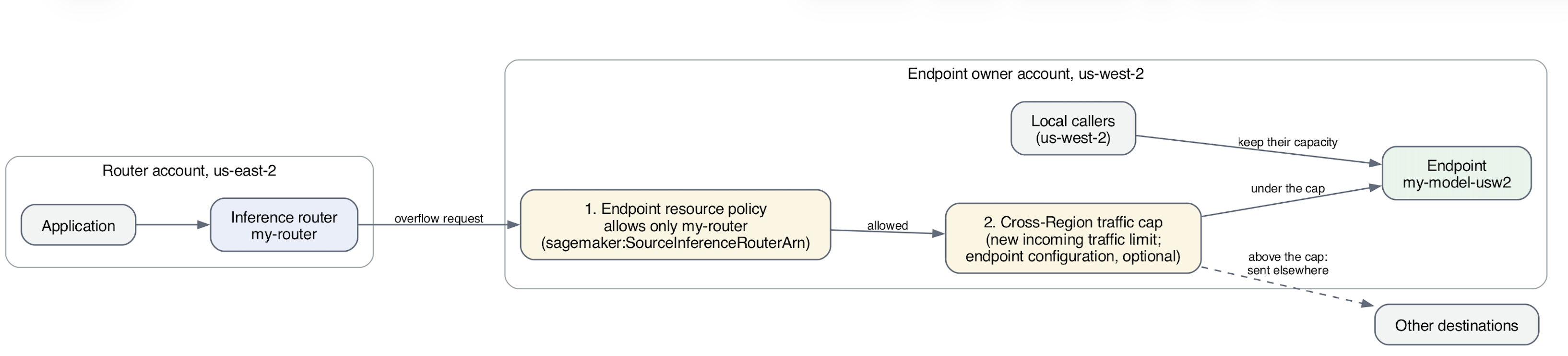
Figure 5: Controls the endpoint owner keeps: an endpoint policy that allows one named router, and an optional cross-Region traffic cap
Protect a receiving endpoint with a cross-Region traffic cap
When the router moves requests away from a Region that’s short on capacity, those requests land on endpoints that already serve their own Region’s callers. By default, a receiving endpoint accepts any amount of cross-Region traffic, so a surge of overflow can push it into throttling. With a cross-Region traffic cap, the endpoint owner decides how much of the endpoint’s capacity other Regions might use.
You set the cap in CreateEndpointConfig with CrossRegionTrafficConfig, which takes two required values. MaxInvocationsPerSecondPerInstance is the number of invocations per second that one instance can take, which you measure with a load test of your model, instance type, and typical payload. MaxCrossRegionPercentPerEndpoint is the share of that capacity that other Regions might use. SageMaker AI multiplies the per-instance rate by the instances in service and applies the percentage, so the cap follows autoscaling. For example, with 50 invocations per second per instance, a 20 percent cap, and 4 instances in service, the endpoint accepts up to 40 requests per second from other Regions. When autoscaling adds 2 instances, the cap rises to 60 requests per second.
sm = boto3.client("sagemaker", region_name="us-west-2")
sm.create_endpoint_config(
    EndpointConfigName="my-model-config-us-west-2",
    ProductionVariants=[...],  # your existing variants, unchanged
    CrossRegionTrafficConfig={
        "MaxInvocationsPerSecondPerInstance": 50,
        "MaxCrossRegionPercentPerEndpoint": 20,
    },
)
Only requests from other Regions count against the cap. Requests from the endpoint’s own Region, including direct InvokeEndpoint calls and calls from a router in the same Region, are never throttled by it. When cross-Region requests exceed the cap, the endpoint rejects the extra requests before your model runs, and the router retries each one once on a different destination. If no other destination can take the request, your application gets a throttling error.
The cap applies to real-time endpoints, and all inference components on an endpoint share it. For an endpoint that hosts inference components, load test one instance with its usual mix of inference components and payloads to measure MaxInvocationsPerSecondPerInstance, and run the test again when that mix or your payloads change. If you leave out CrossRegionTrafficConfig, the endpoint accepts any amount of cross-Region traffic.
Get started: One model in two Regions
In this example, we deploy Qwen3-4B with the vLLM container as an inference component in US East (Ohio) and US West (Oregon), in one account. Because the inference router doesn’t support response streaming, the application sends non-streaming requests, and each request must complete within about a minute, the same limit as InvokeEndpoint. We then create a router in US East (Ohio) with one routing target that lists both:
sm = boto3.client("sagemaker", region_name="us-east-2")
rt = boto3.client("sagemaker-inference-router-runtime", region_name="us-east-2")

sm.create_inference_router(
    InferenceRouterName="my-router",
    RoutingTargets=[{
        "Name": "my-model",
        "Destinations": [
            {"ResourceArn": "arn:aws:sagemaker:us-east-2:111122223333:inference-component/ic-us-east-2"},
            {"ResourceArn": "arn:aws:sagemaker:us-west-2:111122223333:inference-component/ic-us-west-2"},
        ],
    }],
)
Run DescribeInferenceRouter and confirm t