Developers increasingly use Codex with Amazon Bedrock to explore unfamiliar code, make changes, and handle repetitive engineering work. For platform teams, the challenge is to make those tools available without creating a second model-access, identity, and operations stack.
Codex can use Amazon Bedrock for inference with supported OpenAI models. In this post, we show how to fit that path into the AWS identity, AWS Identity and Access Management (IAM), Regional, and observability practices your organization already uses. Codex still runs on the developer workstation. The main design choice is how its model requests reach Amazon Bedrock and where your organization applies policy and operational controls.
We begin with a small, least-privilege pilot and work through the checks that matter before access expands. The examples use GPT-5.6 Sol. Before starting the pilot, review Supported models by AWS Region in Amazon Bedrock to confirm that Sol, Terra, or Luna is available in the AWS Region and inference path you plan to use.
Recommended default: Start with Native AWS Access for a small, least-privilege pilot. Choose AgentCore Gateway, a capability of Amazon Bedrock AgentCore, when you want AWS managed gateway infrastructure for routing or Amazon Bedrock Guardrails. Choose an LLM Gateway when a platform team wants to enforce controls in the request path. A custom integration is the advanced version of the LLM Gateway pattern, not a quick start.
The examples come from the open source Guidance for Codex on AWS repository. It includes quick starts for Native AWS Access, AgentCore Gateway, LiteLLM on ECS, Portkey, the AWS Distro for OpenTelemetry (ADOT), and the Amazon CloudWatch setup used later in the post. Choose the quick start that matches your architecture, use it for the pilot, and adapt it to your environment.
Choose your rollout path
Authentication is only one part of an enterprise rollout. Decide who can use the service and which models and Regions are approved. Also define where configuration lives, what telemetry to collect, how usage is allocated, and which skills or Model Context Protocol (MCP) servers are allowed. The following table maps those needs to an access path and an owning team.
Choose the access path that provides the controls you need now. The most straightforward path that meets the requirement usually has the lowest operational overhead.
Decision rules
- Native AWS Access is the usual starting point when AWS identity and IAM controls are enough for the pilot.
- Amazon Bedrock AgentCore is a platform to build, connect, and optimize agents at scale, with any framework or model. Within the platform, AgentCore Gateway fits teams that want AWS managed gateway infrastructure for routing, Amazon Bedrock Guardrails, or related controls.
- A large language model (LLM) Gateway fits organizations that already operate a gateway or want to enforce controls in the request path. Building a custom gateway is the advanced version of this option.
The following diagram compares where identity, routing, policy, telemetry, and operational ownership sit across the three rollout paths.
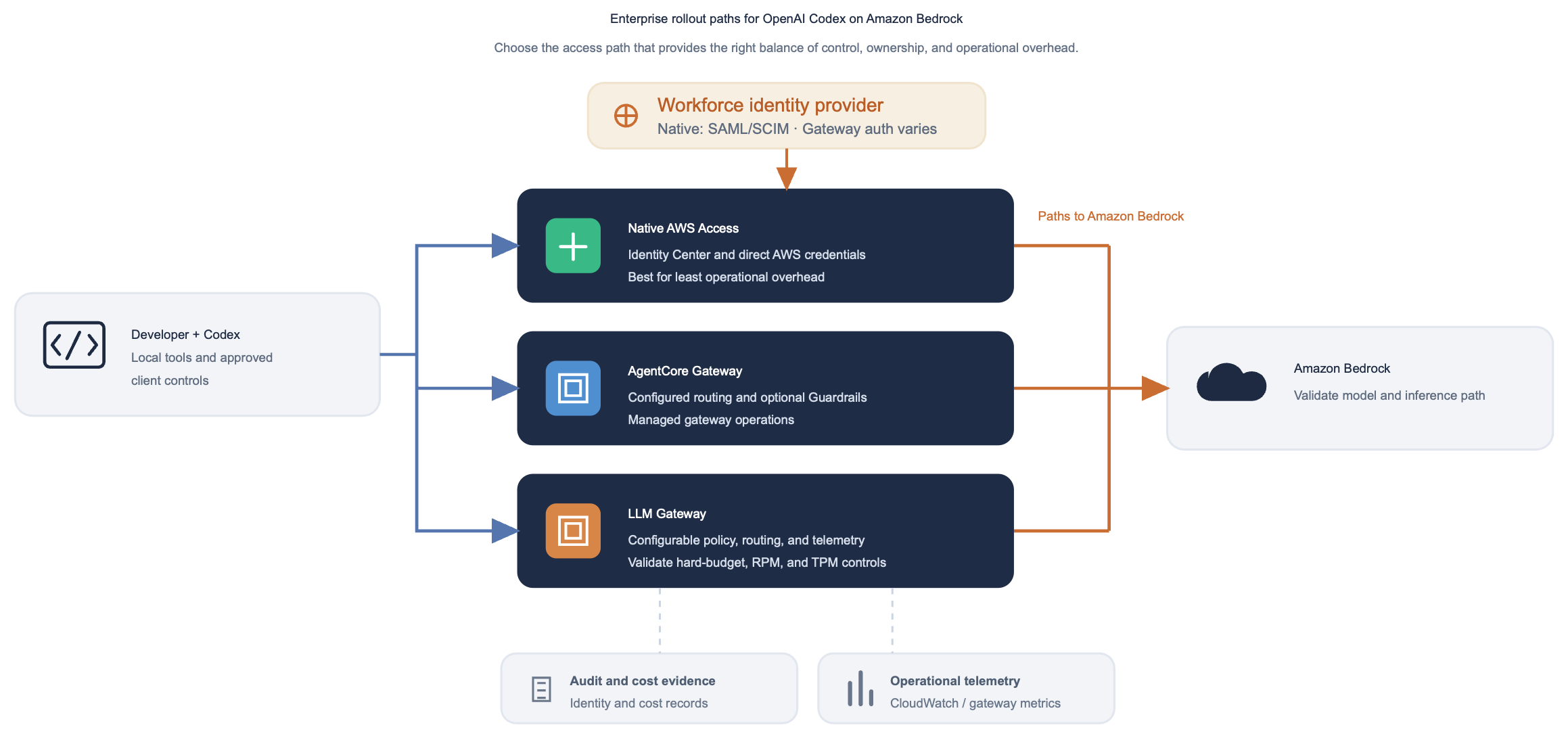
Figure 1: Codex runs on the developer workstation in each scenario. Native AWS Access uses AWS IAM Identity Center, a configured AgentCore Gateway can apply managed routing and Guardrails, and a configured LLM Gateway can apply request-path controls
Native AWS Access
If Native AWS Access fits the pilot, the repository’s Native AWS Access quick start provides the complete procedure and supporting files. The following abbreviated walkthrough focuses on the sequence and the checks that matter most.
Use your workforce identity provider for sign-in
Employees continue to sign in through the identity provider they already use. In this example, Okta handles authentication through Security Assertion Markup Language (SAML) and provisions users and groups into IAM Identity Center through System for Cross-domain Identity Management (SCIM). IAM Identity Center then issues the temporary AWS credentials used by Codex. The identity provider is not configured in Codex.
Prerequisites
- Add each pilot user to a dedicated group in the workforce identity system and provision that group to IAM Identity Center. Keep the assignment limited to the pilot.
- Choose an Amazon Bedrock Region and an OpenAI model available to the pilot identity, plus an inference profile if the selected API requires one. Check Sol, Terra, and Luna separately for the chosen account, Region, and inference path.
- Grant only the Amazon Bedrock model inference permissions used by Codex, any direct validation commands, and the selected observability destination.
- Prepare a non-production repository and name a rollback owner.
Configure
The pilot has three checks. First, sign in using the IAM Identity Center profile configured for the AWS Command Line Interface (AWS CLI) and call Amazon Bedrock Runtime directly. Next, point Codex to the approved model. Finally, run a safe Codex task. The direct call isolates AWS access problems. The final step confirms the Codex configuration.
Step 1: Sign in and validate Amazon Bedrock Runtime access.
aws sso login --profile codex-bedrock
export AWS_PROFILE=codex-bedrock
aws bedrock-runtime converse
--model-id us.openai.gpt-5.6-sol
--messages '[{"role":"user","content":[{"text":"Reply with OK"}]}]'
--region us-east-2
This command creates a short-lived AWS session and checks whether the profile can invoke the chosen model in the chosen Region. If it fails, resolve the profile, Region, model or inference-profile access, or IAM permissions before configuring Codex.
Step 2: Configure the Codex provider.
# ~/.codex/config.toml (or managed user configuration)
model_provider = "amazon-bedrock"
model = "openai.gpt-5.6-sol"

[model_providers.amazon-bedrock.aws]
profile = "codex-bedrock"
region = "us-east-2"
The model value is the Codex model ID. The profile selects the AWS IAM Identity Center session, and region tells Codex which AWS Region to use. Keep these settings in user-level or managed configuration so a repository cannot change the provider.
Verify the pilot and confirm rollback
Before adding users, make sure the pilot reaches the approved model, produces the expected records, and can be disabled cleanly.
- Identity:
aws sts get-caller-identityreturns the expected IAM Identity Center assumed-role session. - Model access: The pilot profile invokes the approved model through the API and Region selected for the test.
- Codex access: The user completes a safe, read-only task in a non-production repository, and the expected request-path evidence is available.
- Evidence and rollback: The identity, invocation, audit, and optional telemetry records are present. Remove the configuration or IAM Identity Center assignment, handle any active session according to your procedure or wait for it to expire, and verify that a new invocation is denied.
Watch the Native AWS Access walkthrough
The walkthrough shows the complete pilot sequence: workforce sign-in, direct Amazon Bedrock Runtime validation, Codex provider configuration, and a safe test task.
Figure 2: Native AWS Access walkthrough covering workforce sign-in, Amazon Bedrock Runtime validation, Codex provider configuration, and a safe pilot task
Use the video to verify the order of the checks and the evidence to collect before adding more pilot users.
Run a two-user identity-isolation check
Two users are required to test identity isolation. A single user shows that sign-in works. A second user tests whether attribution remains distinct. Have two pilot users sign in separately and run the same harmless task. Their assumed-role sessions and audit records, and telemetry records if configured, should remain distinct.
The following diagram shows how separate pilot identities should produce separate AWS sessions, request evidence, and optional telemetry while using the same approved Codex and Amazon Bedrock path.
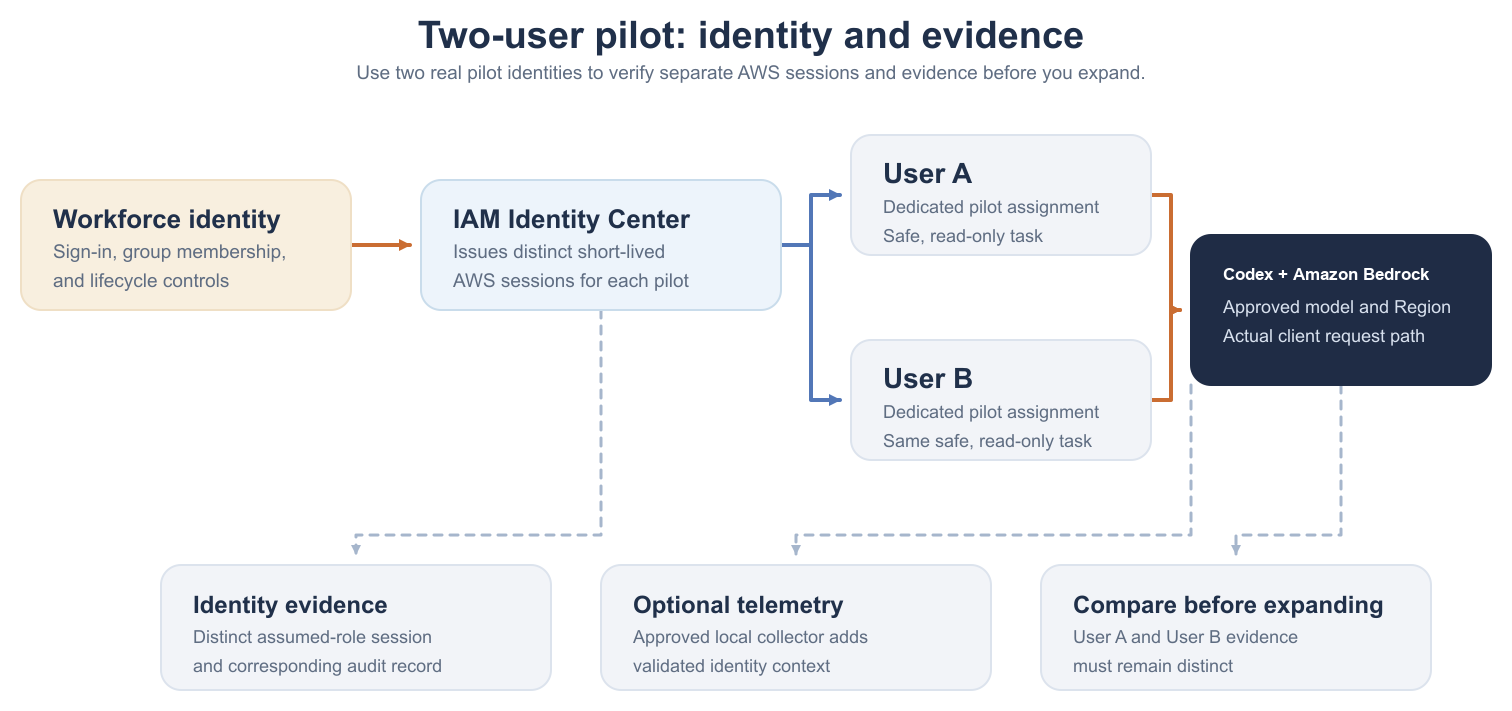
Figure 3: Use trusted identity enrollment for attribution. A local collector can add approved identity context only when it is deployed and configured as part of a managed enrollment process
Gateway paths for request-path controls
AgentCore Gateway is an option when you want AWS managed gateway infrastructure for centralized routing or Amazon Bedrock Guardrails. If your organization already runs an LLM Gateway or wants to enforce controls in the request path, use that gateway instead. Validate the selected gateway before exposing it to pilot users.
LLM Gateway: Validate before a pilot
- Check that the gateway accepts the Codex request format.
- Use the sign-in or token flow defined by the gateway team.
- Before inviting pilot users, test model routing, monitoring, failure handling, and rollback.
Custom enterprise integration
A custom enterprise integration is the most involved form of the LLM Gateway pattern. Consider it only when Native AWS Access, AgentCore Gateway, and an existing gateway cannot meet a specific requirement. The result is another service to design, secure, test, support, and operate, so platform engineering and security need to own it from the start.
Observe, govern, and allocate cost
Codex OpenTelemetry, Amazon Bedrock service records, AWS identity records, and billing data answer different questions. Codex OpenTelemetry describes client activity. Amazon Bedrock service metrics and model invocation logs show service-side activity when enabled. AWS identity records and the AWS Cost and Usage Report (CUR) provide identity and billed-usage evidence. Correlate them for the path you deploy, and do not present token volume as a cost report.
Define what code, prompts, files, and tool output Codex might send through the selected model path. Exclude secrets and restricted data unless the organization has approved that data flow. Require developers to review and test generated changes before merge. Telemetry does not establish correctness or safety.
OpenTelemetry metrics from Codex
For observability, this post uses the ADOT collector configuration and CloudWatch dashboard from the repository’s monitoring and operations guidance. Deploy that configuration to each managed pilot device, then run a safe Codex task.
The repository provides the configuration files. Follow its deployment instructions to install the approved ADOT collector and configure its AWS authentication.
# ~/.codex/config.toml or managed user configuration
[otel]
environment = "pilot"
log_user_prompt = false
metrics_exporter = { "otlp-http" = { endpoint = "http://127.0.0.1:4318/v1/metrics", protocol = "binary" } }
Validate the repository path: run a safe Codex task and confirm that the expected operational metrics appear on the managed CloudWatch dashboard.
| Telemetry plane | Examples | Attribution boundary |
| Codex OpenTelemetry metrics | Token usage, turns, API requests, request duration, tool calls, session source. | Per-user and team dashboard grouping only after the local collector adds validated identity attributes. |
| Amazon Bedrock service metrics | Invocations, latency, input tokens, output tokens, client errors, server errors. | Use the documented namespace, metric names, and dimensions for the selected Runtime, Mantle, or AgentCore path. |
| AWS identity evidence, model invocation logs, and CUR | Assumed-role single sign-on (SSO) principal plus billed Bedrock line items. | For Native IAM Identity Center access, CUR 2.0 with caller-identity allocation can expose the SSO principal. Gateway paths require gateway telemetry and spend records for end-user allocation. |
Amazon CloudWatch dashboard and evidence
The Amazon CloudWatch Coding Agent Insights managed dashboard in the Guidance for Codex on AWS repository shows Codex operational metrics collected through ADOT. Use it to understand client activity, and use AWS identity, audit, and billing records separately when you need attribution or cost evidence.
| Question | Decision | Evidence to keep |
| Who invoked the model? | Use the AWS identity/audit source for the path you selected. | Pilot identity record and request correlation, where available. |
| What did it cost? | Use billing data for actual charge and label any inferred allocation clearly. | CUR source, allocation method, and known uncertainty. |
| Can we stop unsafe or expensive behavior? | Use alarms for detection. Use IAM and managed client controls for their respective access and action boundaries. Use gateway policy when request-path enforcement, such as hard budgets or rate limits, is required. | Control test results and rollback procedure. |
Watch the Codex OTel and CloudWatch walkthrough
The walkthrough shows how to query Codex OpenTelemetry metrics and confirm that the expected token and request data appears in Amazon CloudWatch.
Figure 4: Codex OpenTelemetry metrics shown in an Amazon CloudWatch dashboard
The example validates the aliased metric result in Amazon CloudWatch Query Studio and shows how the dashboard represents Codex client activity.
Standardize team behavior
After the infrastructure path is working, turn to the developer experience. Repository guidance, managed plugins, hooks, and approved MCP servers can make the rollout consistent without asking each team to assemble its own setup.
Plugins
Organization-owned plugins are a practical way to distribute shared skills, hooks, and approved MCP integrations. Give each plugin an owner and version, review changes before release, and publish it only through approved sources. Test updates with a pilot group and keep a documented removal path.
A plugin might include an MCP server configuration, but that does not make every bundled tool approved. Allow only the servers and tools the organization has reviewed, with user confirmation where it is needed.
Hooks
Hooks can be declared in hooks.json or directly in configuration. Keep the documented event casing, and deploy organization-owned policy commands through approved endpoint tooling.
[[hooks.PreToolUse]]
matcher = "^Bash$"

[[hooks.PreToolUse.hooks]]
type = "command"
command = "/usr/local/bin/company-pre-tool-policy"
timeout = 30
Use PreToolUse, PostToolUse, or SessionStart where they solve a specific need. Before wider deployment, test allow, deny, timeout, and disconnected-endpoint behavior.
MCP
An MCP server connects Codex to another system, so each server creates a separate trust boundary. Limit access to the users and tools that need it, manage credentials through an approved OAuth or secrets process, and require confirmation for tools that change external systems. Keep MCP credentials out of the model-provider configuration.
Roll out in phases
The following diagram defines the scope and evidence required to advance from preparation through pilot, expansion, and organization-wide standardization.
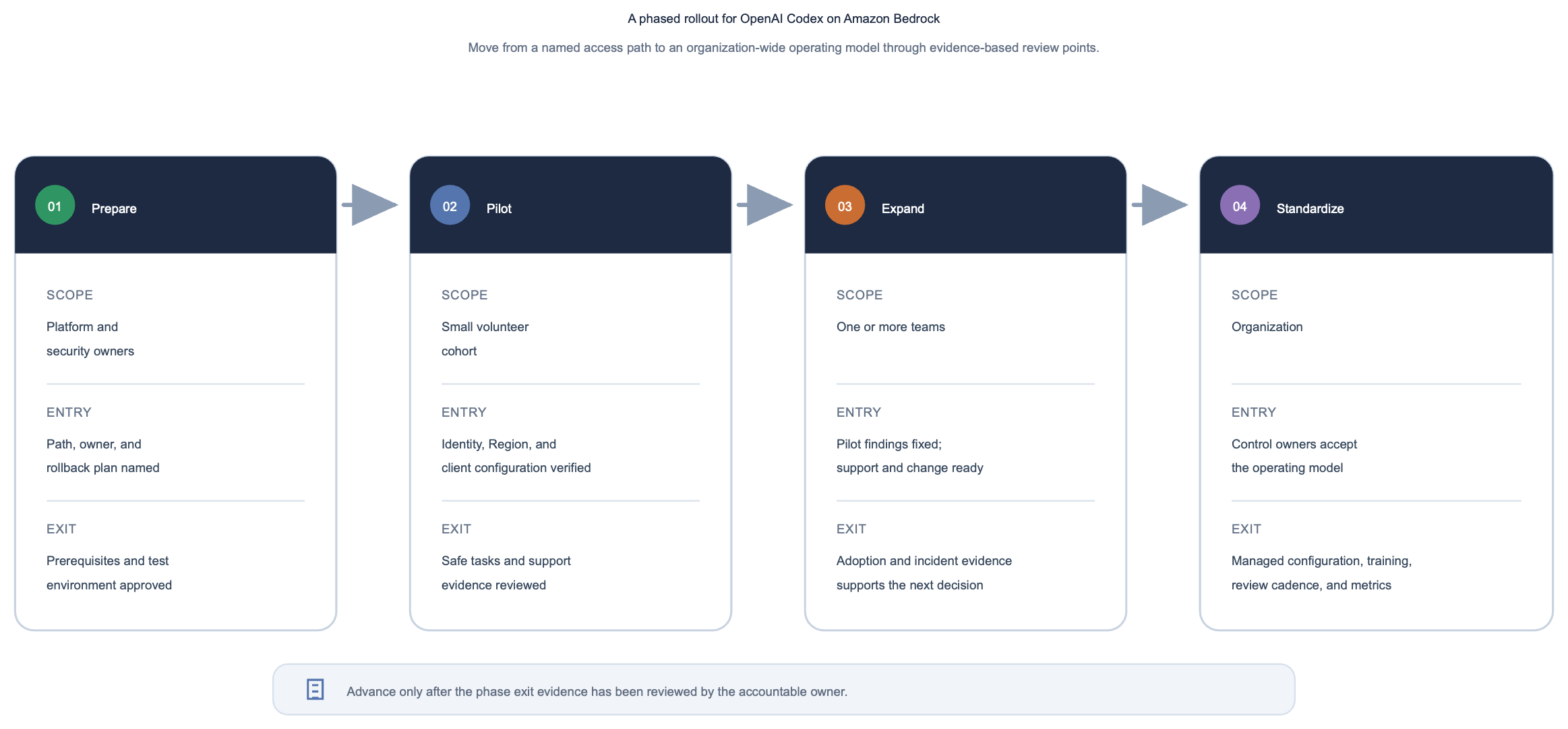
Figure 5: Start with a controlled pilot, expand after validating the access path and operational evidence, and standardize the