Building a multi-agent system is now pretty straightforward. Taking it to production is where the real challenges begin. Thanks to open source frameworks and cloud services, you can set up an agent in a matter of days. A few tool calls, a few lines of prompt, and you have something that looks impressive. But the moment teams try to move beyond a pilot and into real business applications, they hit a familiar wall. If you’ve ever tried to put an agent into production, these frustrations will sound familiar:
Why doesn’t the agent follow our business logic, skip validation steps, or catch edge cases?
You tweak the prompt, add more examples, swap out the model. The same problems keep coming back. That’s because agents don’t follow a fixed sequence of instructions. They make their own judgments based on context. Instructions alone aren’t enough. You need to design how the agent thinks, when it verifies, and what it does when things go wrong. This is exactly why it’s become critical to go beyond prompt engineering alone and design the agent’s entire cognitive architecture and execution flow.
To tackle these challenges head-on, the AWS Solutions Architecture team built Deep Insight, a production-grade multi-agent system. In this post series, we share what the team learned firsthand while building Deep Insight across three posts. We will walk through how we applied Context Engineering techniques proposed by Anthropic (multi-agent architecture, structured note-taking, human-in-the-loop, and more) in a real production environment. We also cover the trade-offs we encountered along the way (with code) and the operational insights we gained from deploying and running this agent on AWS.
Blog series overview
- Part 1: 5 production challenges in multi-agent systems and how Deep Insight solved them.
- Part 2: Beyond the context window: Context Engineering techniques and how Deep Insight applied them.
- Part 3: Harness engineering in practice: moving Deep Insight from dev to production.
This is Part 1 of a three-part series. It defines the five core challenges any production multi-agent system must solve and shows how each layer of the stack addresses them, from Strands Agents SDK and Amazon Bedrock to Amazon Bedrock AgentCore, Application Load Balancer, and AWS Fargate. Parts 2 and 3 cover Context Engineering and production deployment.
Introducing Deep Insight
Deep Insight is a multi-agent system that turns complex data analysis into automated insights. Given a CSV file and a natural-language prompt, a hierarchy of specialized agents (Coordinator, Planner, Supervisor, Coder, Validator, Reporter, and Tracker) collaborates on the analysis. Together they load the data, run analyses, generate charts, validate calculations, and produce a professional report (.docx) with citations.
We will explore the architecture in detail later. First, let’s see it in action. For the demo, we feed advertising data from a fictional food company, Yummy Food (yummy-food-market.csv) with a column definitions file (column_definitions.json), and provide the prompt: Analyze this from a sales and marketing perspective, generate charts and insights, and produce a .docx report. Deep Insight generates an analysis plan, presents it to the user for approval, and, once approved, executes the analysis.
| Content | |
| Input | CSV data file (yummy-food-market.csv) + Column definitions file (column_definitions.json) |
| Example prompt | “Analyze this from a sales and marketing perspective, generate charts and insights, and produce a .docx report.” |
| Output | DOCX report (two versions, one with citations and one without) plus chart graphics (PNG) |
The Deep Insight web demo video that follows shows the full workflow, from uploading data and reviewing the analysis plan to real-time streaming and downloading the finished report.
How can I try it?
Deep Insight is open sourced on GitHub with a full setup guide, and offers three deployment options spanning development to production.
The first is the Self-Hosted version, which runs locally through the CLI. It’s optimized for rapid iteration with full code-level access to every agent, prompt, and workflow. It sets up in about 10 minutes, which makes it well suited to development. (A Self-Hosted demo video is available on YouTube.)
The second is the Web version, a browser-based UI for uploading data, reviewing analysis plans (Human-in-the-Loop, or HITL), and downloading reports, all without writing code, making it accessible for non-developers. (The preceding demo video shows the Web version in action.)
The third is the Managed AgentCore version, a production deployment option powered by Amazon Bedrock AgentCore, a platform to build, connect, and optimize agents at scale, with any framework or model. This version deploys the agents on AgentCore runtime, a capability of Amazon Bedrock AgentCore. The system runs entirely within a private virtual private cloud (VPC), with a custom Code Interpreter hosted separately on AWS Fargate, and agents run concurrently in isolated per-user environments. It’s the right choice when you need session isolation and private VPC deployment. Part 3 covers its deployment and operations in detail.
All three share the same multi-agent architecture, so an agent validated in development deploys to production as-is.
Solution overview
Building a production multi-agent system takes more than good prompts. You need the right technology stack and infrastructure to address how agents collaborate, how they reason, how you deploy them, where they safely execute code, and how you monitor operational health. Deep Insight solves problems across these five key areas. Because the agents generate both code and report content, we also cover responsible AI controls for production in Solution detail 2.
| Challenge | Technology | Approach |
| “How do we control execution flow across multiple agents?” | Strands Agents SDK | Use Strands’ Graph pattern to define execution order between agents and implement human-in-the-loop branching. Use Strands’ Agents as Tools pattern so the Supervisor can invoke specialized agents (Coder, Validator, Reporter, Tracker) as tools on demand. |
| “Which large language model (LLM) should each agent use?” | Amazon Bedrock | Select the right Claude model for each role: Haiku for basic routing, Opus for planning, Sonnet for execution. |
| “How do we reliably operate a finished agent in production?” | Amazon Bedrock AgentCore | Managed runtime with monitoring, session isolation, and private VPC deployment. |
| “How do we mitigate the security issues of executing AI-generated code?” | AWS Fargate + Application Load Balancer (ALB) | Per-session ephemeral sandbox containers for isolated code execution through a custom Code Interpreter. |
| “How do we monitor and manage the system?” | Amazon DynamoDB + Amazon Simple Notification Service (Amazon SNS) + Amazon Cognito | Admin dashboard and failure alerting system. |
The following architecture diagram (Figure 1) illustrates this at a glance. The green boxes represent the Strands Agents multi-agent structure, which addresses challenges 1 and 2 from the preceding table. We will cover this in detail in the upcoming Solution detail 1: Multi-agent system design section. The remaining infrastructure components shown in the diagram address challenges 3, 4, and 5, which we will walk through in Solution detail 2: Production deployment and operations.
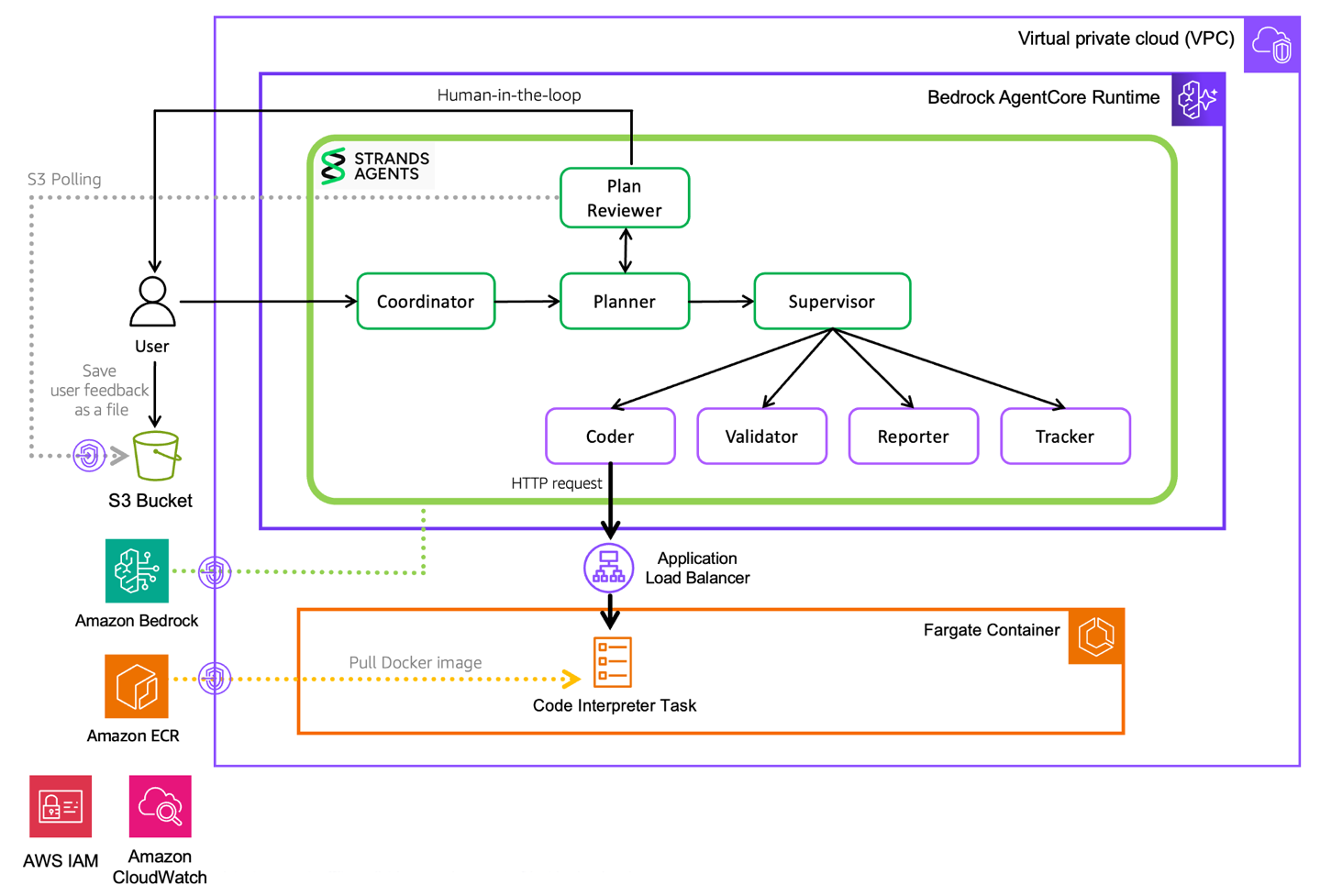
Figure 1: Solution architecture
Solution detail 1: Multi-agent system design
Deep Insight uses a multi-agent architecture in which eight agents collaborate to produce one high-quality deliverable. Each agent works in its own independent context, performs only its specialized tasks, and passes only compressed results onward.
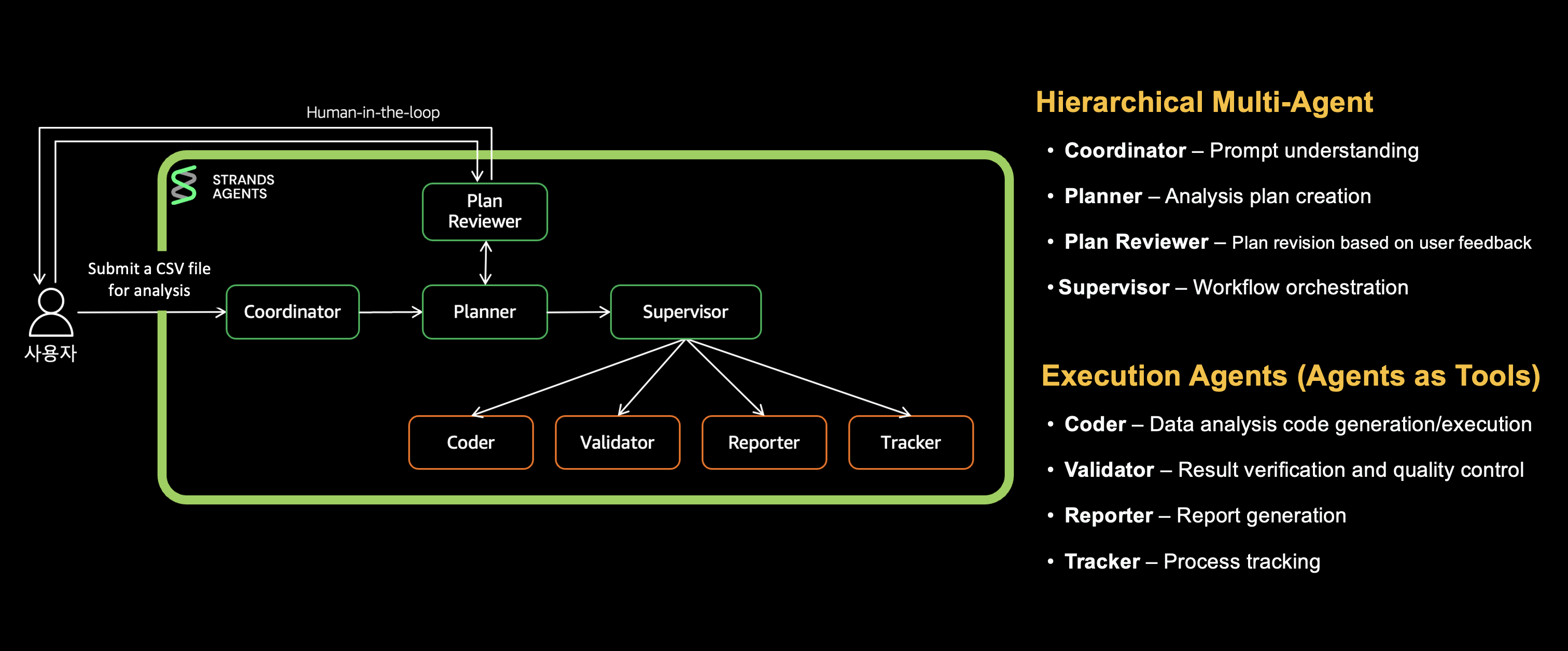
Figure 2: Multi-agent structure
The Coordinator routes user requests, the Planner breaks tasks into discrete steps, the Plan Reviewer collects user feedback, and the Supervisor invokes the appropriate specialized agents according to the plan. The Coder writes and executes data analysis code, the Validator verifies calculations, the Reporter generates the final report, and the Tracker tracks progress. We will explain this across three layers:
- [1st Layer] Coordinator to Planner to Plan Reviewer: Request analysis and execution plan creation.
- [2nd Layer] Supervisor: Specialized agent orchestration.
- [3rd Layer] Coder, Validator, Reporter, Tracker: Specialized task execution.
Two key patterns from the Strands Agents SDK are combined to control execution flow across these agents. First, the Graph pattern defines the execution order and flow of agents as a directed graph. Requests flow Coordinator, Planner, Plan Reviewer, then Supervisor, with a conditional branch looping back to the Planner on revision requests. Determining the next step by condition makes complex workflows like HITL and error handling straightforward. Second, the Agents-as-Tools pattern lets the Supervisor invoke specialized agents (Coder, Validator, Reporter, Tracker) as tools only when needed. Each works in an independent context and returns only results, minimizing context usage while preserving domain expertise.
This section shows how the architecture solves routing, planning, and orchestration.
[1st Layer] Coordinator to Planner to Plan Reviewer
This layer turns a user request into an approved execution plan.
1.1 Coordinator (routing): Not every request needs expensive orchestration
The Coordinator is the entry point for user requests. It handles basic greetings directly and routes complex tasks like data analysis to the Planner with a handoff_to_planner marker.
The key design decision is model selection: because the Coordinator only classifies, it uses the lightweight Claude Haiku, avoiding Opus-level costs on basic greetings and delivering fast responses.
# builder.py: conditional edges for routing decisions
builder.set_entry_point("coordinator")
builder.add_edge("coordinator", "planner", condition=should_handoff_to_planner)
Routing conditions come from the Coordinator’s prompt: any request needing tools, reasoning, or multi-step thinking goes to the Planner.
1.2 Planner (plan creation): Complex analyses need decomposition before execution
In Deep Insight’s multi-agent structure, the Planner agent plays the critical role of distributing tasks across agents. Before substantive work begins, it breaks large tasks into smaller steps, and each specialized agent executes them one at a time, keeping each agent’s context small.
The Planner uses a Claude Opus model with Extended Thinking turned on to develop the analysis plan. It organizes the plan into a [ ] checklist format that specifies concrete tasks assigned to each agent, stored in a full_plan variable. It breaks the request into 5–10 clear steps, as shown in the following example:
## title
Yummy Food Consumer Purchase Patterns and Advertising Effectiveness Analysis Report

## steps

### 1. Coder: Comprehensive Data Analysis and Insight Generation
- [ ] Load all data files from './data/*' path and understand structure
- [ ] Analyze consumer purchase history (patterns, preferences, customer segments)
- [ ] Analyze advertising data by channel (cost, effectiveness, channel comparison)
- [ ] Category-level analysis (fresh food, convenience food, health food ad effectiveness)
- [ ] Calculate key business metrics (conversion rate, CPA, ROAS, etc.)
- [ ] Generate visualizations (5+ charts, consumer segment charts)
- [ ] Derive strategic marketing insights
- [ ] Generate calculation metadata (for validation)

### 2. Validator: Calculation Verification and Citation Metadata Generation
- [ ] Identify verification targets and extract filter calculations
- [ ] Load data files directly and perform recalculations
- [ ] Verify accuracy of per-channel performance metrics
- [ ] Validate data consistency of visuals and graphs
- [ ] Generate citation metadata (reference numbers for verified items)

### 3. Reporter: Marketing Analysis Report Generation
- [ ] Write report overview
- [ ] Create structured report using verified analysis results
- [ ] Insert visualizations and analysis sections
- [ ] Present marketing strategy recommendations and improvement proposals
- [ ] Generate professional marketing report in DOCX format
1.3 Plan Reviewer
The Plan Reviewer is a HITL node that presents the plan to the user and collects approval or revision feedback. If there is feedback, it loops back to the Planner to revise the plan. If approved, it hands the task off to the Supervisor. A maximum revision count (MAX_PLAN_REVISIONS) is set to prevent infinite loops.
# builder.py: Plan Reviewer's bidirectional conditional edges
builder.add_edge("plan_reviewer", "planner", condition=should_revise_plan)
builder.add_edge("plan_reviewer", "supervisor", condition=should_proceed_to_supervisor)
builder.set_max_node_executions(25)
In the Web version, the Plan Reviewer shows a browser modal where the user reads the plan and approves it or enters revision feedback. A 300-second countdown auto-approves the plan if no response arrives.
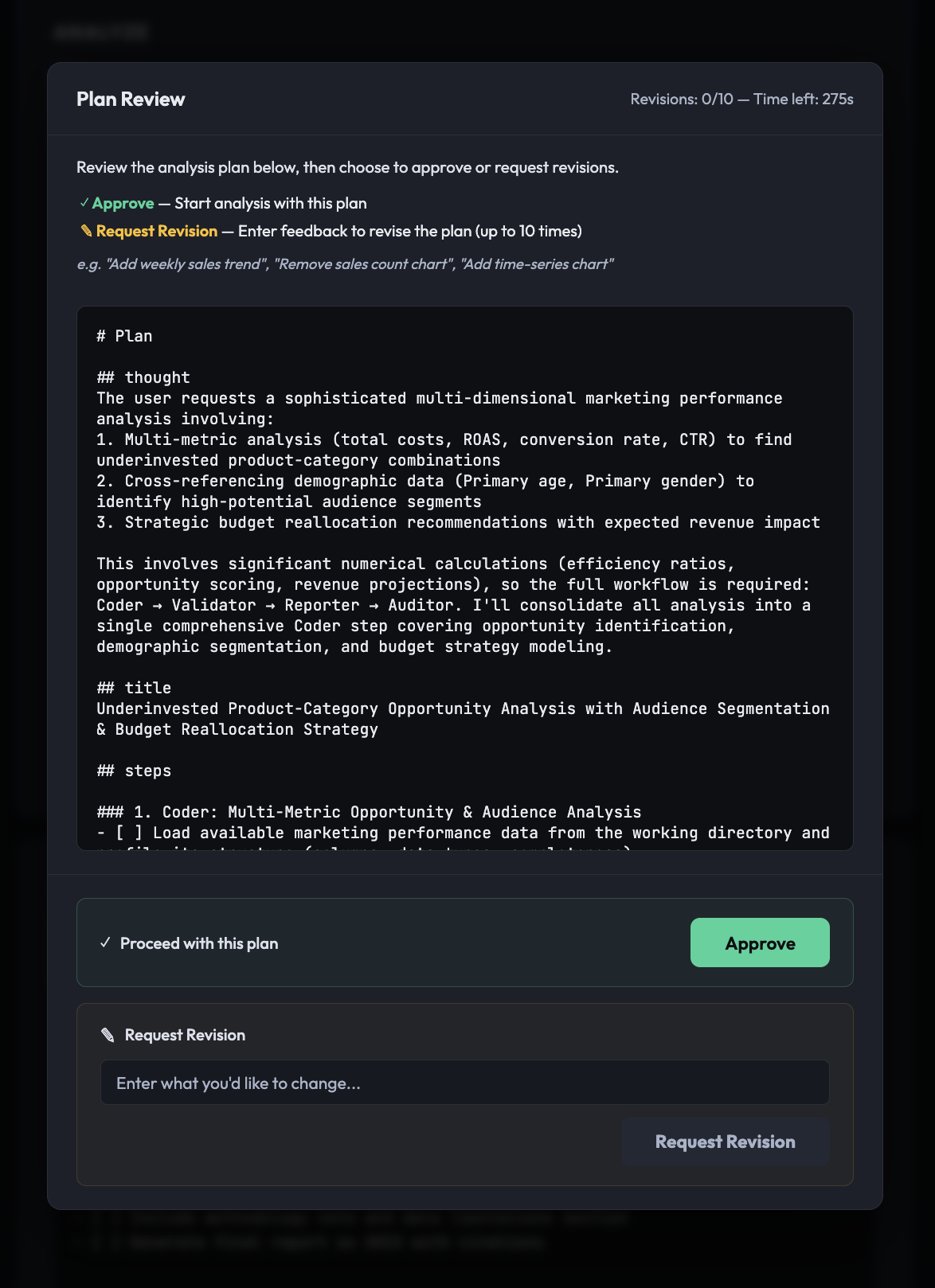
Figure 3: Plan Reviewer agent execution in the web UI
Without planning, the agent decides everything at runtime, a mid-course correction invalidates previous work, and users have no visibility into progress. With the Planner and Plan Reviewer, the user can review and revise the plan, monitor progress in real time, and re-execute only a failed step.
[2nd Layer] Supervisor (orchestrator): Specialized agents need a conductor
The Supervisor executes the Planner’s full_plan in order, invoking the Layer 3 agents (Coder, Validator, Reporter, Tracker) as tools registered on it through Tool Use.
# nodes.py: registering sub-agents as tools on the Supervisor
agent = strands_utils.get_agent(
    agent_name="supervisor",
    system_prompts=apply_prompt_template(prompt_name="supervisor", prompt_context={}),
    model_id=os.getenv("SUPERVISOR_MODEL_ID", os.getenv("DEFAULT_MODEL_ID")),
    prompt_cache_info=(True, "default"),
    tool_cache=True,
    tools=[coder_agent_tool, reporter_agent_tool, tracker_agent_tool, validator_agent_tool],
    streaming=True,
)
The Supervisor’s system prompt defines strict workflow rules:
- Mandatory execution order: Coder, Tracker, Validator, Tracker, Reporter, Tracker: after each agent runs, Tracker is invoked to track progress, letting the Supervisor manage overall task state.
- Section completion rule: The Supervisor does not move to the next agent until all checklist items for the current agent are marked [x].
- Context preservation: The Supervisor passes clues and full_plan variables to each tool agent, maintaining full context and preventing information loss.