From first endpoint to global fleet: 14 more launches for managed endpoints and HyperPod Inference
In September, Amazon SageMaker Inference: 2026 year-to-date launches in review covered 13 launches that shortened the path from a model to a production endpoint. Most of them answered one question: how do I get this model serving quickly and reliably? This post covers the 13 launches that came next, bringing the total for 2026 to 26.
Once a model is in production, the questions change. Teams want to know which configuration the model should run on now that traffic is real, how to fit more models onto GPUs they already pay for, what to do when the next model is too large for one machine, why requests wait in one Region while GPUs sit idle in another, and why latency rose when nobody changed anything. This post takes those questions in the order teams usually meet them.
For HyperPod Inference, it listed additional routing strategies, broader support for model serving frameworks, and expanded multi-Region networking. The Inference Gateway and the Global Inference Gateway deliver the routing and multi-Region work, and managed NVIDIA Dynamo is a new serving framework. For managed endpoints, the roadmap pointed to deeper integration with the rest of the AWS AI landscape. Inference recommendations now run from Amazon SageMaker AI Studio, the SageMaker Python SDK, and the coding agents engineers already use, and endpoints can now route requests across Regions and accounts.
To keep each section concrete, we follow one hypothetical team through the blog post. In the spring, they launched a customer support assistant on a 70B-parameter model behind a single SageMaker AI endpoint, using the launches from part 1. By the fall, they need to support more product lines, adopt a larger reasoning model, serve customers in a second Region, and keep their GPU bill flat.
The launches at a glance
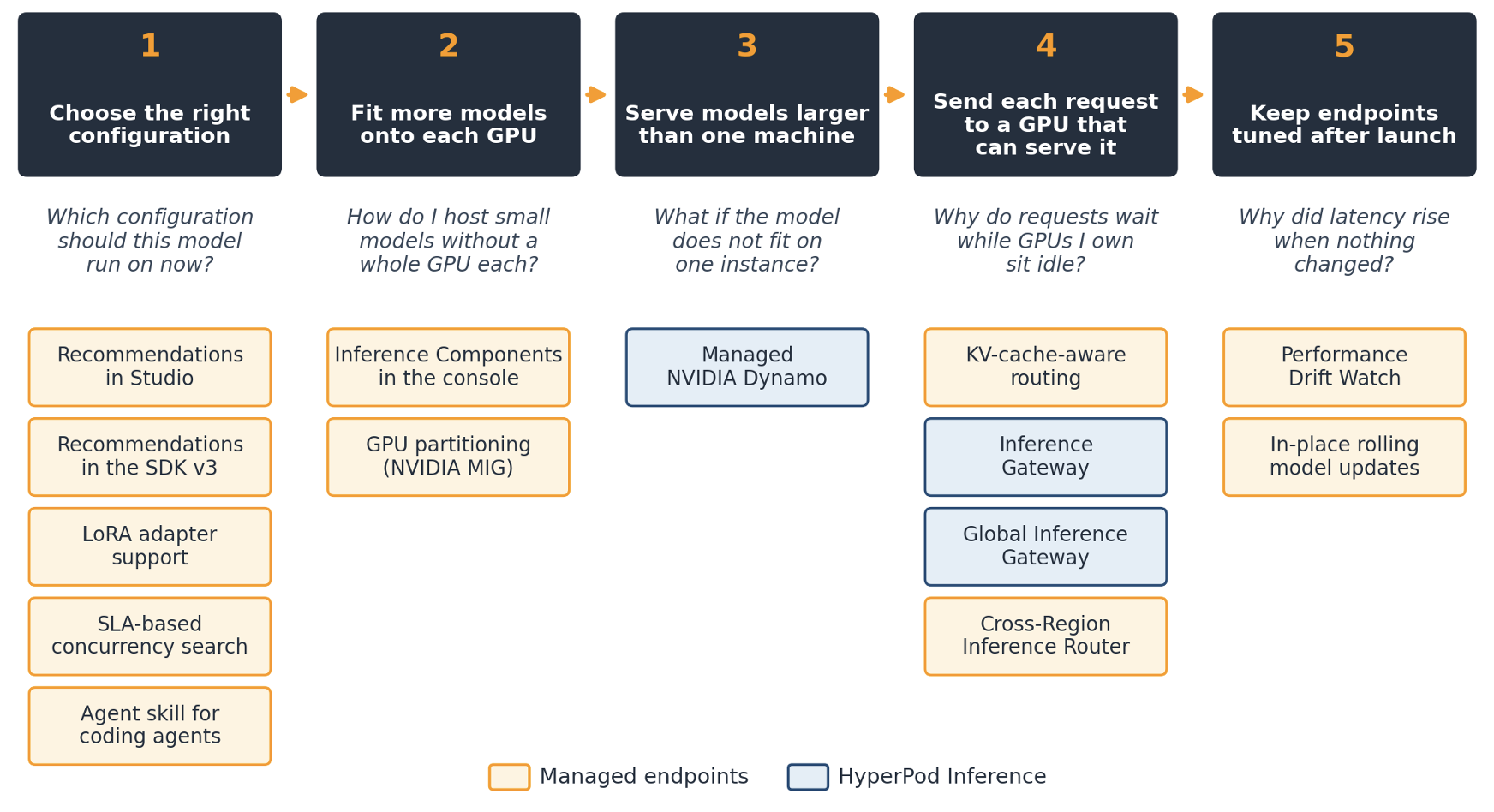
Figure 1: The five stages in this post and the launches in each
Choose the right configuration from wherever you work
The team picked its first configuration from a benchmark run in April. Since then, they have added four LoRA (Low-Rank Adaptation) adapters, one for each product line, and the product team has set a target of 500 milliseconds for time to first token (TTFT) at peak load. The April configuration was never tested against either change. The engineers who will re-run the analysis work in notebooks and coding agents, and few of them use the console.
Inference recommendations launched in April as an API. Four updates since then make it available in more of the places teams work, and let it answer two harder questions: how many adapters an endpoint can carry, and how much concurrency it can take before it misses a latency target. A new agent skill brings the same expertise into coding agents.
Inference recommendations in SageMaker AI Studio (July 2026)
Blog: Launching UI for generative AI inference recommendations in Amazon SageMaker AI
The April launch automated instance, container, and optimization selection through APIs. Inference recommendations are now also available in SageMaker AI Studio as a guided, low-code workflow. In Studio, choose Jobs, then Inference optimization. Choose a use-case profile (Interact, Generate, Summarize, or Custom), an optimization goal (minimize latency, maximize throughput, or minimize cost), and a model from SageMaker JumpStart, Amazon Simple Storage Service (Amazon S3), the Model Registry, or an existing SageMaker model.
SageMaker AI benchmarks candidate configurations on real GPU infrastructure using NVIDIA AIPerf and applies techniques that match the goal, such as speculative decoding for throughput or kernel tuning for latency. You compare the ranked results by TTFT, inter-token latency, throughput, and cost, and then deploy the chosen configuration to a real-time endpoint from Studio.
Inference recommendations in the SageMaker Python SDK v3 (August 2026)
Blog: LLM optimization integration for Amazon SageMaker Python SDK
Benchmarking and recommendations previously required SageMaker AI Studio or direct Boto3 calls. They are now part of the SageMaker Python SDK v3 (version 3.17.0 and later), the same interface teams use for training and deployment, so the workflow fits into notebooks, CI pipelines, and MLOps workflows. You can benchmark a live endpoint against your workload traffic, generate ranked recommendations for a latency, throughput, or cost goal, and deploy the top-ranked configuration to a real-time endpoint in a single call.
The SDK also supports longer workflows. You can run recommendation jobs in parallel to compare serving frameworks such as LMI and vLLM, and you can resume from a completed job so that deployment happens in a different notebook or pipeline stage without re-running the benchmarks.
LoRA adapter support in inference recommendations (September 2026)
Developer guide: Get recommendations for models with LoRA adapters
Many teams use LoRA adapters to specialize one foundation model for several use cases. Each adapter kept in GPU memory reduces the number of concurrent requests the endpoint can serve, and the right balance depends on the instance type, the number of adapters, and the traffic profile.
Inference recommendations now accept adapters as Model Package Amazon Resource Names (ARNs), for adapters produced by SageMaker fine-tuning, or as S3 URIs, for adapters from external pipelines such as Hugging Face PEFT. SageMaker AI benchmarks combinations of adapter count and concurrency on real GPU infrastructure and returns ranked results for your workload. The output lists both formats for every adapter. The recommended deployment uses SageMaker Inference Components, with one component for the base model and one for each adapter, so you can add, update, or remove an adapter without disrupting the base model or the other adapters.
SLA-based concurrency search (September 2026)
Blog: Right-size generative AI endpoints with concurrency sweeps on Amazon SageMaker AI
Right-sizing an endpoint means finding the highest concurrency it can sustain without breaching latency or error targets. Until now, that meant picking concurrency levels by hand, running a sweep, checking the results against the service level agreement (SLA), and repeating with a narrower range whenever the model or instance changed.
Inference recommendations now include a search that finds that boundary directly. Set search_recipe to max-concurrency-under-sla and supply targets for any combination of maximum TTFT, maximum time per output token, maximum end-to-end latency, and maximum error rate. The benchmarking engine (AIPerf) starts from a broad range, narrows it based on which probes pass or fail, and converges in fewer iterations than a linear sweep. The result reports the largest passing concurrency (feasible_max) or, if no level qualifies, the smallest failing one (infeasible_min).
The search uses the same CreateAIWorkloadConfig and CreateAIBenchmarkJob APIs as concurrency sweeps. Optional parameters (concurrency_min, concurrency_max, search_max_iterations, and search_initial_points) bound the cost and speed up convergence.
Agent skill for optimized generative AI inference (October 2026)
Blog: New agent skill: Amazon SageMaker optimized generative AI inference for your coding agent
Engineers increasingly ask their coding agent which instance and container to use. Without grounded knowledge and access to real benchmarks, the agent can only guess, and a wrong instance choice shows up later as missed latency targets or wasted spend.
The aws-ai-ml skill, available through the Agent Toolkit for AWS, gives coding agents such as Kiro built-in SageMaker AI inference expertise. Engineers describe what they need in plain language, and the agent can do the following:
- Find the right instance. Ranked deployment options with measured throughput, latency, and TTFT for a model in Amazon S3, SageMaker JumpStart, or the Hugging Face Hub.
- Benchmark a live endpoint. A report from real load covering throughput, P50 and P99 latency, inter-token latency, and supported concurrency.
- Compare runs. The percentage change on every metric, which shows whether a configuration change helped.
Answers are grounded in measured performance and delivered as SageMaker Python SDK v3 code that engineers review and run under their own credentials. Setup takes about 10 minutes. The skill works with any agent that supports the Model Context Protocol (MCP) and in SageMaker AI Studio JupyterLab spaces.
For the support team, one recommendation job that includes all four adapters, followed by a concurrency search against the 500 millisecond TTFT target, replaces the manual sweeps they ran in April. The engineer who owns it can start the job from a notebook or ask a coding agent to run it.
Fit more models onto each GPU
The support assistant does not run alone. An embedding model, a reranker, and a small classifier that routes tickets live in the same account, and each uses a fraction of a GPU. On a standard endpoint, each model copy still held a whole accelerator, so the team ran out of placement slots while GPU memory sat unused.
Inference Components in the SageMaker AI console (October 2026)
Developer guide: Inference Components in the SageMaker AI Console
With Inference Components, you can host several models on one endpoint and size and scale each model separately. Until now, they were available only through the SDK and the AWS Command Line Interface (AWS CLI). Every create, resize, and scaling policy had to be scripted, and there was no single view of what each model was using.
In the SageMaker AI console, you can now create, view, update, and delete inference components:
- Create and edit. Create an endpoint with inference components, add or delete components later, and change each component’s accelerators, CPU, memory, and copy count.
- Scale each model. Set an automatic scaling policy for each component, down to zero copies, so an idle model stops holding accelerators.
- Monitor. See alarms and per-component metrics on the same page.
The console calls the same SageMaker AI APIs as the SDK and CLI, so teams can start on the console and automate later, or manage scripted components visually.
GPU partitioning with NVIDIA Multi-Instance GPU (October 2026)
Blog: SageMaker Inference now supports Multi-Instance GPU to maximize GPU utilization for model endpoints
GPU partitioning uses NVIDIA Multi-Instance GPU (MIG) technology to divide one physical GPU into as many as seven partitions, depending on the accelerator. Each partition has dedicated GPU compute and memory, with complete hardware isolation. You define the partition layout when you create an endpoint for inference components and choose a partition type for each component. Applications keep invoking models by inference component name, so client code does not change.
MIG isolates GPU compute and memory between partitions. Models on the same instance still share host CPU, host memory, networking, storage, and endpoint routing. You pay the standard rate for the full instance-hour, so the saving comes from placing more models on each instance, not from a lower hourly price.
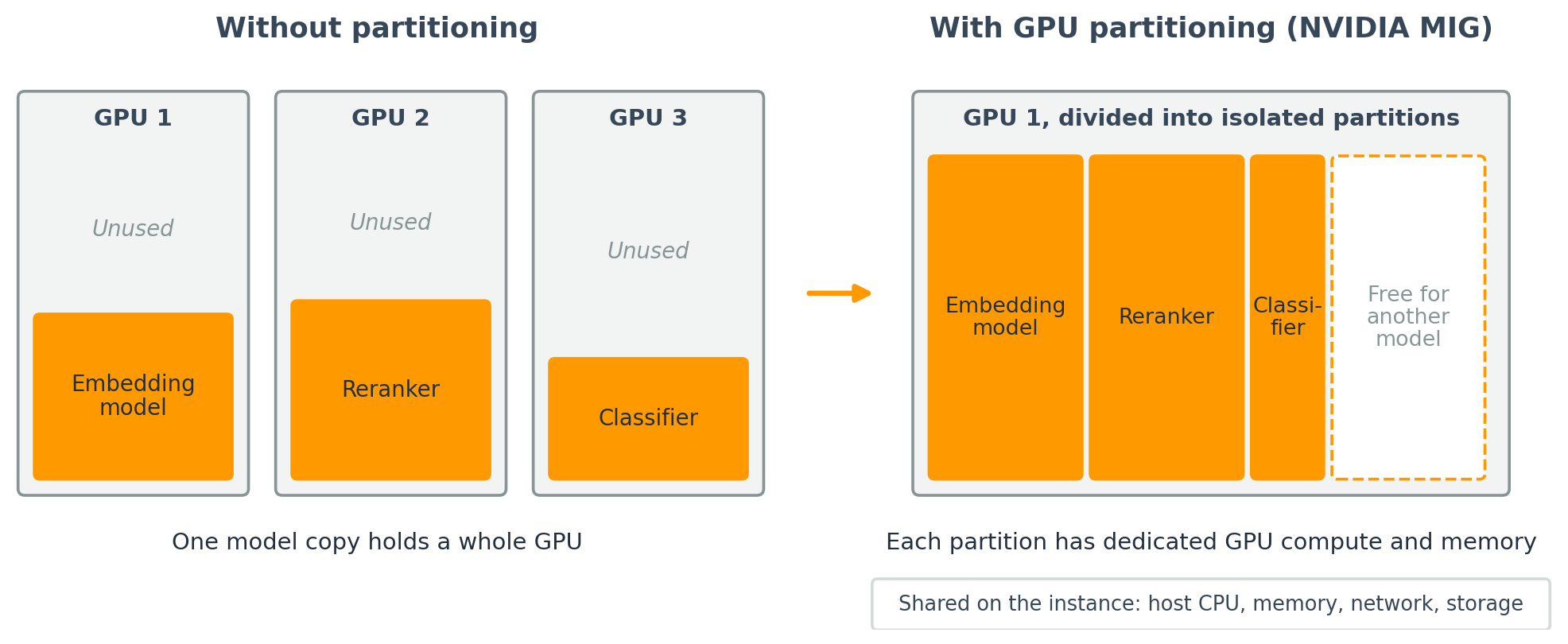
Figure 2: Three small models on three GPUs, compared with the same models in partitions of one GPU
For the support team, the embedding model, the reranker, and the classifier now run in separate partitions of one GPU on a single endpoint, and the team manages every component, including the assistant and its adapters, from the console.
Serve models larger than one instance
The team’s next model is a reasoning model whose weights alone exceed the GPU memory of any single instance. They have also noticed that long, retrieval-heavy prompts slow token generation for every other user on the endpoint. For a model this size, they move the workload to HyperPod Inference, which gives them dedicated clusters and Kubernetes-native control. The support assistant stays on managed endpoints.
Managed NVIDIA Dynamo on HyperPod Inference (November 2026)
Blog: Managed NVIDIA Dynamo on Amazon SageMaker HyperPod Inference
Part 1 covered two building blocks for large models on HyperPod: disaggregated prefill and decode in Inference Operator v3.2, and KV-aware routing as part of the managed tiered KV cache. This launch adds multi-node serving and changes who operates the stack. NVIDIA Dynamo is an open source inference framework that provides multi-node sharded serving, disaggregated prefill and decode, and KV-aware routing. Teams could already run Dynamo on their own Kubernetes clusters, but they had to build and operate everything around it: placing all the nodes of a replica together, wiring Elastic Fabric Adapter (EFA) networking so prefill can hand its KV cache to decode at hardware speed, maintaining serving images, and recovering when one failed node takes down a multi-node replica.
With this launch, Dynamo runs as a managed serving engine on HyperPod. Dynamo makes the serving decisions: how the model is sharded, how prefill and decode are split, and where each request goes. HyperPod provides what those decisions depend on:
- Capacity and networking. GPU capacity and EFA networking, provisioned and wired automatically.
- Node recovery. Node health monitoring and replacement, with multi-node workers rescheduled automatically when a node fails.
- Endpoint operations. Autoscaling, endpoint registration, TLS, and observability.
- One install and upgrade path. The Inference Operator add-on installs Dynamo, the serving images, and the Grove and KAI schedulers as one unit and upgrades them together.
The capabilities Dynamo brings to HyperPod are:
- Multi-node (sharded) serving. One copy of the model spans several nodes, so you can serve models that do not fit on any single instance.
- Disaggregated prefill and decode. Prompt processing and token generation run on separate GPU pools, each on an instance type suited to its work, so a long prompt no longer slows responses for other users.
- KV-aware routing. Each request goes to the worker that already holds its KV cache, which reduces TTFT.
There are three ways to start. Teams running Dynamo on self-managed Kubernetes can bring their existing DynamoGraphDeployment (DGD) manifests largely unchanged. Teams already on HyperPod Inference can update the add-on and add a short dynamoSpec block to an existing InferenceEndpointConfig, which HyperPod converts into a DGD, while existing endpoints keep serving. Teams new to both can create a cluster with the add-on and Dynamo enabled from the console. In each case, clients call a standard OpenAI-compatible endpoint, so client code does not change.
Managed Dynamo supports vLLM, SGLang, and TensorRT-LLM, and is available in the Regions where Amazon SageMaker HyperPod is available.
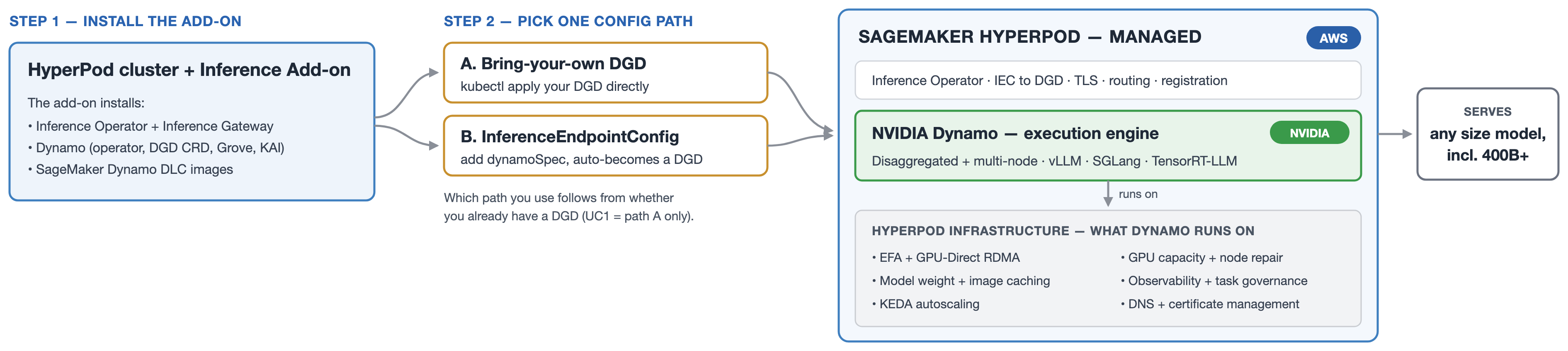
Figure 3: Managed NVIDIA Dynamo on HyperPod Inference
For the support team, the reasoning model runs as one sharded replica across several nodes, with separate prefill and de