Thinking, modeling, and computers
Thinking doesn’t just happen in our heads. When faced with a problem, we rarely sit perfectly still and just think . Instead, we interact with the world around us. We move around the room, talk to other people or to ourselves, write notes, draw diagrams, build prototypes, act out scenarios. We externalize the thinking process. Each externalized thought forms a model —a simplified representation that allows us to preserve, communicate, or reflect on the thought.
Computers have given us many new ways to work with our thoughts. Digital tools for professional drawing ( CAD ), music production ( DAW ) and video editing ( NLE ) allow us to create with amazing precision and to quickly explore multiple ideas. If we learn to program, we can even create richly dynamic simulations of our world and the worlds of our imagination.
But the most versatile tool for externalizing our thoughts isn’t any piece of software—it is the pen & paper. Why is this? Can we design a new tool to help us think, with the simplicity and versatility of pen & paper, but also with the dynamism of software?
Thinking with models
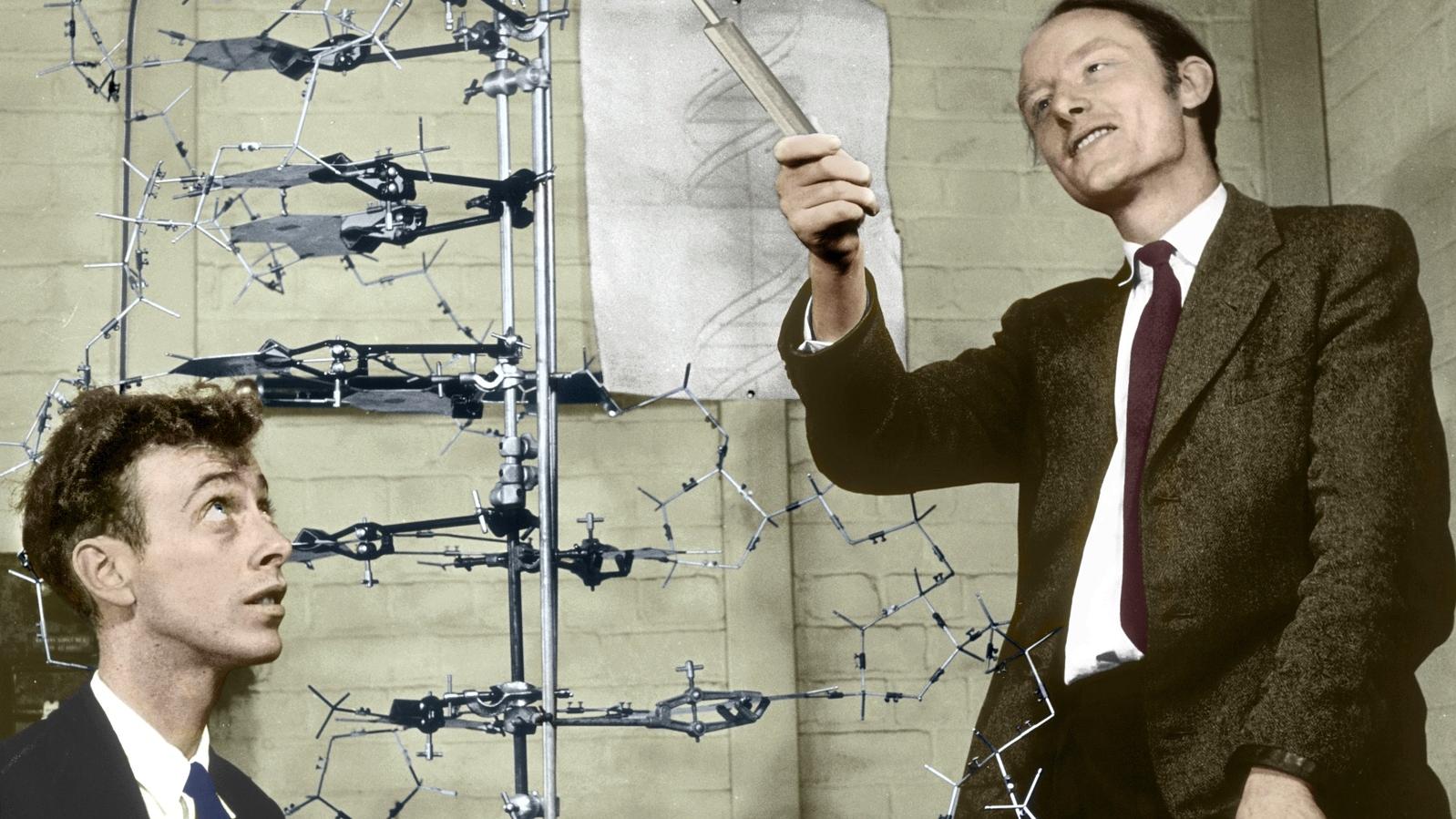
When Watson and Crick discovered the structure of DNA they didn’t just conjure up a structure in their minds, and afterwards build a physical model to demonstrate it. They built a physical model to explore how the different parts of the DNA molecule could actually fit together, and only by doing so came to discover and understand the double-helical structure of DNA.
Models aren’t just the end result of the thinking process. Making models can be an integral part of the process of understanding. The act of externalizing, communicating, and reflecting through models changes and advances one’s inner thoughts, surfacing new realizations.
James Watson (left) and Francis Crick with their DNA model. ( source )
Thoughts move quickly, so the tools we use to make our models must be fast to use and readily available.
Songwriters often use a pocket voice recorder to capture fleeting melodies the moment they appear.
Architects and designers use cheap, throwaway materials and rapid prototyping to physically explore permutations of their designs.
Most universal of all, everyone in every field uses the pen & paper. They are ubiquitous, general, and easy beyond compare.
Model of Sagrada Famillia by Antoni Gaudí—modeling an optimal arch by following a hanging chain. ( source )
When it’s frictionless to externalize your thoughts, you can create many small variations and reflect on the consequences of each change. Just as you might enter into a conversation with a friend to discuss an idea—to untangle its different aspects and consequences—so too, by externalizing your thoughts using a tool like pen & paper, you enter into a kind of conversation with the tool and the models you make with it.
By engaging in a conversation (with a person, a piece of paper, or a computer), thinking becomes a feedback loop . We don’t experience the world only by observing it. We poke and we prod at it. Thinking is a process of affecting and being affected; acting and understanding.
Modeling with computers
Computers offer clear advantages when it comes to working with external representations of our thinking:
Embedded computation (offloading busywork). With pen & paper, we have to do calculations ourselves. Computers can do that for us, embedded within our models.
Dynamism. We can simulate, move things around, see things from multiple perspectives, and filter information.
Abstraction and reuse. We can make things and copy or reuse them without any additional cost.
We’ve seen a proliferation of software that leverages these capabilities—tools for word processing, 3d modeling, music production, and digital illustration, to name but a few. These software tools allow us to express the content of our thoughts, without having to necessarily understand how the computer actually does the things it does.
But note that these tools are focused on a specific, narrow range of media. They have interfaces and features catering to a preselected form of expression. They are molds that you may pour your thoughts into. They rarely allow you to create ad hoc models with unexpected structures—and they certainly don’t encourage it.
Moreover, these tools have a formal, businesslike focus on producing results. They are tools rich with features for polishing your work, preparing something that is ready to be shared, aligned with the technical and cultural expectations for how such a work ought to appear.
As creative people interested in externalizing all kinds of thought, we want tools for exploring the fringes of the possibility space, and for playing with a wide range of low-fidelity representations, not just tools for polished products in predetermined forms.
Of course, if it’s flexibility and creative freedom you want, you could always learn how to program and then write your own software. Programming languages allow you to create rich and dynamic models, or tools for working with models, in virtually any form you desire. But programming demands that you represent concepts as long swaths of abstract symbols in text files. You are no longer thinking in terms of the problem you’re trying to solve, or the thoughts you want to express and reflect on. Instead, you’re forced to think in terms of the computer—functions, and data. Imagine trying to discover the structure of the DNA molecule while at the same time worrying about control flow, syntax, and error handling. The concerns imposed by programming are incidental to the problem you’re trying to solve.
These are the current trade-offs. On the one hand, you have tools that allow you to work directly with the content of your thoughts. But those thoughts are constrained to preselected forms, and the tools have an unfortunate focus on producing polished results. On the other hand you have programming, giving you the freedom to use the full dynamic power of computation in any way you please. But this power comes at a great cost. You may no longer work directly with the content of your thoughts. Instead, you must work in terms of the computer.
Can we make different trade-offs? Can we unify the directness of pen & paper with the dynamism of software?
Design principles
The following set of principles guided our work from the outset.
How it should feel
We wanted something that doesn’t feel like programming .
The simulation should happen inside the computer, not inside your head. When programming, much effort is spent figuring out what the program should do, by imagining in your mind how it will execute. We yearn for a world where this activity is better supported by the machine in front of you.
You shouldn’t have to think about the technical details of the machine while working on the problem. When sketching with dynamic representations, the step of encoding the problem into computer code shouldn’t exist. You should be able to directly manipulate these dynamic representations without thinking about how they are evaluated by the underlying system.
You shouldn’t have to name things just so you can refer back to them. The reliance on naming is an unnecessary formality imposed by the way that programming has been designed.
There should be no errors, undefined values, or unknown parameters to fill in . You should never be locked out of your model because you mistyped something or made an erroneous connection. The model should remain alive and usable, even if it produces unanticipated output.
You should see everything . This includes graphical representations of both data and behavior. You shouldn’t have to guess where dynamic behavior comes from. You shouldn’t have to blindly search through a set of text files or a list of objects to find the one responsible for the behavior on the screen.
You should be able to inspect everything. You should be able to see how bigger parts are built from smaller parts, right down to the most fundamental atoms making up the tool. If there is any hidden state, there should be a way to reveal it and interact with it graphically.
In short, instead of molding your problem to the machine, the machine should be molded to fit your problem.
Importantly, while we didn’t want this to feel like programming , we did want to preserve the power of computation—interactivity, abstraction, encapsulation, iteration—and create an alternative, visual interface to it.
We wanted the building of models to resemble tinkering and bricolage. You should feel as if you’re thinking through the tool , and playfully exploring the problem space.
How it should function
Additionally, we followed a set of intuitions about the technical aspects of the project.
Tablet & stylus can become the dynamic pen & paper. At Ink & Switch, we have been exploring tablet tools for power users with projects like Capstone , Muse and Inkbase . We strongly believe that there’s something magical about pen & paper as a substrate to do your creative work, and that a tablet computer with a stylus could, with the right software, become a dynamic version of that substrate.
Vector graphics can be a great interface for thinking. We believe in visually solving problems. While hand-drawn paths have a sketchy feel to them—which is important for resisting the push to make polished products—vectors are much easier to work with and to turn into dynamic representations.
The interface for drawing , and the interface for constructing dynamic behaviors , should be the same. You shouldn’t have to learn two separate modes of working.
The content of what you’re working on is the most important thing. The chrome—on screen UI elements—should be kept to a minimum, shown only when contextually appropriate.
You shouldn’t have to use an on-screen keyboard. The stylus and touchscreen are great input mechanisms for tablet devices. We strived to find a way to use them for programming. This implied finding ways to express computation other than typing sequences of symbols into a text buffer.
This is a personal thinking space. We want an intimate notebook for exploring our own thoughts. Collaboration and sharing, while important, are out of scope for this project. Relatedly, turning models into apps or scalable systems is also out of scope, and goes against the spirit of sketchy, unpolished thinking.
Inspirations
Beyond the metaphysical yearnings and design goals explored above, our work builds on generations of existing research.
The overlap of drawing and computing
These projects offer ways to visually express computation—building dynamic models, data visualizations, and interactive diagrams by directly manipulating graphical representations. They show alternative interfaces to the very same set of computational ideas behind conventional text-based programming.
A bin of parts
These projects show how building software can be about recomposing visual elements. By carefully thinking about interfacing between components, the building of dynamic models (ThingLab) or situated software (Fabrik) is merely a matter of joining smaller parts into bigger wholes.
Programming as a medium for thinking
There’s a flavor of programming that’s about code as a thing to think through to solve problems at hand, instead of code being merely a means to make software that in turn fulfils some purpose.
While the aesthetics of these inspirations aren’t relevant to us, their different relationship between thinking and code is an important reference point.
Non-inspirations
Finally, it’s worth mentioning a few projects that seem relevant or similar to our work. These projects are interesting in their own right, but aren’t well aligned with one or more of our goals. Identifying them as non-inspirations early helped us hone and focus our work throughout the project.
First, most visual programming languages , which feature colorful blocks of code or nodes connected by wires— Scratch , Max/MSP , Origami , vvvv , etc. They give you a canvas on which to spatially organize your symbolic code, and at their best, show helpful visualizations of program state.
Second, most live editor tools, which synchronize a textual code editor on one side with a visualization of the code’s output on the other— Sketch-n-Sketch , Glisp , the inspector in web browsers, etc. They allow you to see how parts of the textual code relate to parts of the visualization, and at their best, allow changes on either side to affect the other.
In both of these types of tools, you’re still programming with code —manipulating abstract symbols, which indirectly produce some output that exists separately from the code. What we want are tools that let us work directly with a graphical representation of our problem of interest, not with some form of code necessary to express that problem to the machine.
Crosscut
We’re now ready to introduce Crosscut, a tool for drawing dynamic models.
To explore the basic concepts of the tool, we’ll build a Varignon parallelogram —a visual proof that connecting the adjacent midpoints of the sides of any quadrilateral will always form a parallelogram.
Concrete Ink
At the surface level, Crosscut is a very simple vector drawing application: you can draw only points and straight lines. Crosscut is meant to be a dynamic alternative to pen & paper, so we call these drawings ink .
There are two kinds of ink in Crosscut. The first is colored black, and we call it concrete ink . You’ll use these black points and lines to concretely draw representations of your thoughts.
A concrete point on its own (left), and a concrete line connecting two concrete points.
One of the most basic interactions in Crosscut is snapping. Drag one point close to another and they’ll snap together. You can drag the point away to abort the snap, or lift the stylus (shown as a red dot in the video below) to create a connection. This is useful for drawing and for adding dynamic behavior, which we’ll explore next.
Meta ink
Imagine trying to make one of the concrete points move dynamically. The status quo approach would be to give it a symbolic name like point1 , and then manipulate that symbol with code.
function update() { point1.x = Math.sin(Date.now()); requestAnimationFrame(update); } update();
As we explained in earlier sections, this approach corrupts the types of thinking you can do while working with dynamic models. It forces you to work symbolically instead of visually, even though the model you’re making is in a visual medium. Worse, you need to express the dynamic behavior in terms of how the machine works, not in terms that are more relevant to the model or the behavior itself.
In contrast, we designed Crosscut to let you add dynamic behavior directly to your concrete representations. This is accomplished with a second type of ink, rendered in yellow, which we call meta ink . In addition to being something you can draw with, meta ink creates a dynamic relationship between the things it touches. We’ll explore this relationship in depth in the next section.
From left to right: a meta point, meta line, and sin meta node.
Crosscut comes with a selection of prebuilt meta nodes that can be connected via meta lines to manipulate the concrete ink things you draw. Meta nodes make up the low-level programming interface within Crosscut. They have a passing similarity to other node-and-wire programming tools, with some crucial differences we’ll explore shortly.
The first meta node we will examine is the property picker . This meta node has a rounded left side containing a snappable meta point, which should be connected to concrete points. On the right, the node has a flat side with another snappable point, which should be connected to other meta nodes (most of which also have flat sides, a design clue that they’re meant to be connected to one another).
In the example below, the property picker nodes are connected to value meta nodes, which simply display a numeric value.
Using property picker and value nodes to measure the x and y coordinates of a concrete point.
Using meta ink and a property picker meta node, you can extract information about concrete points by directly connecting to them. This might seem like a small detail, but is actually one of the core ideas of the project. Pulling values directly from concrete representations allows you to always see what you’re doing —something that is lost as soon as you start hiding values behind abstract identifiers.
Dynamism and equality
As mentioned above, meta ink creates a dynamic relationship between the things it touches. Specifically, meta ink establishes an equality . All points connected by meta lines will have the same value , much in the way that all directly connected points in an electrical circuit have the same voltage. We can illustrate this with a basic example.
Here, the two property picker nodes select the x values of the two concrete points, and then the x values are made equal by the meta ink lines connected on the right.
You can build more complex relationships using additional meta nodes. For example, a concrete point can be animated by taking the sine of the current time.
Recall that we saw this same example earlier, only expressed a little differently. Here it is again, for stark contrast.
function update() { point1.x = Math.sin(Date.now()); requestAnimationFrame(update); } update();
Meta nodes allow you to define relationships between concrete points. For example, the two concrete points below share an x position, and are kept one unit apart on the y -axis.
Reusable parts in the library
Recall that as we explore the basic concepts of Crosscut, we’re building toward the construction of a Varignon parallelogram.
With what we’ve already seen, we can build a key piece of that geometric proof: a line with a midpoint.
We could rebuild this same construction three more times to get four separate lines with midpoints, but this is tedious. Instead, let’s do something very common when programming and turn it into a reusable component.
The status quo way to make this midpoint reusable would be to turn it into a function or a class, give it a name, expose some parameters, and call it by the name any time we want to use it. There are some issues with this. For one, we’re back to indirectly using named things rather than directly using tangible things. Second, when the function requires parameters, you have to to fill them in—and to fill them in, you have to know what kinds of values are meaningful. Types can be helpful here, but only to a point—you still need to know what the values mean to the function. All of this, again, forces you think more about the technicalities of the tool, instead of thinking with it.
Our approach is to flip this situation on its head. You don’t explicitly mark something as reusable—every drawing you create is a reusable part .
You can pinch to zoom-out from the drawing interface, which will take you to a library of parts. Here you’ll find all the parts you’ve created, plus all the parts and meta nodes that Crosscut includes by default, ready to be reused and remixed in the creation of new parts.
The library is a freeform canvas. You can pl