In Part 1, you built a task agent on Amazon Bedrock AgentCore, a platform to build, connect, and optimize agents at scale, with any framework or model. The agent runs on Amazon Bedrock AgentCore runtime, a capability of Amazon Bedrock AgentCore, and acts for signed-in users through Okta Cross App Access (XAA). Okta decided which agent might act for which user, and Amazon Bedrock AgentCore Identity, a capability of Amazon Bedrock AgentCore, redeemed Okta’s grant inside the agent. That proves the governance mechanism, and it runs on a deliberately small topology: one agent, two Model Context Protocol (MCP) servers, and the authorization check written into each server.
The mechanism scales. The topology doesn’t. Three things that are fine for one agent and two tools become the work in an enterprise with hundreds of agents and thousands of tools:
| What Part 1 does | Why it stops scaling | What Part 2 does instead |
| The agent holds each MCP server’s runtime ARN and calls it directly | N agents against M servers is a wiring matrix, and every new tool touches every agent that needs it | Agents reach one Gateway endpoint, and the Gateway holds the target registry |
| The agent’s role holds the token-exchange permission and reads the provider’s secret | Every agent that acts for users gets a credential path to every resource it might reach | The Gateway redeems the grant, and the agent’s role holds no token-exchange or secret permissions |
Each MCP server carries the same groups check in its own code |
The same rule, copied into thousands of servers, drifts and can’t be audited or changed in one place | One default-deny Cedar policy set, evaluated at the Gateway before tools run |
In this post, you make that change on the Part 1 solution. Amazon Bedrock AgentCore Gateway, a capability of Amazon Bedrock AgentCore, becomes the single front door and redeems Okta’s grant for each target. Policy in Amazon Bedrock AgentCore evaluates Cedar policies that bind each tool to the agent and the scope Okta delegated. A second agent on Amazon Elastic Kubernetes Service (Amazon EKS) joins under its own Okta identity, to show that the front door doesn’t care where an agent runs. And Amazon Bedrock AgentCore Observability, a capability of Amazon Bedrock AgentCore, with Amazon CloudWatch gives you one place to read every decision, including Okta’s. We also compare XAA with per-user OAuth consent for applications that can’t accept Okta’s grant.
What changes from Part 1
The Okta configuration, the AgentCore Identity credential provider, and the MCP servers from Part 1 stay as they are. Figure 1 shows the architecture with the additions.
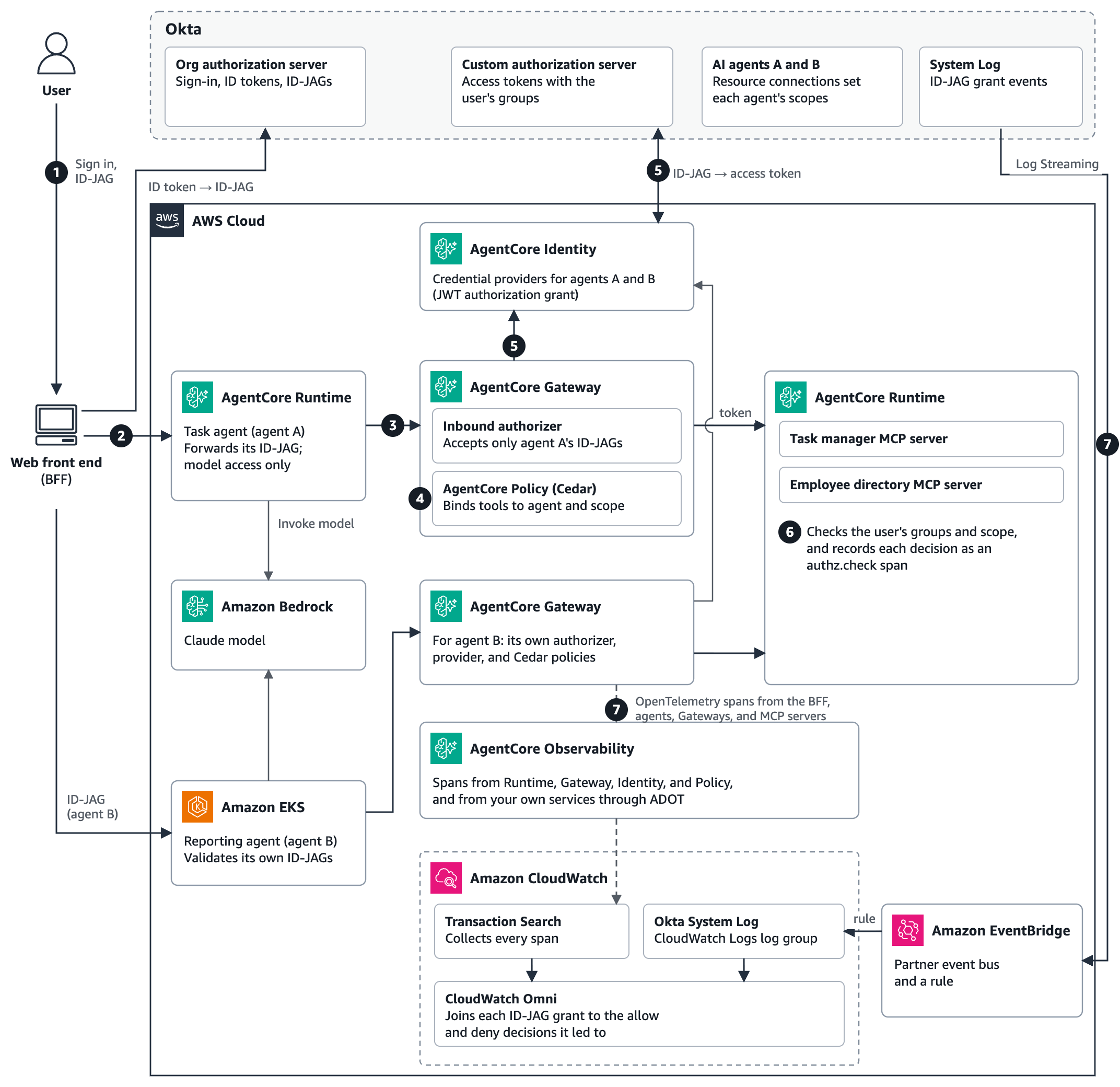
Figure 1: The Part 1 solution with AgentCore Gateway, Policy, and Observability, a second agent on Amazon EKS, and the audit path, with numbers matching the steps that follow
- The user signs in, and the backend for frontend (BFF) exchanges the ID token for an Identity Assertion JWT Authorization Grant (ID-JAG) issued to the task agent, agent A, as in Part 1.
- The BFF invokes agent A on AgentCore runtime with the ID-JAG.
- Agent A forwards the ID-JAG to its Gateway as the bearer token of its MCP session. The Gateway’s inbound authorizer accepts only agent A’s ID-JAGs.
- Policy in AgentCore evaluates Cedar policies for each tool listing and each tool call, before the Gateway invokes a target.
- For calls that Cedar permits, the Gateway has AgentCore Identity redeem the ID-JAG for each target at Okta’s custom authorization server through the Part 1 credential provider. A call that Cedar denies doesn’t redeem the ID-JAG.
- The MCP server checks the user’s groups and scope, as in Part 1, and records each decision as an
authz.checkspan. - Every hop emits OpenTelemetry spans to AgentCore Observability, which CloudWatch Transaction Search collects, and Okta streams its System Log to CloudWatch through Amazon EventBridge.
The reporting agent, agent B, runs on Amazon EKS and follows the same path through its own Gateway.
Prerequisites
In addition to the Part 1 solution, you need the following:
| Prerequisite | Needed for |
| eksctl, kubectl, and Docker | The second agent on Amazon EKS |
| Okta Log Streaming | Okta’s System Log in CloudWatch |
| AWS Identity and Access Management (IAM) permissions | AgentCore Gateways and policy engines, Amazon EKS clusters, CloudWatch log groups, and Amazon EventBridge rules |
The additions take about 90 minutes. The EKS control plane costs $0.10 per hour, plus nodes and the Amazon EKS Auto Mode management fee, and the AgentCore features charge for what you use. See Amazon EKS pricing and Amazon Bedrock AgentCore pricing.
As in Part 1, the base for this solution is the AWS sample 08-okta-xaa-delegation-chain on GitHub, and you can build the Part 2 additions on top of it. Beyond that sample, the snippets and configurations in this post show the pattern conceptually. They aren’t a complete, deployable solution. The code is sample code for non-production use, so work with your security and legal teams to meet your organization’s security, regulatory, and compliance requirements before you deploy it.
Create a Gateway that accepts the ID-JAG
The Gateway’s inbound authorizer works like the runtime authorizer from Part 1. Its issuer is Okta’s org authorization server, its audience is the custom authorization server, and allowedClients pins it to one agent:
authorizer = {"customJWTAuthorizer": {
    "discoveryUrl": f"{OKTA_ORG}/.well-known/openid-configuration",  # the ID-JAG's issuer
    "allowedAudience": [f"{OKTA_ORG}/oauth2/{CUSTOM_AS_ID}"],         # the resource's authorization server
    "allowedClients": [AGENT_CLIENT_ID],                               # only this agent's ID-JAGs
    "allowedScopes": ["xaa:read", "xaa:write"],
}}
Figure 2 shows the resulting inbound authorizer.
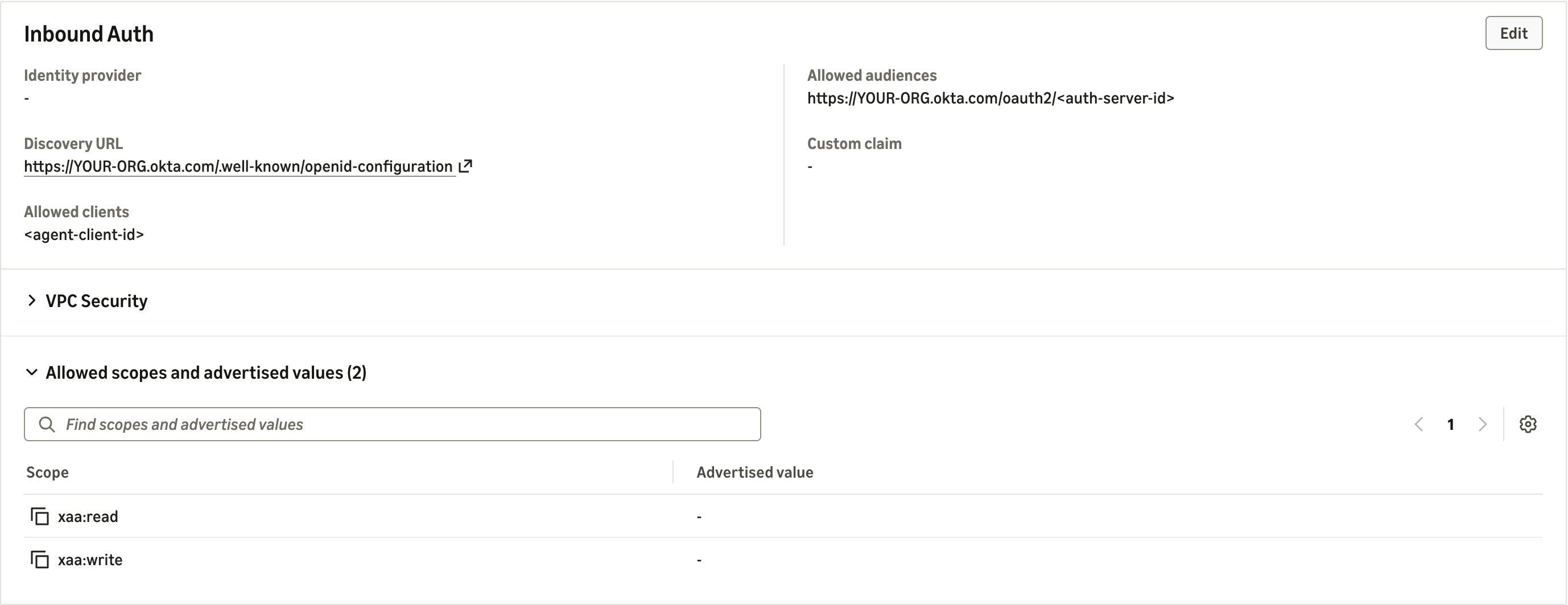
Figure 2: The Gateway accepts only ID-JAGs that Okta issued to the agent for the resource’s authorization server
Each MCP server becomes a Gateway target whose outbound authorization uses TOKEN_EXCHANGE through the Part 1 credential provider, so the Gateway performs the second exchange:
"credentialProviderConfigurations": [{
    "credentialProviderType": "OAUTH",
    "credentialProvider": {"oauthCredentialProvider": {
        "providerArn": provider_arn,          # the JWT_AUTHORIZATION_GRANT provider from Part 1
        "scopes": ["xaa:read", "xaa:write"],  # must equal the ID-JAG's scopes
        "grantType": "TOKEN_EXCHANGE",
    }},
}]
Figure 3 shows a target configured this way.
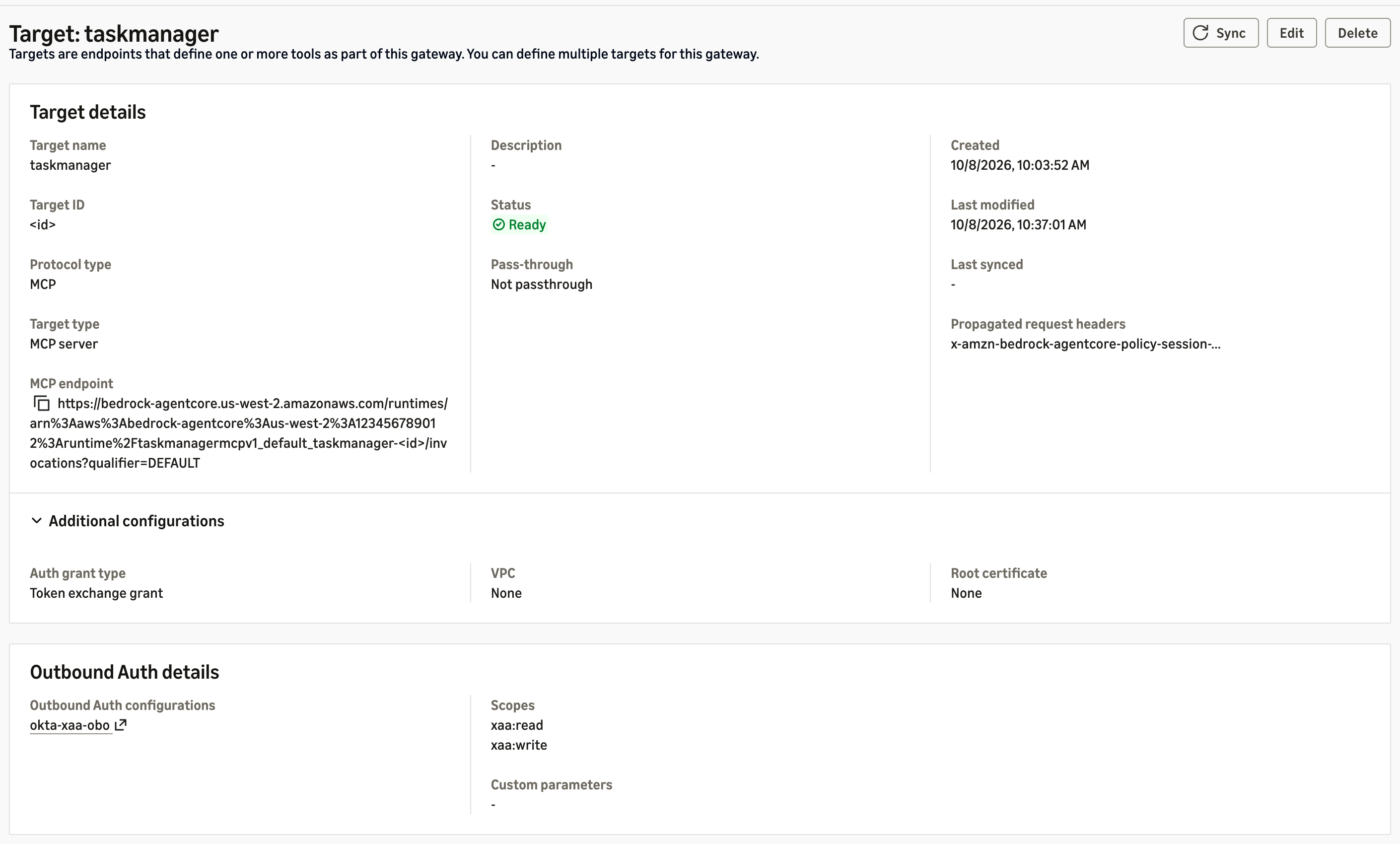
Figure 3: The task manager target redeems the ID-JAG through the Part 1 credential provider
Three details matter here. First, as in Part 1, the target’s scopes must equal the ID-JAG’s. Second, give each target a static tool schema (listingMode set to DEFAULT with an inline mcpToolSchema), so the tool names your Cedar policies reference are fixed when you write them. In our tests, policies that name tools also couldn’t attach to dynamically listed targets. Third, the Gateway pages tools/list by target, so your client must follow the pagination cursor, or tools from later targets disappear. AgentCore Identity keeps the token from the Gateway’s exchange, so one single-use ID-JAG serves every tool call in a session. In our tests, it also opened a second session within its 5-minute life.
Because a credential provider authenticates as one Okta agent, give each agent its own Gateway and provider. Sample 08-okta-xaa-delegation-chain takes a different route, in which a Gateway interceptor performs both exchanges itself.
Bind tools to agents with Cedar
Attach a Policy in AgentCore engine to the Gateway in ENFORCE mode, and write permit-only policies. Cedar exposes JWT claims as tags. A policy that reads a missing tag errors and is skipped. A skipped permit grants nothing, so default deny holds, but a skipped forbid blocks nothing. Guard each tag with hasTag:
permit(
  principal is AgentCore::OAuthUser,
  action in [AgentCore::Action::"taskmanager___create_task",
             AgentCore::Action::"taskmanager___update_task_status"],
  resource == AgentCore::Gateway::"<gateway-arn>"
) when {
  principal.hasTag("client_id") && principal.getTag("client_id") == "<agent-client-id>" &&
  principal.hasTag("scope") &&
  (principal.getTag("scope") == "xaa:write" ||
   principal.getTag("scope") like "xaa:write *" ||
   principal.getTag("scope") like "* xaa:write" ||
   principal.getTag("scope") like "* xaa:write *")
};
The scope tag holds the ID-JAG’s space-separated scope claim, so the four conditions match xaa:write only as a whole entry. A scope such as xaa:write-admin doesn’t match. A matching policy, written the same way, permits the read tools with xaa:read. Check that every policy is ACTIVE before you attach the engine: an engine whose policies failed to create leaves the Gateway denying every call. Cedar binds tools to the agent and its delegated scope, and the MCP server still decides each user’s authority from the groups claim, as in Part 1.
Point the agent at the Gateway
Agent A now forwards its inbound ID-JAG to the Gateway instead of calling AgentCore Identity itself:
id_jag = context.request_headers["Authorization"].removeprefix("Bearer ")  # allowlisted header
tools = make_client(GATEWAY_URL, id_jag)  # the Gateway redeems the ID-JAG for each target
Remove the Part 1 AgentCore Identity statements from the agent’s execution role. That’s the only change to the role, which now holds no token-exchange or secret permissions, because the Gateway’s role holds the permission to exchange tokens. Keep allowedClients on the runtime’s authorizer.
Run a second agent on Amazon EKS
Our second agent, a reporting agent, runs the same code on Amazon EKS with its own Okta registration. Its resource connection allows only xaa:read, and it has its own Gateway and credential provider. EKS Pod Identity gives the pod an IAM role that can invoke models and write its own logs and traces, and nothing else. The AWS Distro for OpenTelemetry (ADOT) SDK exports its traces. The agents-on-eks sample shows the Pod Identity setup.
Outside AgentCore runtime, no authorizer sits in front of the pod, so the agent validates the ID-JAG before a model call. It checks the signature, issuer, audience, token type oauth-id-jag+jwt, expiry, and that client_id is its own. If you kept the Part 1 agent check in the MCP servers, add agent B’s client ID to REGISTERED_AGENTS. Two settings tripped us up. The EKS Auto Mode general-purpose node pool runs only amd64, so build multi-architecture images. And the AgentCore Python SDK, a capability of Amazon Bedrock AgentCore, binds to localhost unless you set DOCKER_CONTAINER=true.
Trace every decision with AgentCore Observability
The spans in this section are AgentCore Observability, the component in Figure 1 that sits between the agents and CloudWatch. Runtime, Gateway, Identity, and Policy emit OpenTelemetry spans for each hop without code changes, after you turn on Transaction Search and trace delivery. Your own services add theirs with the AWS Distro for OpenTelemetry (ADOT). CloudWatch Transaction Search collects them, the AgentCore console reads them as agent traces, and Amazon CloudWatch Omni reads the same spans as traces.default, which is what lets one query put them beside Okta’s events.
One tool call therefore produces this chain of spans, each naming the control that made a decision:
| Span | Emitted by | What it records |
AgentCore.Gateway.InboundAuth |
Gateway | Whether the inbound ID-JAG was issued to this agent |
AgentCore.Policy.AuthorizeAction |
Policy | The Cedar decision for this tool |
AgentCore.Identity.GetWorkloadAccessToken |
Identity | Binding the agent’s workload identity to the user |
AgentCore.Identity.GetResourceOauth2Token |
Identity | Redeeming the ID-JAG at Okta for a scoped access token |
AgentCore.Gateway.InvokeTool |
Gateway | The tool call and its outcome |
authz.check |
The MCP server (ADOT) | The user’s groups, the agent, the decision, and the reason |
Okta’s System Log is the one record AWS can’t emit, so you bring it in. Figure 4 shows both paths meeting in Omni.
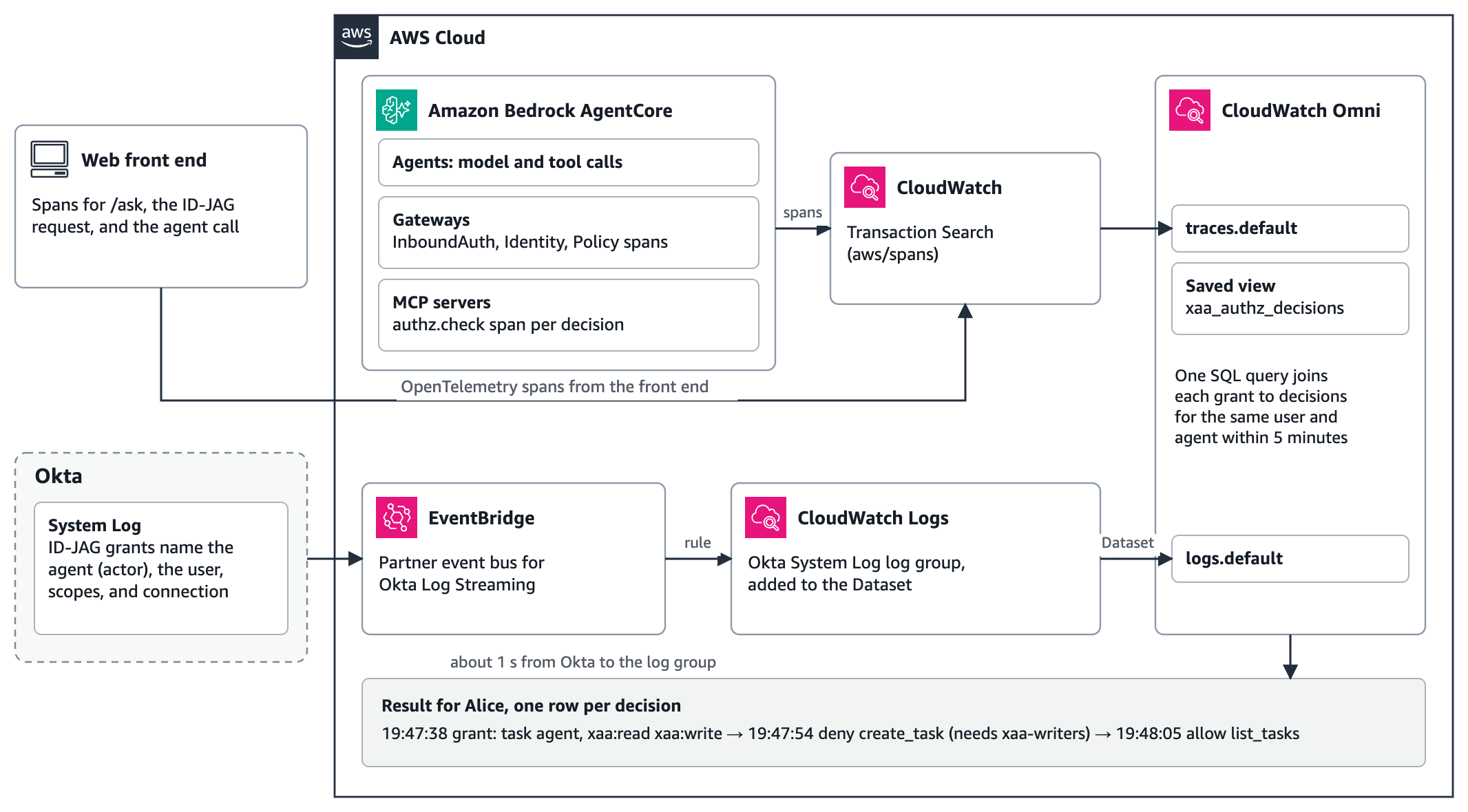
Figure 4: The audit path, where spans and Okta’s System Log reach CloudWatch and one Omni query joins them
To set it up:
- Turn on CloudWatch Transaction Search, turn on trace delivery for each Gateway (see this sample script), and add ADOT to the BFF and the MCP servers. The task manager writes each decision, the user, and the agent onto an
authz.checkspan. - In Okta, add a Log Stream for Amazon EventBridge. Okta delivers each event to a partner event bus in your account, and a rule writes it to a CloudWatch Logs log group. In our tests, events arrived about 1 second after Okta published them. Each ID-JAG grant event names the agent as the actor, the user as a target, and the granted scopes and resource connection.
- Set up an Omni space in the account and AWS Region, add the Okta log group to the CloudWatch Dataset integration, and save a view,
view.xaa_authz_decisions, over theauthz.checkspans.
One query then joins each ID-JAG grant to the decisions it led to:
SELECT o.okta_time, o.agent, o.user_email, o.granted, a.decision_time, a.decision, a.reason
FROM (SELECT `@timestamp` AS okta_time, detail['actor']['id'] AS agent_id,
             detail['actor']['displayName'] AS agent,
             array_element(regexp_match(`@message`, '"type"\s*:\s*"User"\s*,\s*"alternateId"\s*:\s*"([^"]+)"'), 1) AS user_email,
             detail['debugContext']['debugData']['grantedScopes'] AS granted
      FROM "logs.default"
      WHERE `@timestamp` BETWEEN NOW() - INTERVAL '1' HOUR AND NOW()
        AND detail['eventType'] = 'app.oauth2.token.grant.id_jag') o
JOIN (SELECT `@timestamp` AS decision_time, user_id, agent_client_id, decision, reason
      FROM "view.xaa_authz_decisions"
      WHERE `@timestamp` BETWEEN NOW() - INTERVAL '1' HOUR AND NOW()) a
  ON a.user_id = o.user_email AND a.agent_client_id = o.agent_id
 AN