Black Friday Save $20 on a lifetime license — $59 $79 through Dec 1. $20 off through Dec 1 See offer
Save every AI conversation. Find it. Continue anywhere.
Automatically back up your chats, projects and files from ChatGPT, Claude, Gemini and Grok as Markdown in a folder you own . Search your saved history and continue any saved conversation in another AI.
14 days free · No card required · Buy license, $59 once
Your chats are saved locally, not uploaded to Carry’s servers.
Save Automatic Markdown backups
Find Search your saved conversations
Continue Continue in another AI
What should I budget for the first month in Lisbon?
Set it once. Forget it’s running.
ChatGPT, Claude, Gemini and Grok save on their own every couple of hours.
Saved, searchable and ready to continue.
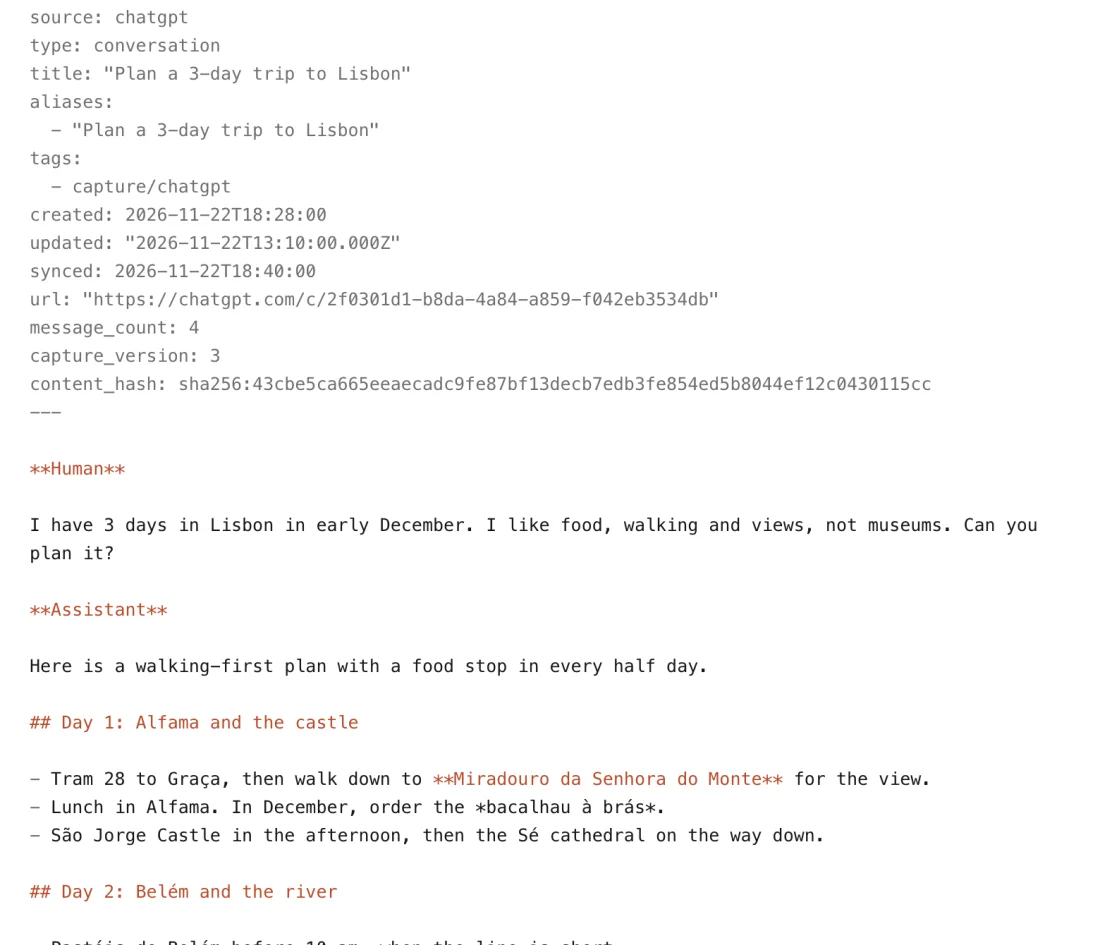
One Lisbon trip plan, saved from ChatGPT, found by search and continued in Claude.
Saved as Markdown, on its own
Chats, projects and files go to your folder as plain Markdown, kept current with no exports to run.
One search across every chat
Every saved chat in one search box, with the matching line highlighted and filters for app, date and project.
Continue in another AI
Open a saved chat in ChatGPT, Claude, Gemini or Grok, with the transcript attached.
In their words.
Marcel “It gives me control over my data and allows me to build a long-term, searchable knowledge archive.” M Marcel “ Exactly what I’ve been looking for! I’ve been searching for a reliable way to preserve and organize my AI conversations for a long time, and Carry is exactly the solution I needed. Being able to automatically save conversations as Markdown files and integrate them into my own Obsidian knowledge base is incredibly valuable. It gives me control over my data and allows me to build a long-term, searchable knowledge archive. What also impressed me was the developer’s responsiveness. I reported an issue, and Ankit quickly identified the cause, explained it clearly, and released a fix. A genuinely useful application with a thoughtful concept and a dedicated developer. Highly recommended! 5-star review on the Chrome Web Store
Danielle Hamburg “I am also always worried that I will lose my chats. Now I don’t have to worry.” D Danielle Hamburg “ I didn’t realize how much I needed this tool until I started using it. I switch back and forth between ChatGPT and Claude depending on what I am doing. It really helps to be able to search my Obsidian for anything I’ve talked to AI about. I am also always worried that I will lose my chats. Now I don’t have to worry. I had an issue and the developer was very responsive and quick to reply. I can’t wait until Gemini is supported. Well worth the purchase!!! 5-star review on the Chrome Web Store
kirti verma “My conversations are written directly to a folder in my local rather than being uploaded to another service or cloud.” K kirti verma “ I’ve been using Carry extensively while building side projects, and it has become an important part of my workflow. I often use different LLMs to brainstorm ideas, explore potential experiments, and learn about new topics. Carry makes it incredibly easy to bring all those conversations together and sync them into Obsidian—even when they happen on the go. From there, I use the conversations to consolidate my research, write a proper PRD, and eventually start building. Having discussions from multiple LLMs in one place also makes it much easier to open Claude Code in the terminal and refine the research further. One feature I’d really love is the ability to selectively sync conversations. This is missing PS: What I love most - my conversations are written directly to a folder in my local rather than being uploaded to another service or cloud. It also uses the provider sessions I’m already signed into, so I don’t have to share passwords or manage separate API keys. makes it feel more reliable. 5-star review on the Chrome Web Store
LEE “SIR. Jorah” SAM “Support replied to emails and solved problems very quickly.” L LEE “SIR. Jorah” SAM “ 功能非常方便省心, 解决了AI聊天记录自动备份到Obsidian的问题。 客服回复邮件和解决问题速度很快。 Translated from Chinese Very convenient and worry-free. It solved the problem of automatically backing up my AI chat history to Obsidian. Support replied to emails and solved problems very quickly. 5-star review on the Chrome Web Store
Read every review on the Chrome Web Store
One conversation. One Markdown file.
Your conversations are ordinary Markdown files in a folder you choose, with project folders and the original files Carry could still download. Open them in Obsidian, VS Code or any text editor. Nothing goes to a Carry cloud, and the files stay yours even if you stop using Carry.
2026-09-16-q3-orders-by- region.md 17 Sep
2026-10-03-heat-pumps-in-cold- climates.md 3 Oct
q3_orders_by_ region.csv 17 Sep
2026-10-08-moving-day- checklist.md 8 Oct
moving-day- checklist.docx 8 Oct
2026-09-07-pomodoro-timer- page.md 7 Sep
2026-10-03-chapter-2-reading- plan.md 3 Oct
night-temperatures- 2025.xlsx 3 Oct
2026-09-11-lisbon-first-month- budget.md 11 Sep
2026-09-26-book-swap- poster.md 26 Sep
2026-10-02-lisbon-to-porto-by- train.md 2 Oct
2026-07-26-kyoto-in-late- november.md 26 Jul
2026-09-29-hiking-newsletter- names.md 29 Sep
2026-10-06-household-budget- csv.md 6 Oct
2026-10-09-planting-calendar- page.md 9 Oct
2026-10-11-house-rules- summary.md 11 Oct
building-house- rules.docx 11 Oct
--- conversation_id: "66e85b2f-1c4a-8003-9d2e-7a41c0f3b9e2" source: chatgpt type: conversation title: "Q3 orders by region" aliases: - "Q3 orders by region" tags: - capture/chatgpt created: 2026-09-16T16:20:05 updated: "2026-09-16T16:27:41.318Z" verified_list_token: "2026-09-16T16:27:41.318Z" conversation_files_fetched: true synced: 2026-09-17T10:59:12 url: "https://chatgpt.com/c/66e85b2f-1c4a-8003-9d2e-7a41c0f3b9e2" capture_gaps: - files parser_id: "p2:4bd144f59343bd06b194526eef21531d88abef0279ddf7066cdfb5429f11b8b3:chatgpt-format=3,claude-format=6,grok-format=2,message-order=2,tool-output=5" message_count: 4 capture_version: 2 content_hash: sha256:44524063934983f7a24e7992968ddc6485123b74fe88ca20872df85342ff2c30 --- **Human** Our Q3 orders by region, July to September: ``` North 1240, 1388, 1515 South 980, 1011, 1042 West 1410, 1552, 1688 East 760, 842, 931 ``` Which region grew fastest? Give me a table and a CSV I can open in Sheets. **Assistant** East grew fastest in percentage terms, just ahead of North. West added the most orders overall. | Region | July | September | Change | | --- | ---: | ---: | ---: | | East | 760 | 931 | +22.5% | | North | 1,240 | 1,515 | +22.2% | | West | 1,410 | 1,688 | +19.7% | | South | 980 | 1,042 | +6.3% | To recompute the change column yourself: ```python import pandas as pd df = pd.read_csv("q3_orders_by_region.csv") df["change"] = df["september"] / df["july"] - 1 print(df.sort_values("change", ascending=False)) ``` [Download the CSV] (files/q3_orders_by_region.csv) **Human** Can you chart it too? A simple bar chart is fine. **Assistant** Here it is: July and September side by side for each region. [Download the chart] (sandbox:/mnt/data/q3_orders_chart.png) > [!missing] File: q3\_orders\_chart.png — file could not be downloaded
Our Q3 orders by region, July to September:
North 1240, 1388, 1515 South 980, 1011, 1042 West 1410, 1552, 1688 East 760, 842, 931
Which region grew fastest? Give me a table and a CSV I can open in Sheets.
East grew fastest in percentage terms, just ahead of North. West added the most orders overall.
To recompute the change column yourself:
import pandas as pd df = pd.read_csv("q3_orders_by_region.csv") df["change"] = df["september"] / df["july"] - 1 print(df.sort_values("change", ascending=False))
Can you chart it too? A simple bar chart is fine.
Here it is: July and September side by side for each region.
File: q3_orders_chart.png — file could not be downloaded
--- conversation_id: "670e3a91-5c2d-8001-b4f7-2e9d18c6a053" source: chatgpt type: conversation title: "Heat pumps in cold climates" aliases: - "Heat pumps in cold climates" tags: - capture/chatgpt created: 2026-10-03T08:14:22 updated: "2026-10-03T08:31:09.552Z" verified_list_token: "2026-10-03T08:31:09.552Z" conversation_files_fetched: true synced: 2026-10-03T08:47:30 url: "https://chatgpt.com/c/670e3a91-5c2d-8001-b4f7-2e9d18c6a053" message_count: 2 capture_version: 2 content_hash: sha256:00a623e4dbb58e72633ab7801f12e6cc0b961d4770b8a5568a965f14fb796467 --- **Human** Research how well air-source heat pumps work in cold climates. Compare efficiency below freezing, running costs against a gas boiler, and what installers recommend for older houses. **Assistant** # Air-source heat pumps in cold climates ## Summary Cold-climate heat pumps keep heating well below freezing, but they get less efficient as it gets colder. Whether one costs less to run than a gas boiler depends mostly on local electricity and gas prices, and on how well the house holds heat. ## How efficiency changes with temperature Efficiency is measured as the coefficient of performance (COP): units of heat delivered for each unit of electricity used. | Outdoor temperature | Cold-climate model | Standard model | | --- | --- | --- | | 7 °C | 3.5–4.5 | 3–4 | | −8 °C | 2.3–3 | 1.8–2.5 | | −15 °C | 1.8–2.5 | 1.3–2 | | −25 °C | 1.3–1.8 | Often switches to backup heat | Even at a COP of 1.5, a heat pump gives more heat per kilowatt-hour than a plain electric heater, which has a COP of 1. ## Running costs against a gas boiler Divide the electricity price by the seasonal COP, and the gas price by the boiler's efficiency (about 0.9 for a modern condensing boiler). The lower number is the cheaper heat. - **Electricity at 0.30 per kWh, seasonal COP of 3:** 0.10 per kWh of heat. - **Gas at 0.08 per kWh, boiler 90% efficient:** about 0.09 per kWh of heat. At these prices the two are close. Better insulation or a time-of-use tariff tips the balance toward the heat pump. ## What installers recommend for older houses 1. **Do a room-by-room heat loss calculation** before sizing the unit. An oversized unit cycles on and off and loses efficiency. 2. **Check radiator sizes.** Heat pumps work best at lower flow temperatures (35–50 °C), so some rooms may need larger radiators. 3. **Fix the cheap insulation first:** loft insulation, draught-proofing and pipe lagging. 4. **Plan for a hot water cylinder.** Most heat pump systems need one. ## What to ask an installer - A seasonal efficiency estimate for your climate, not just the rated COP at 7 °C. - How often the backup heater is expected to run in the coldest weeks. - Whether the quote includes radiator upgrades and controls.
Research how well air-source heat pumps work in cold climates. Compare efficiency below freezing, running costs against a gas boiler, and what installers recommend for older houses.
Cold-climate heat pumps keep heating well below freezing, but they get less efficient as it gets colder. Whether one costs less to run than a gas boiler depends mostly on local electricity and gas prices, and on how well the house holds heat.
Efficiency is measured as the coefficient of performance (COP): units of heat delivered for each unit of electricity used.
Even at a COP of 1.5, a heat pump gives more heat per kilowatt-hour than a plain electric heater, which has a COP of 1.
Divide the electricity price by the seasonal COP, and the gas price by the boiler's efficiency (about 0.9 for a modern condensing boiler). The lower number is the cheaper heat.
Electricity at 0.30 per kWh, seasonal COP of 3: 0.10 per kWh of heat.
Gas at 0.08 per kWh, boiler 90% efficient: about 0.09 per kWh of heat.
At these prices the two are close. Better insulation or a time-of-use tariff tips the balance toward the heat pump.
What installers recommend for older houses
Do a room-by-room heat loss calculation before sizing the unit. An oversized unit cycles on and off and loses efficiency.
Check radiator sizes. Heat pumps work best at lower flow temperatures (35–50 °C), so some rooms may need larger radiators.
Fix the cheap insulation first: loft insulation, draught-proofing and pipe lagging.
Plan for a hot water cylinder. Most heat pump systems need one.
A seasonal efficiency estimate for your climate, not just the rated COP at 7 °C.
How often the backup heater is expected to run in the coldest weeks.
Whether the quote includes radiator upgrades and controls.
--- conversation_id: "67014e2c-5a9d-8004-b1c7-3f8e2d6a0b45" source: chatgpt type: conversation title: "Moving day checklist" aliases: - "Moving day checklist" tags: - capture/chatgpt created: 2026-10-08T14:02:31 updated: "2026-10-08T14:05:12.904Z" verified_list_token: "2026-10-08T14:05:12.904Z" conversation_files_fetched: true synced: 2026-10-08T14:20:36 url: "https://chatgpt.com/c/67014e2c-5a9d-8004-b1c7-3f8e2d6a0b45" project: "Office move" message_count: 2 capture_version: 2 content_hash: sha256:dc1fadeefea1fec52ff71fb90503df5c9aab652b1420faa1cfb2ada0be471941 --- **Human** Write a moving day checklist for the team as a Word document. Use the move notes, and split it into the day before and the day itself. **Assistant** Here is the checklist, split into the two days: **Thursday 13 November** - Pack your desk into two crates. - Label each crate with your new desk number from the floor plan. - Leave monitors for IT to disconnect in the afternoon. **Friday 14 November** - Movers arrive at 8:00. - Find your crates at your new desk. - Report anything missing to facilities. [Download the checklist] (files/moving-day-checklist.docx)
Write a moving day checklist for the team as a Word document. Use the move notes, and split it into the day before and the day itself.
Here is the checklist, split into the two days:
Pack your desk into two crates.
Label each crate with your new desk number from the floor plan.
Leave monitors for IT to disconnect in the afternoon.
Find your crates at your new desk.
Report anything missing to facilities.
A PDF added to the project, saved as the original file.
# Move notes - Movers arrive at 8:00 on Friday 14 November. - Each person packs their own desk into two crates. - IT disconnects monitors on Thursday afternoon. - Kitchen and meeting rooms are packed by facilities. - New desks are numbered on the floor plan.
Movers arrive at 8:00 on Friday 14 November.
Each person packs their own desk into two crates.
IT disconnects monitors on Thursday afternoon.
Kitchen and meeting rooms are packed by facilities.
New desks are numbered on the floor plan.
The Word document ChatGPT made in the project chat, saved as the original file.
We are moving the team to the fourth floor on 14 November. - Keep answers short and practical. - Use the floor plan and the move notes in this project.
We are moving the team to the fourth floor on 14 November.
Keep answers short and practical.
Use the floor plan and the move notes in this project.
--- source: chatgpt project_id: "g-p-68f0c2a91b7c8191a4e5d3b02f6c9e17" url: "https://chatgpt.com/g/g-p-68f0c2a91b7c8191a4e5d3b02f6c9e17/project" archived: false --- # Office move - **Provider**: ChatGPT - **Project ID**: `g-p-68f0c2a91b7c8191a4e5d3b02f6c9e17` - **Link**: https://chatgpt.com/g/g-p-68f0c2a91b7c8191a4e5d3b02f6c9e17/project - **Instructions**: [instructions.md] (instructions.md) ## Files - [floor-plan.pdf] (files/floor-plan.pdf) - [move-notes.md] (files/move-notes.md) - [moving-day-checklist.docx] (files/moving-day-checklist.docx)
Project ID : g-p-68f0c2a91b7c8191a4e5d3b02f6c9e17
Link : https://chatgpt.com/g/g-p-68f0c2a91b7c8191a4e5d3b02f6c9e17/project
Instructions : instructions.md
--- conversation_id: "3f6a9c2e-8b14-4d7a-9e05-6c1b2d4f8a13" source: claude type: conversation title: "Pomodoro timer page" aliases: - "Pomodoro timer page" tags: - capture/claude created: 2026-09-07T13:02:18 updated: "2026-09-07T13:09:44.617Z" verified_list_token: "2026-09-07T13:09:44.617Z" conversation_files_fetched: true synced: 2026-09-07T13:30:05 url: "https://claude.ai/chat/3f6a9c2e-8b14-4d7a-9e05-6c1b2d4f8a13" documents: - "Pomodoro timer" message_count: 4 capture_version: 2 content_hash: sha256:fe6ae9c9c99d81890177ba2d7dc46718cee5e2ec0a6fb7eb33d14d2b4592ccc8 --- **Human** Make me a simple pomodoro timer I can open in a browser. 25 minutes of focus, 5 minutes of break, and one start/pause button. **Assistant** > [!note]- Thought for 6s > Planning a single-file page with a countdown and one button Here is a single-file timer page. It counts down 25 minutes of focus, then a 5-minute break, and the tab title shows the time left so you can see it from another tab. Open it in any browser. Press Space to start or pause. **Human** Can it play a sound when the timer ends? **Assistant** Yes. It now plays a short beep from the Web Audio API, so there is no sound file to load. Browsers only allow sound after a click on the page, so the first beep needs one press of Start, which you do anyway. ### 📄 Pomodoro timer [Pomodoro timer] (files/Pomodoro%20timer.html) <!doctype html> <html lang="en"> <head>
Make me a simple pomodoro timer I can open in a browser. 25 minutes of focus, 5 minutes of break, and one start/pause button.
Planning a single-file page with a countdown and one button
Here is a single-file timer page. It counts down 25 minutes of focus, then a 5-minute break, and the tab title shows the time left so you can see it from another tab.
Open it in any browser. Press Space to start or pause.
Can it play a sound when the timer ends?
Yes. It now plays a short beep from the Web Audio API, so there is no sound file to load.
Browsers only allow sound after a click on the page, so the first beep needs one press of Start, which you do anyway.
<!doctype html> <html lang="en"> <head> <meta charset="utf-8"> <meta name="viewport" content="width=device-width, initial-scale=1"> <title>Pomodoro timer</title> <style> body { margin: 0; min-height: 100vh; display: grid; place-items: center; font-family: system-ui, sans-serif; background: #f7f4ee; color: #222; } main { text-align: center; } .mode { letter-spacing: 0.08em; text-transform: uppercase; color: #777; } .time { margin: 0.2em 0; font-size: 5rem; font-variant-numeric: tabular-nums; } button { font: inherit; padding: 0.6rem 1.6rem; border-radius: 8px; border: 1px solid #ccc; background: #fff; cursor: pointer; } </style> </head> <body> <main> <p class="mode" id="mode">Focus</p> <p class="time" id="time">25:00</p> <button id="toggle">Start</button> </main> <script> const FOCUS = 25 * 60; const BREAK = 5 * 60; let left = FOCUS; let onBreak = false; let tick = null; const tim