If you run foundation model (FM) workloads on Amazon SageMaker HyperPod, you know the work is rarely a single task. It is a chain of dependent ones. An infrastructure team creates the network and control plane, attaches accelerator capacity, and installs cluster dependencies in the right order. It also prepares storage and identity, keeps distributed jobs alive through hardware faults, deploys model servers, and watches all of it. Each step has its own API, its own failure modes, and its own waiting period. Most of the operational pain lives in the handoffs between them.
Amazon SageMaker HyperPod removes a large share of that burden. It offers managed, resilient compute and Amazon EKS integrated capabilities for health monitoring, node autoscaling, training recovery, and inference. Amazon Elastic Kubernetes Service (Amazon EKS) stays the user-managed orchestration surface. This gives your team direct Kubernetes access. It also makes your team responsible for composing AWS resources, add-ons, workloads, and day-two operations into a coherent whole.
HyperPod InstantStart is an open source control plane built around that composition problem. It gives you two ways to drive the same control plane. In the web interface, creating a cluster with dependencies installed, automatic node recovery on, and storage mounted is a form, a progress panel, and a refresh button. In a terminal, it is one sentence.
[hypd-inst-agent] > Help me create a new HyperPod clusterAn AI agent then plans the multi-stage workflow, launches each stage, and polls asynchronous AWS operations to completion. It pauses only for the decisions that are genuinely yours, such as Availability Zone, instance type, and capacity type. Then it hands back a running cluster with storage mounted. Both interfaces call the same backend APIs, pass the same validations, and read the same persisted operation state. Neither one has private logic the other lacks.
In this post, we walk through the system underneath both interfaces. We show how it turns cluster bootstrap, capacity, training, inference, and storage into guarded, retryable operations. We cover which parts are HyperPod managed capabilities and which parts the project adds. And we explain why encoding operational rules into a control-plane API, instead of handing an agent a raw CLI, is what makes agent-driven infrastructure dependable.
Solution overview
HyperPod InstantStart runs as a single out-of-band management container in your AWS account. It calls AWS service APIs and the Kubernetes API. It doesn’t sit in the data path of a training job or an inference request. Everything it creates is a standard AWS or Kubernetes resource. You can inspect it with the AWS Command Line Interface (AWS CLI) and kubectl.
The following diagram illustrates the solution architecture and where responsibility changes hands.
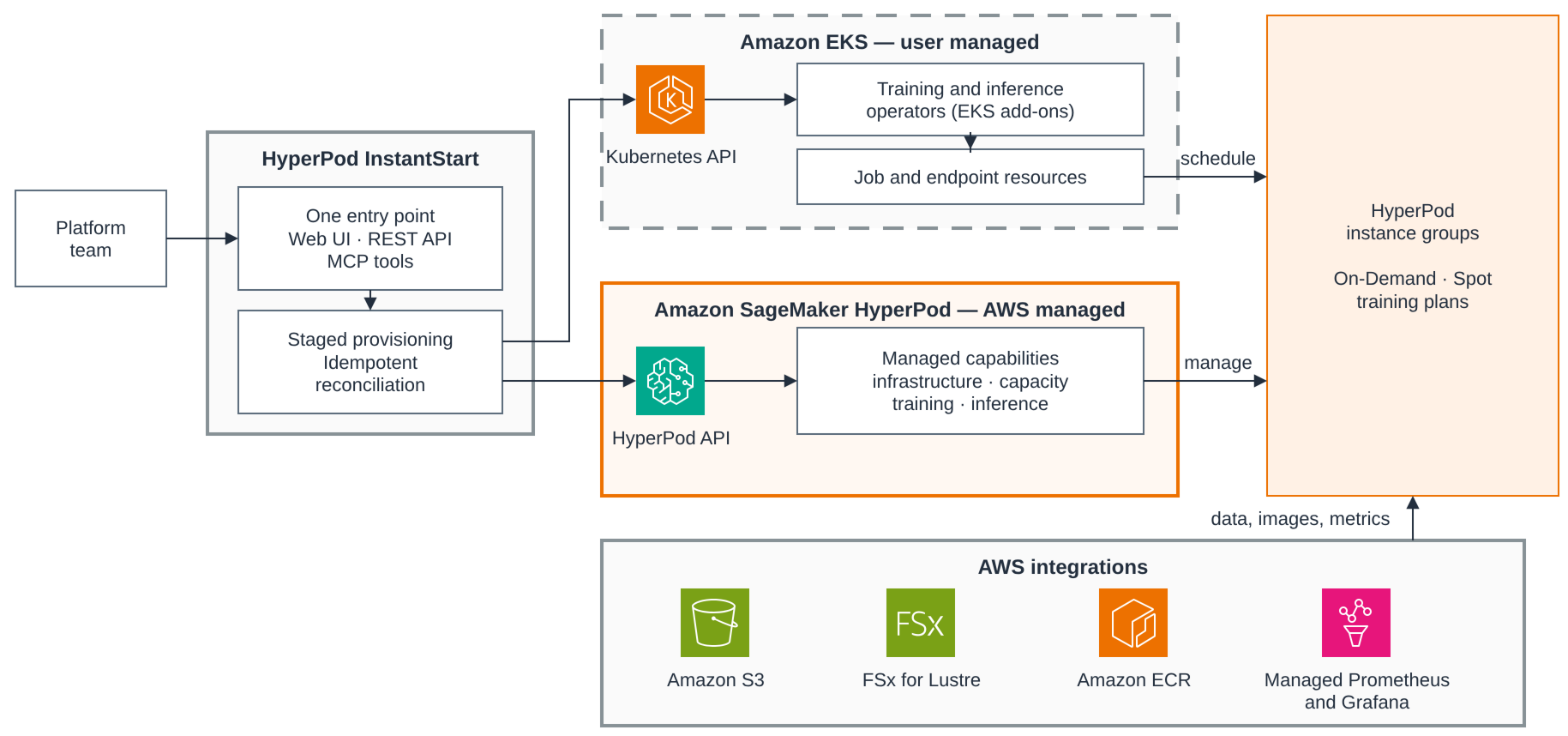
Read the diagram from left to right. Your infrastructure team drives one entry point. The web UI, the REST API, and the Model Context Protocol (MCP) tools that the AI agent uses are three faces of the same container, so both interfaces enter through one door. Behind them sits the staged provisioning and idempotent reconciliation logic that the rest of this post describes. From there the control plane calls two API surfaces.
The Kubernetes side is Amazon EKS, which stays user-managed. It holds the Kubernetes API, the HyperPod training and inference operators installed as EKS add-ons, and the HyperPodPyTorchJob and InferenceEndpointConfig resources they reconcile into training and inference pods. The AWS side is Amazon SageMaker HyperPod, which is AWS managed. Its capabilities fall into four groups. Infrastructure covers health monitoring, deep health checks, and automatic node recovery. Capacity covers continuous provisioning and managed Karpenter autoscaling. Training covers process-level recovery and managed tiered checkpointing. Inference covers intelligent routing and tiered key-value (KV) caching.
The two halves meet at the HyperPod instance groups. Kubernetes schedules pods onto them, and HyperPod manages them. That is the single most useful thing to know when something needs attention, because it tells you which half AWS operates and repairs without your involvement. AWS integrations sit around that path, and the diagram shows the storage and observability ones. Amazon Simple Storage Service (Amazon S3), Amazon FSx for Lustre, and Amazon Elastic Container Registry (Amazon ECR) carry images, data, and checkpoints. Amazon Managed Service for Prometheus and Amazon Managed Grafana receive health and utilization. Managed MLflow on Amazon SageMaker AI also receives metrics and artifacts.
InstantStart organizes this environment into four layers.
| Layer | InstantStart contribution | Managed foundation |
| Infrastructure | Staged EKS creation or import, dependency reconciliation, network layout, multi-cluster state | AWS CloudFormation and Amazon EKS |
| Capacity and resilience | Instance-group workflows, capacity-type choices, managed-feature configuration | HyperPod health monitoring, automatic node recovery, continuous provisioning, managed Karpenter |
| Workloads and data | Training recipes, two inference paths, model download and storage workflows, MLflow integration | HyperPod training and inference operators, Amazon S3, FSx for Lustre, managed MLflow |
| Interfaces | Web UI with live state, REST APIs, MCP tools, and agent skills | AWS and Kubernetes APIs remain directly inspectable |
One design principle ties the two interfaces together. The MCP tools wrap the backend’s own REST APIs, the exact code paths the browser calls, rather than the AWS CLI or SDK, so a validation added once protects both. We return to why that matters for agents. First, let’s watch the control plane do its main job.
Prerequisites
Use least-privilege IAM roles for deployment and ongoing operations. Follow AWS guidance for CloudFormation access control and SageMaker HyperPod IAM, and limit Amazon S3 access to the designated project bucket. Two capacity items take AWS turnaround time, so start them early. Request an Amazon SageMaker service quota increase for Cluster Usage on each instance type you intend to run, and for high-end accelerator types, purchase an Amazon SageMaker Flexible Training Plan to reserve capacity. Check your virtual private cloud (VPC) quota as well, because the staged provisioning path creates a VPC per cluster by default.
- A management environment to run the container in. The project provides an AWS CloudFormation template that creates the environment, shared S3 bucket, and supporting IAM roles. Deploy it from the AWS Management Console or with the AWS CLI.
On the instance created by the stack, clone the repository and run ui-panel/start-prod.sh. The script pulls the prebuilt container image from public Amazon ECR and starts it with yourkubectland AWS credentials mounted, serving the web interface on port 3099. Reach that port through an AWS Systems Manager port-forwarding session rather than opening it to the internet. The template’s security group allows public access to it for convenience. Restrict that before you use the environment for anything real. - For the agent interface, Kiro CLI installed and authenticated. The MCP server and the agent skills ship inside the same container, so nothing else needs installing locally.
Creating a cluster: A conversation and a console
Moving from an empty account to usable HyperPod capacity takes several long-running, order-dependent stages. InstantStart deliberately separates them into EKS control-plane creation, active-cluster selection, dependency reconciliation, HyperPod cluster creation, and storage setup. Separating them means a failure in a later stage doesn’t roll back an earlier stage that already succeeded. EKS control-plane creation finishes in roughly 8–12 minutes. Every later stage records its own status and is independently retryable.
Through the web interface, this is the Cluster Management page. You enter a cluster tag, create, and watch the staged progress indicators. Through the agent, the whole pipeline is a conversation. The following is a condensed transcript from a real session with the hypd-inst-agent, an agent configuration for Kiro CLI that loads the project’s MCP server and skills.
[hypd-inst-agent] > Help me create a new HyperPod cluster

> Creating a HyperPod cluster is a multi-step process:
1. Create EKS cluster (approximately 8-12 minutes)
2. Switch to the new cluster and verify
3. Install dependencies
4. Create HyperPod cluster
5. Configure S3 storage
6. Final verification
Let me first check the existing cluster situation:

Running tool cluster_list_all (from mcp server: hypd-inst)

> There are currently 2 existing clusters. Would you like to give the new cluster a tag name, or should I auto-generate one?

[hypd-inst-agent] > Go ahead

Running tool cluster_create_eks {"clusterTag": "hypd-0304b"}

> EKS cluster creation has started. I'll check progress every 2 minutes.

Running tool wait_seconds {"seconds": 120}
Running tool cluster_get_eks_creation_status

> Still creating (about 4 minutes elapsed). Continuing to wait...
...
> Step 1 complete! EKS cluster hypd-0304b created successfully.
...
> Step 3 complete! All dependencies installed successfully.

Now I need the following information from you to create HyperPod:
Availability Zone, GPU instance type, instance count, and capacity type (On-Demand or Training Plan)?

[hypd-inst-agent] > us-west-2c, one g6.4xl

Running tool hyperpod_create {"AcceleratedInstanceType": "ml.g6.4xlarge", "AcceleratedInstanceCount": 1, "availabilityZone": "us-west-2c", ...}
...
> HyperPod cluster creation fully complete! Summary:
| EKS Cluster      | eks-cluster-hypd-0304b       |
| HyperPod Cluster | hp-cluster-hypd-0304b        |
| Node             | 1x ml.g6.4xlarge (On-Demand) |
| Node Status      | Ready / Schedulable          |
| S3 Storage       | s3-claim mounted             |
Three behaviors in this transcript come from workflow rules encoded in the project’s agent skill, not from improvisation.
- The agent polls to completion. Every long-running operation is followed by
wait_secondsand a status tool until it reaches a terminal state. The agent is not allowed to stop early and tell you to check back later. The conversation ends with a verified cluster, not a submitted request. - The agent asks only decision-grade questions. Cluster tag, Availability Zone, instance type, and capacity type are your decisions. Subnet CIDRs, route tables, security groups, and installation order aren’t. They are control-plane work.
- The agent inspects before it creates. It lists existing clusters first. It queries valid Availability Zones and instance types before offering choices, so the options that you see are the ones this account and Region can actually satisfy.
The networking that the conversation doesn’t mention shows what the control plane encodes. The AWS CloudFormation path can create or reuse the VPC. It separates EKS control-plane subnets from HyperPod compute subnets, because their address-space needs differ by an order of magnitude. Compute subnets are sized at /20 to hold large accelerator fleets. Every capacity path runs through one function, ensureComputeSubnet(), with a fixed priority. It uses an explicitly specified subnet, or reuses a compatible per-Availability-Zone subnet, or creates one complete with route table and S3 gateway endpoint association. Cluster creation and later capacity expansion share this logic, so there is exactly one place where the network layout can be right or wrong.
Capacity choices, with resilience as the default
After the control plane exists, capacity management becomes the recurring operation. You add an instance group for a new workload, choose how to pay for it, and trust the control plane to keep it healthy.
InstantStart creates HyperPod clusters with automatic node recovery enabled. HyperPod can reboot or replace faulty nodes based on findings from its health-monitoring agent, basic health checks, and, when configured, deep health checks. Deep checks stress-test GPUs and Elastic Fabric Adapter (EFA) connectivity before nodes accept work. Health findings also project into Kubernetes labels, taints, and annotations, so your schedulers and tooling can react through the Kubernetes API without calling AWS.
When you add an instance group, the system treats the full capacity decision as one create-time operation rather than scattered follow-up configuration.
- Capacity type. Choose On-Demand, Amazon Elastic Compute Cloud (Amazon EC2) Spot Instances for fault-tolerant workloads, or reserved capacity through an Amazon SageMaker training plan. A training plan pins its capacity to specific Availability Zones. The control plane reconciles your zone selection against the plan rather than letting the mismatch surface as a confusing failure. Capacity type is fixed for the life of the group.
- Network interface mode. Instance types with multiple network cards can request EFA-only interfaces, which conserve VPC IP addresses. This setting is fixed after the group is created. The InstantStart surfaces it as a create-time field instead of letting you discover the immutability from a rejected update.
- Subnet placement. By default, groups share the per-AZ compute subnet. A large group can request a dedicated subnet to avoid IP exhaustion, and that subnet deliberately outlives the group so a successor can reuse it.
The following screenshot shows the Add Instance Group form, where these choices become one create-time step.
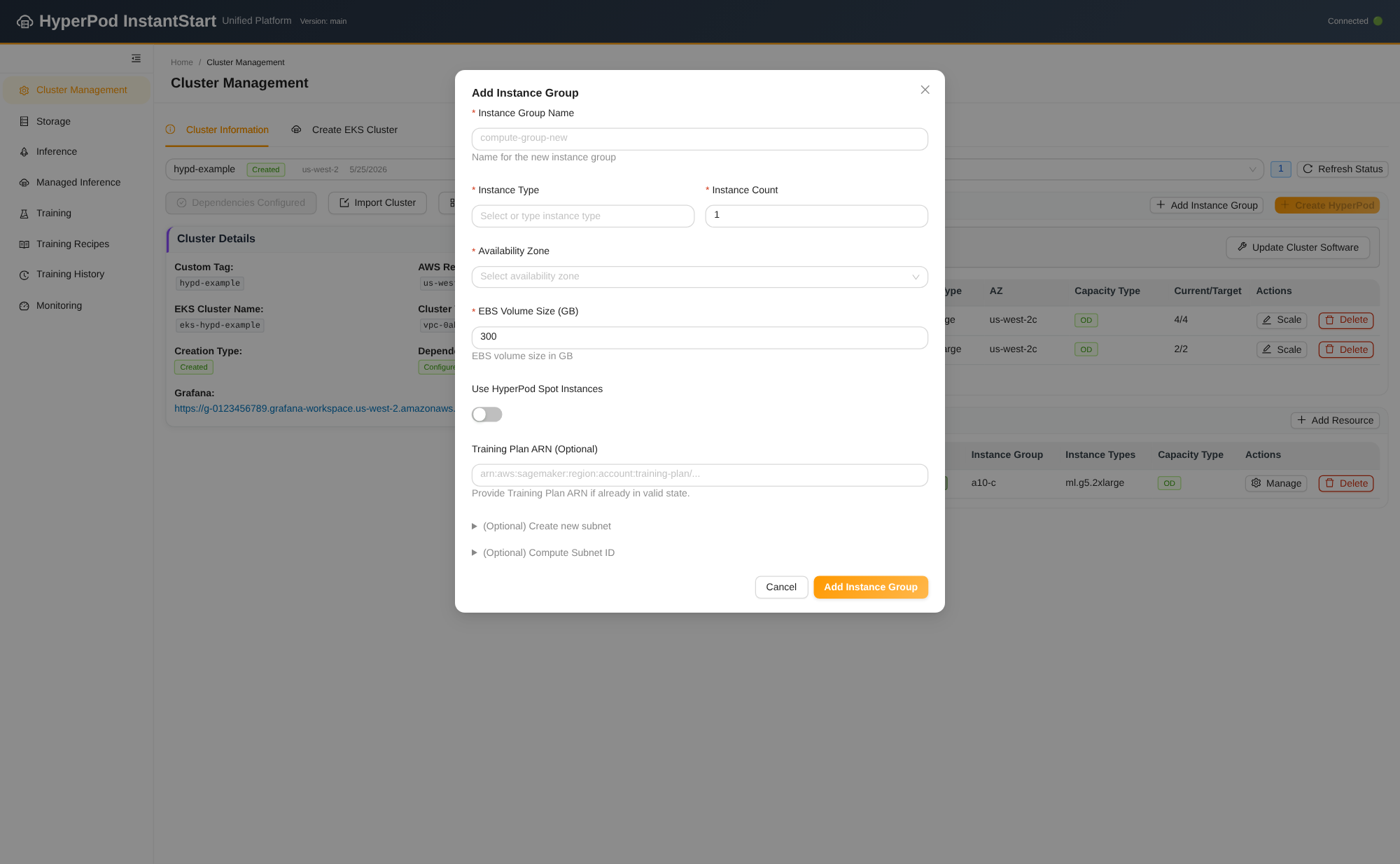
Figure 2: The Add instance group form, where capacity choices become one create-time step
Some instance-group fields are immutable and others are easy to lose. So the control plane doesn’t hand-assemble an update request. Whenever it resubmits an instance group, it normalizes the group through an explicit field allowlist. Settings such as OnStartDeepHealthChecks and NetworkInterface carry forward, so an unrelated scaling operation can’t silently reset a group’s health-check or EFA configuration. The same normalization runs whether the request came from the web interface or an MCP tool call.
Managed Karpenter: Autoscaling without operating Karpenter
A static instance group sets how much capacity you own. HyperPod managed Karpenter-based node autoscaling decides how much of it runs at any moment. AWS operates the Karpenter controller itself, and nodes launch from HyperPod instance groups scaled up from zero rather than from raw Amazon EC2. Autoscaled capacity therefore inherits the health monitoring and automatic node recovery described earlier, instead of arriving as unmanaged instances. Scheduling stays a standard Karpenter NodePool bound to a HyperpodNodeClass, which InstantStart provisions with working defaults, including consolidation that scales an idle group back toward zero. Because the control plane already defaults to continuous provisioning and automatic recovery, enabling managed Karpenter is a validated toggle rather than a runbook. One scoping note: HyperPod managed Karpenter manages HyperPod instance groups, not general-purpose Amazon EC2 capacity.
Managed capabilities as reconciled state, not runbooks
HyperPod ships several managed capabilities, and each has a documented multi-step setup. These include the training operator, the inference operator, managed tiered checkpointing, and managed autoscaling. InstantStart exposes them in one Advanced Features panel. The value is not the checkboxes. It is that each checkbox maps to a dependency-aware backend operation.
The following screenshot show