Multiple teams within the same company increasingly need shared access to expensive GPU clusters for their generative AI operations, while maintaining isolation boundaries, resource fairness, and operational independence. Consider a data science team training large language models, a computer vision group running inference workloads, and a research team experimenting with new model architectures. All of them might need access to the same cluster. Without a well-designed multi-tenant (multi-team) architecture, organizations face uncontrolled resource consumption, weak isolation between teams, an inability to attribute shared GPU costs to the teams that incur them, and administrative overhead that slows down innovation.
Amazon SageMaker HyperPod is a purpose-built AI service that simplifies the management of large-scale compute clusters for gen AI workloads. It provides resilient, optimized clusters orchestrated by Amazon Elastic Kubernetes Service (Amazon EKS) or Slurm, so organizations can run distributed training, interactive development, and model inference at scale. At the same time, it automatically handles node health monitoring, fault recovery, and cluster lifecycle management.
In this post, we present a reference architecture for building a multi-tenant environment on Amazon SageMaker HyperPod with EKS. This architecture uses AWS IAM Identity Center for centralized authentication, per-team SageMaker AI domains for a tailored user experience, Kubernetes namespaces for workload isolation, HyperPod Task Governance for fair resource allocation, and namespace-level cost allocation for per-team spend visibility and chargeback. By the end of this post, you will have a clear blueprint for multiple teams to efficiently share a single HyperPod EKS cluster.
Architecture overview
The following diagram illustrates the high-level architecture of a multi-tenant HyperPod EKS deployment. In this example, two teams (Team A and Team B) share a single HyperPod EKS cluster, each operating within their own isolated namespace.
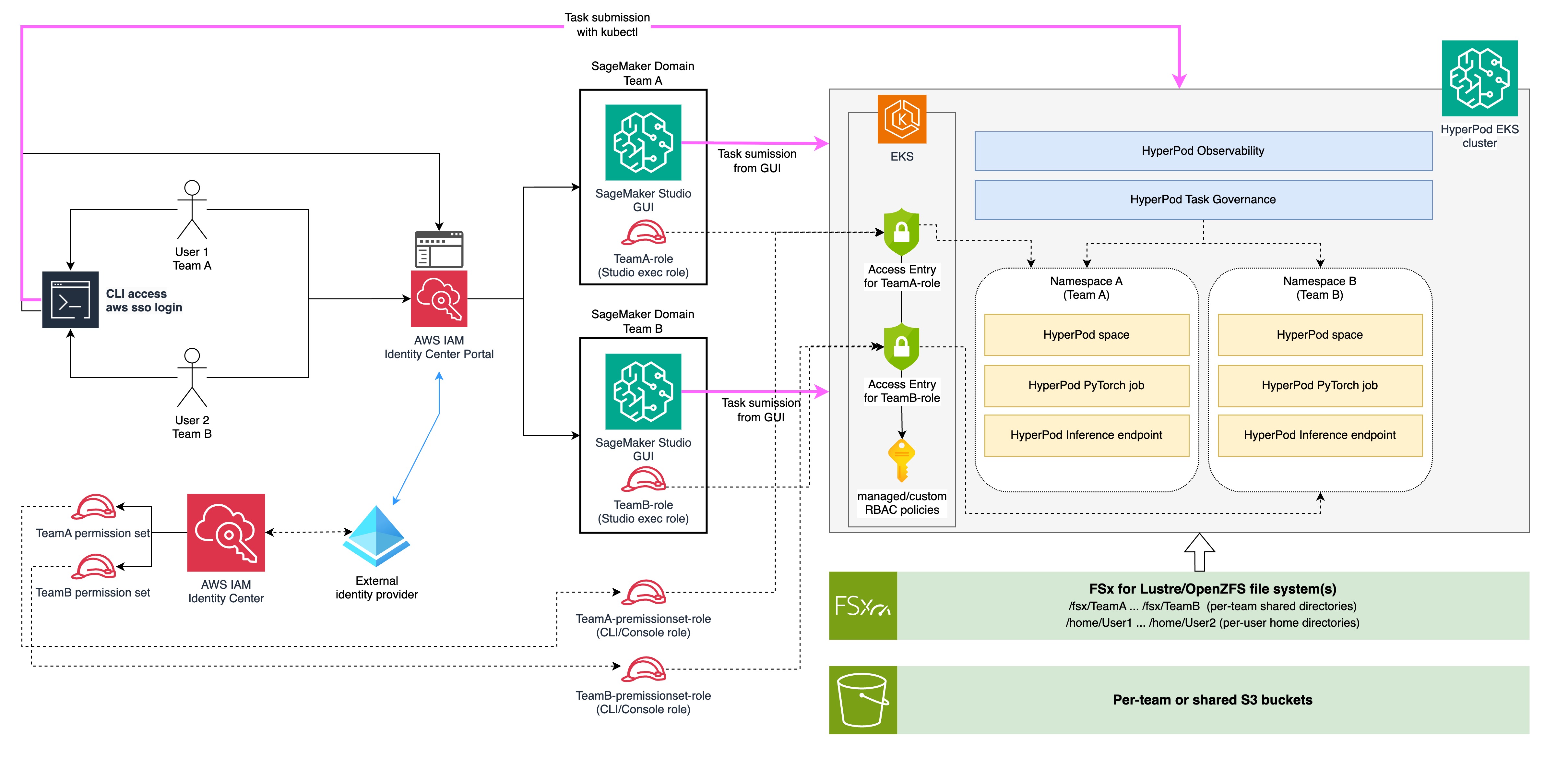
Figure 1: High-level multi-tenant architecture for two teams sharing one HyperPod EKS cluster
The architecture is structured as a layered flow from left to right, connecting user identity through authorization controls and into isolated workload namespaces on the cluster.
Users and authentication
On the far left, individual users from each team (User 1 from Team A, User 2 from Team B) interact with the system through two paths. Both paths authenticate through the AWS IAM Identity Center Portal, which federates with an external identity provider (such as Microsoft Entra ID) shown at the bottom-left.
The first path is through CLI access. Users authenticate with aws sso login, which redirects them to the Identity Center portal, and then obtain temporary credentials from their team’s permission set to submit tasks directly to the EKS cluster with kubectl. In the diagram, the pink arrow flows from the CLI terminal across the top directly into the HyperPod EKS cluster.
The second path is through the Identity Center portal directly, where users select the SageMaker Studio application to sign in to their team-specific SageMaker AI domain.
Each team has a corresponding permission set (TeamA permission set, TeamB permission set) that carries the AWS Identity and Access Management (IAM) policies needed for CLI workflows. Identity Center automatically provisions an IAM role for each permission set, shown in the diagram as TeamA-permissionset-role and TeamB-permissionset-role (labeled “CLI/Console role”). This role serves as the IAM principal when users authenticate through aws sso login.
SageMaker AI domains
From the Identity Center portal, users are routed to their team-specific SageMaker AI domain. Each domain (SageMaker AI domain Team A and SageMaker AI domain Team B) provides a dedicated Amazon SageMaker Studio GUI and is configured with a team-specific execution role (TeamA-role and TeamB-role respectively). These domains serve as the primary workspace interface, so users can submit tasks from the GUI (shown by the pink arrows flowing toward EKS).
EKS access control
At the EKS boundary, access entries map IAM roles to Kubernetes permissions. The diagram shows access entries for TeamA-role and TeamB-role (the Studio execution roles), which authorize requests originating from the SageMaker Studio GUI. Access entries must also be configured for the Identity Center-provisioned CLI/Console roles (TeamA-permissionset-role and TeamB-permissionset-role) to authorize requests arriving through kubectl. All access entries are associated with managed or custom role-based access control (RBAC) policies (represented by the key icon) and scoped to the team’s designated namespace. As a result, whether access originates from Studio or the CLI, users can only interact with resources in their own namespace.
HyperPod EKS cluster
The cluster itself is depicted with two cross-cutting platform layers at the top: HyperPod Observability (for monitoring and dashboards) and HyperPod Task Governance (for compute quota management and scheduling priorities). Below these layers, the cluster is partitioned into Namespace A (Team A) and Namespace B (Team B). Within each namespace, teams can run their own HyperPod Spaces (interactive development environments), HyperPod PyTorch jobs (distributed training workloads), and HyperPod Inference endpoints (model serving).
Storage
Beneath the cluster, the architecture includes two storage tiers. The first is a POSIX-compliant file system (Amazon FSx for Lustre or Amazon FSx for OpenZFS) organized into per-team shared directories (/fsx/TeamA, /fsx/TeamB) and per-user home directories (/home/User1, /home/User2). The second is per-team or shared Amazon Simple Storage Service (Amazon S3) buckets for object storage, governed by the team’s IAM execution role.
This architecture isolates each team from authentication through authorization to workload execution, while sharing expensive GPU infrastructure efficiently.
Authentication and access control
The foundation of any multi-tenant system is robust authentication: verifying who users are before they interact with any resource. In this architecture, AWS IAM Identity Center serves as the centralized authentication layer, federating with an external identity provider to manage user identities and group memberships.
Why AWS IAM Identity Center
AWS IAM Identity Center (successor to AWS Single Sign-On) provides a single place to manage workforce identities across AWS accounts and applications. For a multi-tenant HyperPod deployment, it offers several key capabilities:
- Centralized identity management – Rather than maintaining separate user databases per AWS service, Identity Center provides a single source of truth for all user identities and their group memberships.
- Federation with existing identity providers – Most enterprises already manage their workforce identities in systems like Microsoft Entra ID (formerly Azure AD), Okta, or Ping Identity. Identity Center integrates with these providers, so organizations can reuse their existing identity infrastructure without duplicating user accounts.
- Native integration with SageMaker AI – SageMaker AI domains support Identity Center authentication, so users can sign in to SageMaker Studio through their corporate identity provider with single sign-on (SSO).
- AWS account access – Identity Center can also grant users access to the underlying AWS account with specific permission sets, which support CLI workflows alongside the Studio GUI experience.
- Required for Amazon Managed Grafana – Amazon Managed Grafana uses Identity Center as its authentication mechanism for workforce users, making it the natural choice when teams also need access to observability dashboards for monitoring their workloads.
Learn more: What is IAM Identity Center
Configuring Identity Center with an external identity provider
In this reference architecture, we use Microsoft Entra ID as the external identity provider, though the same pattern applies to most standard Security Assertion Markup Language (SAML) 2.0 providers.
The configuration involves:
- Group structure in the identity provider – In Entra ID, create groups that correspond to your organizational teams. In our example, we define three groups:
TeamA,TeamB, andAdmin. Each group contains the users belonging to that team (for example,user1-teamA@example.comin theTeamAgroup). - SCIM provisioning – Enable SCIM (System for Cross-domain Identity Management) synchronization between Entra ID and AWS IAM Identity Center. SCIM provides automatic provisioning and de-provisioning of users and groups. When a new user is added to the
TeamAgroup in Entra ID, they’re automatically synchronized to Identity Center and gain appropriate access without manual intervention. - SAML-based authentication – Configure SAML 2.0 federation so that when users authenticate, they do so against Entra ID. Identity Center acts as the service provider, trusting the assertions from your Entra ID tenant.
With this configuration, you manage team membership (which drives all downstream authorization decisions) in your existing corporate directory, and it propagates to AWS automatically.
The following image shows an example of how organizational teams can be represented in Microsoft Entra ID, with dedicated groups for TeamA, TeamB, and Admin.
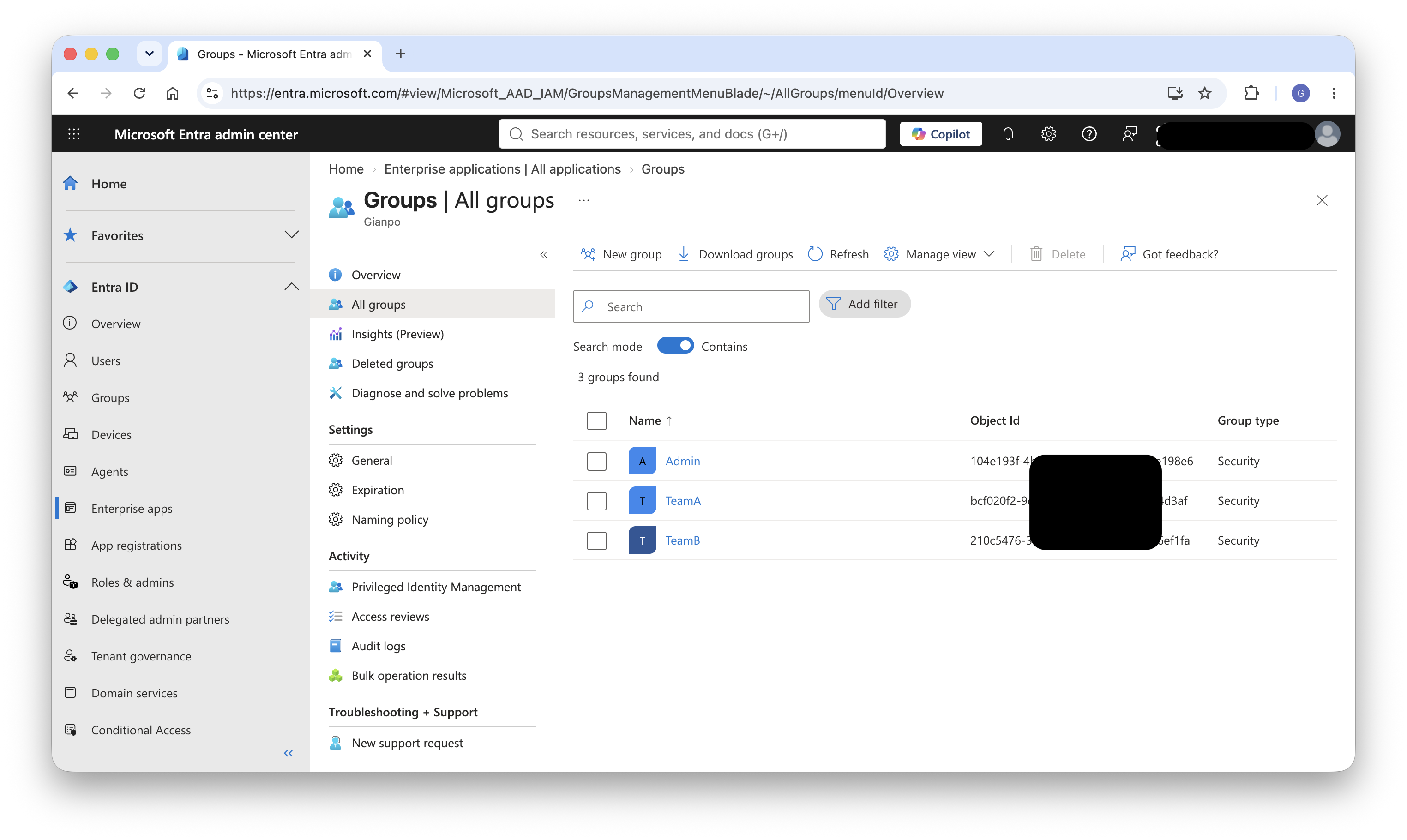
Figure 2: Organizational teams represented as groups in Microsoft Entra ID
Then, the following image shows the corresponding groups in AWS IAM Identity Center, automatically provisioned from Entra ID through SCIM synchronization.
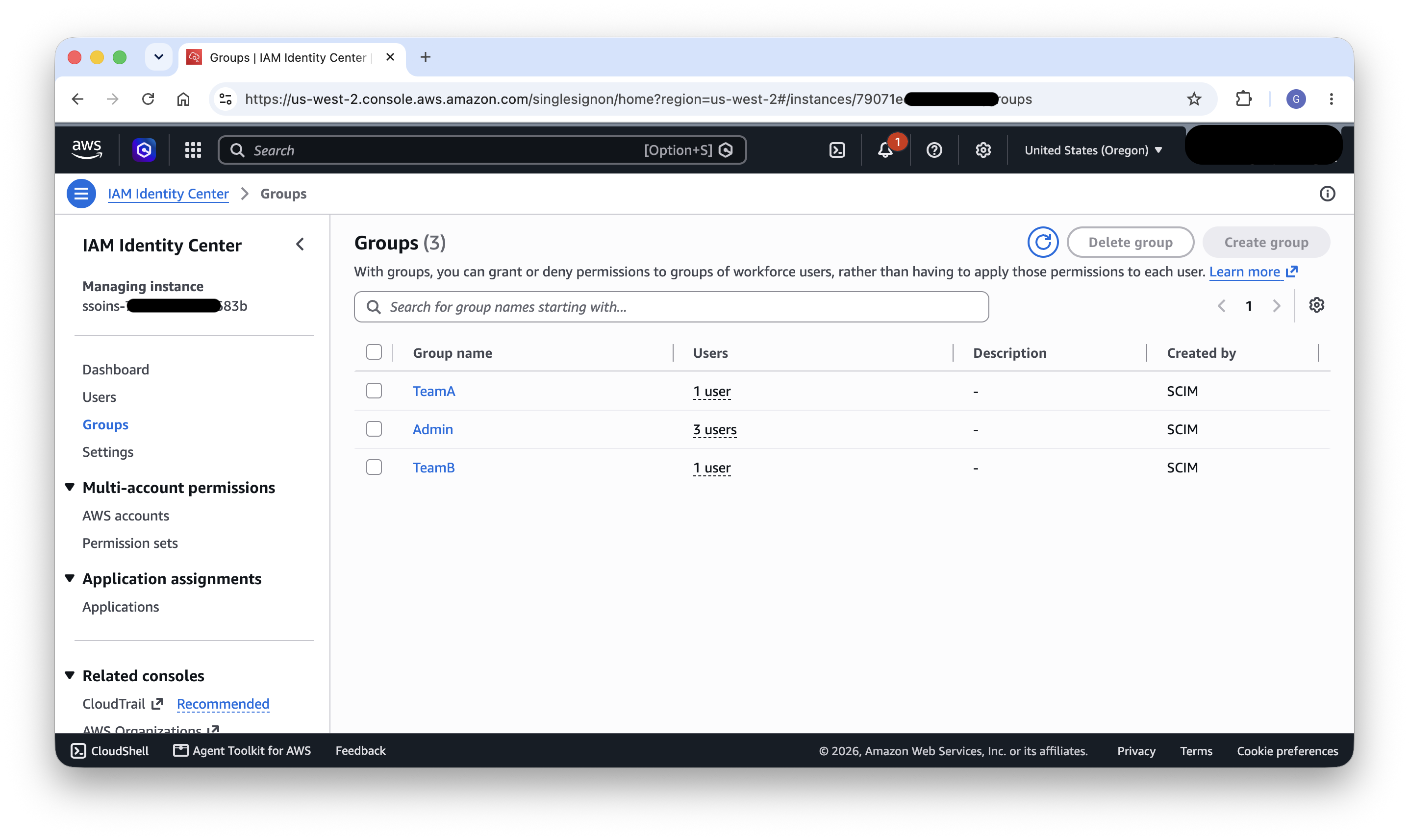
Figure 3: Corresponding groups in AWS IAM Identity Center, provisioned through SCIM
Learn more: Connect an external identity provider · SCIM profile and SAML 2.0 implementation
Authorization
With authentication established, the next layer is authorization: controlling what actions each team can perform across AWS services and the Kubernetes cluster. Authorization in this architecture operates at two levels: IAM for service-level access, and Kubernetes RBAC for cluster-level access.
Per-team IAM roles
Each team requires a dedicated IAM role that encapsulates the AWS level permissions needed for their AI and machine learning (ML) workflows. These roles serve as the SageMaker AI domain execution role and define what AWS services the team can access.
A typical team IAM role should include policies granting access to:
- Amazon SageMaker AI – For managing HyperPod clusters, MLflow tracking servers, and other SageMaker AI resources through the SageMaker AI API.
- Amazon S3 – For reading training datasets and writing model artifacts, checkpoints, and logs. Scope these permissions to team-specific bucket prefixes.
- Amazon CloudWatch – For viewing logs and metrics related to the team’s workloads.
- Amazon EKS – Specifically, the
eks:AccessKubernetesApiandeks:MutateViaKubernetesApipermissions, which the SageMaker Studio GUI needs to make Kubernetes API calls on behalf of the user (for example, listing Spaces or submitting jobs).
The trust policy on each IAM role must include sagemaker.amazonaws.com as a trusted principal, so SageMaker AI can assume the role on behalf of users when they operate through Studio. If you plan to reuse the same execution role as an EKS Pod Identity association for in-cluster workloads (as discussed later in the Amazon S3 storage section), the trust policy must also include pods.eks.amazonaws.com as a trusted principal. CLI access through Identity Center uses a separate permission set with its own policies (see the “AWS account access through Identity Center” section), so CLI permissions can be independently scoped.
Learn more: How to use SageMaker AI execution roles
AWS account access through Identity Center
Beyond SageMaker Studio, teams often need direct AWS account access for CLI operations such as running kubectl commands, scripting workflows, or accessing resources programmatically. Identity Center permission sets provide this capability.
For the Admin group, assign a permission set with administrative access as required by your company’s policies, granting the necessary account access for cluster management and administrative operations.
For Team A and Team B, create permission sets with inline or managed policies that grant the permissions needed for CLI workflows directly. A typical team permission set includes permissions for eks:AccessKubernetesApi (to view Kubernetes resources from AWS Console), scoped S3 access for the team’s data, and CloudWatch read access for monitoring. These policies are defined independently from the Studio execution role, so administrators can tailor CLI permissions to the specific operations that teams perform from the command line.
Users retrieve temporary credentials through the AWS Command Line Interface (AWS CLI) using aws sso login, which they can then use to configure kubectl for direct interaction with the EKS cluster.
The following image shows the per-team permission sets in AWS IAM Identity Center, providing scoped AWS account access for CLI workflows such as running kubectl and aws sso login against the EKS cluster.
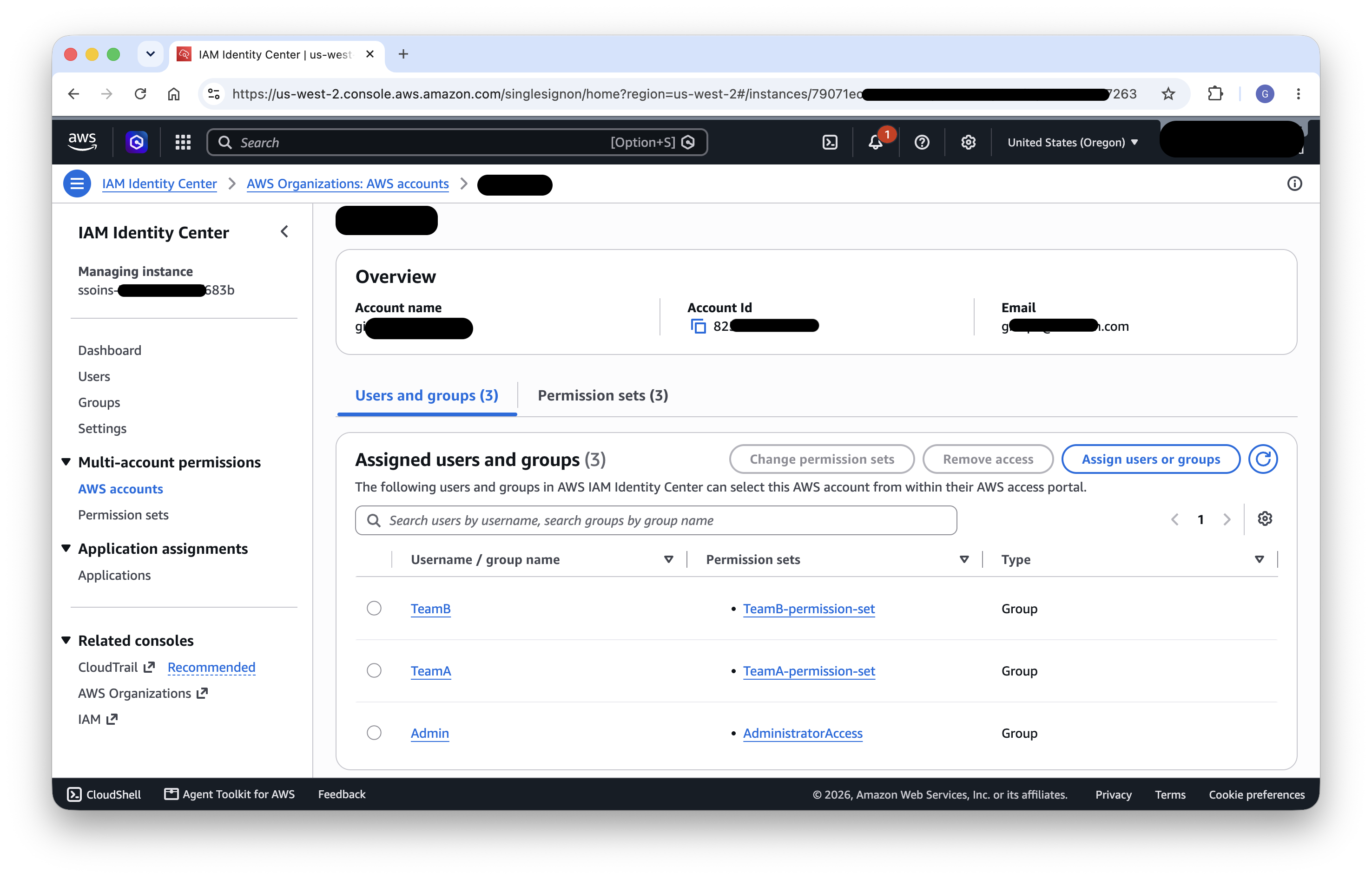
Figure 4: Per-team permission sets in AWS IAM Identity Center for CLI workflows
Learn more: Manage AWS accounts with permission sets
Configuring the AWS CLI
Team members configure the AWS CLI to authenticate through Identity Center by running aws configure sso. This creates profiles in ~/.aws/config that reference the appropriate Identity Center session and permission set. Each team member uses their team-specific profile when interacting with the cluster from the command line, maintaining authorization boundaries whether access originates from Studio or from a local terminal.
The resulting configuration defines a shared sso-session block for the Identity Center portal and one named profile per team, each pointing at that team’s permission set. Team members then run aws sso login --profile <team> to obtain temporary credentials scoped to their permission set:
[sso-session my-sso]
sso_start_url = https://d-xxxxxxxxxx.awsapps.com/start
sso_region = us-west-2
sso_registration_scopes = sso:account:access

[default]
sso_session = my-sso
sso_account_id = 123456789012
sso_role_name = OpsAdmin
region = us-west-2

[profile team-a]
sso_session = my-sso
sso_account_id = 123456789012
sso_role_name = TeamA-permission-set
region = us-west-2

[profile team-b]
sso_session = my-sso
sso_account_id = 123456789012
sso_role_name = TeamB-permission-set
region = us-west-2
Learn more: Configuring IAM Identity Center authentication with the AWS CLI
SageMaker AI domains
SageMaker AI domains provide the workspace boundary for each team, offering a tailored user experience, pre-configured execution roles, and built-in integration with Identity Center authentication.
Why SageMaker AI domains
Using one SageMaker AI domain per team is a well-established pattern for organizing multi-team environments. This approach offers several advantages:
- Established multi-team pattern – AWS has documented this approach extensively for separating lines of business or teams with multiple domains, making it a proven and supported configuration.
- Native Identity Center authentication – Each domain can be configured with Identity Center authentication, meaning users sign in once through their corporate i