With video intelligence powered by agentic AI, you can ask natural language questions about uploaded videos and get answers within seconds. Organizations across media, security, insurance, and professional services are generating more video than their teams can review. Meeting recordings accumulate in shared drives, and security cameras capture weeks of unreviewed footage. Field inspection videos sit in object storage long after the initial review. The information inside these videos is often valuable: a design decision discussed three weeks ago, the exact moment a person arrived at a door, or the sequence of events leading to a vehicle collision. But accessing it has traditionally required watching hours of content manually. The alternative, building custom machine learning (ML) pipelines for each specific question type, demands significant development effort. Each new use case meant new development work:
- A transcription pipeline for meeting queries.
- A computer vision pipeline for visual search.
- A face-matching integration.
In this post, we walk through the architecture and key patterns for building a video intelligence solution that accepts natural language questions and returns answers from video content. The solution uses an agentic architecture that decides at runtime which AWS services to invoke. For previously analyzed content, responses return in under a second. Initial analysis of new videos takes 5–10 minutes depending on length and services required. The complete implementation is available in the companion GitHub repository.
Rather than pre-building a fixed pipeline for each question type, we use the Strands Agents SDK to create a single AI agent that orchestrates Amazon Bedrock, Amazon Rekognition, and Amazon Transcribe based on what the user asks. A major media and entertainment company adopted this approach during an AWS Professional Services engagement. With this solution, their consultants can query recorded discovery session content, extracting design decisions, action items, and stakeholder positions. The result: a reduction in manual review time of approximately 80 percent across a backlog of more than 200 multi-hour recordings, based on the customer’s internal before-and-after comparison of analyst hours per recording (not independently verified).
Solution overview
The solution is an AI agent that accepts video files and makes their content instantly queryable through natural conversation. A user can upload a 90-minute meeting recording and ask “What decisions were made in this meeting?” or “Did anyone mention the budget timeline?” The agent determines whether to invoke transcription, visual analysis, or both, then synthesizes the results into a coherent answer. The same system handles security footage queries (“Did this person appear?”), content analysis (“Summarize the first 30 minutes”), and investigative questions (“Which vehicle changed lanes before the collision?”). No separate processing pipelines are required for each use case.
The following screenshot shows the interface that provides a chat panel for natural language queries and a sidebar for file uploads and analysis mode selection.
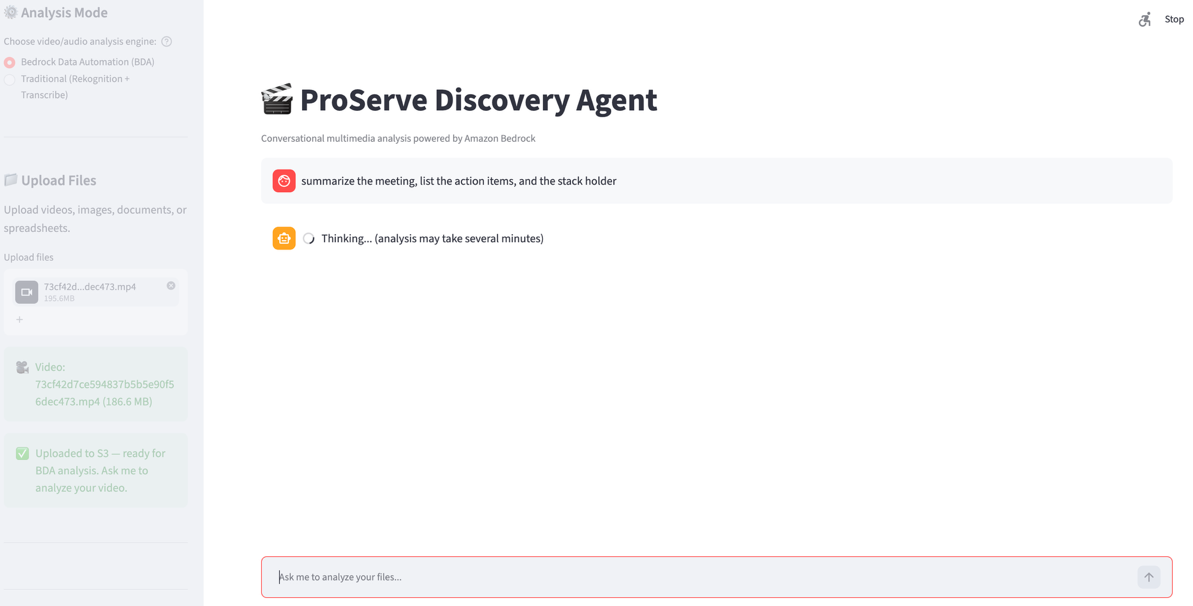
Figure 1: The video intelligence chat interface
The key insight is that the pipeline is determined at runtime. The agent calls Amazon Transcribe for spoken-content questions, turns to Amazon Rekognition for face matching, and reuses cached results for follow-up questions about previously processed content. The model handles the routing, not application code.
Prerequisites
To follow along with the implementation in this post, you need:
- An AWS account with access to Amazon Bedrock (Anthropic Claude Sonnet enabled) and Amazon Simple Storage Service (Amazon S3). For document processing, either Amazon Bedrock Data Automation (BDA) or Amazon Rekognition and Amazon Transcribe is required. See Supported models by AWS Region in Amazon Bedrock.
- Python 3.11 or later with the Strands Agents SDK installed (
pip install strands-agents strands-agents-tools). - AWS Command Line Interface (AWS CLI) configured with AWS Identity and Access Management (IAM) permissions for the services listed earlier.
- Basic familiarity with AI agent concepts such as tool use and reasoning loops.
Architecture
The system consists of an agent orchestrator connected to multiple AWS AI services, with Amazon S3 providing storage for uploaded videos and cached analysis outputs. The agent orchestrator is the reasoning engine. It’s built with the Strands Agents SDK and powered by Amazon Bedrock, using Claude Sonnet or another large language model (LLM) that supports tool use. It receives natural language queries from users and determines which tools to invoke based on the question, sequences multiple service calls when needed, and synthesizes the results into conversational responses. The agent maintains conversation history, so follow-up questions build on prior analysis without reprocessing.
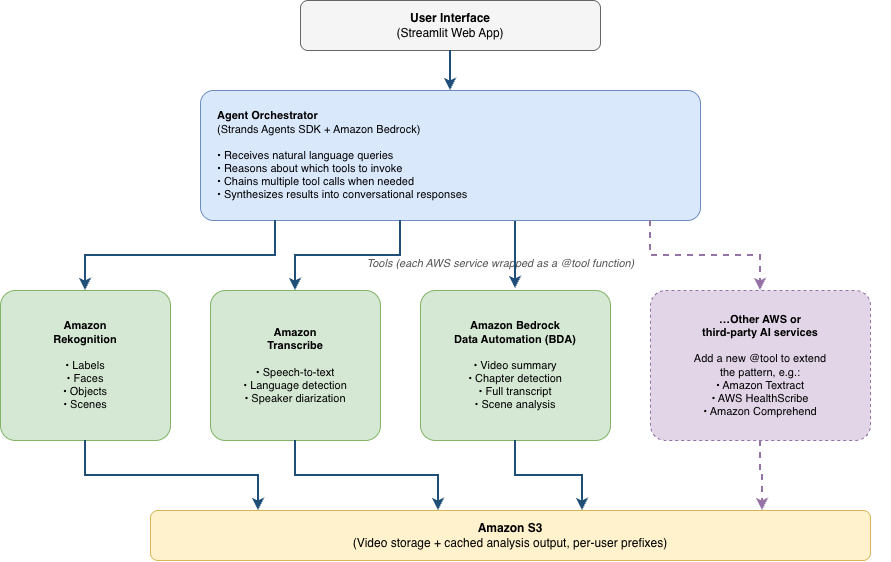
Figure 2: Solution architecture
Amazon Rekognition provides visual analysis, including detecting objects, scenes, activities, and faces in video frames. The agent invokes Amazon Rekognition when the user’s question concerns something visible in the video. Amazon Transcribe converts spoken audio to text with automatic language detection across more than 100 languages (see Amazon Transcribe supported languages) and speaker diarization. The agent uses Transcribe when the question relates to spoken content. Amazon Bedrock Data Automation (BDA) offers an alternative analysis path that combines video summary, chapter detection, and full transcription in a single API call. This is useful when the user wants comprehensive analysis in one step, or when Amazon Rekognition or Transcribe aren’t available. All uploaded videos and analysis outputs are stored in Amazon S3 with per-user prefixes for multi-tenant isolation.
These three services are the starting set, not a fixed one. Because the agent selects tools from their descriptions rather than from hard-coded workflow logic, the same architecture accepts additional services as tools. We return to this point in Extending beyond video. For production deployments, we recommend adding Amazon Bedrock Guardrails to enforce content filtering and grounding checks on agent responses, particularly for face-matching and surveillance use cases where responsible-AI controls are essential.
How agentic orchestration works
In a conventional video analysis application, the developer defines a fixed processing pipeline: upload the video, run transcription, perform visual analysis, present results. This approach processes every video through the same steps regardless of the specific query, and users wait for the full pipeline to complete before asking questions. The agentic approach inverts this model. With minimal pre-processing limited to uploading video files to an S3 bucket, the agent reasons about each question independently and calls only the services needed to answer it.
When a user submits a query, the agent first parses the intent: the user wants a transcript summary, a visual search, or a face match? Then it checks whether relevant analysis has already been performed and cached. If not, it selects the appropriate tools, executes them (potentially in sequence when one tool’s output feeds another), and combines the results into a natural language answer. In our testing with 60-minute videos, the first question about a video typically takes 5–10 minutes (while transcription or visual analysis runs). Subsequent questions about the same content return in under a second because the agent reuses cached results. Actual times vary based on video length, resolution, and the AWS services invoked.
Configuring the agent
The following code shows the complete agent setup. We define the model provider, a system prompt that guides the agent’s reasoning behavior, and the set of available tools. With Strands, the entire orchestration logic (deciding which tools to call, in what order, and how to combine their outputs) is handled by the LLM rather than application code. We show two representative tool implementations (search_faces_in_video and analyze_with_bda). The remaining tools, including transcribe_video and analyze_video_visuals, follow the same pattern and are available in the GitHub repository.
from strands import Agent
from strands.models.bedrock import BedrockModel
from tools import (
    transcribe_video, analyze_video_visuals,
    search_faces_in_video, analyze_reference_image,
    analyze_with_bda, upload_video
)

model = BedrockModel(
    model_id="us.anthropic.claude-sonnet-4-5-20250929-v1:0",
    max_tokens=4096
)

SYSTEM_PROMPT = """
You are a video intelligence assistant. For each user query:
1. Determine whether it requires spoken content analysis,
   visual content analysis, or both
2. Check if prior analysis results are already cached
3. Invoke the appropriate tools
4. Synthesize results into a clear answer with timestamps
"""
The production system prompt spans approximately 250 source lines. The following abbreviated example illustrates three representative policies (cache reuse, service fallback, and multi-modal orchestration) rather than reproducing the prompt verbatim:
# --- Cache management (excerpt) ---
CACHE_GUIDANCE = """
Before invoking any analysis tool, check the cache:
- Call get_cached_result(video_id, analysis_type) first
- If cached results exist and are < 24 hours old, use them
- If the user says "re-analyze" or "fresh analysis", bypass cache
- After any new analysis, store results with cache_result()

# --- Tool fallback behavior ---
If a tool call fails or returns low-confidence results:
- Transcribe failure: suggest BDA as fallback
- Rekognition low confidence (<60%): report uncertainty to user
- BDA timeout: fall back to individual Transcribe + Rekognition calls

# --- Multi-modal orchestration ---
When the query requires both audio and visual understanding:
1. Run Transcribe and Rekognition in parallel when possible
2. Correlate timestamps across modalities
3. Synthesize a unified answer referencing both sources
4. Cite specific timestamps for each claim
"""

agent = Agent(
    model=model,
    system_prompt=SYSTEM_PROMPT,
    tools=[transcribe_video, analyze_video_visuals,
           search_faces_in_video, analyze_reference_image,
           analyze_with_bda, upload_video]
)
The rest of the production prompt inventories the available tools and defines workflows for file selection, cache reuse and explicit re-analysis, BDA setup and access-denied fallback, reference-image search, transcription and captions, sports highlights, architecture diagrams, and choosing between BDA and service-specific analysis. It also standardizes unified multi-file responses, requires confirmation before cleanup, reuses prior results for follow-up questions, and applies scope and upload-progress guardrails.
With this configuration, the agent handles the routing, tool sequencing, and response synthesis autonomously. Adding a new capability (for example, detecting on-screen text) requires only defining a new tool function and adding it to the tools list. No workflow logic changes are needed.
Defining tools with the @tool decorator
Each AWS service is exposed to the agent as a Python function decorated with @tool. The function signature defines the parameters, and the docstring tells the agent when and how to use it. This docstring is critical: It serves as the agent’s instruction manual for the tool. The following example shows the face search tool that wraps Amazon Rekognition:
from strands.tools import tool
import boto3

@tool
def search_faces_in_video(
    video_s3_key: str,
    collection_id: str,
    confidence_threshold: float = 80.0
) -> dict:
    """Search for a specific person in video footage.

    Use this tool when the user provides a reference photo
    and asks whether that person appears in a video.
    Requires a face collection created first via
    analyze_reference_image.

    Args:
        video_s3_key: S3 key of the uploaded video
        collection_id: Rekognition collection with the
            indexed reference face
        confidence_threshold: Minimum confidence for a
            match (default 80%)

    Returns:
        Dict with matched_faces containing timestamps
        and confidence scores for each appearance
    """
    rek = boto3.client("rekognition")
    response = rek.start_face_search(
        Video={"S3Object": {
            "Bucket": BUCKET, "Name": video_s3_key}},
        CollectionId=collection_id,
        FaceMatchThreshold=confidence_threshold
    )
    job_id = response["JobId"]
    # Poll for completion and collect results...
    return {"matched_faces": matches}
The following example shows the BDA tool, which provides comprehensive video analysis (summary, chapters, and transcript) in a single API call:
@tool
def analyze_with_bda(
    s3_uri: str,
    analysis_types: list[str] = ["SUMMARY", "CHAPTERS", "TRANSCRIPT"]
) -> dict:
    """Perform comprehensive video analysis using Amazon Bedrock Data Automation.

    Use this tool when the user wants a full video summary, chapter
    breakdown, or complete transcript, or when Rekognition/Transcribe
    are unavailable. Returns all requested analysis types in one call.

    Args:
        s3_uri: S3 URI of the uploaded video (s3://amzn-s3-demo-bucket/key)
        analysis_types: List of analysis types to perform.
            Options: "SUMMARY", "CHAPTERS", "TRANSCRIPT", "IAB"

    Returns:
        Dict with keys for each requested analysis type,
        including timestamps and confidence scores
    """
    bda = boto3.client("bedrock-data-automation-runtime")
    response = bda.invoke_data_automation_async(
        inputConfiguration={"s3Uri": s3_uri},
        dataAutomationConfiguration={
            "dataAutomationArn": BDA_PROJECT_ARN
        },
        outputConfiguration={"s3Uri": f"s3://{BUCKET}/bda-output/"}
    )
    invocation_arn = response["invocationArn"]
    # Poll for completion...
    result = poll_bda_result(invocation_arn)
    return {
        "summary": result.get("summary"),
        "chapters": result.get("chapters", []),
        "transcript": result.get("transcript")
    }
Multi-step reasoning in action
To illustrate how the agent chains multiple tool calls, consider a user who uploads a reference photo and asks “Did this person appear in my security footage?” The agent must first index the reference face, then search for it in the video. These are two sequential operations that depend on each other. The following trace shows the agent’s internal reasoning:
[Think] This is a face-matching query. I need to index
the reference photo first, then search the video.

[Act] analyze_reference_image(image="reference.jpg")
[Observe] {"faces_detected": 1, "face_id": "face_001",
"confidence": 99.8}

[Think] Face indexed. Now searching the video.

[Act] search_faces_in_video(
video_s3_key="security_cam_july5.mp4",
collection_id="user_collection")
[Observe] {"matched_faces": [
{"timestamp": "00:14:32", "confidence": 97.2},
{"timestamp": "00:47:15", "confidence": 94.8}]}

[Response] Yes, the person appeared twice: at 14:32
(97% confidence) and 47:15 (95% confidence).
The agent determined the correct sequence of operations and handled the dependency between them (the face search requires an indexed collection). It then presented the results conversationally. No application code defined this sequence. The model reasoned through it based on the tool descriptions and the user’s question.
For comprehensive analysis (when the user asks “analyze this video” or “summarize this recording”), the agent can invoke Amazon Bedrock Data Automation (BDA) instead of calling Amazon Rekognition and Transcribe separately. BDA produces a video summary, chapter-by-chapter breakdown with timestamps, and full transcript in a single asynchronous API call:
[Think] The user wants a full summary. BDA provides summary +
chapters + transcript in one call, more efficient than
running Rekognition and Transcribe separately.

[Act] analyze_with_bda(s3_uri="s3://amzn-s3-demo-bucket/meeting.mp4")
[Observe] {"summary": "Team discussed Q3 roadmap...",
"chapters": [{"title": "Introductions", "start": "00:00"},
{"title": "Roadmap Review", "start": "05:32"}, ...],
"transcript": "Welcome everyone. Let's start with..."}

[Response] Here's the meeting summary with chapters:
Summary
The team discussed the Q3 roadmap...
Chapters
- 00:00 - Introductions
When results are ambiguous, the agent communicates uncertainty explicitly. A borderline confidence score (for example, 62 percent) produces a qualified answer: “I found a possible match at 14:32, but the confidence is low, so you may want to verify manually.” If transcription fails because of poor audio, the agent suggests alternatives: “The audio quality is too low for reliable transcription. Would you like me to try visual analysis of the presentation slides instead?”
Example use cases
The agentic pattern applies broadly to scenarios where users need to extract specific information from video content without knowing in advance which