An agent that works in a notebook isn’t an agent in production. After real users arrive, you own work that has nothing to do with your agent’s reasoning. Keep one user’s session out of another’s, and hold state across turns and days. Auth for every tool the agent calls sits in your code, and the operating system underneath needs patching. Those are four of the ten operational burdens this post maps.
When the agent reaches production, add Amazon Bedrock Guardrails to filter harmful content, validate grounding against your source documents, and block prompt injection attempts. Those controls apply to any agent regardless of which stage you stop at.
This post starts from an agent you already have. It’s a LangGraph customer support agent that classifies each message, escalates an angry customer and answers everyone else with three tools, and its model calls already go to Amazon Bedrock. You own the container, the web server and the conversation state in the process. Inference is the one call a migration doesn’t touch, so being on Amazon Bedrock already isn’t the head start it sounds like. If your model calls go to OpenAI or Anthropic directly, one constructor changes, shown at stage 0.
In this post you move that agent in two stages. Stage 1 transitions it onto Amazon Bedrock AgentCore Runtime, Gateway and Memory, graph unchanged. Stage 2 rebuilds the loop as model-driven planning on Strands Agents. Stop after stage 1 and you have a hosted agent with managed tools and durable state. Stage 3 hands the loop to an AgentCore harness, a capability of Amazon Bedrock AgentCore, documented here rather than built.
Where you are
The agent in this post answers support questions. A customer asks where an order is, or how to return something, and the agent looks it up, answers what it can, and escalates what it can’t. It runs on compute you provision, patch and scale.
That last clause is what this post is about. None of it describes what the agent does.
In code the migration is bounded, and four constructs are all it touches. What you operate is the longer list, and the next section maps it.
| LangGraph construct | Strands equivalent | AgentCore feature |
build_graph(...), plus the container and web server you run it in |
Agent(model=..., system_prompt=..., tools=...), callable |
Runtime: BedrockAgentCoreApp and an @app.entrypoint function, on one microVM per session |
@tool functions bound with ToolNode(tools) and llm.bind_tools(tools) |
tools from MCPClient.list_tools_sync(), passed to Agent(tools=...) |
Gateway: an AWS Lambda target, published as Model Context Protocol (MCP) tools named supportTools___<name> |
MemorySaver() with thread_id in the invoke config |
AgentCoreMemorySessionManager(AgentCoreMemoryConfig(...)) |
Memory: state keyed on actor_id and the session |
add_conditional_edges("classify_intent", route_intent) |
no equivalent: model-driven planning replaces the branch, or you keep the graph | Runtime hosts it unchanged. Nothing replaces it |
The last row answers the question “what does AgentCore take away from me”. Nothing. Runtime is where your agent runs, not what decides its next step. Losing the hand-written branch is a choice, made at stage 2.
Solution overview
The point of moving is to shed the work that has nothing to do with your agent’s reasoning. Amazon Bedrock AgentCore is a platform to build, connect, and optimize agents at scale, with any framework or model. You attach its services one at a time, each attachment retiring specific burdens, and the following figure maps the ten onto them. Runtime takes the compute, so OS patching, auto scaling and session isolation stop being yours. By default it runs on AWS-managed infrastructure, and you can attach it to a virtual private cloud (VPC) you own. Either way you still design the network, place edge protection in front of your entry point, and decide authorization. Gateway takes tool auth and calls your function with its own execution role. Checkpoint storage goes to Memory, which holds conversation state across turns, processes and days.
AWS Identity and Access Management (IAM) policies, VPC configuration, web application firewall (WAF) rules, and secrets rotation stay yours at every stage. Dependency updates move at stage 3 and nowhere earlier.
Three more services attach without replacing anything. Identity brokers credentials and refreshes OAuth access tokens for APIs the agent calls on someone’s behalf. This walkthrough does not exercise it. The agent signs its Gateway calls with its own IAM credentials using Signature Version 4, and Gateway then invokes the AWS Lambda target under its own execution role. Nothing in that path needs a third-party token. Policy decides individual tool calls at the Gateway. Observability sends Runtime logs, metrics and traces to Amazon CloudWatch without you configuring it.
Take the stages in order. Stage 1 moves where the agent runs and changes nothing about how it thinks, which keeps one variable in play. Stage 2 moves how it plans, against a runtime you have already proved. A team rewriting the agent anyway can start at stage 2, because the gateway, target and Memory store built first serve either stage. Stage 3 is documented, not built.
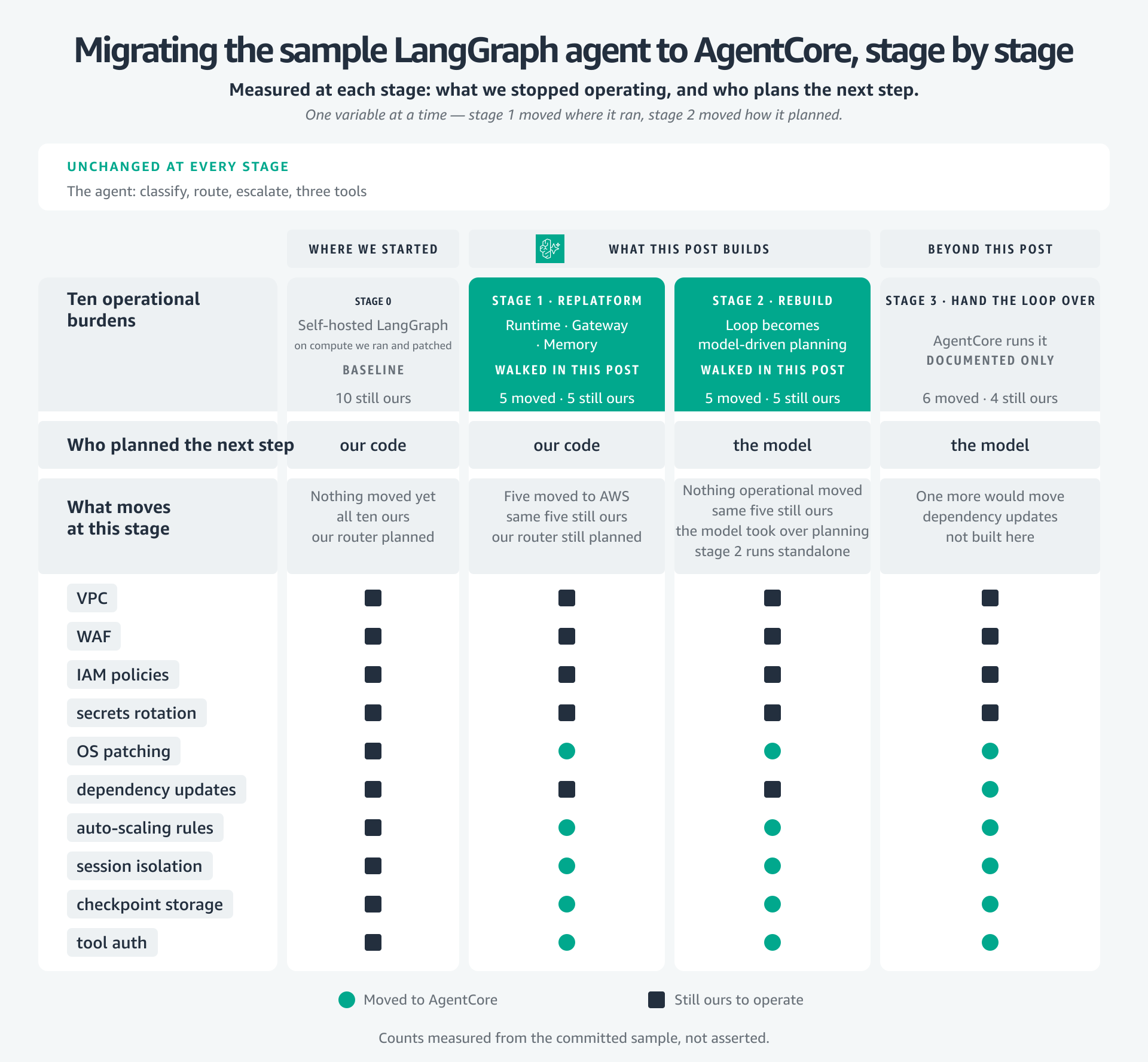
Figure 1: What stops being yours to operate, and who plans the agent’s next step. Stage 1 moves the first, stage 2 moves the second
Migration walkthrough
The sample repository is laid out as the following stages, so each stage can be compared against the one before it. The following figure is the shape of that comparison: what each stage started from, what moved, and why the next one follows. Where this post gives a count of what moved, that count is measured from the committed sample rather than estimated.
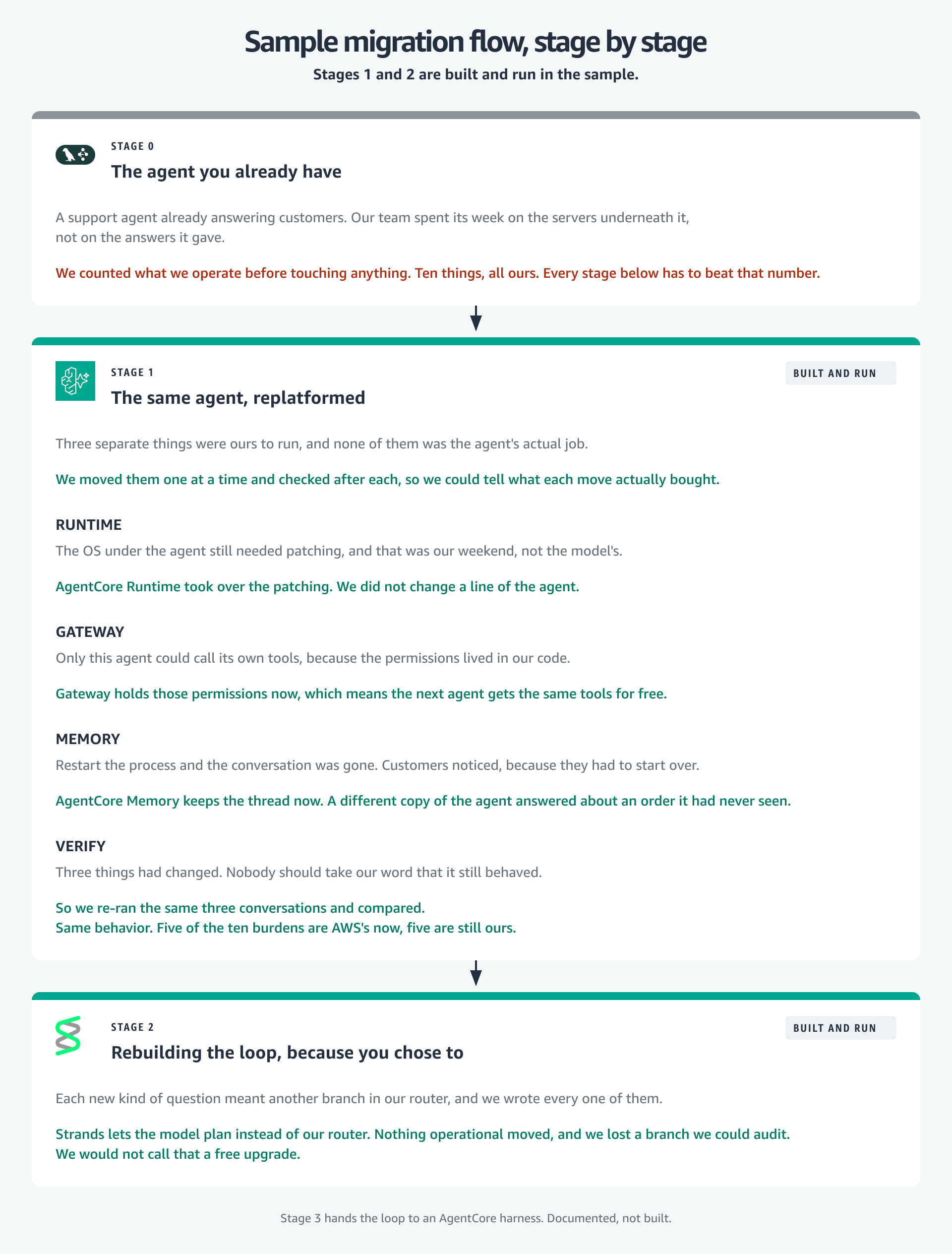
Figure 2: Where each stage started, what moved, and why the next one follows
Prerequisites
You need an AWS account with Amazon Bedrock model access enabled, Python 3.12, and the AWS Command Line Interface (AWS CLI) configured with credentials that can create AgentCore, Lambda, Amazon Simple Storage Service (Amazon S3) and IAM resources. Enable CloudWatch Transaction Search once for the account as well, or the traces this walkthrough produces cannot be viewed.
git clone https://github.com/aws-samples/sample-migrate-agents-to-amazon-bedrock-agentcore.git
cd sample-migrate-agents-to-amazon-bedrock-agentcore
./setup.sh
That creates a virtual environment and installs seven requirements. If you already run a LangGraph agent against Amazon Bedrock, the new ones are strands-agents, bedrock-agentcore, mcp and langgraph-checkpoint-aws. Two are pinned rather than floored, because an unpinned langchain-aws resolves higher and drags boto3 forward with it.
Confirm the install with the test suite, which needs no credentials:
source .venv/bin/activate
python -m unittest discover -s tests -q
Stage 0: The agent you already have
Read the agent before changing it, because its current behavior is the baseline every later stage must preserve. It’s a compiled StateGraph: classify_intent asks the model for one word, and a hand-written route_intent reads it. An angry customer goes to escalate, which returns a fixed handoff and makes no model call. Everyone else goes to assist, which calls the model with the tools bound:
builder.add_edge(START, "classify_intent")
builder.add_conditional_edges(
    "classify_intent",
    route_intent,
    {"escalate": "escalate", "assist": "assist"},
)
builder.add_edge("escalate", END)
builder.add_conditional_edges("assist", tools_condition)
builder.add_edge("tools", "assist")

return builder.compile(checkpointer=checkpointer)
Three tools hang off it as @tool functions over an HTTP backend: lookup_order, process_return and search_faq. They return an {"error": ...} payload instead of raising, because an exception inside the tool node kills the run while an error payload is something the model can act on.
State is a MemorySaver checkpointer keyed on a thread_id passed at invoke time, and it’s the one piece with a hard limit. A dictionary in the process dies with the process, and two replicas cannot see each other’s conversations. Everything else here is fine at production scale. That is not.
The model is ChatBedrockConverse, so inference already goes to Amazon Bedrock and stage 0 touches no AgentCore API. If you’re arriving from OpenAI or Anthropic instead, that constructor is your one change, with the model ID and AWS Region as arguments. For model availability by Region, refer to Supported models by AWS Region in Amazon Bedrock. Record the baseline before you move anything: which tools ran, and the final message from the graph state, not the model’s reply. That makes the next stage a comparison rather than a hope. This runs locally and creates nothing in AWS:
python -m examples.run_walkthrough --stage 0Stage 1: The same agent, migrated
Stage 0 left you a working agent and a recorded baseline. Stage 1 is where five of the ten burdens stop being yours, and the agent’s behavior is the thing that doesn’t change. Three things move: Runtime takes the process, two of the three tools go behind Gateway, and the conversation state lands in Memory. Inference does not move, because it was never the problem.
The migrated package doesn’t copy stage 0, it imports it:
from examples.stage0_langgraph.agent import build_graph
from examples.stage0_langgraph.tools import SUPPORT_TOOLS
Those two imports carry the graph topology, the router, the state schema, all three prompts and all three tool bodies, so none of it can drift. They also make the cost countable, measured from disk rather than asserted: 45 lines change inside the agent, 22 lines are new supporting code the SDK doesn’t ship, and 85 lines are imported untouched. That 22 is small for one reason. The expensive piece used to be a hand-written LangGraph checkpointer over AgentCore Memory, and it now ships in a package, so a tool adapter is all the glue left.
Runtime: Hosting the loop
All ten operational burdens are still yours, and the baseline is now recorded over three turns. The machine underneath the loop moves first, because patching an operating system is not what your agent does. It is also the least code you will change for the most return: the operating system stops being yours to patch, and session isolation becomes one microVM per session. Wrap the loop you have in BedrockAgentCoreApp and give it an entrypoint:
from bedrock_agentcore import BedrockAgentCoreApp
from langchain_core.messages import HumanMessage

app = BedrockAgentCoreApp()

@app.entrypoint
def agent_invocation(payload, context):
    state = support_graph().invoke(
        {"messages": [HumanMessage(payload.get("prompt", ""))]},
        config={"configurable": {"thread_id": context.session_id or "local-session"}},
    )
    return {"result": state["messages"][-1].text}

if __name__ == "__main__":
    app.run()
The invoke call inside it is stage 0’s. What changed is where the thread_id comes from. Stage 0 chose one. Here it arrives as context.sessi