Governing models across accounts is the natural next step once automatic model registration is in place. In Part 1 we introduced how managed MLflow on Amazon SageMaker AI synchronizes registered models into the SageMaker AI Model Registry. We walked through a single-account setup where AWS Identity and Access Management (IAM) condition keys separate the data scientist and governance officer personas. Larger organizations, however, separate development from production at the account level. They run multiple development accounts and a central governance function. In regulated environments, they also impose a hard requirement that development workloads cannot write into production-grade accounts.
In this post, we extend the same building blocks to two cross-account governance topologies. The first is a hub-and-spoke pattern that centralizes governance by sharing one MLflow app across development accounts with AWS Resource Access Manager (AWS RAM). The second is a hybrid pattern for regulated environments that keeps development accounts fully isolated from the governance hub. We close by showing how an approved model moves from the registry to a deployed endpoint through continuous integration and continuous delivery (CI/CD), and we compare the topologies to help you choose one. Working notebooks are available in the accompanying GitHub repository.
The personas
Part 1 introduced the data scientist (works in a Jupyter notebook, interacts only with MLflow) and the governance officer (works in the Amazon SageMaker Studio Models UI). Cross-account topologies add two more. The administrator performs the one-time cross-account setup: AWS RAM shares, bucket policies, and destination groups, using the console or CLI. In the hybrid topology, a model owner in each development account approves models locally before they are promoted to the hub. Each topology that follows is organized by these persona workflows.
Prerequisites
Before starting this walkthrough, make sure you have the following:
- Completion of Part 1. Familiarity with automatic model registration, the lifecycle staging construct, and IAM condition key gates from Part 1.
- Two AWS accounts, a development (spoke) account and a governance (hub) account. Configure a named AWS Command Line Interface (AWS CLI) profile for each (for example,
mlops-spokeandmlops-hub). For setup details, see the Account and profile setup (REPO_LINK#account-and-profile-setup) section in the accompanying repository. - The accompanying AWS CloudFormation stack deployed into both accounts. The template (
cfn/sagemaker-studio-mlflow.yaml(REPO_LINK)) provisions a SageMaker AI Studio domain, user profile, execution role, and a Managed MLflow app withAutoModelRegistrationEnabled. Deploy one stack per account. See Provision the environment (REPO_LINK#provision-the-environment-cloudformation) in the repository README for the exact commands.
For the full provisioning walkthrough, including CloudFormation deployment, reading stack outputs, and setting environment variables, refer to the accompanying repository (REPO_LINK).
Topology 1: Hub-and-spoke central governance
For larger organizations with multiple teams, it is common to have multiple separate development accounts with a central governance account. This topology provides workload isolation for development within each development account, with shared services offered through a centralized account hosting the MLflow app and the central Model Registry. The centralized hub account shares the MLflow app with one or more spoke (development) accounts using AWS RAM. This pattern extends the approach described in Centralize model governance with SageMaker Model Registry and AWS RAM sharing.
The following figure illustrates the workflow:
- The hub creates an AWS RAM resource share for the MLflow app and the spoke accepts the invitation. Using external principals lets the share work even when the accounts are not in the same organization.
- A data scientist in the spoke registers a model against the shared MLflow app. With automatic registration, you get the Model Package Group and version in the hub account, created synchronously with the register call.
- The hub attaches a resource policy to the group and shares it back to the spoke with the
AllowDeploymanaged permission, so the spoke can describe and deploy the model. - The governance officer validates the synced metrics and lineage and approves the model centrally in the hub.
- The approval event triggers a CI/CD pipeline, and a machine learning (ML) engineer deploys the approved model to an Amazon SageMaker endpoint in the spoke account.
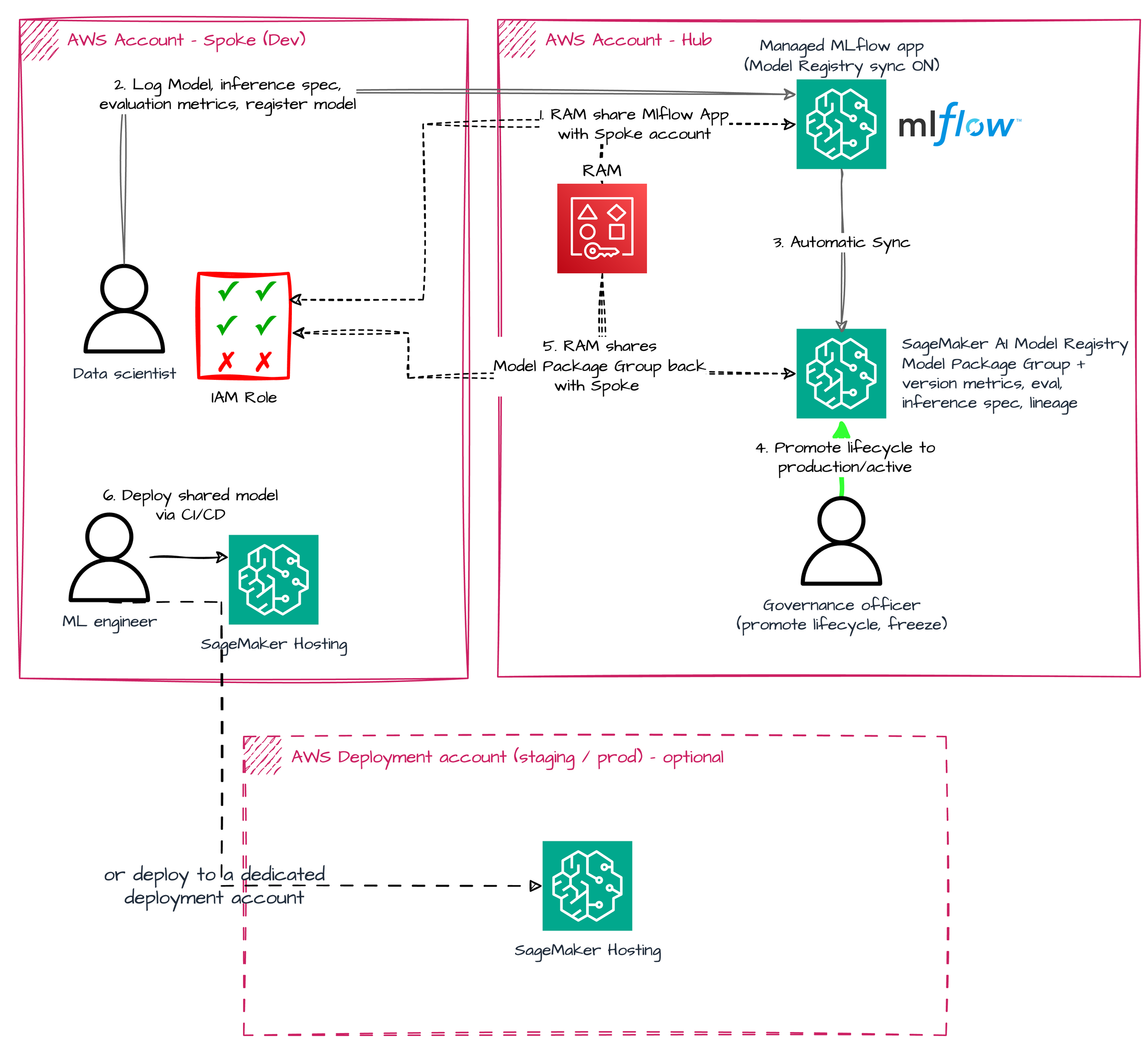
Figure 1: Hub-and-spoke topology with centralized governance
Administrator: Set up cross-account access (one-time)
The administrator prepares the hub and the sharing before either persona starts working. Prerequisite: model artifacts live in the hub’s MLflow artifact store, an S3 bucket in the hub account. Cross-account S3 access is needed on both sides:
- Resource side: a bucket policy on the hub artifact bucket granting the spoke account
s3:GetObject,s3:PutObject,s3:ListBucket, ands3:GetBucketLocation. Without it, the data scientist’slog_modelcall fails with an S3 access error before registration happens. - Identity side: the spoke execution role needs
s3:GetObjecton the hub bucket for deploy-time artifact reads.AmazonSageMakerFullAccesscovers buckets whose name containssagemaker. If the spoke role is scoped tighter, add the hub bucket explicitly.
With the prerequisite in place, the administrator:
- Creates an AWS RAM resource share for the hub MLflow app, which the spoke accepts.
- After the first registration, attaches a resource policy to the synced Model Package Group and RAM-shares it back to the spoke with the
AllowDeploymanaged permission.
In the hub AWS RAM console both shares show as Active:
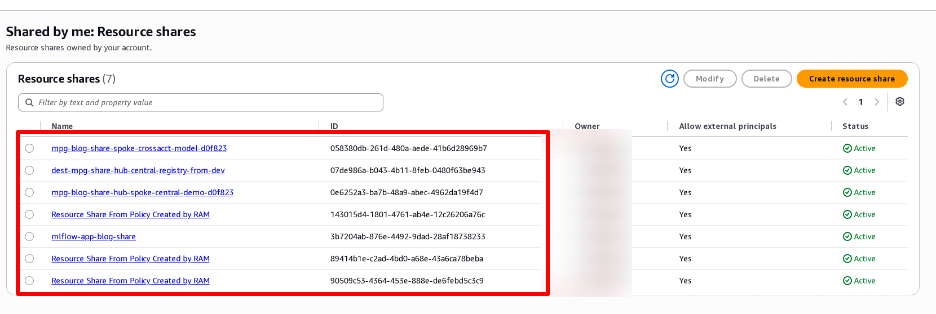
Figure 2: The MLflow app resource share shown as Active in the hub AWS RAM console
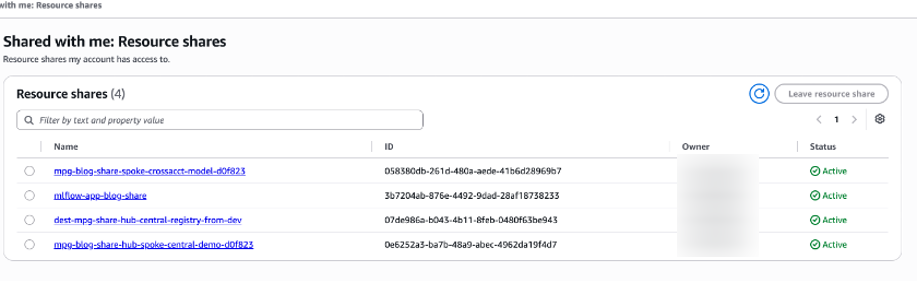
Figure 3: The Model Package Group resource share shown as Active in the hub AWS RAM console
Data scientist: Register from the spoke, in a notebook
The workflow is identical to Part 1, with one difference: the notebook points the MLflow tracking URI at the hub app’s Amazon Resource Name (ARN). Automatic registration creates the Model Package Group and version in the hub, synchronously with the register call. The candidate appears in the hub registry pending approval, with the metrics, evaluation card, and lineage from the spoke’s run, as shown in the following figure:
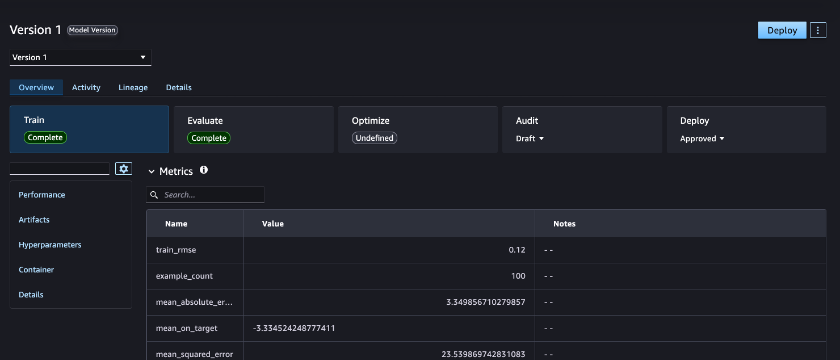
Figure 4: The synced candidate in the hub registry, pending approval with metrics and lineage
Two points to plan for. First, automatic registration appends a short hash suffix to the group name, so my-model becomes my-model-<hash>. Discover the group with list_model_package_groups(NameContains=...), and reference it cross-account by its full ARN rather than its name. Second, lineage is recorded in the hub, because the sync executes there. The governance officer sees the full lineage graph in the hub’s Studio, but lineage entities are not shared back to the spoke by the AWS RAM share. Cross-account lineage sharing is not automatic.
Governance officer: Approve centrally, in the hub Studio UI
The governance officer works in the hub’s Studio Models view, one control point for candidates from every spoke. They review the synced metrics and lineage, promote to production, and set the approval status to Approved. The following figure shows the current lifecycle status of the registered version in the SageMaker AI Model Registry.
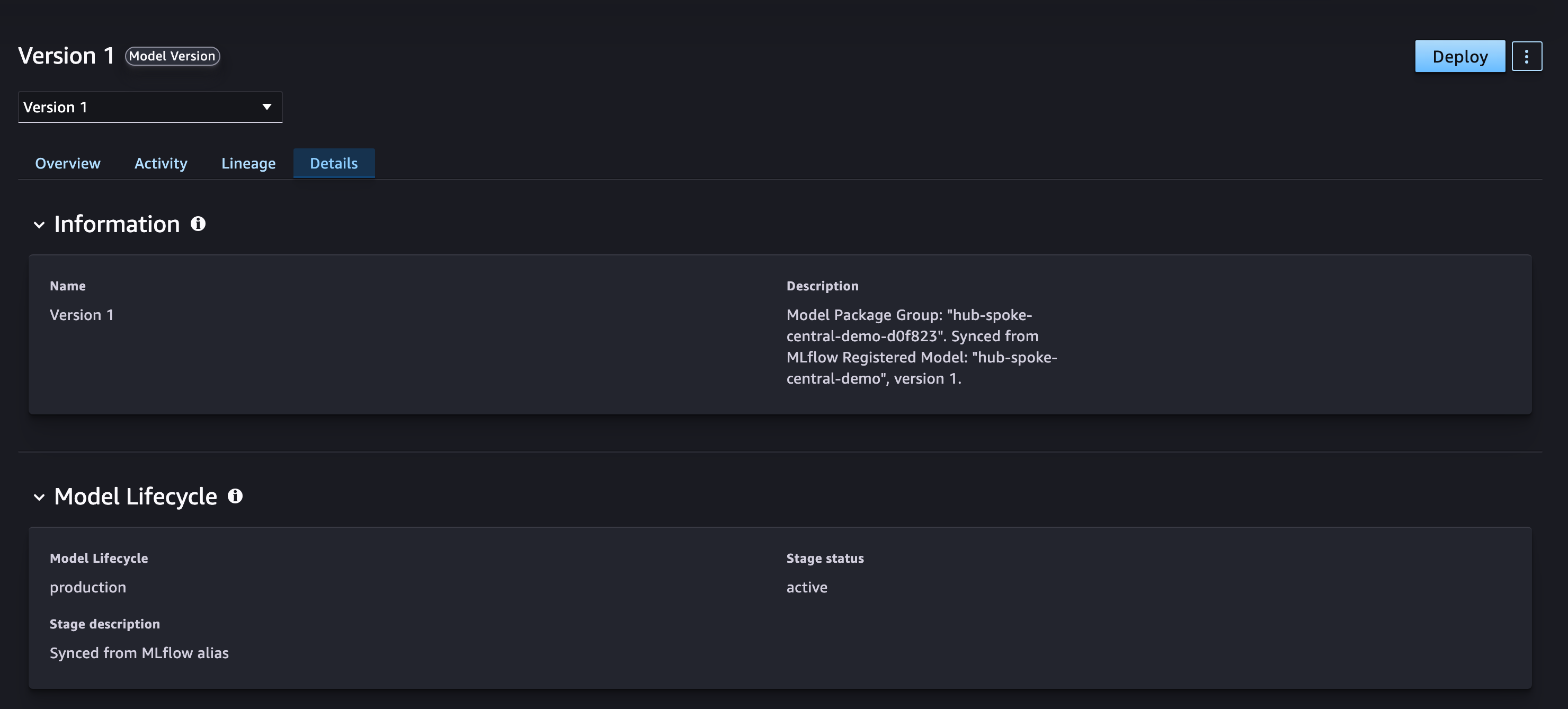
Figure 5: Lifecycle status of the registered version in the SageMaker AI Model Registry
What happens after approval is covered in the From approval to deployment section.
Topology 2: Hub-and-spoke hybrid governance
Some regulated organizations treat the hub as a production-grade account and do not want data scientists writing into it, even indirectly. For these customers, we recommend a hybrid topology that keeps each development account self-contained.
The following figure illustrates the workflow:
- A data scientist registers a model against the development account’s own MLflow app.
- Automatic sync registers it into the development Model Registry, local to that account. The hub is untouched.
- The development account’s model owner reviews and approves the model in the development registry, which triggers the copy workflow.
- The workflow copies the approved model into the hub cross-account: it replicates the model artifacts into a hub-owned bucket, rewrites the inference specification, and registers the package in the hub’s shared destination group.
- The governance officer in the hub re-validates the copied model and approves it as the central governance record.
- An ML engineer deploys the locally approved model to an endpoint in the spoke, typically through a CI/CD pipeline. No cross-account artifact is needed at deploy time.
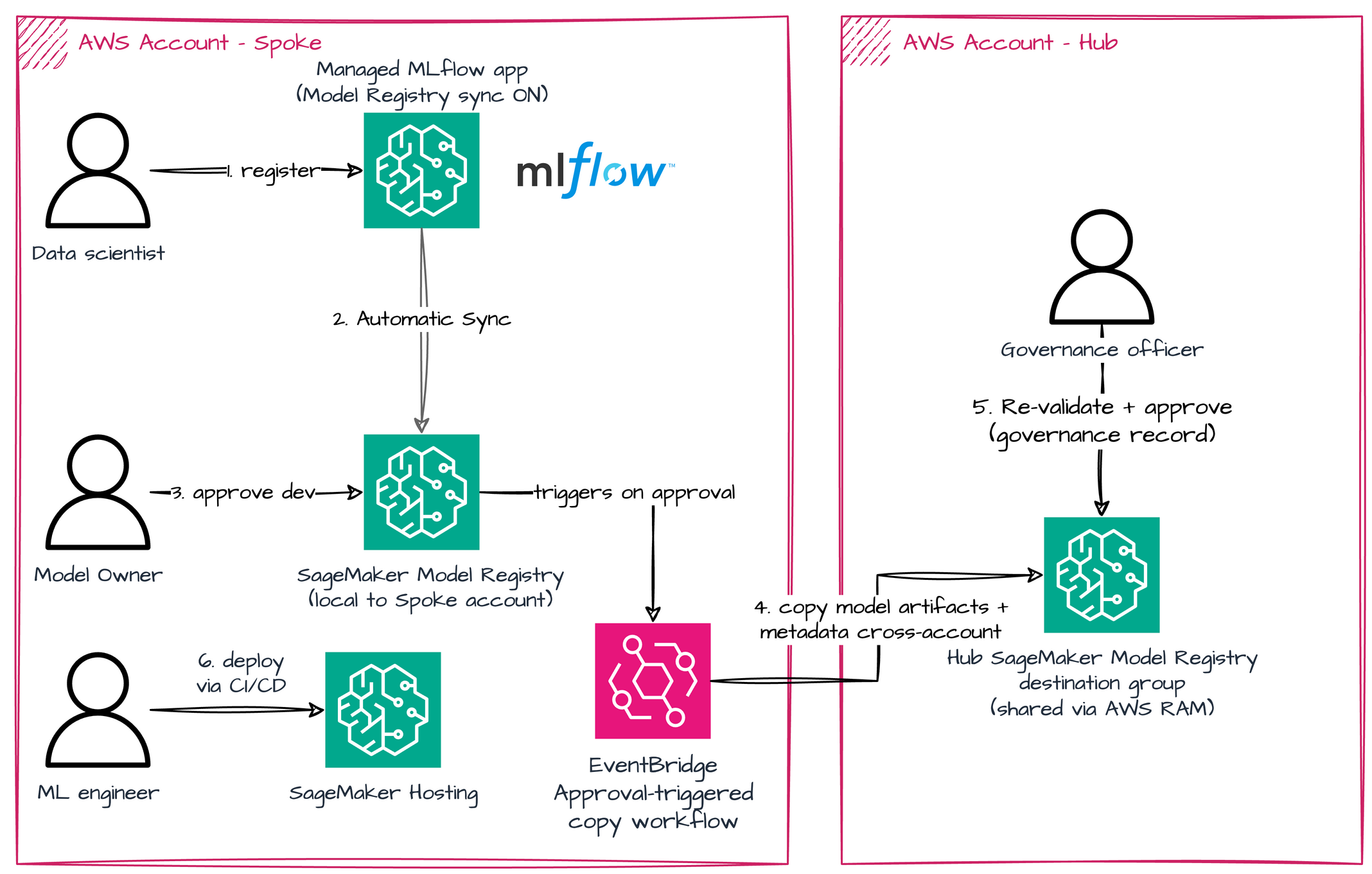
Figure 6: Hub-and-spoke topology with hybrid governance
Administrator: Expose the hub destination group (one-time)
The hub administrator creates a destination Model Package Group, attaches a resource policy allowing the development account to CreateModelPackage into it, and RAM-shares it with the AllowRegister managed permission. The administrator also creates (or designates) a hub-owned artifact bucket that the copy workflow writes model artifacts into. The bucket policy grants the development account s3:PutObject and s3:ListBucket so the copy can run under the development account’s role. The AWS managed framework images used in this post are public per-Region, so no container image replication is needed. If your container image lives in a private repository in the development account, replicate the image to the hub or add an Amazon Elastic Container Registry (Amazon ECR) repository policy.
Data scientist: Register in the development account, in a notebook
Identical developer experience to Part 1, entirely inside the development account: the data scientist registers a model in the development MLflow app, which automatically syncs the registered model into the development Model Registry. The hub is untouched.
Development account model owner: Approve locally
The model owner reviews the candidate in the development registry and approves it. This local approval is the trigger for promotion to the hub, as shown in the following figure:
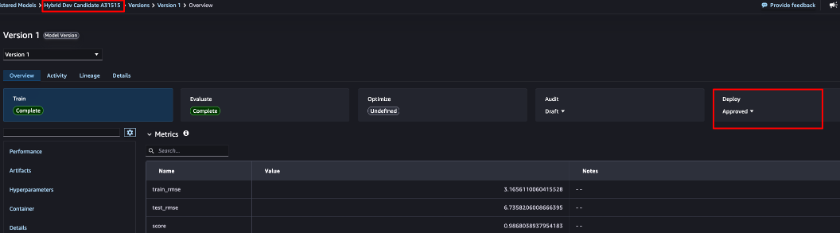
Figure 7: The development account model owner approving a model version locally
Approval-triggered copy, then governance officer re-validates in the hub
The approval triggers a workflow (an Amazon EventBridge rule on the Model Package state change in production) that copies the approved package into the hub. The copy step replicates the model artifacts into a hub-owned bucket, rewrites the inference specification to point at the hub copy, and recreates the package in the hub with a pointer back to the source. The result is self-contained: the hub package has no runtime dependency on the development account.
The copy step performs three actions. It replicates the model artifacts from the development bucket into the hub-owned bucket, and rewrites the inference specification so it points at the hub copy. Finally, it registers the package in the hub destination group with CustomerMetadataProperties recording the source package ARN and account. The result is self-contained: the hub package has no runtime dependency on the development account. See the repository for the actual implementation.
The governance officer sees the copied package in the hub’s Studio, with provenance metadata pointing back to the source, re-validates it, and approves it independently. An example of the metadata a governance officer can see is shown in the following figure.
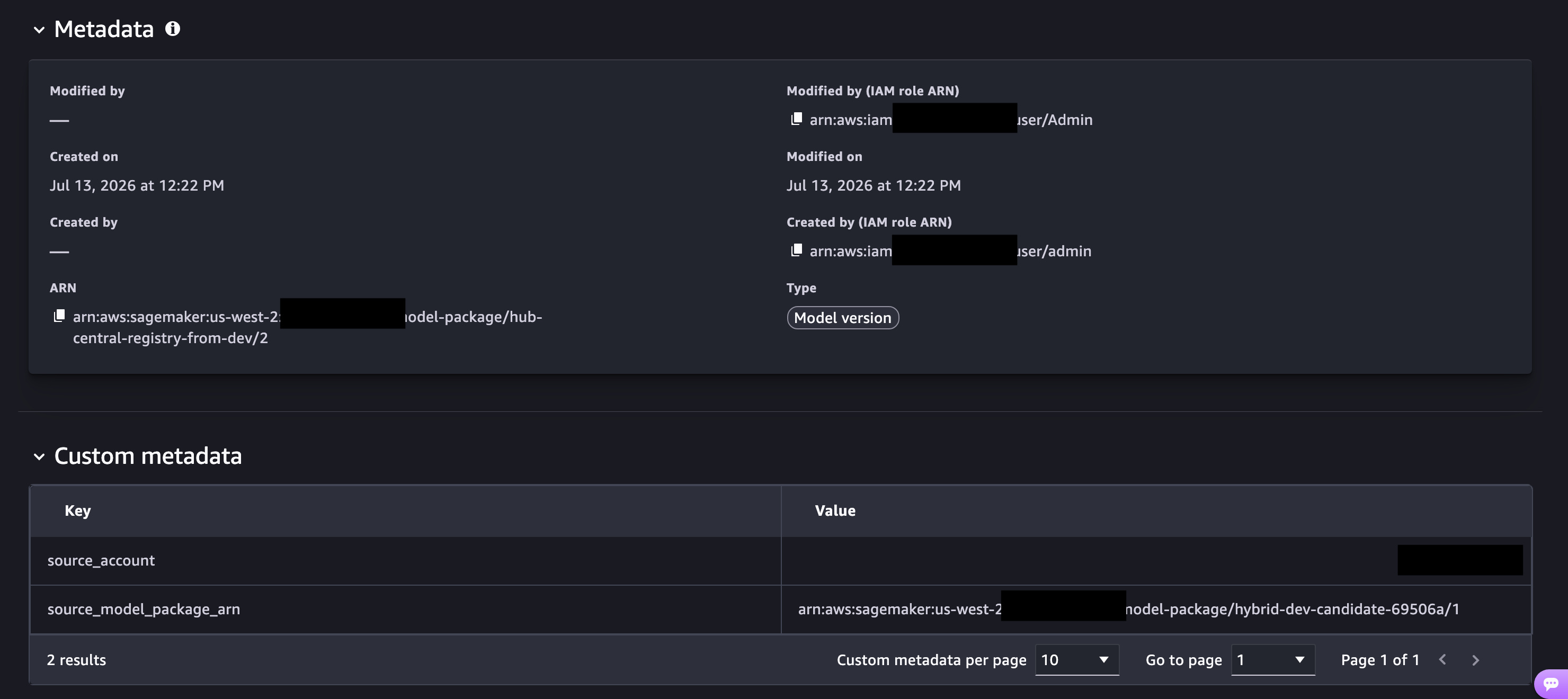
Figure 8: The copied package in the hub with provenance metadata pointing to the source
From approval to deployment
Across both topologies, the approval in the registry is the gate, not the deployment itself. The approval status change emits an event to Amazon EventBridge, and you consume that event to trigger a CI/CD deployment pipeline: an Amazon EventBridge rule matching ModelApprovalStatus: Approved starts a pipeline that creates or updates the endpoint from the approved Model Package.
Where the pipeline runs and where the endpoint lands are organizational choices. A common arrangement runs the pipeline in a shared-services account and deploys into a dedicated deployment account. Simpler setups run both in the development (spoke) account, which is what the accompanying samples demonstrate. Whichever account deploys needs read access to the model artifacts. In the central topology, that means the hub artifact bucket (see the preceding administrator prerequisite). In the hybrid topology, the hub copy is already self-contained.
One consideration when introducing a separate deployment account: model lineage stays in the account where the sync recorded it. Plan your governance r