October 2026: This post was reviewed and updated for accuracy.
Scaling cloud migrations with agentic AI on Amazon Bedrock AgentCore raises a practical question. Which parts of a large migration program belong to a managed service, and which parts need custom automation? One enterprise program answered that question across 300+ applications and a fixed fiscal year deadline. The four-agent pattern in this post reduced infrastructure as code (IaC) development time from 3 to 4 weeks per application to minutes, based on internal project tracking data.
This pattern runs alongside AWS Transform rather than in place of it, as a hybrid that adds custom agents where your program requires them. AWS Transform covers the migration and modernization work, and AWS Database Migration Service (AWS DMS) covers the database tier. The agents in this post attach to those services and carry one further requirement: sources and destinations reached through Model Context Protocol (MCP) tools that your organization builds and maintains.
AWS Professional Services builds a suite of purpose-built AI agents for programs with that requirement. The agents use the Strands Agents SDK and run on Amazon Bedrock AgentCore, a platform to build, connect, and optimize agents at scale, with any framework or model. Each agent reaches its sources and destinations through MCP tools exposed by AgentCore Gateway.
In this post, you explore the architecture of a four-agent pattern for MCP-connected environments. You also see the code that defines an agent, connects it to its tools, and applies responsible AI controls. The pattern includes four agents:
- The Intake Agent, which reads migration inputs from document and collaboration systems through MCP tools.
- The IaC Agent, which generates IaC that composes your approved internal modules.
- The Migration Intelligence and Governance Agent, which reports and governs inside your own program tools.
- The Site Reliability Engineering (SRE) Agent for operations after cutover.
To follow along, you need an AWS account with access to Amazon Bedrock AgentCore and to Amazon Bedrock foundation models. You also need familiarity with the Strands Agents SDK and MCP server patterns, plus the IaC tooling used by your organization. Confirm first that an AWS managed service does not already cover your migration path.
When this pattern applies
AWS Transform covers migration and modernization for server, network, mainframe, .NET, and application code workloads as a managed service, and AWS DMS covers databases. This pattern adds agents for the requirements that stay specific to your organization.
On the program described here, three conditions held together.
- MCP-connected sources and destinations: The systems holding the migration inputs, and the systems receiving the outputs, were reached through MCP tools that the delivery team built and maintained. They included an internal wiki holding security standards, a ticketing system, a collaboration platform, and an in-house provisioning API.
- Organization-specific IaC composition: Generated infrastructure code had to compose an internal module library that the security office reviews and approves. Writing that composition by hand took 3 to 4 weeks per application, which across a 300+ application portfolio translates to years of engineering effort.
- Work continuing past cutover: Program scope included operations after handover, which sits outside the migration services.
Architecture overview
This pattern uses four purpose-built agents. The architecture attaches to a migration program at three points: the systems holding migration inputs, IaC composition, and operations after cutover. The pattern applies security at each of those points. The following diagram shows how the agents, tools, and AWS services connect.
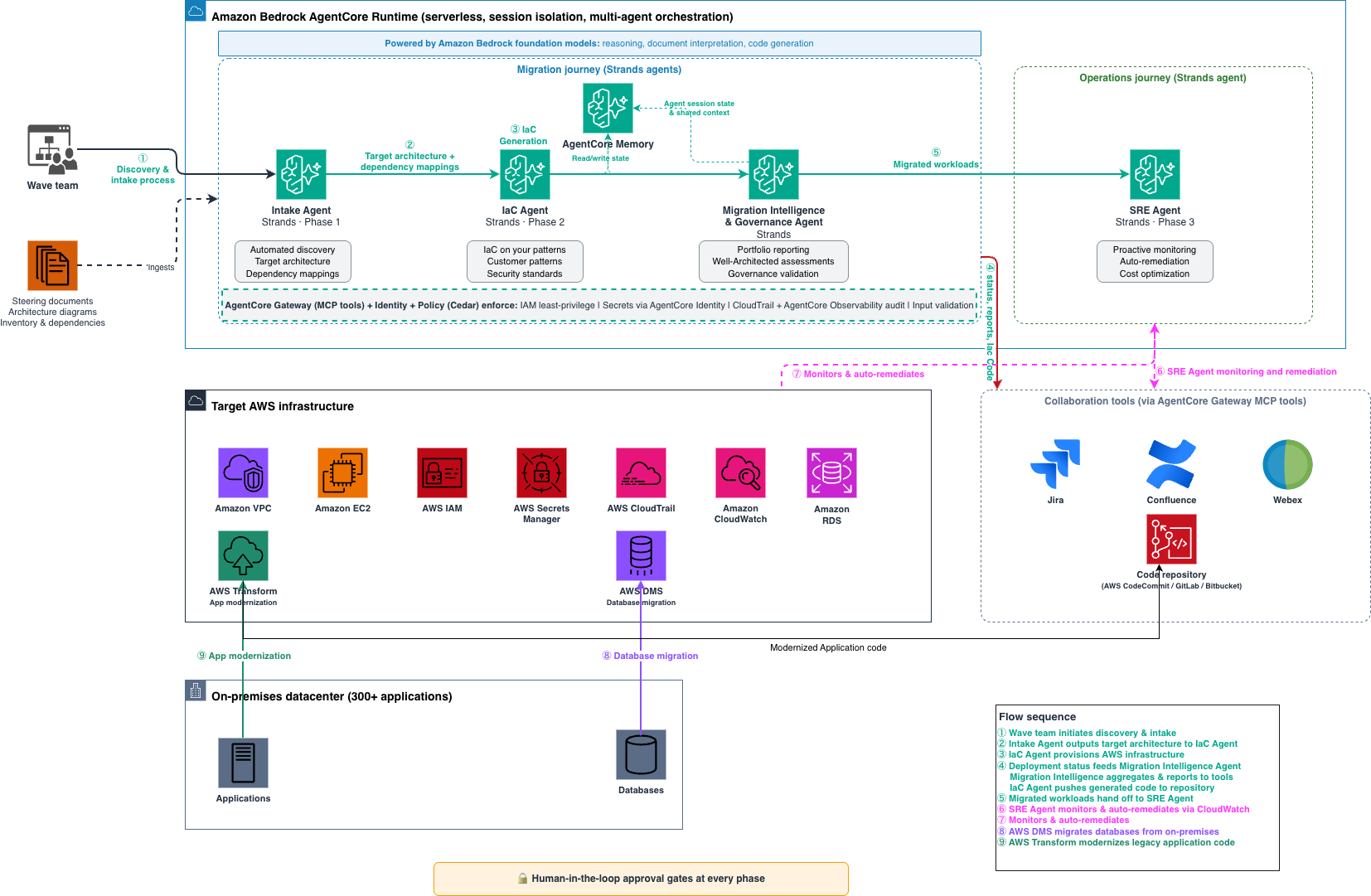
Figure 1: How the agents connect across the migration and operations journeys through Model Context Protocol tool calling
The pattern organizes agents into two journeys. The migration journey agents handle discovery through deployment. The operations journey agent handles post-migration monitoring.
Migration journey agents:
- Intake Agent (Phase 1): Reads architecture documents, questionnaires, and dependency records through MCP tools, then defines target state architecture.
- IaC Agent (Phase 2): Generates IaC that composes your approved internal modules for each application.
- Migration Intelligence and Governance Agent: Provides automated portfolio reporting, well-architected assessments, and governance across Jira, Confluence, and Webex.
Operations journey agents:
- SRE Agent (Phase 3): Provides monitoring and automated remediation after cutover.
AWS managed services carry the migration and complement the custom agents:
- AWS Database Migration Service (AWS DMS): Generative AI-assisted schema conversion and automated cutover for database migration.
- AWS Transform: Discovery, wave planning, landing zone creation, network conversion, rehost or replatform execution, and modernization for mainframe, virtualized, and .NET workloads.
How the components connect
This section describes how the framework components interact at runtime.
Each agent is a Strands agent, defined by a foundation model, a system prompt, and a set of tools. Amazon Bedrock AgentCore runtime hosts them in a serverless environment with session isolation and multi-agent orchestration. Amazon Bedrock foundation models power the reasoning that interprets documents, generates code, and drives multi-step workflows. For model availability by AWS Region, refer to Supported foundation models in Amazon Bedrock.
Each agent calls MCP tools scoped to its function through AgentCore Gateway, a capability of Amazon Bedrock AgentCore, which converts your APIs, AWS Lambda functions, and existing services into MCP-compatible tools. AgentCore Identity, a capability of Amazon Bedrock AgentCore, authenticates each call through scoped AWS Identity and Access Management (IAM) roles and your identity provider.
Amazon Bedrock AgentCore memory stores agent session state and shared context. Agents use this shared context to persist outputs and track migration progress across over 300 applications. When the Intake Agent completes discovery, it writes the target architecture and dependency mappings to AgentCore memory. The IaC Agent reads this shared context to begin code generation without manual handoff.
Defining an agent in code
The following Python example defines the IaC Agent and prepares it for Amazon Bedrock AgentCore runtime. The agent reaches your MCP tools through AgentCore Gateway, and it calls a foundation model through Amazon Bedrock with an Amazon Bedrock Guardrails policy attached.
 import json
 import logging
 import os
 import uuid
 from bedrock_agentcore.runtime import BedrockAgentCoreApp
 from strands import Agent
 from strands.models import BedrockModel
 from strands.tools.mcp import MCPClient
 from strands.tools.mcp.mcp_types import MCPClientCredentials

 logger = logging.getLogger(__name__)
 app = BedrockAgentCoreApp()

 REGION = os.environ["AWS_REGION"]

 # url+auth lets the SDK run the client_credentials grant and re-mint the
 # token on expiry. A statically captured bearer token would go stale.
 gateway = MCPClient(
     url=os.environ["GATEWAY_MCP_URL"],
     auth=MCPClientCredentials(
         client_id=os.environ["GATEWAY_CLIENT_ID"],
         client_secret=get_secret("gateway/client_secret"),
         scopes=[os.environ["GATEWAY_SCOPE"]],
     ),
 )

 model = BedrockModel(
     model_id=os.environ["MODEL_ID"],
     region_name=REGION,
     guardrail_id=os.environ["GUARDRAIL_ID"],
     guardrail_version=os.environ.get("GUARDRAIL_VERSION", "1"),
     guardrail_trace="enabled",
 )


 @app.entrypoint
 def invoke(payload, context):
     prompt = (payload.get("prompt") or "").strip()
     if not prompt:
         return {"status": "error", "error": "missing required field: prompt"}

     try:
          with gateway:
              # Fetch the approved policies for this wave first, so the rules
              # travel in the system prompt instead of depending on the model
              # to ask for them.
              lookup = gateway.call_tool_sync(
                  tool_use_id=str(uuid.uuid4()),
                  name="get_policies",
                  arguments={
                      "resource_types": payload.get("resource_types", []),
                      "wave": payload.get("wave"),
                  },
              )
              if lookup["status"] != "success":
                  return {"status": "error", "error": "policy lookup failed"}
              policies = lookup.get("structuredContent", {})

              # tools=[gateway]: SDK owns the connection lifecycle and paginates
              # tool discovery, which list_tools_sync() alone does not.
              agent = Agent(
                  model=model,
                  system_prompt=(
                      f"{IAC_AGENT_PROMPT}\n\n"
                      f"Generated IaC satisfies these approved policies:\n"
                      f"{json.dumps(policies.get('policies', []), indent=2)}"
                  ),
                  tools=[gateway],
              )
              result = agent(prompt)

          if result.stop_reason == "guardrail_intervened":
              logger.warning("guardrail blocked request, session_id=%s",
                             getattr(context, "session_id", None))
              return {"status": "blocked_by_guardrail"}

          return {
              "status": "ok",
              "iac": str(result),
              "policy_set_version": policies.get("version"),
              "waived_policies": policies.get("waived", []),
          }

      except Exception as e:
          logger.exception("invocation failed, session_id=%s",
                           getattr(context, "session_id", None))
          return {"status": "error", "error": str(e)}


  if __name__ == "__main__":
      app.run()
The entrypoint returns the generated IaC together with the policy set version that shaped it, so a reviewer traces the output back to a signed-off standard. AgentCore Runtime handles session isolation and scaling. For deployable examples, see the Amazon Bedrock AgentCore samples repository and the Strands Agents samples repository on GitHub. For the deployment steps, refer to Getting started with AgentCore runtime.
Phase 1: Intake Agent for automated discovery
The Intake Agent reads the migration inputs that live in your document and collaboration systems. On this program, those systems were reachable through MCP tools the delivery team built and maintained.
The agent ingests architecture documentation, application inventory lists, intake questionnaires, and dependency records through those tools. It then produces a target AWS architecture with a recommended migration pattern, resource sizing specifications, and a compliance validation report.
The output feeds directly into the IaC Agent, creating an automated handoff from intake to infrastructure provisioning.
Phase 2: IaC Agent for automated infrastructure code generation
AWS Professional Services deployed the IaC Agent first in the portfolio, and it delivers the most immediately measurable impact. It generates IaC code adhering to your security best practices and standards.
How it works
The agent workflow proceeds through five steps:
Step 1: Ingest the steering document. The agent reads the steering document from the wave team. It extracts deployment scope, compliance constraints, and Security Office-approved wave-specific overrides.
Step 2: Interpret the target state architecture diagram. Using the Intake Agent’s output, the IaC Agent identifies infrastructure components, their relationships, and dependencies.
Step 3: Generate IaC. Based on this interpretation, the agent generates IaC using your defined and established patterns. It populates configurations with wave-specific parameters and configures remote state management. It then applies mandatory tagging and adds monitoring configurations required by organizational standards.
Step 4: Validate through Policy in Amazon Bedrock AgentCore. Before execution, Policy in AgentCore evaluates each tool call against Cedar rules. It calculates the scope of potential change, checks dependency conflicts with concurrent waves, and confirms compliance window validity.
Step 5: Execute and report. The centralized execution plane triggers the IaC, monitors deployment, and reports outcomes through AgentCore Observability, a capability of Amazon Bedrock AgentCore. Post-deployment validation runs automatically and compliance metrics update in real time.
Custom MCP tools: The security foundation
Each action passes through custom MCP tools exposed by Amazon Bedrock AgentCore Gateway and governed by AgentCore Identity and Policy in AgentCore. AgentCore Identity authenticates each agent action through scoped IAM roles with least-privilege access. The framework validates inputs against defined schemas and rejects malformed inputs at the boundary.
No credentials or sensitive values pass through agent context, because AgentCore Identity resolves secrets at runtime from a centralized credential provider. AgentCore Observability and AWS CloudTrail write each agent action to an immutable, centralized audit trail. Policy in AgentCore enforces Cedar rules that help prevent a single operation from affecting more than a defined threshold.
Curated organizational policies as MCP tools
The security office curates the policy set, not the agent. A versioned document holds each rule, the resource types it covers, a machine-checkable assertion, and the approval record. The following example shows three policies and one wave exception.
{
    "policy_set": "security-office/baseline",
    "version": "2026.09.1",
    "policies": [
      {
        "id": "SEC-ENC-001",
        "applies_to": ["aws_s3_bucket", "aws_ebs_volume", "aws_rds_cluster"],
        "requirement": "Encrypt data at rest with a customer managed KMS key",
        "assertion": "kms_key_id != null and sse_algorithm == 'aws:kms'",
        "severity": "blocking",
        "source": "SecOffice/Encryption-Standard-v4"
      },
      {
        "id": "SEC-NET-014",
        "applies_to": ["aws_security_group_rule"],
        "requirement": "No ingress from 0.0.0.0/0 on administrative ports",
        "assertion": "not (cidr_blocks contains '0.0.0.0/0' and to_port in [22, 3389])",
        "severity": "blocking",
        "source": "SecOffice/Network-Standard-v7"
      },
      {
        "id": "OPS-TAG-003",
        "applies_to": ["*"],
        "requirement": "Carry owner, cost-center, data-classification, and wave tags",
        "assertion": "tags has_keys ['owner', 'cost-center', 'data-classification', 'wave']",
        "severity": "blocking",
        "source": "SecOffice/Tagging-Standard-v2"
      }
    ],
    "wave_overrides": [
      {
        "wave": "wave-14",
        "policy_id": "SEC-NET-014",
        "decision": "exception",
        "expires_on": "2026-10-31",
        "approved_by": "security-office"
      }
    ]
  }
An AWS Lambda function serves that document, and AgentCore Gateway exposes the function as an MCP tool named get_policies. The IaC Agent requests only the policies in scope for the resource types in the wave it generates.
  import json
  from datetime import date
  from pathlib import Path

  POLICY_SET = Path("policies/security-office-baseline.json")

  def get_policies(event, context):
      """Return the approved policies for the requested resource types and wave.

      AgentCore Gateway exposes this function as the get_policies MCP tool.
      """
      doc = json.loads(POLICY_SET.read_text())
      requested = set(event.get("resource_types") or [])
      today = date.today()
      waived = {
          o["policy_id"]
          for o in doc["wave_overrides"]
          if o["wave"] == event.get("wave")
          and date.fromisoformat(o["expires_on"]) >= today
      }
      policies = [
          p for p in doc["policies"]
          if (p["applies_to"] == ["*"] or requested & set(p["applies_to"]))
          and p["id"] not in waived
      ]
      return {
          "version": doc["version"],
          "policies": policies,
          "waived": sorted(waived),
      }
The response carries the policy set version, so generated code records which rules produced it and a reviewer traces a resource back to a signed-off standard. Waived policies travel in their own field ra