Memory lifecycle policies help long-running agents on Amazon Bedrock AgentCore stay effective by systematically managing what they remember and forget. Your agent generates memories from every conversation it conducts. If you don’t actively manage these memories, your agents will accumulate outdated context, which can degrade response quality and create compliance risks for your deployment.
After months of production use, problems emerge. We observed a customer support agent reference a billing dispute resolved four months earlier, treating it as active. Another agent repeated outdated deployment advice because its memory still contained a superseded runbook.
In this post, we introduce memory lifecycle management for AI agents: the practice of systematically scoring, consolidating, and pruning agent memories over time. We walk through a deployable architecture using AgentCore memory (a capability of Amazon Bedrock AgentCore), AWS Step Functions, and Amazon Bedrock to run a nightly lifecycle workflow. By the end, you will have an AWS Cloud Development Kit (AWS CDK) stack and a framework for managing agent memory as a managed resource. The complete code is available in the GitHub repository.
This solution targets agents that accumulate high volumes of interaction data over weeks or months, such as customer support agents, sales advisors, and IT helpdesk bots. For lower-volume agents like personal assistants, you might start with time-to-live (TTL) expiration and General Data Protection Regulation (GDPR) compliance alone. All thresholds are configurable to match your agent’s needs.
Solution overview
This solution combines a shared memory taxonomy with three lifecycle policies that run as a nightly workflow. We begin with the memory types that shape those policies.
Memory types
Before designing lifecycle policies, we need a shared vocabulary for what agents remember. We categorize agent memory into three types, each with different retention requirements.
- Episodic memory: Episodic memories capture what happened, it’s the record of past conversations. These are timestamped, session-bound, and high-volume. Agentcore memory stores this information in two strategies, Summary and Episodic. Both strategies store memories as individual entries tied to specific agent-user sessions. Episodes and Summary provide short-term continuity but individually they become less relevant as time progresses. When designing your lifecycle policies, prioritize these memories for expiration first.
- Semantic memory: Semantic memories are distilled facts and preferences extracted from interactions but decoupled from any single conversation. “The user prefers the US East (N. Virginia) AWS Region (us-east-1) for deployments.” These are durable, high value, and compact. In your lifecycle policies, retain semantic memories longer than episodic memories. These are prime candidates for consolidation, where you merge multiple episodic observations into a single, authoritative fact.
- Procedural memory: Procedural memories encode learned workflows and tool-use patterns. “When the user asks about costs, query the AWS Cost Explorer API first, then summarize.” These represent the agent’s operational expertise. Procedural memories are lower volume but the most valuable type for certain use cases. They have the longest retention and the highest bar for pruning. AgentCore memory stores procedural knowledge as reflections tied to episodic memory. Read more about it in Episodic memory deep dive blog. You should check these for validity as your procedures evolve.
Lifecycle policies
With our taxonomy in place, we can design three complementary lifecycle policies. Each targets a different failure mode of unbounded memory.
Policy 1: TTL-based expiration
The first policy automatically deletes memories older than a configured TTL. We default to 90 days for episodic memories. TTL does not consider whether a memory is still useful, but it provides a hard ceiling on accumulation and is essential for compliance.
In production, differentiate TTL by memory type. Configure your summary memories to expire after 30–60 days, semantic memories after 6–12 months, and consider setting no TTL for procedural memories. This post delivers a single configurable memoryTtlDays parameter as a starting point. TTL expiration runs first, before scoring or consolidation, which helps avoid wasting compute on memories that should already be gone.
AgentCore memory doesn’t provide a built-in auto-delete TTL. However, it exposes system-generated timestamp fields that support BEFORE and AFTER filter operators on ListMemoryRecords. Our pruner uses x-amz-agentcore-memory-createdAt with a BEFORE filter to retrieve only records older than the configured TTL, then deletes them.
cutoff = (now - timedelta(days=ttl_days)).isoformat()

response = client.list_memory_records(
    memoryId=memory_id,
    namespace=agent_id,
    metadataFilters=[{
        "left": {"metadataKey": "x-amz-agentcore-memory-createdAt"},
        "operator": "BEFORE",
        "right": {"metadataValue": {"dateTimeValue": cutoff}},
    }],
)
Policy 2: Relevance decay scoring
Not all memories age at the same rate. A memory accessed yesterday is more relevant than one untouched for weeks. We score each memory using a three-term weighted formula that combines creation recency, last-access recency, and access frequency:
score = W_RECENCY * exp(-decay_rate * days_since_creation)
        + W_ACCESS * exp(-decay_rate * days_since_last_access)
        + W_FREQUENCY * min(access_count / MAX_ACCESS_BASELINE, 1.0)
Rather than exposing a raw decay constant, we provide one intuitive parameter: pruneDays, the approximate number of days after which an unaccessed memory’s score drops below the relevance threshold:
import math

def decay_rate_from_prune_days(prune_days: int, threshold: float) -> float:
    """Convert pruneDays to an exponential decay rate.

    decay_rate = -ln(threshold) / prune_days
    """
    if prune_days <= 0:
        raise ValueError(f"prune_days must be a positive integer, got: {prune_days}")
    if threshold <= 0 or threshold >= 1:
        raise ValueError(
            f"threshold must be in the open interval (0, 1), got: {threshold}"
        )
    return -math.log(threshold) / prune_days
With the defaults (pruneDays = 45, threshold = 0.3), this gives decay_rate ≈ 0.02676. The formula produces a score between 0.0–1.0. When memories score below your configured threshold, the system flags them for consolidation or pruning based on your policy settings.
The formula balances three intuitions: recent memories matter, recently used memories matter even more, and frequently retrieved memories carry additional signal. The exponential decay means scores drop sharply in the first few weeks, then level off. A memory that is old but accessed recently and frequently can still score well.
The three weights are configurable, letting operators emphasize different signals depending on their agent’s workload:
W_RECENCY(default 0.4): Weight for creation recency. Higher values favor newer memories.W_ACCESS(default 0.35): Weight for last-access recency. Higher values favor recently retrieved memories.W_FREQUENCY(default 0.25): Weight for access frequency. Higher values favor memories that are retrieved often.MAX_ACCESS_BASELINE(default 50): The access count at which the frequency term saturates at 1.0. Set this to the approximate number of accesses a “heavily used” memory accumulates in your lookback window.
When the three weights sum to 1.0, the score will fall in [0.0, 1.0]. Operators can adjust weights to match their agent’s needs. For example, increase W_FREQUENCY for agents where frequently accessed memories are most valuable (for example, a support bot that repeatedly references the same troubleshooting runbook), or increase W_RECENCY for agents where freshness matters most (for example, a real-time trading assistant).
The right pruneDays value depends on your agent’s use case. The following table provides recommended starting points for common agent archetypes:
| Agent type | pruneDays | Rationale |
| Real-time support bot | 7 | Tickets resolve in hours/days. Old context is not needed |
| Sales / onboarding agent | 21 | Deals close in weeks. Stale leads pollute context |
| General assistant | 45 | Balanced retention for mixed workloads |
| IT helpdesk / ops agent | 90 | Incident patterns repeat seasonally |
| Legal / compliance advisor | 180 | Precedents stay relevant for months |
The following scoring function comes from our Memory Scorer AWS Lambda function (code/lambdas/memory_scorer/handler.py):
def compute_relevance_score(
    created_at: datetime,
    last_accessed_at: datetime,
    access_count: int,
    decay_rate: float,
    now: datetime,
    w_recency: float = 0.4,
    w_access: float = 0.35,
    w_frequency: float = 0.25,
    max_access_baseline: int = 50,
) -> float:
    """Compute relevance score using the 3-term weighted decay formula.

    score = w_recency * exp(-decay_rate * days_since_creation)
            + w_access * exp(-decay_rate * days_since_last_access)
            + w_frequency * min(access_count / max_access_baseline, 1.0)

    Returns a float in [0.0, 1.0] when weights sum to 1.0.
    Raises ValueError if max_access_baseline is zero or negative.
    """
    if max_access_baseline <= 0:
        raise ValueError(
            f"max_access_baseline must be a positive integer, got: {max_access_baseline}"
        )
    days_since_creation = max((now - created_at).total_seconds() / 86400, 0.0)
    days_since_last_access = max((now - last_accessed_at).total_seconds() / 86400, 0.0)
    recency_term = w_recency * math.exp(-decay_rate * days_since_creation)
    access_term = w_access * math.exp(-decay_rate * days_since_last_access)
    frequency_term = w_frequency * min(access_count / max_access_baseline, 1.0)
    score = recency_term + access_term + frequency_term
    return score
AWS CloudTrail-based access tracking
The AgentCore memory API does not include a lastAccessedAt field in its MemoryRecordSummary. To get real access data, we use AWS CloudTrail. The CDK stack configures a trail with advanced event selectors that capture GetMemoryRecord data events. Your CloudTrail configuration logs every memory retrieval with its memoryRecordId and timestamp, then delivers the logs to your Amazon Simple Storage Service (Amazon S3) bucket. At the start of each scoring invocation, the Memory Scorer lists CloudTrail log files from the past 25 hours, decompresses them, and aggregates GetMemoryRecord events into a per-record lookup of last-access timestamps and access counts. To maintain cumulative access history across invocations, the scorer persists an access ledger in Amazon S3. Each run merges fresh CloudTrail counts with historical counts, giving the frequency term a true lifetime signal rather than a narrow daily snapshot.
Policy 3: LLM-based consolidation
Before pruning low-scoring memories, we give them one last chance. Consolidation uses Amazon Bedrock to merge related memories into a single, compact semantic entry. Five episodic memories about deployment preferences become one authoritative fact. In this step, a large language model (LLM) summarizes its own memories. The consolidation prompt instructs the model to preserve essential facts, remove redundancy, and output a confidence score:
CONSOLIDATION_PROMPT_TEMPLATE = """You are a memory consolidation assistant.
Given the following agent memories, create a single concise summary that
preserves essential facts, user preferences, and actionable knowledge.
Remove redundancy and outdated information.

Memories:
{memory_contents}

Output a JSON object with:
- "summary": the consolidated memory text
- "confidence": a float 0.0-1.0 indicating consolidation quality
- "key_facts": list of preserved key facts"""
The system stores the consolidated memory back in AgentCore memory, then deletes the originals. If Amazon Bedrock fails, the system retains the originals unchanged. The system logs failed deletions for your manual review. Consolidation is lossy by nature. An LLM summarizing five memories into one can drop some nuance. The confidence score returned by the model helps flag low-quality consolidations for human review. For high-stakes domains, consider archiving originals to cold storage instead of deleting them.
For production deployments, configure Amazon Bedrock Guardrails to filter harmful content and use grounding checks to verify consolidated memories remain faithful to the source material. These controls are production requirements, not optional additions.
Architecture diagram
The following diagram shows the nightly lifecycle workflow architecture. Amazon EventBridge triggers an AWS Step Functions state machine that orchestrates five Lambda functions in sequence.
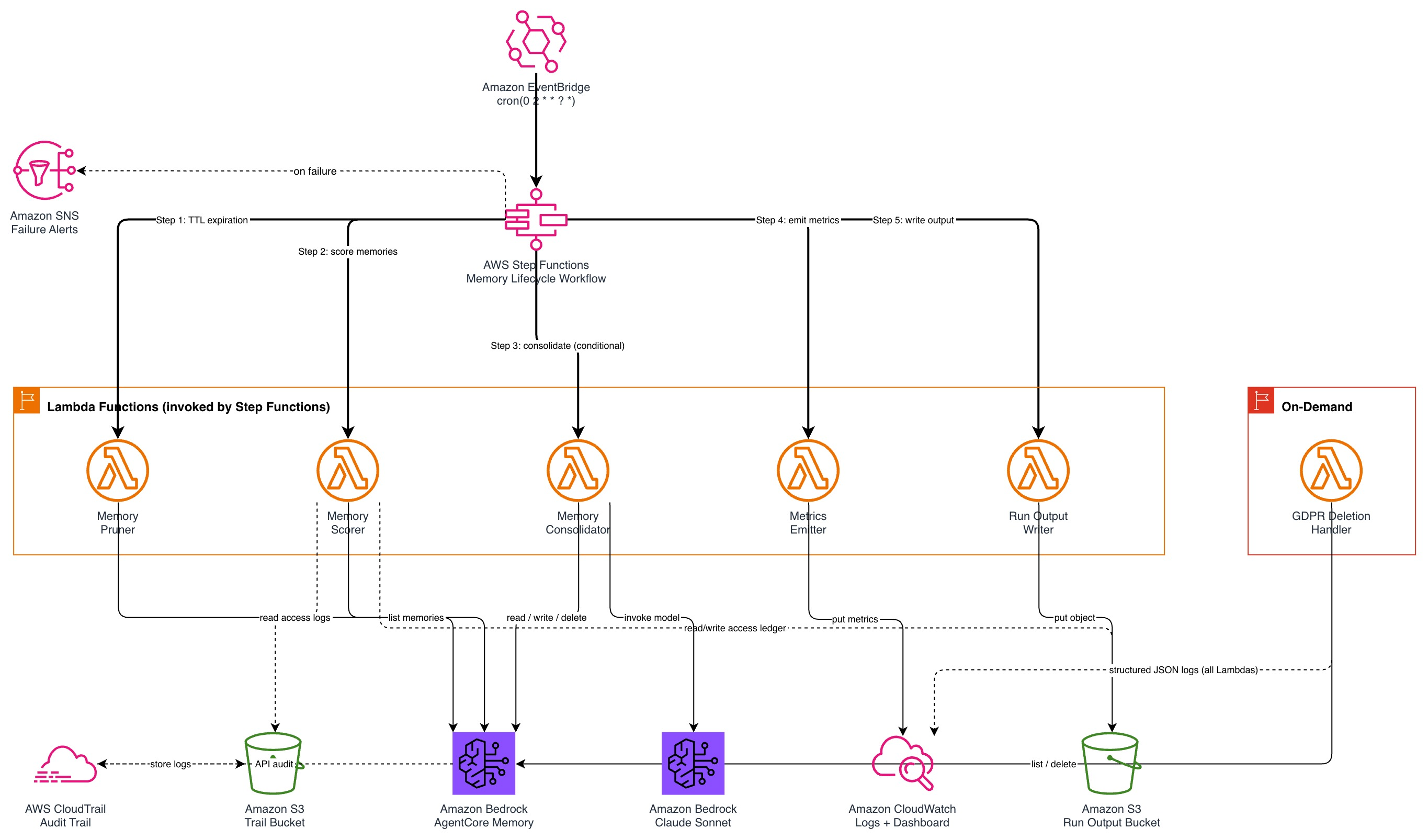
Figure 1: Nightly memory lifecycle workflow orchestrated by Amazon EventBridge and AWS Step Functions
Text description for accessibility: An Amazon EventBridge rule triggers a Step Functions state machine nightly. The state machine invokes Lambda functions in sequence: Memory Pruner (TTL expiration), Memory Scorer (relevance scoring using CloudTrail access data), Memory Consolidator (LLM-based merging through Amazon Bedrock), Metrics Emitter (Amazon CloudWatch metrics), and Run Output Writer (S3 persistence). Failures route to an Amazon Simple Notification Service (Amazon SNS) topic for alerts.
The workflow proceeds as follows:
- TTL Expiration: The Memory Pruner queries AgentCore memory for records older than the configured TTL (default: 90 days) and deletes them.
- Score Memories: The Memory Scorer builds a per-record access lookup from CloudTrail logs, merges it with a persistent S3 ledger, computes relevance scores, and returns memories below the threshold.
- Consolidate: The workflow batches low-scoring memories (default size: 10) and sends them to the Memory Consolidator, which invokes Amazon Bedrock to merge them into compact semantic entries and deletes the originals.
- Emit Metrics: The Metrics Emitter publishes workflow metrics (memories processed, consolidated, pruned) to CloudWatch.
- Write Run Output: The Run Output Writer persists workflow results to S3 for auditability. If any step fails, a Catch block routes to a failure handler that publishes error details to an Amazon SNS topic.
Prerequisites
Before deploying the solution, confirm you have the following:
- An AWS account with permissions to create Lambda functions, Step Functions state machines, Amazon EventBridge rules, SNS topics, CloudWatch dashboards, CloudTrail trails, and S3 buckets.
- AWS CDK v2 installed (
npm install -g aws-cdk). - Node.js 18+ and npm.
- Python 3.12 with pip.
- Amazon Bedrock model access enabled for Claude Sonnet 4.5 (
anthropic.claude-sonnet-4-5-20250929-v1:0) in your target Region. See Supported models by AWS Region in Amazon Bedrock to verify availability. - Amazon Bedrock AgentCore with at least one agent configured with memory enabled.
- AWS Command Line Interface (AWS CLI) configured with appropriate credentials.
Clone the repository and install dependencies:
cd code
npm install
Solution walkthrough
We orchestrate the entire lifecycle as a nightly AWS Step Functions workflow triggered by Amazon EventBridge. The workflow runs five stages in sequence: TTL expiration, scoring, consolidation, metrics emission, and run output writing.
CDK stack walkthrough
A single CDK stack (code/lib/memory-lifecycle-stack.ts) defines the entire infrastructure. Here are the key sections.
Lambda function definitions: Each handler uses Python 3.12 with least-privilege IAM permissions. The stack deploys shared code as a Lambda Layer and passes configurable parameters as environment variables:
// Lambda Layer for the