Claim answers are scattered across adjuster diary entries, repair estimates, police reports, payment ledgers, and scanned attachments rather than one searchable field. A policyholder might ask whether a claim was approved, while an adjuster might need every open auto claim over $10,000 from last month. Both tasks require finding and combining evidence quickly and accurately.
Retrieval Augmented Generation (RAG) uses retrieved documents to ground model responses. Amazon Bedrock Knowledge Bases is the fully managed RAG capability for documents. Amazon Bedrock handles parsing, chunking, embeddings, and vector storage, so you can build a conversational interface that returns cited answers from claim files.
This technical how-to uses synthetic claim records and doesn’t describe a production customer deployment. You build a claims assistant that answers natural-language questions with citations by completing these steps:
- Ingest claim documents and their metadata from Amazon Simple Storage Service (Amazon S3).
- Query them in plain language with the
AgenticRetrieveStreamAPI. - Ask multi-turn follow-up questions.
- Scope retrieval with metadata filters on attributes such as claim ID and claim type.
- Add a contextual grounding guardrail to keep answers tied to the records.
The claims lookup challenge
Policyholders, contact center agents, and adjusters ask different questions:
- Policyholders ask for a plain-language status update: “Has the estimate for claim CLM-100482 been approved, and when will the check be issued?”
- Contact center agents need a fast, accurate answer while the customer waits, without transferring the call.
- Adjusters ask multi-part questions across claims, such as which open auto claims over $10,000 were filed last month and what work remains on each.
Answers are stored in PDF adjuster reports, Word correspondence, and text notes rather than consistent database fields.
Records can conflict or supersede earlier versions. A revised estimate can replace an earlier one, or a provisional payment can be reversed later. The assistant must identify which estimate, payment, or status controls.
Because claims are regulated, every answer must be grounded in source documents and include citations. Contact center agents can verify a source before repeating an answer, and supervisors can audit how the assistant reached it.
Solution overview
The solution uses Amazon Bedrock Knowledge Bases to index claim documents from Amazon S3 for retrieval.
Agentic retrieval through AgenticRetrieveStream plans an answer, breaks a multi-part question into sub-queries, and runs one or more retrieval passes. It checks whether the evidence is sufficient before generating a response.
The API streams trace events, answer text, and citations. Trace events expose the retrieval plan, and each citation maps part of the answer to a source claim document.
The following diagram shows both paths. The ingestion lane loads claim documents and metadata into a knowledge base. The retrieval lane sends each question through AgenticRetrieveStream and an Amazon Bedrock Guardrails grounding check before returning a cited answer.
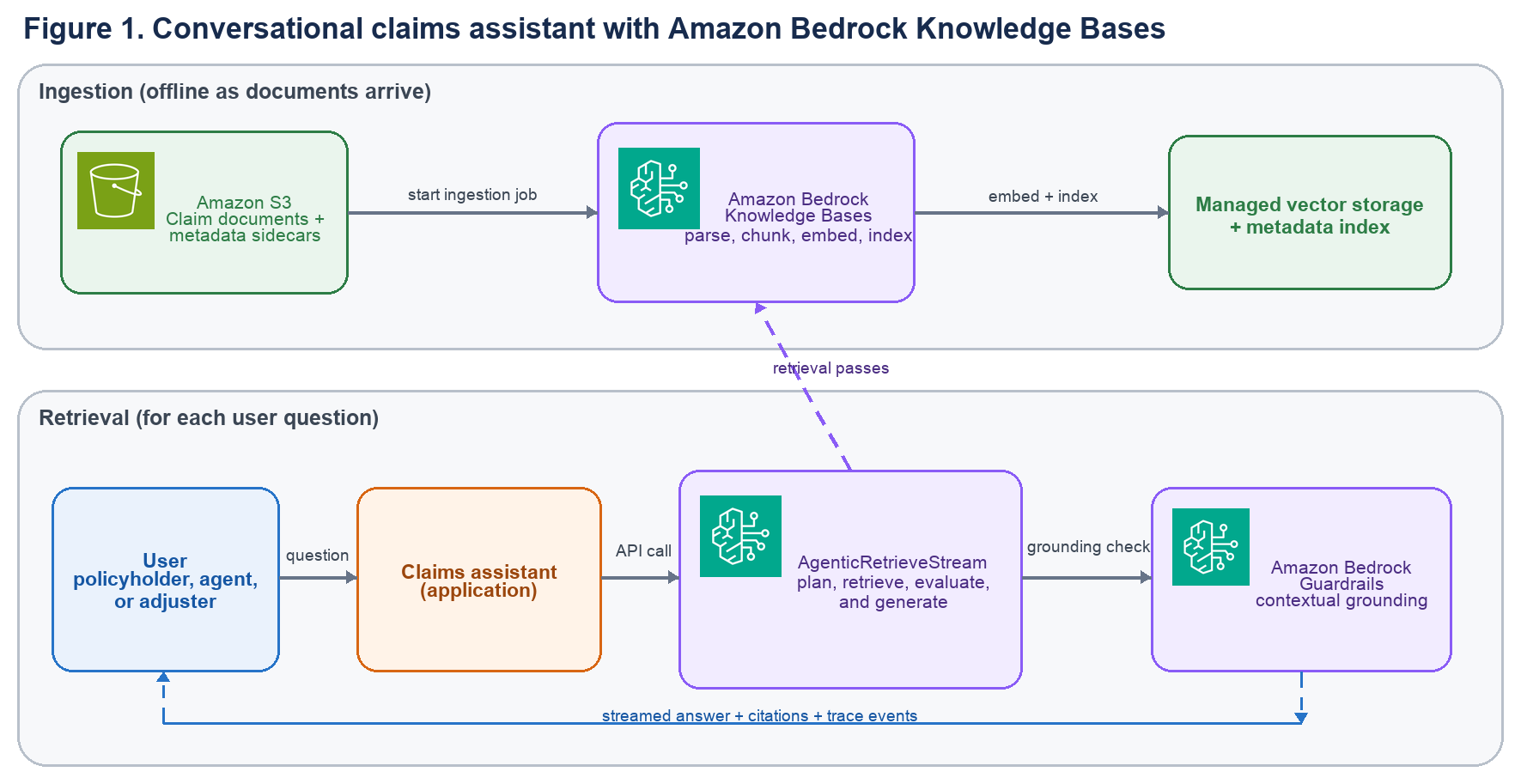
Figure 1: Conversational claims assistant with Amazon Bedrock Knowledge Bases
The ingestion lane runs as documents arrive:
- Claim documents in PDF, Word, or text format land in Amazon S3 with matching metadata sidecars.
- An ingestion job synchronizes the S3 data source with the knowledge base as documents change.
- The knowledge base parses, chunks, embeds, and indexes the documents and their metadata in managed vector storage.
The retrieval lane runs for each question:
- The application calls
AgenticRetrieveStreamwith the question, conversation history, and optional metadata filters that scope the search. - A foundation model creates sub-queries and repeats retrieval until it has enough evidence, up to maxAgentIteration rounds.
- A contextual grounding check blocks answers that are unsupported by the retrieved records.
- Amazon Bedrock streams the answer, trace events, and citations, so the application can display output as it arrives.
Prerequisites
Before you begin, verify that you have the following:
- An AWS account with AWS Identity and Access Management (IAM) permissions for Amazon Bedrock and Amazon S3.
- Access to a foundation model (FM) enabled through Amazon Bedrock model access.
- An AWS Region that supports the selected foundation model and Amazon Bedrock Knowledge Bases. This walkthrough uses US West (Oregon), us-west-2. Check Supported models by AWS Region in Amazon Bedrock before deployment.
- The AWS SDK for Python (Boto3), configured with credentials and a version that supports the APIs used here.
- An S3 bucket for the synthetic claim documents and metadata.
- Familiarity with Python and with basic RAG concepts.
Prepare the claims documents and metadata
Store one document per claim in Amazon S3. The knowledge base reads PDF adjuster reports, Word correspondence, and text notes directly, so you can keep documents in their native format.
Figure 2 shows a synthetic claim record. Current exposure is the estimated total claim cost. Its evidence index identifies a superseded fax draft, meaning a record replaced by a newer version. The metadata sidecar repeats fields that the assistant can filter.
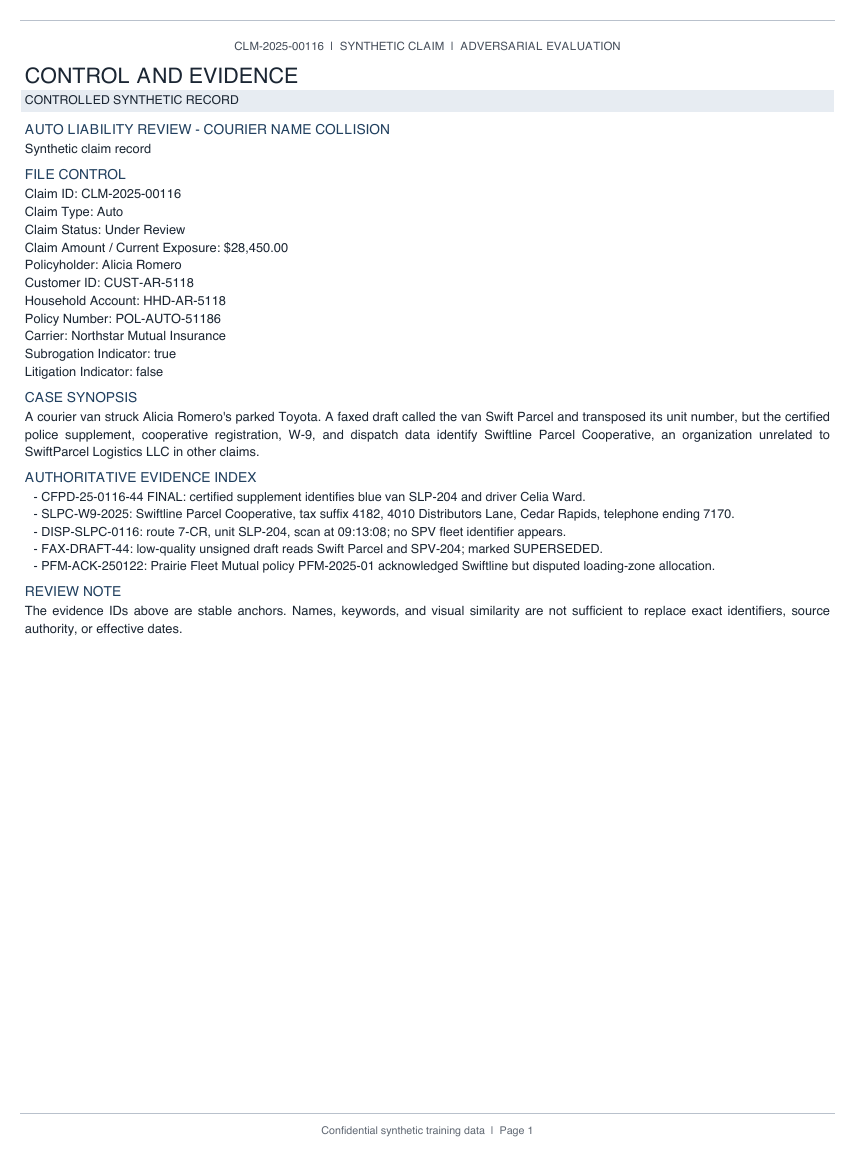
Figure 2: A synthetic claim record with its file-control fields and evidence index
For filtering, add an accompanying metadata file with the same name plus .metadata.json. For CLM-100482.pdf, use CLM-100482.pdf.metadata.json. Subrogation is an insurer’s effort to recover costs from a responsible third party. The following example describes one auto claim:
{
    "metadataAttributes": {
        "claim_id": "CLM-100482",
        "claim_type": "auto",
        "status": "open",
        "date_filed": 20260709,
        "amount": 14250,
        "region": "us-west",
        "adjuster": "Martha Rivera",
        "policyholder": "Mary Major",
        "policy_number": "POL-AUTO-78432",
        "customer_id": "CUST-MM-1042",
        "household_id": "HHD-MM-1042",
        "document_type": "adjuster_report",
        "carrier": "Example Insurance",
        "has_subrogation": true,
        "has_litigation": false,
        "complexity_tier": "high"
    }
}
The sidecar contains scalar string, number, and Boolean values. Value types determine available filters. The following table lists fields used later in the queries.
This post uses synthetic data. Don’t place real personally identifiable information (PII) or protected health information in these resources without the required controls and approvals.
| Attribute | Type | Example | Filter use |
claim_id |
String | CLM-100482 |
equals for a single-claim lookup |
claim_type |
String | auto |
equals or in for a line of business |
status |
String | open |
in for active work queues |
amount |
Number | 14250 |
numeric range comparisons |
date_filed |
Number | 20260709 |
date ranges as YYYYMMDD integers |
region |
String | us-west |
tenant scoping from the session |
customer_id |
String | CUST-MM-1042 |
customer scoping from the session |
has_subrogation |
Boolean | true |
equals for recovery work |
Store dates as YYYYMMDD integers because metadata filters compare numbers rather than date strings. This format supports ranges such as “filed last month.”
Store only one comparable monetary value in amount. A reserve is money set aside for the estimated claim cost, while a hold is temporarily withheld. Keep reserves, payments, and holds in document text so their labels remain clear.
Sidecar files are limited to 10 KB. See Connect to Amazon S3 for your knowledge base for the complete format.
The S3 layout pairs each claim document with its metadata file:
s3://amzn-s3-demo-insurance-claims/claims/CLM-100482.pdf
s3://amzn-s3-demo-insurance-claims/claims/CLM-100482.pdf.metadata.json
s3://amzn-s3-demo-insurance-claims/claims/CLM-100517.docx
s3://amzn-s3-demo-insurance-claims/claims/CLM-100517.docx.metadata.json
s3://amzn-s3-demo-insurance-claims/claims/CLM-100533.txt
s3://amzn-s3-demo-insurance-claims/claims/CLM-100533.txt.metadata.json
Create the managed knowledge base and ingest the claims
Create the knowledge base with the bedrock-agent client. Set knowledgeBaseConfiguration.type and embeddingModelType to MANAGED.
Amazon Bedrock selects and operates the embedding model. No vector store configuration is required. See CreateKnowledgeBase for all parameters. The following code creates the knowledge base:
import boto3

bedrock_agent = boto3.client("bedrock-agent", region_name="us-west-2")

kb = bedrock_agent.create_knowledge_base(
    name="insurance-claims-kb",
    description="Synthetic insurance claims for the claims assistant",
    roleArn="arn:aws:iam::111122223333:role/InsuranceClaimsKnowledgeBaseRole",
    knowledgeBaseConfiguration={
        "type": "MANAGED",
        "managedKnowledgeBaseConfiguration": {
            "embeddingModelType": "MANAGED"
        },
    },
)
kb_id = kb["knowledgeBase"]["knowledgeBaseId"]
The roleArn service role grants the knowledge base permission to read the S3 bucket and use the managed embedding model. See Create a service role for Amazon Bedrock Knowledge Bases. To encrypt managed vector storage with a customer managed AWS Key Management Service (AWS KMS) key, pass its ARN in serverSideEncryptionConfiguration.
Next, connect the S3 bucket as a data source. The inclusionPrefixes setting limits ingestion to claims/:
data_source = bedrock_agent.create_data_source(
    knowledgeBaseId=kb_id,
    name="claims-s3",
    dataSourceConfiguration={
        "type": "S3",
        "s3Configuration": {
            "bucketArn": "arn:aws:s3:::amzn-s3-demo-insurance-claims",
            "inclusionPrefixes": ["claims/"],
        },
    },
)
data_source_id = data_source["dataSource"]["dataSourceId"]
Start an ingestion job to parse, chunk, embed, and index the documents. Run it again whenever claim documents are added or updated so the index stays synchronized:
bedrock_agent.start_ingestion_job(
    knowledgeBaseId=kb_id,
    dataSourceId=data_source_id,
)
Check status with get_ingestion_job or the Amazon Bedrock console. When the job completes, the claims are searchable. See StartIngestionJob for details.
Query claims with the AgenticRetrieveStream API
With the claims ingested, call AgenticRetrieveStream with the bedrock-agent-runtime client. See the API reference for complete request and response syntax. The request has three parts:
- messages: Conversation turns. Each message has a user or assistant role and a content.text value.
- retrievers: Up to five knowledge bases. Each includes a knowledge base ID and can specify a metadata filter and maxNumberOfResults (1–100). Increase the limit for questions that span many claims.
- agenticRetrieveConfiguration: Planning model and iteration limit. Use MANAGED for the service model. To use a specific model, use CUSTOM with a model ARN. maxAgentIteration caps the number of planning and retrieval rounds.
This request asks for one claim’s status. Setting generateResponse to True returns a natural-language answer:
bedrock_agent_runtime = boto3.client("bedrock-agent-runtime", region_name="us-west-2")

response = bedrock_agent_runtime.agentic_retrieve_stream(
    messages=[
        {"role": "user", "content": {"text": "What is the status of claim CLM-100482?"}}
    ],
    retrievers=[
        {
            "configuration": {"knowledgeBase": {"knowledgeBaseId": kb_id}},
            "description": "Synthetic insurance claim records",
        }
    ],
    agenticRetrieveConfiguration={
        "foundationModelType": "MANAGED",
        "maxAgentIteration": 5,
    },
    generateResponse=True,
)
Iterate over response[“stream”] and handle these three event types:
- traceEvent: Reports planning, retrieval, full-document expansion, guardrail actions, status, and generated sub-queries for each step.
- responseEvent: Provides incremental answer text that you can stream to the user.
- result: Contains deduplicated retrieval results and, when generateResponse is True, the complete generated answer and its citations.
The following loop streams answer chunks as they arrive and retains the final result for citation rendering:
answer = ""
final_result = None

for event in response["stream"]:
    if "traceEvent" in event:
        attributes = event["traceEvent"]["attributes"]
        print(f"[trace] {attributes.get('step')}: {attributes.get('status')}")
    elif "responseEvent" in event:
        chunk = event["responseEvent"]["text"]
        answer += chunk
        print(chunk, end="", flush=True)
    elif "result" in event:
        final_result = event["result"]
Read the trace to see the plan
The basic loop prints each step and status. This helper also prints sub-queries, full-document fetches, and guardrail actions:
def report_trace(trace_event):
    attributes = trace_event.get("attributes", {})
    print(f"[trace] {attributes.get('step')}: {attributes.get('status')}")

    for action in attributes.get("actions", []):
        if "retrieve" in action:
            sub_query = action["retrieve"].get("inputQuery", {}).get("text", "")
            print(f"    sub-query: {sub_query}")
        elif "fullDocumentExpansion" in action:
            document = action["fullDocumentExpansion"].get("documentId", "")
            print(f"    full document: {document}")

    for warning in attributes.get("warnings", []):
        if "guardrail" in warning:
            print(f"    guardrail: {warning['guardrail'].get('action')}")
Figure 3 shows the agentic loop. The service plans a strategy, creates sub-queries, retrieves evidence, and checks whether it has enough. If needed, it runs another pass before generating a cited answer.
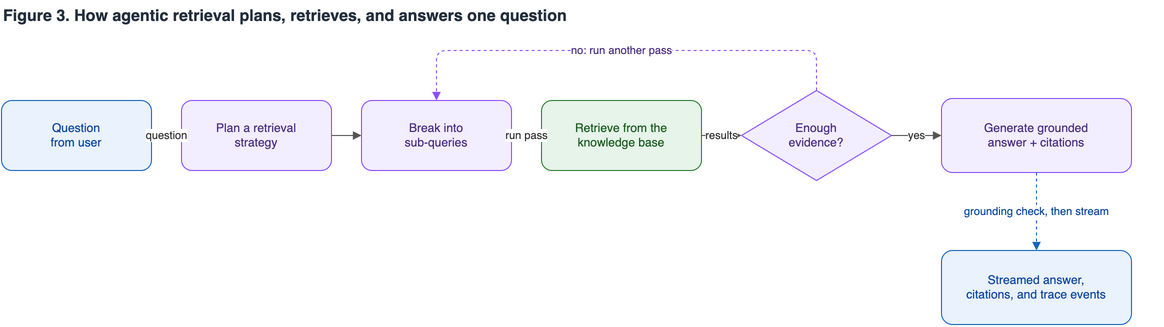
Figure 3: The agentic retrieval loop from question to cited answer
Render citations
Each citation identifies a character span in the answer and references supporting entries in the result event’s results array. The application uses the indexes to associate the displayed text with its source documents.
The following code prints each cited span beside the built-in x-amz-bedrock-kb-source-uri value for its source document:
generated = final_result["generatedResponse"]
results = final_result["results"]

for citation in generated.get("cita