Teams that process documents at scale know the routine: files land in storage, someone notices, opens each one, decides what it needs, and routes it for review. Monitoring alerts queue up the same way, waiting for a person to act on them. The hours lost to manual triage are the operational problem ambient agents solve. Imagine a document lands in your Amazon Simple Storage Service (Amazon S3) bucket and within seconds a job appears on your Jobs page, ready to run (or already running if you configured it that way). The agent analyzes the file, surfaces the findings, and asks you for approval before taking the next step. The event itself is the prompt. That is an ambient agent: it responds to event streams, pauses for human input through a single ask_human tool when it needs to, and resumes from where it left off once the human answers.
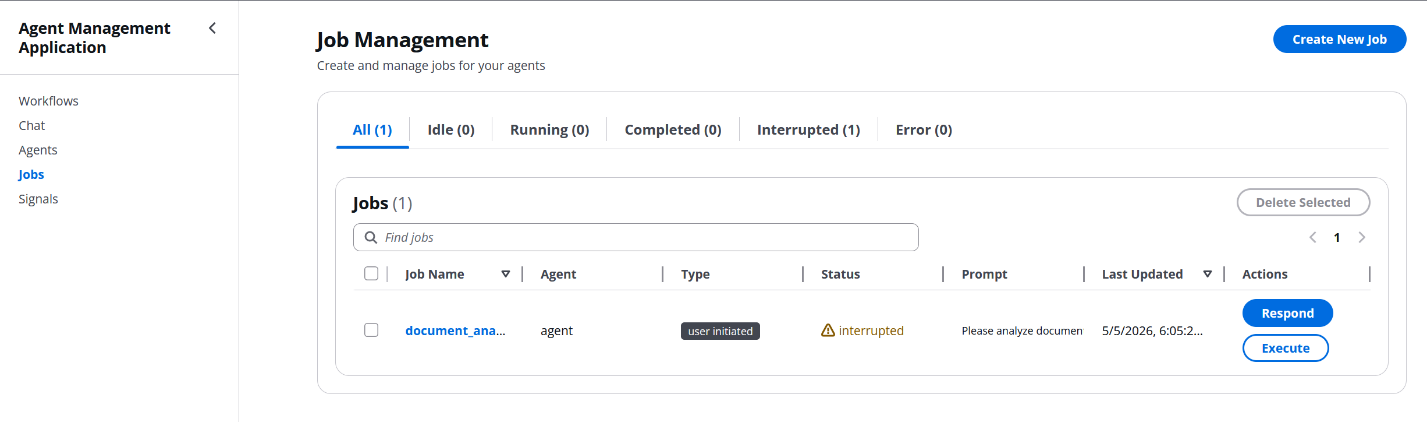
Figure 1: Overview of an ambient agent responding to an event on AgentCore Runtime and pausing for human input
Most AI agent experiences today follow a different pattern: a user opens a chat interface, types a prompt, and waits for a response. That works for one-time questions, but it limits the agent to one conversation at a time and requires a human to describe what happened before anything can act on it. For scenarios where agents should react to events happening across your infrastructure (file uploads, database changes, scheduled tasks, system alerts), that chat-only model breaks down.
Ambient agents describe a different paradigm, one that LangChain among others has articulated. Instead of waiting for users to initiate conversations, ambient agents listen to an event stream and act on it, potentially handling many events in parallel. They aren’t solely triggered by human messages, and multiple agents can run simultaneously. Crucially, they aren’t fully autonomous: a production design pays careful attention to when the agent pauses to interact with humans. When a signal fires, the agent executes its workflow and only interrupts a human when clarification, approval, or review is needed. This human-in-the-loop component lowers the stakes for deploying agents to production, builds user trust, and lets agents learn and improve over time through feedback.
Organizations running on AWS already have the event-driven infrastructure in place: Amazon S3 event notifications, Amazon EventBridge rules, AWS Lambda triggers, and Amazon DynamoDB streams. The missing piece is connecting those event sources to intelligent agents that can reason about what happened, act, and loop in humans when the situation calls for it. Fully automated pipelines like AWS Step Functions can orchestrate workflows but can’t reason through ambiguity or ask clarifying questions. Chat-based agents can reason but require someone to start the conversation. Ambient agents bridge this gap.
Amazon Bedrock AgentCore is a platform to build, connect, and optimize agents at scale, with any framework or model. AgentCore Runtime provides the execution environment that makes this pattern work: container-based agent hosting with support for long-running workloads, built-in session isolation, and integration with Amazon Bedrock foundation models. AgentCore Runtime supports sessions long enough to cover the signal → agent → human-in-the-loop (HITL) flow shown here. The reference implementation caps each agent turn at the Lambda 15-minute timeout, which is more than enough headroom in practice. Combined with AWS Lambda for event processing and Amazon DynamoDB for state management, the result is a fully serverless ambient-agent platform.
In this post we walk through the pattern end-to-end on Amazon Bedrock AgentCore. You will come away understanding:
- How an Amazon S3 or scheduled event becomes a job that an agent runs on AgentCore Runtime, with or without a human in the loop.
- How a single
ask_humantool plus a canonical response envelope is enough to support the full range of human-in-the-loop interactions. - What you get from the reference sample, and what you write on top for your own use case.
Prerequisites
Before deploying the reference implementation, make sure you have the following in place:
- An AWS account with permissions to create AWS Identity and Access Management (IAM) roles, Lambda functions, DynamoDB tables, S3 buckets, Amazon Simple Queue Service (Amazon SQS) queues, Amazon API Gateway APIs, Amazon CloudFront distributions, Amazon Cognito user pools, Amazon Elastic Container Registry (Amazon ECR) repositories, and Bedrock AgentCore runtimes. Administrator access on a sandbox account is a good starting point.
- The AWS Command Line Interface (AWS CLI) configured with credentials for that account and a default AWS Region of
us-east-1(the sample defaults are wired up for that Region). - The AWS Cloud Development Kit (AWS CDK) v2 installed and bootstrapped in your account and Region (
cdk bootstrap). - Docker installed and running locally. The agent container is built and pushed to Amazon ECR as part of deployment.
- Python 3.11 or later for the backend Lambda functions and the agent build, and
Node.js18 or later for the React frontend. - Access to the Anthropic Claude Sonnet 4.5 model in Amazon Bedrock in your target Region. If you haven’t used Bedrock before, follow Manage access to Amazon Bedrock foundation models (FMs) to enable the model. Model availability varies by AWS Region. Check the Amazon Bedrock documentation for the current list of models supported in your target Region. Switching models is a one-line config change later.
Understanding ambient agents
Before we get into the architecture, it helps to look at what makes an ambient agent different from a typical chatbot and at the building blocks the rest of the post relies on: the event-driven trigger model, the ambient signal abstraction, and the single human-in-the-loop tool that ties them together.
Event-driven compared to user-initiated agents
User-initiated agents follow a request-response pattern:
User → Prompt → Agent → Response → UserAmbient agents follow an event-driven pattern:
Event → Signal → Agent → [Optional human interaction] → ActionThe key difference is the trigger mechanism. Ambient agents are activated by system events rather than explicit user requests, which makes them a natural fit for document-processing pipelines, monitoring and alerting, scheduled analysis, and multi-step workflows that need approval gates along the way.
Ambient signals: The trigger mechanism
An ambient signal is a configuration that maps an event source to an agent. When the event occurs, the platform automatically creates a job for the agent. What happens next depends on one setting on the signal:
- With
autoExecute: false(the default), the job lands on the Jobs page inidlestatus and waits for a human to review and run it. This is the safe, review-first flow you want when a signal could fire on unknown input or when the agent has high-stakes tools available. - With
autoExecute: true, the signal processor enqueues the job straight onto the worker queue, the agent runs immediately, and a human is only pulled in if the agent itself callsask_human. This is the fully autonomous flow.
The pattern covers several signal event sources. The reference sample ships the first two. The rest are extension points you add by writing a new handler Lambda function and a corresponding form field on the Signals page:
- Amazon S3 file uploads (ships): Trigger when files are uploaded to specific buckets and prefixes.
- Scheduled events (ships): Trigger agents on a cron-like schedule. Driven by jobs carrying
jobType: "scheduled"rather than by a signal on the Signals page. - API webhooks (extension point): Respond to external system notifications.
- Database changes (extension point): React to Amazon DynamoDB streams or Amazon Relational Database Service (Amazon RDS) events.
Human-in-the-loop: One tool, one envelope, one view
Ambient agents need structured ways to interact with humans. In this sample the agent surfaces those interactions through a single tool (ask_human) and returns a canonical response envelope. In that envelope, status is one of completed, interrupted, or error, and the matching field is result, question, or error. The platform additionally threads session_id and job_id through every response so continuation turns can be correlated. Those are correlation metadata, not part of the core contract your agent must implement. When the agent returns interrupted, the platform moves the job into interrupted status and sets its requiresAction flag to true. The reference React frontend surfaces these on the Interrupted tab of the Jobs page with a warning indicator on each row, so there is no separate review queue to poll. The same Jobs view shows pending questions, proposed actions awaiting approval, final results, and failed jobs, giving a user one place to see everything their agents are doing instead of monitoring multiple chat windows or email threads.
The same mechanism supports several prompting patterns that a reader may recognize from the wider agents literature: a Notify turn where the agent simply reports a result, a Question turn where it asks for clarification, a Review turn where it proposes an action and waits for APPROVE / REJECT / MODIFY, and an Error turn where the failure is captured on the job record and the user decides whether to retry. These are conventions for how the agent writes its question, not separate runtime modes. At the platform level there is exactly one code path and exactly one envelope.
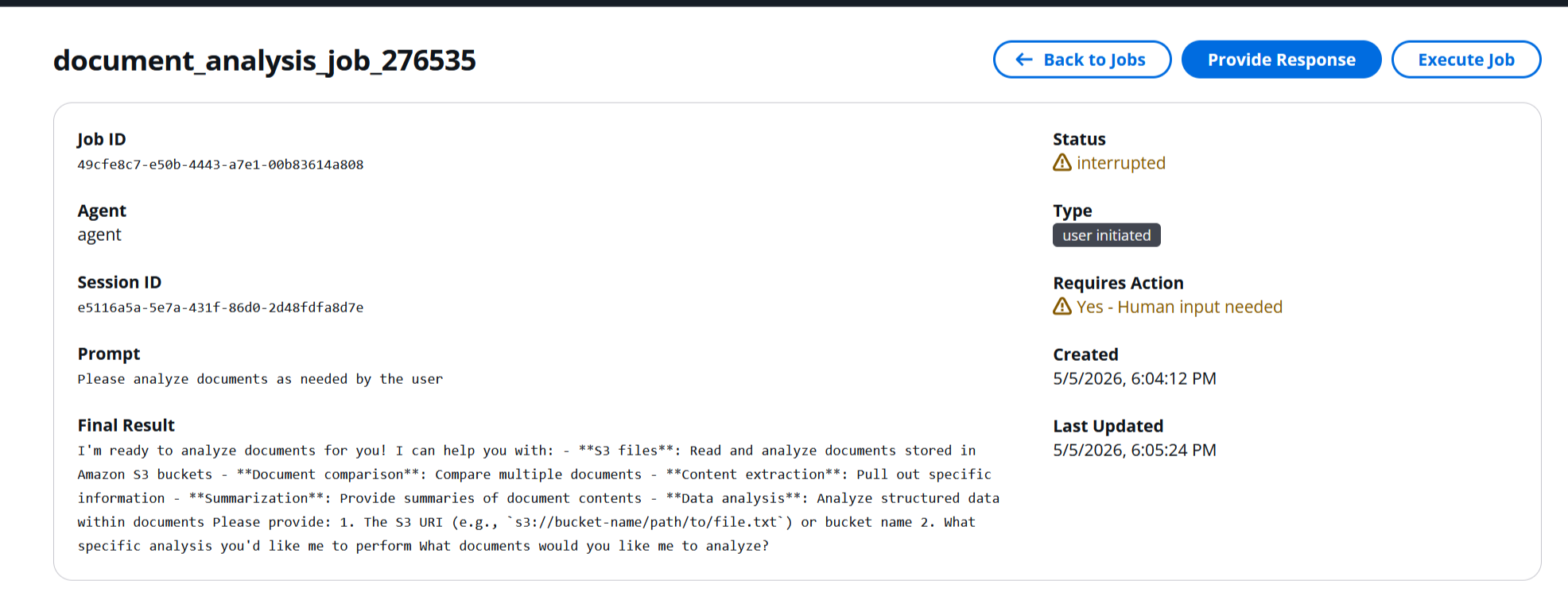
Figure 2: The Notify, Question, and Review human-in-the-loop patterns, all surfaced through the ask_human tool
Architecture overview
The platform is a small set of serverless components stitched together by an event pipeline. This section walks through the end-to-end flow first, then describes each component in turn.
Events flow through the platform end-to-end as follows. Amazon S3 emits an s3:ObjectCreated notification, which a Signal Processor Lambda function receives. The Signal Processor queries a global secondary index (GSI) on the ambient-signals table to find any matching signal for the event bucket, then creates a job record for each match. The API tier (or the scheduler) enqueues the job onto an Amazon SQS queue. The same Job Execution Lambda function that serves the API path also drains the queue through an attached SQS event source, invokes the agent on Amazon Bedrock AgentCore Runtime, and writes results (and any human-input requests) back to Amazon DynamoDB. A React frontend served from Amazon S3 through Amazon CloudFront polls a small Amazon API Gateway and Lambda tier for updates and lets the user respond to pending interactions.
The major components are:
- Amazon S3 with event notifications serves as the entry point for signals when files are uploaded. Prefix and suffix filters are pushed down into the bucket’s notification configuration so the signal processor is only invoked for events that could plausibly match a signal.
- Amazon SQS decouples the API Gateway request from the agent call. A job-execution queue holds pending work. A dead-letter queue (DLQ) captures messages the worker can’t process after the configured number of retries.
- Three pipeline Lambda functions carry the event from intake to agent (a separate management tier behind API Gateway is described later in this section):
- Signal Processor matches incoming events to configured signal definitions and creates jobs.
- Job Execution has two entry paths in one Lambda function: an API handler that enqueues messages, and an SQS worker that consumes them and invokes AgentCore Runtime with the job context.
- Scheduler fires on a one-minute cron and enqueues due scheduled jobs onto the same SQS queue.
- Amazon Bedrock AgentCore Runtime runs agent code in isolated containers and supports long-running workloads.
- Amazon DynamoDB stores the agent registry, job records, ambient signal definitions, chat threads, conversation history, and Powertools idempotency records. Conversation messages are appended atomically with
UpdateItem+list_appendso concurrent writers do not clobber each other. - Five management-tier Lambda functions behind Amazon API Gateway expose the REST API the frontend consumes (
agent_management,job_management,signal_management,chat_management,conversation_management), plus achat_executionworker Lambda thatchat_managementinvokes asynchronously so chat API calls return immediately. See Production deployment for how they are provisioned. - A React frontend served from Amazon S3 through Amazon CloudFront provides the Agent Management UI where users monitor jobs, chat with agents, respond to questions, and review pending actions.
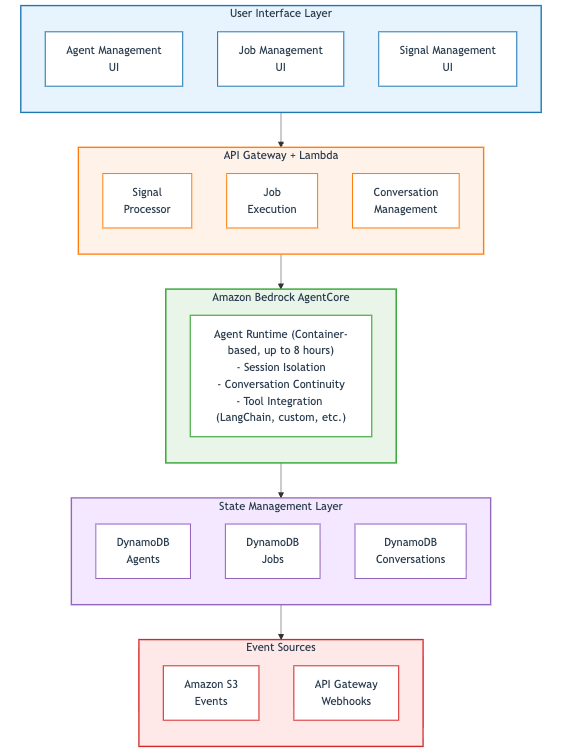
Figure 3: Event flow from Amazon S3 through Amazon SQS and AWS Lambda to AgentCore Runtime, with state in Amazon DynamoDB and a React frontend
Building the event infrastructure
With the architecture in mind, the next step is wiring up the event source that turns an Amazon S3 upload into an agent job. This section creates the bucket, points its event notifications at the Signal Processor Lambda function, and walks through how the processor matches events against configured signals.
Setting up the Amazon S3 signal trigger
Create the Amazon S3 bucket and configure event notifications that drive the Signal Processor:
aws s3 mb s3://amzn-s3-demo-bucket-$(date +%s)The bucket is configured to send s3:ObjectCreated:* events directly to the Signal Processor Lambda function. In this sample the notification configuration is installed dynamically by the signal_management Lambda function when a signal is created or updated, so adding a new signal for a new prefix doesn’t require a redeploy.
Signal Processor Lambda function
The Signal Processor receives Amazon S3 events, finds matching signal definitions in DynamoDB, and creates a job per match. At its heart the handler is the shape shown in the following example. The real handler in backend/functions/multi_agent/signal_processor.py also uses AWS Lambda Powertools for structured logging and idempotency, queries the bucketName-signalId-index GSI on the signals table, applies the prefix and suffix checks configured on each signal, and writes a signal_triggered job row.
def process_s3_signal(event):
    """Process S3 file-upload events and create agent jobs."""
    for record in event["Records"]:
        bucket = record["s3"]["bucket"]["name"]
        key = record["s3"]["object"]["key"]

        for signal in find_matching_signals(bucket, key):
            create_agent_job(signal, {"bucket": bucket, "key": key})
Signal configuration data model
Signals are stored in DynamoDB with this structure:
{
  "signalId": "sig-123abc",
  "userId": "user-456def",
  "agentId": "agent-789ghi",
  "signalName": "Document Processor",
  "signalType": "s3_file_upload",
  "enabled": true,
  "autoExecute": false,
  "bucketName": "ambient-agent-documents",
  "configuration": {
    "bucketName": "ambient-agent-documents",
    "prefix": "invoices/",
    "suffix": ".pdf"
  },
  "triggerCount": 42,
  "lastTriggered": "2026-04-15T10:30:00Z",
  "createdAt": "2026-04-01T00:00:00Z"
}
You only set configuration.bucketName when creating a signal through the API. The top-level bucketName shown in the preceding example is populated by the platform. DynamoDB GSI partition keys can’t be nested inside a map attribute, so signal_management mirrors configuration.bucketName out to a top-level bucketName on every write so the bucketName-signalId-index GSI can fan out to matching signals on every Amazon S3 event.
The autoExecute flag is the single switch that decides whether the agent fires autonomously or a human reviews the job first. The Signals form in the Agent Management UI exposes it as a checkbox alongside