Organizations that process thousands of scanned documents daily, including medical forms, insurance claims, and financial records, face a recurring compliance need: personally identifiable information (PII) redaction before documents are shared with third parties or processed downstream.
Manual redaction doesn’t scale: It consumes staff hours, introduces human error, and creates compliance exposure. Redaction is also a precision problem, in addition to a detection problem. A single page can contain multiple names, dates, and addresses where only some are sensitive to the use case. Traditional redaction approaches pair optical character recognition (OCR) with pattern matching or custom machine learning (ML) models. However, these approaches have limitations when text is degraded, cannot easily express field-level business logic, and require ML expertise to build and retrain custom models as document formats change.
In this post, we demonstrate how to automate end-to-end PII detection and redaction from documents and images at scale on AWS. We design a custom blueprint for PII redaction and showcase a serverless batch architecture for processing with Amazon Bedrock Data Automation (BDA), AWS Step Functions, and AWS Lambda. The process is outlined in Figure 1.
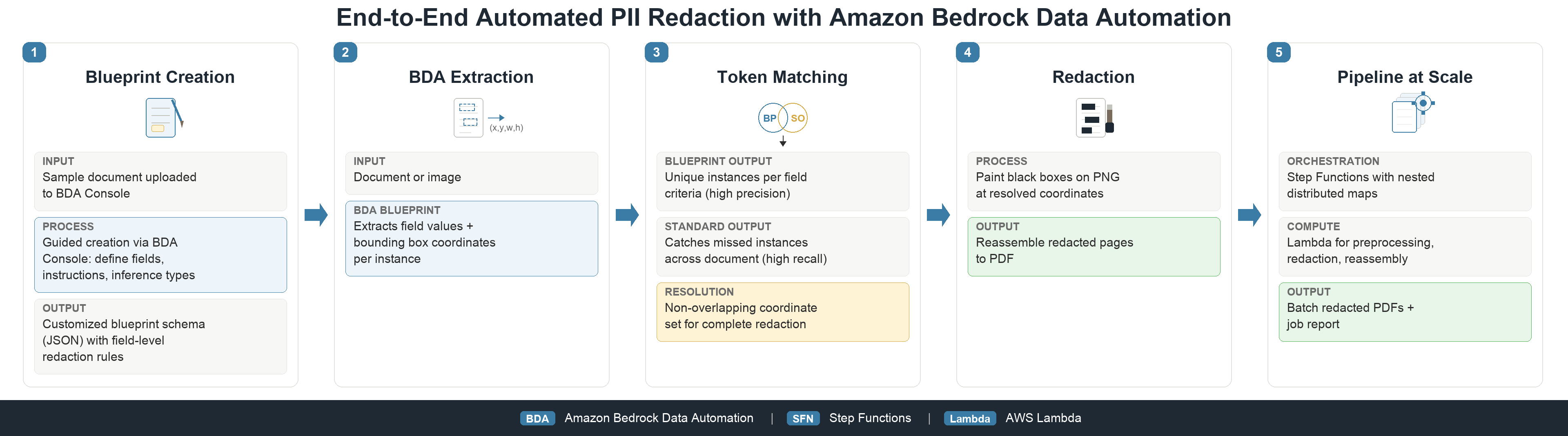
Figure 1: End-to-end serverless PII redaction workflow
Generative AI document understanding helps remove traditional redaction constraints. Foundation models can interpret a document page holistically, including its layout, field labels, and context, and can distinguish whose information a field belongs to using plain-language instructions rather than trained entity models. Amazon Bedrock Data Automation is a service offering from Amazon Bedrock that intelligently extracts structured information from unstructured documents, images, audio, and video.
Using the custom blueprint feature of BDA, you can declare named document fields intended for precise extraction using plain-language instructions. With BDA, you get the desired field content, a confidence score, and bounding box coordinates for each instance for downstream post-processing. By tailoring a custom blueprint to your batch PII redaction use case, you can use BDA as a bespoke PII detection engine for redaction at scale.
To learn more about Amazon Bedrock Data Automation blueprints and custom output schemas, see the Amazon Bedrock Data Automation documentation. For guidance on managing PII in generative AI applications more broadly, see the Generative AI Security Scoping Matrix.
Solution overview
The solution has two parts: a custom BDA blueprint that defines what to redact, and a serverless pipeline that applies it, using best practices we outline in this post, at batch scale. The same serverless pipeline can fulfill many use cases using unique blueprints.
Designing a PII redaction blueprint
Designing a bespoke redaction blueprint for a document processing use case requires four scoping questions: what is the sensitive information, what is not sensitive information, where is it on the page, and how do you remove it? In this post, we demonstrate the process through the use case of PII redactions performed on Attending Physician Statements prior to downstream claim processing.
From the context of the use case, we establish the requirements for redaction in Table 1.
| Scoping Question | Use Case Requirement |
| What is the sensitive information? | Patient name, date of birth, home address, contact information |
| What is not sensitive information? | Physician name, examination dates, office address, office contact information, symptoms and medical notes |
| Where is it on the page? | Spans structured form fields, unstructured handwriting, multiple instances across document |
| How can it be removed? | Identify bounding box coordinates for eligible fields, convert PDF to PNG and apply black box redaction at coordinate locations in post-processing |
Table 1: Requirements for the bespoke redaction blueprint
Using the requirements captured, create a BDA blueprint through the AWS Management Console, AWS Command Line Interface (AWS CLI), or developer SDKs that specify the target blueprint schema. The console offers a walkthrough option to generate a blueprint schema based on a sample document. The final schema must enumerate the fields eligible for redaction, their data type, a brief natural language description, and applicable transformations, such as date format if using an inferred inference type. Explicit inference type provides extraction without expected transformations.
For example, take the case of the patient date of birth field. It’s a date type field, however not all dates should be redacted in the document, such as appointment and signature dates. The blueprint instruction tells BDA which sub-types of date information to extract, focusing the extraction on only the target field.
The instruction scopes the field to the patient, allowing BDA to distinguish the date of birth from appointment and signature dates, even when different formats appear on the same page. The same design process keeps the attending physician’s printed name and signature out of the redaction set. Figure 2 shows an example statement before and after redaction using this PII redaction pipeline. Figure 3 shows the blueprint rendered on the console.
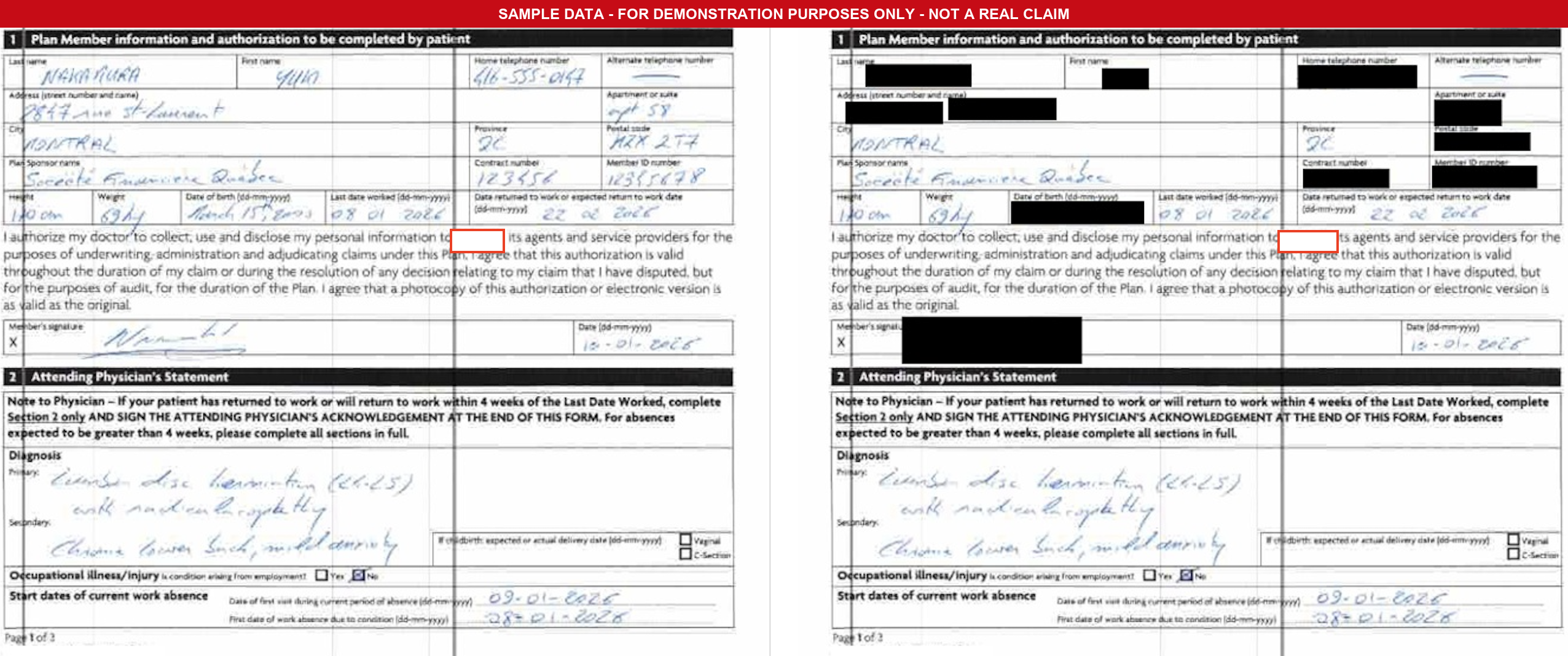
Figure 2: Side-by-side comparison of a handwritten Attending Physician Statement before and after redaction
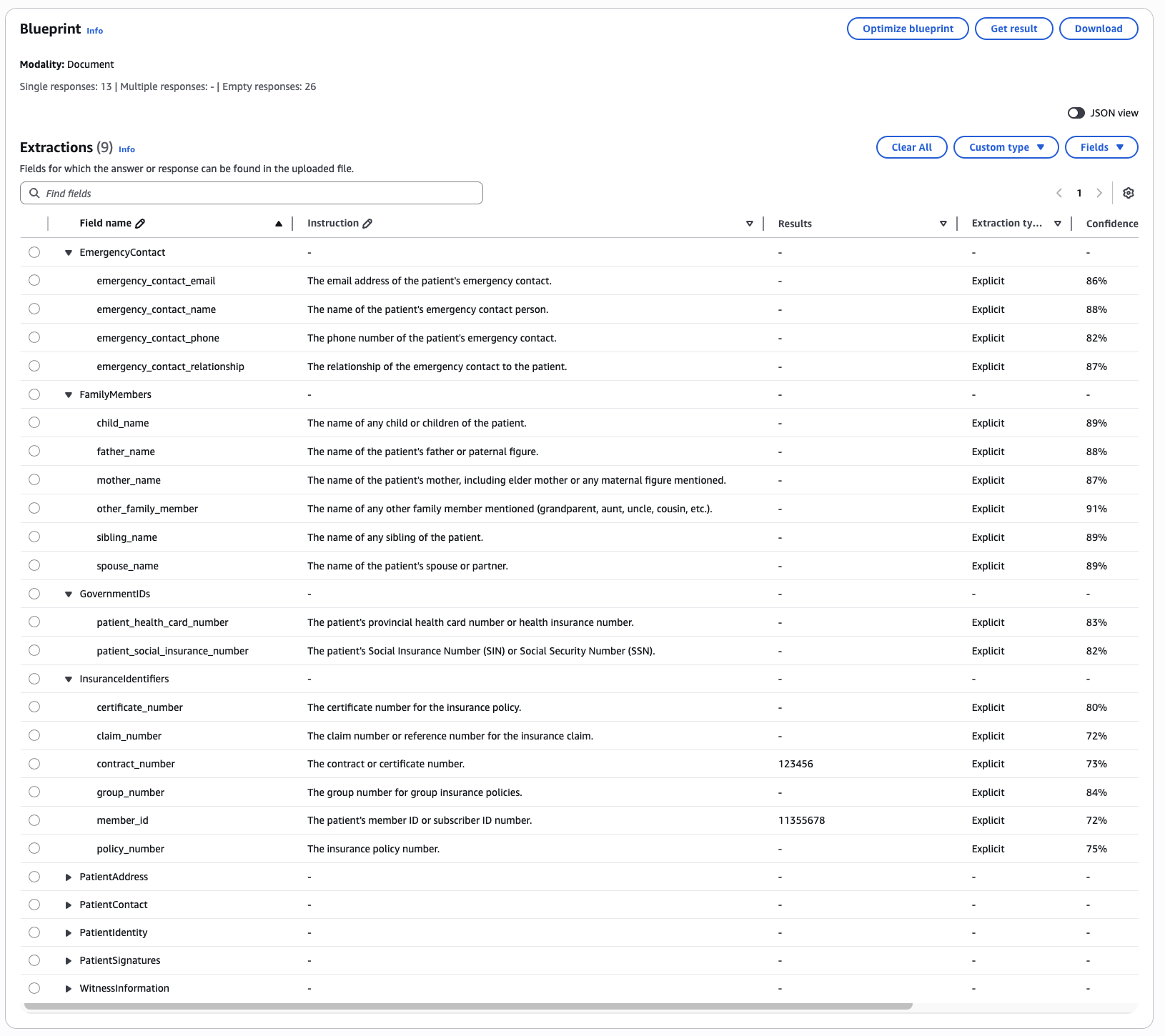
Figure 3: Amazon Bedrock Data Automation console extractions view with the EmergencyContact, FamilyMembers, GovernmentIDs and Insuranceldentifiers field groups expanded
The following excerpt shows a representative field group from the blueprint schema. The full blueprint schema for the PII redaction of the Attending Physician Statements use case defines 37 fields across 9 field groups. Field group is a structure that is used to organize related results into a single location within your extraction.
{
  "PatientIdentity": {
    "type": "object",
    "properties": {
      "patient_first_name": {
        "type": "string",
        "inferenceType": "explicit",
        "instruction": "The patient's given or first name."
      },
      "patient_last_name": {
        "type": "string",
        "inferenceType": "explicit",
        "instruction": "The patient's surname or family name. Look carefully in all sections including signature areas."
      },
      "patient_date_of_birth": {
        "type": "string",
        "inferenceType": "explicit",
        "instruction": "The patient's date of birth in any format (dd-mm-yyyy, mm/dd/yyyy, etc.)."
      },
      "patient_mrn": {
        "type": "string",
        "inferenceType": "explicit",
        "instruction": "The patient's Medical Record Number (MRN)."
      }
    }
  }
}
Each field uses inferenceType: "explicit" for extraction without transformation and a natural-language instruction to scope detection. Field group is a structure that organizes related results into a single location within your extraction.
We recommend designing a bespoke BDA blueprint suited to the redaction requirements of each document processing use case. Use case blueprint customization relies on successive experimentation results, and further automated experimentation is a subject of future work.
In the final deployment, the Amazon Resource Name (ARN) of the desired blueprint is used as an input parameter, allowing the same batch pipeline infrastructure to be orchestrated and deployed to scale multiple redaction use cases. In the pipeline, we send one document page per API call to BDA to focus the generative AI request scope to one page of context at a time.
In an individual request, BDA processes the complete document page to interpret the layout, field labels, and context without relying on character-level OCR. With this, BDA can locate a handwritten patient name that an OCR engine may struggle to transcribe, and can handle edge cases with poor input document quality more effectively.
Evaluating a blueprint
After you’ve designed a blueprint, evaluate its redaction performance by computing precision and recall for redacted PII instances against human redacted ground truth documents. We tested document samples spanning six document quality levels in our use case, from clean typed forms through low-resolution 100 dots per inch (DPI) scans (Table 2).
| Level ID | Document quality | Challenge |
| 1 | Clean typed forms | Baseline case: structured fields, clear print |
| 2 | Printed and faxed | Compression artifacts, rotation, blurring |
| 3 | Faxed with poor printer quality | Noise, partial characters |
| 4 | Handwritten forms | Messy handwriting, variable spacing |
| 5 | Handwritten, printed, and rescanned | Combined print and scan degradation |
| 6 | Low-resolution scans (100 DPI) | Reduced pixel density, aliased text |
Table 2: Document quality testing levels
Initial testing on the sample test cases showed that the blueprint identified each PII instance in our sample set of 12 documents (47 pages) at least once, but would occasionally miss repeated instances in narrative text and handwritten physician notes. To raise recall with minimal precision impact, we introduced a second detection pass using BDA standard output and combined the results through a post-processing token matching step shown in Figure 4.
With a single API call, BDA returns two outputs:
- Custom output: PII fields with bounding boxes detected from the blueprint.
- Standard output: Complete extraction including a bounding box for every word.
response = self._runtime.invoke_data_automation_async(
    inputConfiguration={"s3Uri": input_s3_uri},
    outputConfiguration={"s3Uri": output_s3_uri},
    dataAutomationProfileArn=profile_arn,
    dataAutomationConfiguration={
        "dataAutomationProjectArn": project_arn,
        "stage": stage,
    },
)
Token matching normalizes each detected PII value into word-level tokens, then scans the page’s word-level standard output for words whose normalized form matches a PII token. New, non-overlapping matches are added to the final set of coordinates to redact. With this, repeated PII instances are caught wherever they reappear on the page, including free-text paragraphs and handwriting.
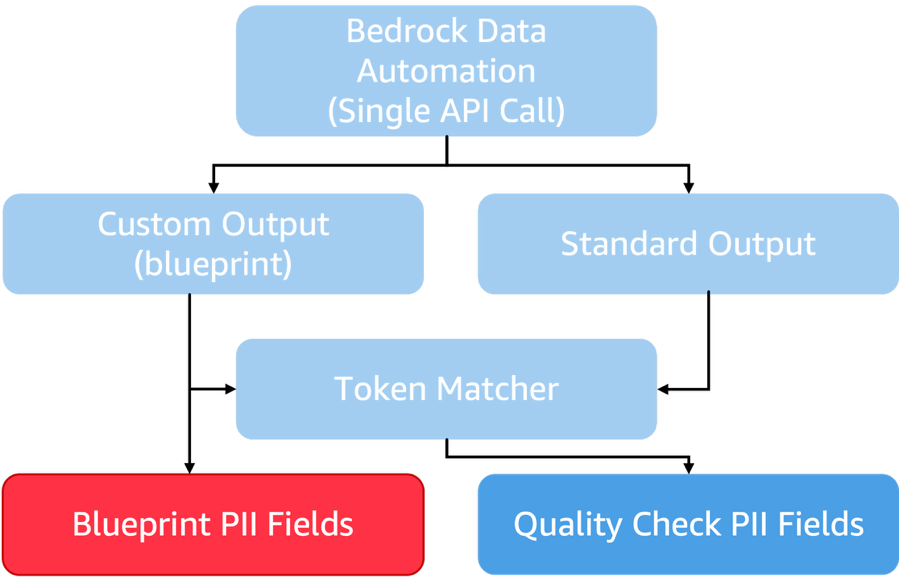
Figure 4: Quality checking process. A single BDA API call produces custom output and standard output, which feed a matcher that produces the final set of PII fields
Because both passes draw on one API call, the quality check adds coverage without latency from a second invocation. We evaluated a set of 12 documents (47 pages) spanning the six quality levels in Table 2, comparing pipeline output to human-redacted ground truth. Results are shown in Table 3.
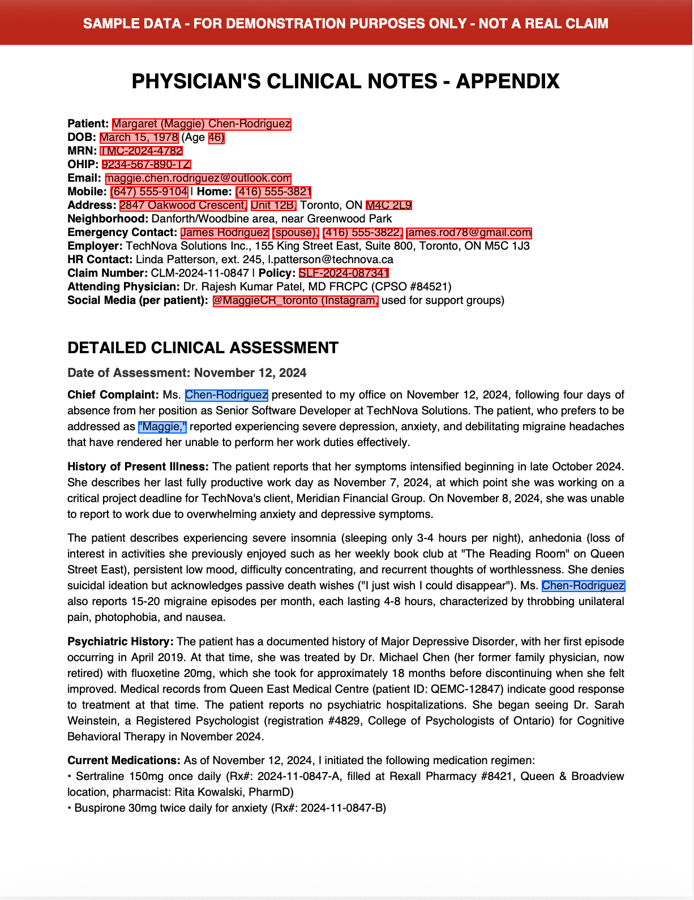
Figure 5: Document page where the patient name is redacted in both a labeled field and narrative text
| Redaction Design | Precision | Recall | Notes |
| Blueprint extraction only | 97.0% | 89.3% | High precision on explicitly declared fields. Missed PII in free-text narrative blocks |
| Blueprint + standard output + matching logic | 96.5% | 95.2% | Token matching added coverage for repeated PII in narrative text. With minor over-redaction precision trade-off |
Table 3: Redaction quality evaluation against human-redacted ground truth for the use case
Introducing the BDA standard output call as a quality check step increased redaction recall from 89.3 percent to 95.2 percent. In Figure 5, the blueprint pass redacts the labeled form field containing the patient name, shown in red. The standard output token match catches the same name where it appears in a narrative paragraph further down the page, shown in blue. Evaluating blueprint performance alongside BDA confidence scores can help you route edge cases for human review as suited to your use case.
Pipeline architecture
Here, we demonstrate how to build a serverless pipeline to promote a validated PII redaction blueprint for batch document processing. Production document volumes for redaction of Attending Physician Statements can span approximately 25,000 pages nightly. Maximizing redaction workload concurrency while maintaining cost efficiency is an important design consideration.
The pipeline runs as a serverless workflow of five AWS Lambda functions orchestrated by an AWS Step Functions state machine. Multiple AWS Step Functions distributed map states fan out concurrent BDA API calls at the page level. Document PDFs are input through an Amazon Simple Storage Service (Amazon S3) prefix. If throttle failures affect your workflow, you can use the native Step Functions redrive capability to continue processing.
Figure 6 outlines the production pipeline architecture.
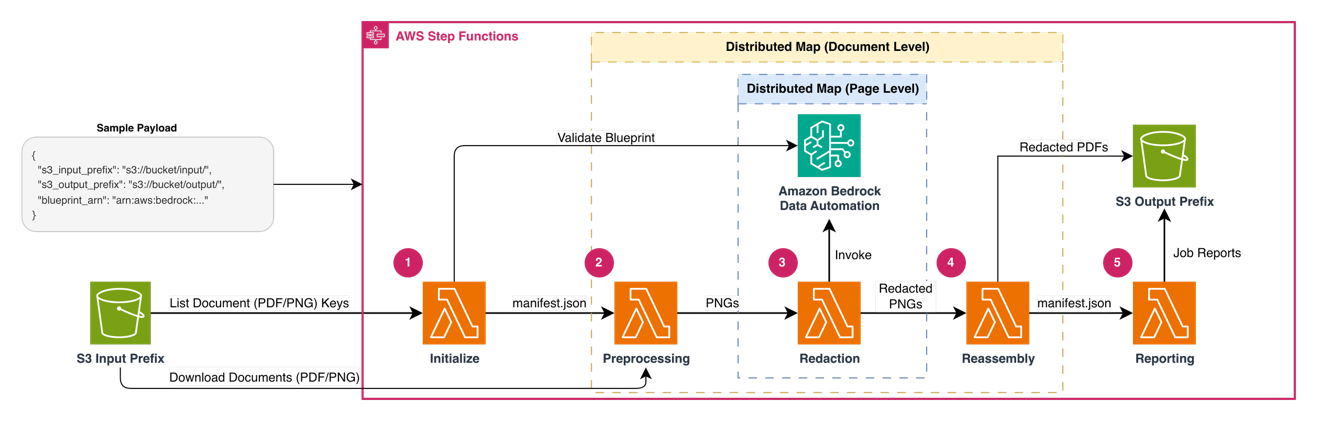
Figure 6: Serverless PII redaction pipeline architecture
The architecture diagram shows an AWS Step Functions state machine orchestrating five sequential Lambda functions: Initialize, Preprocessing, Redaction, Reassembly, and Reporting. Two levels of nested distributed maps handle parallelism: an outer map iterates over documents and an inner map iterates over pages within each document. Amazon S3 provides input and output storage, and Amazon Bedrock Data Automation processes each page image for PII detection.
There are three inputs to the Step Function:
- An S3 input prefix, containing a set of unredacted PDF inputs.
- An S3 output prefix, configuring where to write results.
- The blueprint ARN, the validated BDA blueprint ID developed for the redaction use case.
The redaction workflow includes the following steps:
- Initialize – Validates the input, resolves the blueprint, lists source documents from Amazon S3, and writes a manifest for the document-level distributed map.
- Preprocess – Converts each PDF to per-page PNG images. Image documents pass through as single-page PNGs.
- Detect and redact – Sends each page image to Amazon Bedrock Data Automation for PII detection, then applies black boxes over each detected region coordinates.
- Reassemble – Combines the redacted page images into a single redacted PDF per document and builds document-level metadata.
- Report – Aggregates document summaries into a job-level report and runs a reconciliation check.
Step Functions runs two levels of nested distributed maps: an outer map iterates over documents and an inner map iterates over pages within each document. Your document-level and page-level concurrency settings must suit your account-level service quota for InvokeDataAutomationAsync. Optimize concurrency based on your workload properties and request the increases necessary for your use case.
Performing redaction
The Preprocessing Lambda function converts each input document into per-page PNG images. It downloads the document from Amazon S3, detec