With Amazon SageMaker HyperPod and Qumulo, you can place training compute in one AWS Region and keep your dataset in another. Training large AI models requires massive GPU capacity, but your ideal compute resources and your training data don’t always reside in the same AWS Region. Accessing data across Regions adds network latency and transfer costs. Teams face a choice: either replicate petabytes of data across Regions, or absorb cross-Region latency on every read and accept slower training. This pairing can help tackle that trade-off, letting teams keep frontier models current without moving data or sacrificing throughput.
In this post, we present a solution to this challenge, explain the architecture, and share validation results from a cross-Region training run. By pairing Amazon SageMaker HyperPod with Cloud Native Qumulo (CNQ) and Qumulo’s Cloud Data Fabric (CDF), training jobs can read datasets stored in another AWS Region or on-premises without copying the data, changing the code, or sacrificing throughput. We validated the approach by running the same training job independently on two clusters. The hub cluster runs in the US East (Ohio) Region (us-east-2), co-located with the data. The spoke cluster runs in the US West (Oregon) Region (us-west-2) and reads the data remotely through CDF with 60 ms of network latency. We then compared their throughput. After a short warmup, the spoke cluster matched the hub’s performance.
Pairing Amazon SageMaker HyperPod with CNQ delivers two measurable outcomes:
- Single-Region training performance: CNQ’s cloud-native architecture allows it to scale its performance independently of its data storage size. This results in full 99 percent GPU utilization and p5.48xlarge network saturation with sub-3 ms data operations.
- Remote clusters train at optimal utilization: A HyperPod cluster running in a different Region from its data reaches the same throughput as a cluster co-located with the data (115–117 samples/sec) with no additional data orchestration needed. Throughput converges within the first 100–150 batches, and that one-time warmup is negligible at scale: under 1 percent of wall-clock time at 10,000+ batches, and under 0.1 percent at over 100,000. This ultimately results in 80–90 percent GPU utilization for the initial phase of training for 100–150 batches and then converges on 98–100 percent GPU utilization.
Solution overview
Amazon SageMaker HyperPod provides the managed training infrastructure including resilient clusters with automatic health checks, node replacement, and checkpoint recovery. The solution pairs SageMaker HyperPod with Qumulo’s storage layer. We validated the solution with the following components:
- Single source of truth: Store your training dataset in one AWS Region using Cloud Native Qumulo (CNQ).
- Cross-Region access: Each HyperPod cluster mounts its local CNQ instance over Network File System (NFS). The CNQ spoke cluster retrieves data from the hub cluster over Virtual Private Cloud (VPC) peering, making the full dataset available without cross-Region access from the compute nodes.
- Intelligent data placement: Qumulo’s Cloud Data Fabric (CDF) uses predictive caching through NeuralCache. It learns your data loader access patterns and serves data from local Non-Volatile Memory Express (NVMe), making cross-Region latency transparent after an initial warmup period.
Figure 1 shows the validated architecture. In the spoke Region, machine learning developers submit jobs through an Amazon Elastic Kubernetes Service (Amazon EKS) orchestrator, which runs them on the HyperPod cluster compute nodes. Those nodes mount a local CNQ spoke over NFS. The CNQ hub in the second Region holds the single copy of the training data, and CDF projects that dataset to the spoke over VPC peering, so the compute nodes read from the same local mount path in both Regions.
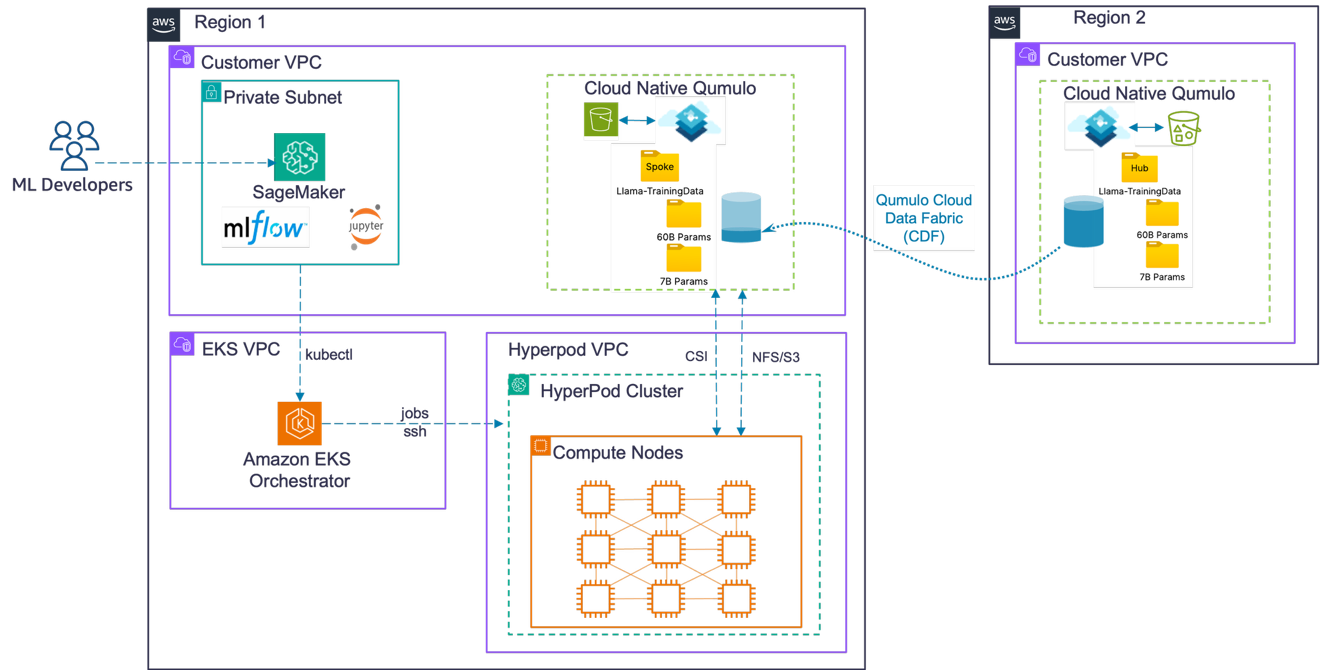
Figure 1: SageMaker HyperPod with multi-Region data on Qumulo
About Qumulo Cloud Data Fabric
CDF makes a single dataset on a hub Cloud Native Qumulo (CNQ) instantly visible and accessible to multiple spoke CNQ instances. This holds even on network links with more than 100 ms of latency. The primary component is Qumulo’s NeuralCache, which uses an AI model to predict the next 4 KB blocks a job will need and pre-caches them at the spoke. Combined with CNQ’s elastic performance, the dataset performs like local storage for the spoke clusters in this validated configuration, without the costs of full data replication.
We ran the same training job (1.02 billion-parameter LLaMA v3, two ml.p5.48xlarge instances per Amazon SageMaker HyperPod cluster, 16 H100 GPUs total) independently on each cluster. The following table compares the performance:
| Configuration | Training speed | Time to 999 batches | NeuralCache state |
| Hub (us-east-2 to us-east-2) | 116–117 samples/sec | 18.5 minutes | N/A (local) |
| Spoke, Warm Cache (us-east-2 to us-west-2) | 115–116 samples/sec | 18.5 minutes | Converged |
| Spoke, Cold Start (us-east-2 to us-west-2) | 95–115, then 116 samples/sec | ~19–20 minutes* | Warming then Converged |
** Worst-case scenario with no prior runs. Batches 0–150 run 15–20 percent slower during NeuralCache warmup, then converge to hub-level performance within the first epoch.*
Understanding the architecture
The following sections introduce the validated architecture with Qumulo configured in the same Region as the HyperPod cluster as a hub and also as a spoke.
How Cloud Data Fabric and NeuralCache work
Cloud Data Fabric (CDF) keeps a single authoritative copy of your dataset on the hub cluster and projects it to spoke clusters as a unified Portable Operating System Interface (POSIX) namespace. When a spoke is created, CDF replicates the filesystem metadata to it, so the full namespace is browsable within seconds, before file data has moved. When the spoke mounts the filesystem, CDF services each read from the nearest valid source: local NVMe cache on a hit, the hub on a miss. CDF also uses advanced congestion control, which paces to measured bottleneck bandwidth and round-trip propagation time rather than backing off on packet loss. This is what keeps a long-haul link full where loss-based algorithms collapse. CDF sustains near-line-rate throughput on paths with round-trip times (RTTs) as high as 900 ms.
NeuralCache is the predictive caching layer inside CDF. It observes the sequential 4 KB block reads issued by the training data loader and learns the access pattern. It then places data predictively before the job issues the request. Within the first 100–150 batches, the model learns to predict which blocks will be requested next and pre-fetches them from the hub into local NVMe storage on the spoke. Once warmed, 94–96 percent of reads are served from local cache at sub-5 ms latency. This results in lower latency operations for applications.
Hub configuration
Data and compute share the same Region. Qumulo delivers 1.0–1.3 GBps sustained read throughput (saturating the 10 Gbps network link) at 2–3 ms max read latency, keeping GPUs fully utilized throughout training. Co-locating data and compute matters because every data loader read travels only within the Region, so there’s no wide-area network hop on the critical path. CNQ sustains these numbers because its cloud-native architecture scales throughput with the size of the cluster rather than the size of the dataset. This is why a 4-node cluster can saturate the network link feeding the GPUs. Figure 2 shows this single-Region layout, with the HyperPod cluster, the Amazon EKS orchestrator, and the CNQ hub that stores the dataset all in one Region.
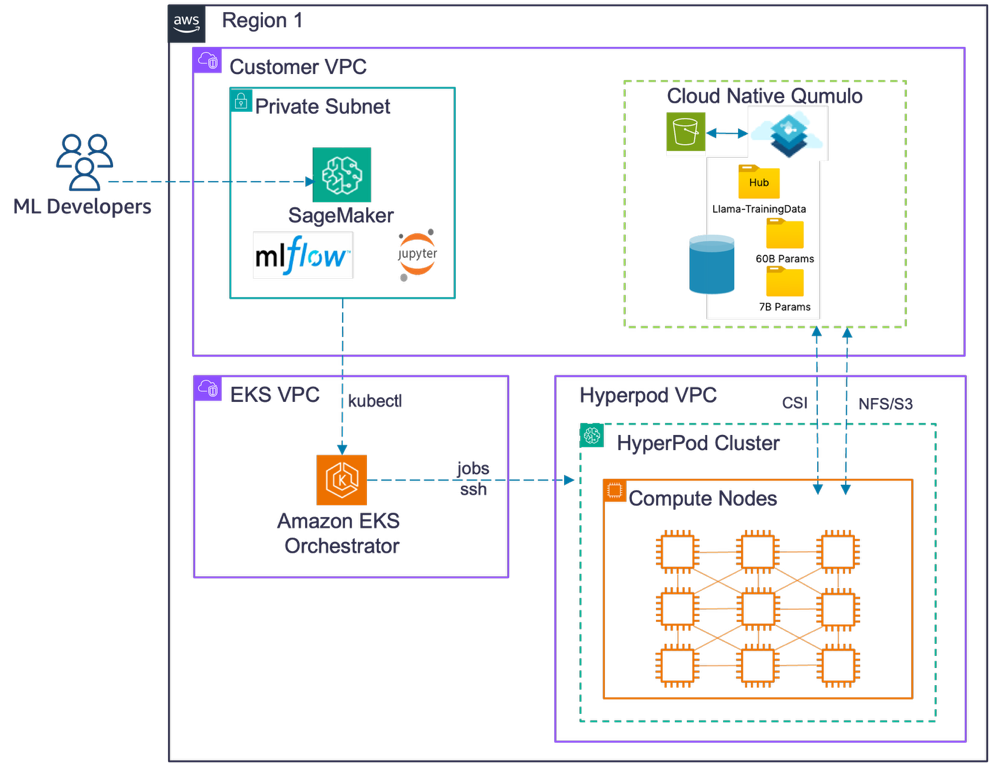
Figure 2: SageMaker HyperPod with single-Region data on Qumulo
Spoke configuration (cold start)
Your Amazon SageMaker HyperPod cluster runs in a different Region from where the data originates. It mounts the local Qumulo spoke, which handles fetching data from the hub. NeuralCache observes your data loader access patterns in real time and begins caching data locally. During the initial 100–150 batches, cross-Region latency is visible and training runs at 95–105 samples per second. Performance then converges to hub-equivalent levels (115–117 samples per second) for the remainder of the run. Figure 3 shows this cross-Region layout. The HyperPod cluster and a CNQ spoke run in one Region, and the CNQ hub that holds the dataset runs in a second Region, connected by CDF over VPC peering.
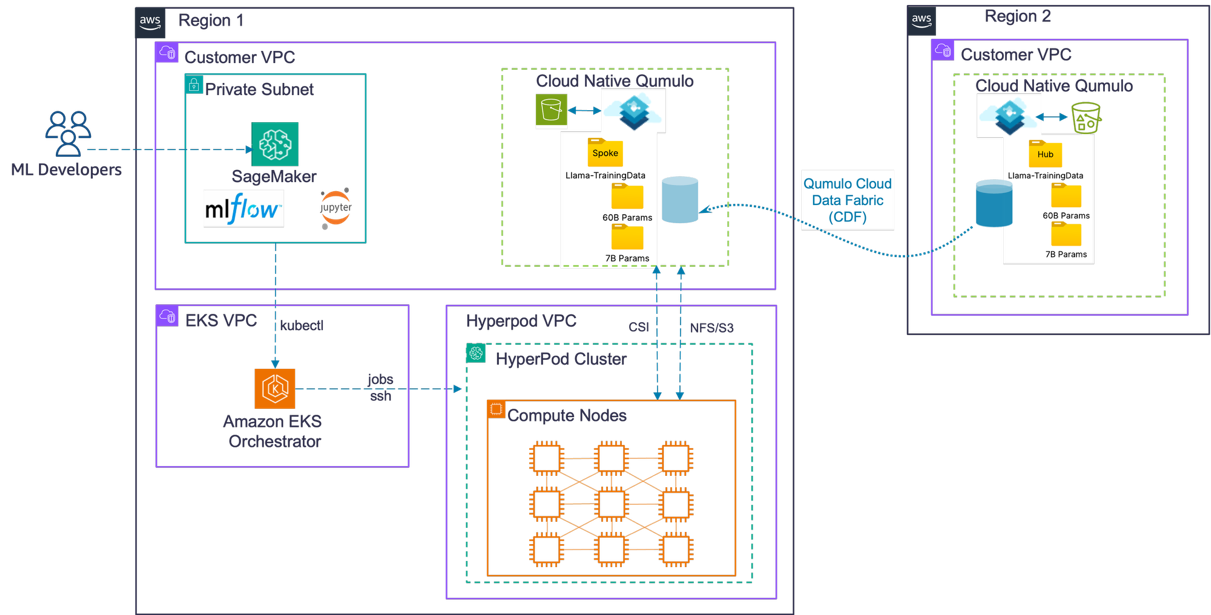
Figure 3: SageMaker HyperPod with multi-Region data on Qumulo (cold start, worst case)
Spoke configuration (warm cache)
Subsequent runs benefit from a fully warmed NeuralCache. With a 94–96 percent cache hit rate, data is served from local NVMe at sub-5 ms latency, delivering immediate hub-equivalent performance with GPU utilizations above 99 percent.
Walkthrough
This walkthrough provides a step-by-step process for configuring and running these same tests.
Prerequisites
To set up a representative environment, you need the following prerequisites:
- An AWS account with Amazon SageMaker HyperPod enabled.
- Deploy Qumulo Cloud Native in your primary Region (us-east-2, Ohio).
- Sufficient quota for ml.p5.48xlarge instances (two per cluster).
- Configure VPC peering between hub and spoke Regions.
- Basic familiarity with PyTorch and distributed training concepts.
Step 1: Deploy Qumulo Cloud Native in your hub Region
Deploy Qumulo Cloud Native in us-east-2 from AWS Marketplace. In the Amazon Simple Storage Service (Amazon S3) bucket that hosts your deployment files, find the AWS CloudFormation template at templates/cnq-standard.template.yaml and copy its object URL. Create the stack from that URL, then choose r5.8xlarge instances and a 4-node cluster in your existing VPC.
Step 2: Configure VPC peering between Regions
Create a VPC peering connection between your hub (us-east-2) and spoke (us-west-2) VPCs. Then accept the connection in the peer Region and update the route tables in both Regions so that each VPC’s CIDR range routes to the peering connection. This gives Qumulo instances in the spoke Region a path to the Qumulo instances in the hub Region. Now, Amazon SageMaker HyperPod instances in the spoke Region (us-west-2) have access to data in the hub Region (us-east-2) through their local NFS mount. This is because both Qumulo clusters are connected with a private, low-latency path.
VPC peering traffic between AWS Regions is encrypted in transit. Configure security groups on both the Qumulo and HyperPod instances to allow only the required NFS ports (TCP 2049) between the two VPCs.
Note: Replace placeholder values (shown in angle brackets) with your own resource identifiers.
aws ec2 create-vpc-peering-connection \
    --vpc-id <hub-vpc-id> \
    --peer-vpc-id <spoke-vpc-id> \
    --peer-region us-west-2 \
    --region us-east-2
Accept the peering connection from the spoke Region. Then update the route tables in both Regions so that each VPC’s CIDR block routes through the peering connection:
# Accept the peering connection in the spoke Region (us-west-2)
aws ec2 accept-vpc-peering-connection \
    --vpc-peering-connection-id <peering-connection-id> \
    --region us-west-2

# Add a route in the hub route table (us-east-2) pointing to the spoke CIDR
aws ec2 create-route \
    --route-table-id <hub-route-table-id> \
    --destination-cidr-block <spoke-vpc-cidr> \
    --vpc-peering-connection-id <peering-connection-id> \
    --region us-east-2

# Add the reciprocal route in the spoke route table (us-west-2)
aws ec2 create-route \
    --route-table-id <spoke-route-table-id> \
    --destination-cidr-block <hub-vpc-cidr> \
    --vpc-peering-connection-id <peering-connection-id> \
    --region us-west-2

# Verify the peering connection is active
aws ec2 describe-vpc-peering-connections \
    --vpc-peering-connection-ids <peering-connection-id> \
    --query "VpcPeeringConnections[0].Status.Code" \
    --region us-east-2
# Expected output: "active"
Step 3: Upload your training dataset to Qumulo
Mount Qumulo over NFS and sync your pre-tokenized dataset. We used the C4 dataset, tokenized for LLaMA (48.4 million sequences packed to 4,096-token windows). Qumulo presents a unified POSIX namespace, so hub and spoke instances use the same mount path.
sudo mount -t nfs4 -o rw,hard,nointr,proto=tcp <qumulo-ip>:/ /mnt/qumulo
aws s3 sync s3://<your-bucket-name>/c4-tokenized/ /mnt/qumulo/data/c4/
Step 4: Create your HyperPod clusters
Create Amazon SageMaker HyperPod clusters in both Regions with ml.p5.48xlarge instances. HyperPod manages the underlying infrastructure (health monitoring, automatic node replacement, and checkpoint-based recovery), so your training run survives hardware failures without manual intervention. Configure a lifecycle script that mounts Qumulo at startup. The spoke cluster uses the same lifecycle script and mounts the local Qumulo spoke instance over NFS. The Qumulo spoke retrieves data from the hub transparently over VPC peering.
aws sagemaker create-cluster \
    --cli-input-json file://hub-cluster-config.json \
    --region us-east-2

aws sagemaker create-cluster \
    --cli-input-json file://spoke-cluster-config.json \
    --region us-west-2
Each cluster is defined by a CreateCluster request file. The following hub-cluster-config.json creates a two-node ml.p5.48xlarge instance group attached to your Amazon EKS control plane, with automatic node recovery turned on and a lifecycle script that mounts Qumulo at startup:
{
    "ClusterName": "hyperpod-hub-us-east-2",
    "InstanceGroups": [
        {
            "InstanceGroupName": "training",
            "InstanceType": "ml.p5.48xlarge",
            "InstanceCount": 2,
            "LifeCycleConfig": {
                "SourceS3Uri": "s3://sagemaker-<your-bucket-name>/lifecycle-scripts/",
                "OnCreate": "on_create.sh"
            },
            "ExecutionRole": "arn:aws:iam::<account-id>:role/<hyperpod-execution-role>",
            "ThreadsPerCore": 1,
            "OnStartDeepHealthChecks": ["InstanceStress", "InstanceConnectivity"]
        }
    ],
    "VpcConfig": {
        "SecurityGroupIds": ["<hub-security-group-id>"],
        "Subnets": ["<hub-private-subnet-id>"]
    },
    "Orchestrator": {
        "Eks": {
            "ClusterArn": "arn:aws:eks:us-east-2:<account-id>:cluster/<hub-eks-cluster-name>"
        }
    },
    "NodeRecovery": "Automatic"
}
Create spoke-cluster-config.json from the same structure, changing ClusterName, the Region in the Amazon EKS cluster ARN, and the VpcConfig values to the spoke Region resources. Each HyperPod cluster must sit in the same VPC as its Amazon EKS control plane, and the subnets must be private.
Step 5: Configure the Container Storage Interface (CSI) driver to mount Qumulo
Install the Qumulo CSI driver using your preferred installation method. This example uses Helm:
helm repo add qumulo https://qumulo.github.io/qumulo-csi-driver
helm repo update
helm install qumulo-csi qumulo/qumulo-csi-driver --namespace kube-system
Verify the CSI driver pods are running before proceeding to mount:
kubectl get pods -n kube-system -l app=qumulo-csi

# All pods should report STATUS=Running. If any pod shows Pending or CrashLoopBackOff, run to inspect the events:
kubectl describe pod <pod-name> -n kube-system
Create a Static Persistent Volume like this YAML: The accessModes value of ReadWriteMany lets every training node mount th