Voice agents, interactive learning applications, accessibility tools, and customer service assistants need to respond without long silent pauses. In this tutorial, you deploy a text-to-speech (TTS) model on Amazon SageMaker AI that can start playing speech before it finishes generating the full response. You use the AWS vLLM-Omni Deep Learning Container (DLC) to deploy Qwen3-TTS, stream text in and audio out over one persistent bidirectional connection, and try the workflow through a Gradio application.
AWS Deep Learning Containers provide Docker images with deep learning frameworks and dependencies for training and inference on AWS. AWS provides deployment guidance for broadly adopted serving frameworks such as vLLM and SGLang. This post is Part 1 of a series about specialized DLCs, including vLLM-Omni, WhisperX, and llama.cpp. It focuses on streamed speech for real-time voice applications. Part 2 applies the vLLM-Omni DLC to image and video generation. The series pairs focused use cases with deployment examples and reproducible benchmarks where they add useful evidence.
The vLLM-Omni project extends vLLM beyond text generation to serve models that process or generate text, audio, images, and video. The AWS vLLM-Omni DLC packages tracked vLLM-Omni releases in AWS images and adds routing middleware for SageMaker AI. You use SageMaker bidirectional streaming to send text and receive audio chunks over the persistent connection.
The earlier post, Build real-time voice applications with Amazon SageMaker AI and vLLM, demonstrates the input side of a voice pipeline. It streams microphone audio to the Voxtral-Mini-4B Realtime speech-to-text (STT) model and returns transcription events. This post adds the output side by sending text to Qwen3-TTS and streaming generated speech back through the vLLM-Omni DLC.
You will clone the code sample, deploy a Qwen3-TTS model, and try streaming speech through a Gradio application.
Specialized AWS DLCs for multimodal inference
Specialized inference runtimes support model architectures and media pipelines that differ from general text generation. AWS DLCs package these runtimes with their framework dependencies and deployment configuration, giving you a consistent image-based path to AWS compute and managed inference services.
vLLM-Omni extends vLLM from text-focused autoregressive generation to models that process and generate multiple modalities. Its heterogeneous pipeline abstraction coordinates multi-stage model workflows, including autoregressive and diffusion stages. It also provides streaming outputs and OpenAI-compatible APIs.
The runtime is not limited to TTS. Its supported models include unified omni models, automatic speech recognition (ASR), TTS, audio generation, image generation, and video generation. This post uses Qwen3-TTS as a focused example because streamed speech provides a direct way to demonstrate bidirectional audio output.
The previous vLLM post covers the input path: microphone audio enters a Voxtral model and transcription events return to the application. A voice application can pass that transcription to its conversation logic, then use this example to turn the response text into streamed speech. The orchestration between the two endpoints remains outside this walkthrough.
Solution overview
The complete sample lives in 03-features/bidirectional-streaming-vLLM-Omni. Clone the repository to use the deployment script, shared streaming transport, and Gradio client together.
SageMaker bidirectional streaming exposes a full-duplex WebSocket transported over HTTP/2. The client connects to the SageMaker Runtime endpoint on port 8443. The SageMaker inference sidecar forwards the connection to the vLLM-Omni native WebSocket route inside the container.
Figure 1 shows the request and response path. The client sends session configuration and text events. Qwen3-TTS returns audio lifecycle and chunk events over the same connection.
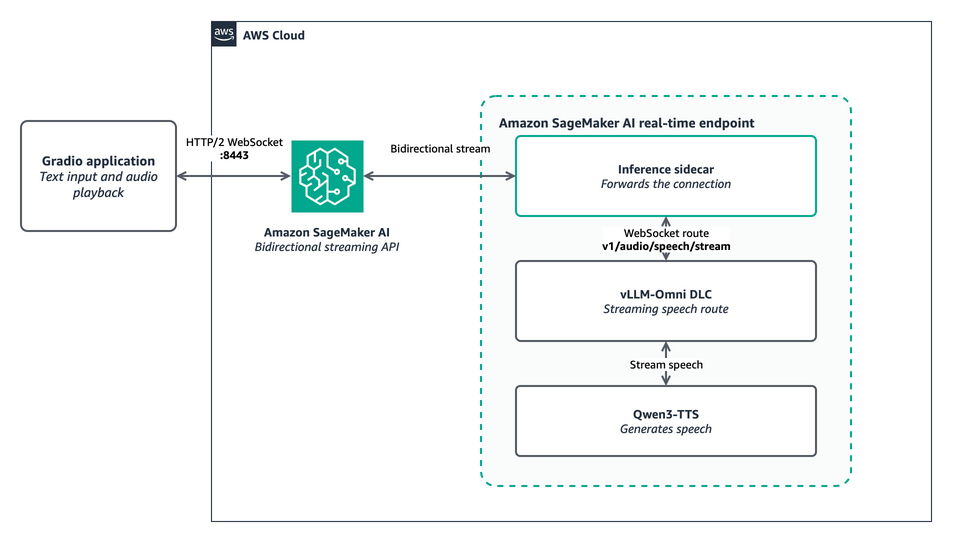
Figure 1: A Gradio application uses an HTTP/2 WebSocket to stream text events through Amazon SageMaker AI, the inference sidecar, and the vLLM-Omni DLC to Qwen3-TTS. Audio events and 24 kHz PCM chunks return over the same connection
The vLLM-Omni v1.5 DLC adds the bidirectional streaming capability label and routing middleware required by SageMaker AI. The sample uses v1/audio/speech/stream, one of the native WebSocket routes exposed by vLLM-Omni.
The endpoint configuration also uses SageMaker instance pools. An instance pool defines a priority-ordered list of compatible instance types for one production variant. SageMaker first tries ml.g6.xlarge, then falls back to ml.g6e.xlarge, ml.g5.xlarge, or ml.g4dn.xlarge when capacity is unavailable. It still provisions one instance, not one instance per pool.
SageMaker validates quota for every configured pool entry when it creates the endpoint, so you need available quota for each included type. Your hourly cost can also change if SageMaker selects a different instance. Use --instance-types to restrict the pool to the types that meet your quota, price, and performance requirements.
Prerequisites
Before starting, you need:
- An AWS account with credentials configured for the AWS Command Line Interface (AWS CLI) or an AWS SDK
- Git
- Python 3.12 or newer
- A SageMaker AI execution role
- Permission to create and invoke SageMaker AI endpoints
- Endpoint quota for at least one pooled instance type:
ml.g6.xlarge,ml.g6e.xlarge,ml.g5.xlarge, orml.g4dn.xlarge - Boto3 version 1.40.0 or newer
- The SageMaker Runtime HTTP/2 Python client version 0.4.0
The walkthrough uses the US East (N. Virginia) Region. The sample builds the DLC image URI and runtime endpoint from AWS_REGION.
Deploy a streaming speech endpoint
- Clone the hosting examples repository. Clone the repository and enter the vLLM-Omni bidirectional streaming sample directory.
git clone https://github.com/aws-samples/sagemaker-genai-hosting-examples.git cd sagemaker-genai-hosting-examples/03-features/bidirectional-streaming-vLLM-Omni - Install the required Python packages.Create a virtual environment and install the versions defined by the sample.
python3.12 -m venv .venv source .venv/bin/activate python -m pip install -r requirements.txt - Configure the sample. Set your SageMaker AI execution role. The sample defaults to
us-east-1. Pass--regionto use another supported Region.export SAGEMAKER_EXECUTION_ROLE_ARN="arn:aws:iam::<account-id>:role/<sagemaker-execution-role>"The inference AMI setting is required for the SageMaker sidecar that handles the HTTP/2 WebSocket. The model invocation path must omit the leading slash because SageMaker adds it before forwarding the request.
- Deploy and retain the model endpoint. The sample creates a SageMaker model from the DLC, an endpoint configuration, and a real-time endpoint. The environment variable
SM_VLLM_MODELtells the container which model to load. The script also runs a streaming smoke test and saves the result asvalidation-output.wav.python deploy_bidi_stream.py \ --endpoint-name vllm-omni-bidi \ --region us-east-1 \ --keep-endpointWait until the endpoint reaches
InService. The first deployment takes time because the instance downloads the DLC image and model artifacts. - Launch the Gradio application. Run the checked-in Gradio client against the endpoint.
python sagemaker_bidi_tts_client.py \
  --endpoint-name vllm-omni-bidi \
  --region us-east-1
Open
http://127.0.0.1:6006in your browser. The--shareoption creates a Gradio public link, so leave it disabled unless you need that behavior. - Generate streaming speech. Enter text, choose a voice and language, and choose Generate speech. The shared client opens the bidirectional stream, configures pulse-code modulation (PCM) output, and sends the text.
await send_json(
    stream,
    {
        "type": "session.config",
        "voice": voice,
        "language": language,
        "response_format": "pcm",
        "stream_audio": True,
    },
)
await send_json(stream, {"type": "input.text", "text": text})
await send_json(stream, {"type": "input.done"})
The Gradio audio component plays each 24 kHz PCM chunk as the client receives it. The status field reports the chunk count and total audio bytes.
- Delete the sample resources. Stop the Gradio process, then delete the endpoint, endpoint configuration, and model.
python deploy_bidi_stream.py \
  --endpoint-name vllm-omni-bidi \
  --region us-east-1 \
  --delete-endpoint
Clean up
Confirm that the cleanup command reports deletion of the endpoint, endpoint configuration, and model. If the process stops before cleanup completes, delete the resources through the SageMaker AI console or API. A running GPU endpoint continues to incur charges.
Conclusion
By deploying a text-to-speech model, you used the AWS vLLM-Omni DLC on SageMaker AI to stream audio while the model was still generating it. This example shows how specialized AWS DLCs support multimodal models whose execution and streaming patterns differ from general text generation. Paired with the previous vLLM speech-to-text example, the samples show complementary paths: stream microphone audio into transcription, then stream the application’s text response back as speech. Part 2 which will show how to use the same DLC family for image and video generation.
Try the code sample, then explore the vLLM-Omni DLC documentation and SageMaker AI bidirectional streaming developer guide to apply the pattern to other supported multimodal models.
Resources
- SageMaker AI bidirectional streaming developer guide.
- vLLM-Omni DLC documentation.
- AWS Deep Learning Containers repository.
- SageMaker generative AI hosting examples.
- Generate images and video with vLLM-Omni on SageMaker AI – Part 2.
Acknowledgements
The authors thank Zhuofu Bai, Ayush Sharma, Christian Kamwangala, and Jon Chua for their contributions to the solution and publication process.
About the authors

Yadan Wei
Yadan is a Software Development Engineer on the AWS Deep Learning Containers team. She builds containers that package tested framework versions, dependencies, and AWS deployment configuration for Amazon SageMaker AI, Amazon Elastic Compute Cloud (Amazon EC2), Amazon Elastic Container Service (Amazon ECS), and Amazon Elastic Kubernetes Service (Amazon EKS), including the vLLM-Omni DLC used in this post.

Dmitry Soldatkin
Dmitry is the Worldwide Leader for Specialist Solutions Architecture, SageMaker Inference at AWS. He helps customers design, build, and optimize generative AI and machine learning solutions, with interests in deep learning and deploying machine learning at scale. He has a passion for continuous innovation and using data to drive business outcomes.

Mona Mona
Mona is a Senior AI/ML Specialist Solutions Architect at AWS. She focuses on generative AI, machine learning, and cloud technology and has authored three AI books and multiple technical blogs. She co-authored award-winning research on CORD-19 neural search.

Daniel Wirjo
Daniel is a Solutions Architect at AWS, focused on frontier AI startups. As a former startup CTO, he enjoys collaborating with founders and engineering leaders to drive growth and innovation on AWS. Outside of work, Daniel enjoys taking walks with a coffee in hand, appreciating nature, and learning new ideas.