OpenAI ChatGPT Codex with LiteLLM can provide centralized enterprise controls for generative AI coding agents. These agents help developers understand repositories, write code, run tests, and complete multi-step engineering tasks. As organizations move from individual experimentation to managed adoption, teams need a consistent way to control model access and attribute consumption. They must also apply budgets and rate limits, and observe the model-access path.
OpenAI Codex (Codex) runs its task loop on the developer workstation. It reads local files and runs approved tools under its local sandbox and approval settings. Customers can still route model inference through infrastructure in the customer’s AWS account.
In this post, we walk you through deploying a customer-operated LiteLLM gateway on Amazon Elastic Container Service (Amazon ECS). We show how to connect it to an OpenAI model on Amazon Bedrock, and configure Codex to use the gateway’s Responses API. We also show how to validate semantic continuation, streaming, and function calling. Finally, we explain when direct AWS IAM Identity Center access or a managed gateway such as Portkey can be a better fit.
The complete implementation is available in the guidance-codex repository. For the primary path in this post, follow the LiteLLM on AWS quickstart.
Solution overview
The following architecture places LiteLLM between Codex and Amazon Bedrock. LiteLLM becomes the shared control point for model authentication, routing, budgets, rate limits, and gateway telemetry. Codex retains responsibility for the local task and tool-execution loop.
The following diagram shows the end-to-end request flow from the developer workstation through the gateway to Amazon Bedrock and back. Look for the five numbered steps that trace a single model turn through the infrastructure.
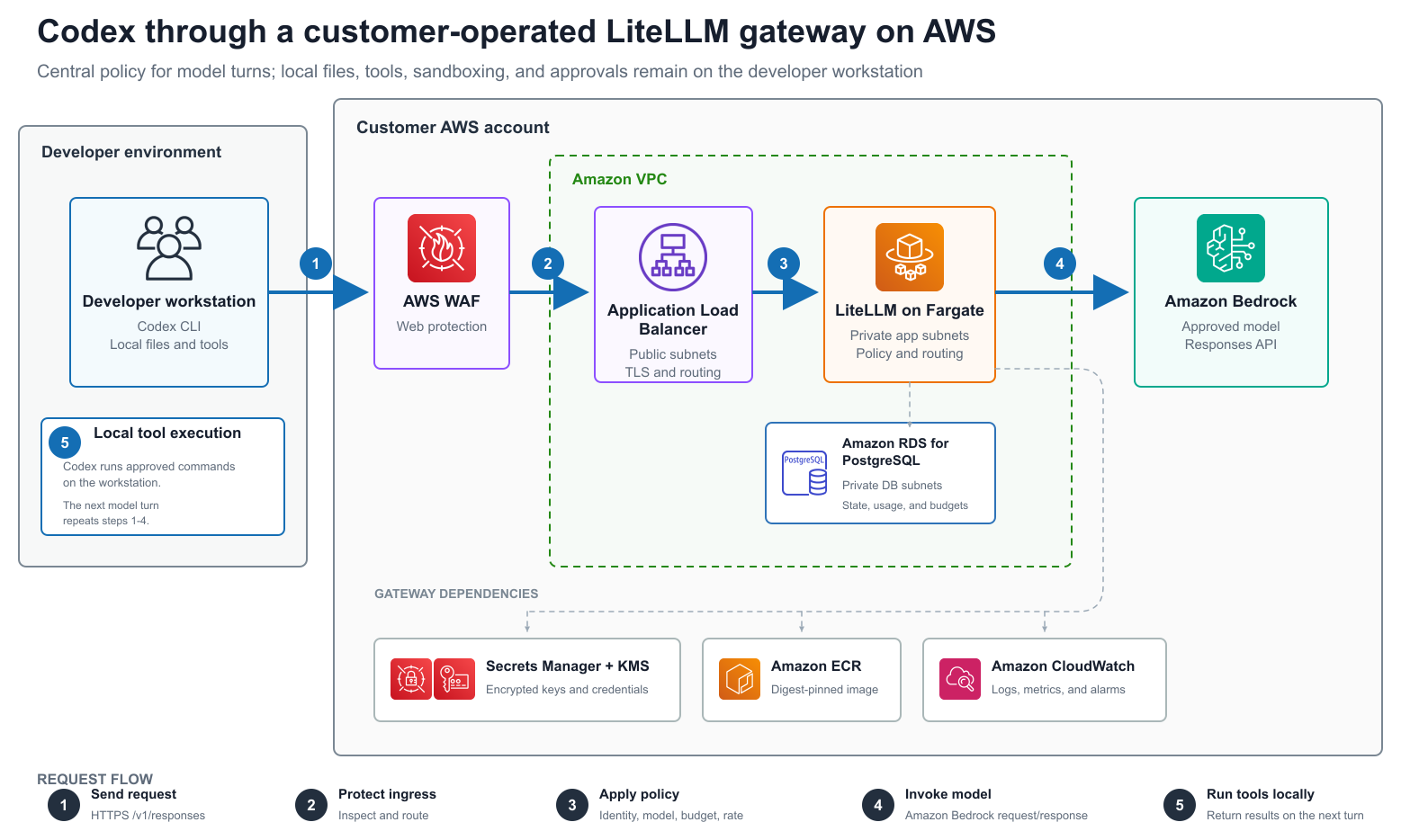
Figure 1: Codex sends model requests through LiteLLM while local tool execution remains on the developer workstation
The request flow proceeds in five steps:
- Codex sends the current task context and available tool definitions to the gateway’s
/v1/responsesendpoint. - The Application Load Balancer and AWS WAF apply network and web-layer controls before forwarding the request to LiteLLM on AWS Fargate.
- LiteLLM authenticates the caller, checks the configured model and consumption policy, and uses its ECS task role to invoke the approved model on Amazon Bedrock.
- Amazon Bedrock returns text or a function call through LiteLLM.
- If the model requests a tool, Codex runs it locally under its sandbox and approval policy. Codex sends the tool result through LiteLLM on the next Responses request, and the loop continues.
The reference deployment also uses:
- Amazon Relational Database Service (Amazon RDS) for PostgreSQL for LiteLLM state, usage, and budget data.
- AWS Secrets Manager and AWS Key Management Service (AWS KMS) for gateway and scoped-key storage.
- Amazon CloudWatch logs, CloudWatch Container Insights, alarms, and deployment health.
- Amazon Elastic Container Registry (Amazon ECR) for an immutable gateway image.
- Optional AWS WAF managed protections and source-IP rate limiting.
This separation matters. The gateway does not receive a general-purpose shell in the AWS account, and it doesn’t replace Codex’s local approvals. It governs each model turn.
Why use LiteLLM for this pattern
LiteLLM is an open source AI gateway that provides model routing, virtual keys, budgets, rate limits, and usage telemetry behind API-compatible endpoints. In this pattern, the customer operates LiteLLM and its supporting infrastructure inside their AWS account.
Direct access to Amazon Bedrock is the lowest-complexity option when native AWS identity, AWS Identity and Access Management (IAM) policies, and AWS CloudTrail logs meet the customer’s requirements. A gateway becomes useful when the system team needs additional controls that are consistent across developers, teams, or model providers.
LiteLLM is a useful customer-operated option when you need to:
- Allow only approved model aliases.
- Issue user- or team-scoped gateway keys.
- Apply hard budgets and requests-per-minute or tokens-per-minute limits.
- Centralize routing and fallback policy.
- Retain gateway-level identity when the upstream model uses a shared ECS task role.
- Operate the gateway, database, networking, logs, and upgrade process in your own AWS account.
The operational responsibility is the main trade-off. Your team owns gateway availability, database lifecycle, version upgrades, incident response, and capacity planning.
Deploy a LiteLLM gateway for Codex on Amazon ECS
This section walks you through deploying the LiteLLM gateway, connecting it to Amazon Bedrock, and configuring Codex to send requests through the gateway.
Prerequisites
For this walkthrough, you need:
- An AWS account and permissions to create a virtual private cloud (VPC), Amazon ECS, Elastic Load Balancing, Amazon RDS, Amazon ECR, AWS WAF, IAM, AWS KMS, Secrets Manager, and CloudWatch resources.
- Access to the selected OpenAI model on Amazon Bedrock in the deployment AWS Region.
- AWS Command Line Interface (AWS CLI) version 2 with an authenticated profile.
- Docker with Buildx.
- Codex CLI.
- Python 3.
- For an HTTPS deployment, a public Amazon Route 53 hosted zone or an existing AWS Certificate Manager (ACM) certificate in the same Region.
The walkthrough was validated in the US East (N. Virginia) Region (us-east-1) with the gateway alias openai.gpt-5.5, which maps to bedrock_mantle/openai.gpt-5.5 in the LiteLLM configuration. Model availability varies by account and Region.
Cost note: This solution creates billable resources, including an Application Load Balancer, Fargate tasks, Amazon RDS, AWS WAF, logs, and model inference. A sample VPC can also create networking charges. Review current pricing for your Region and follow the cleanup section after the walkthrough.
Deploy LiteLLM on Amazon ECS
Clone the repository and create a local deployment environment file:
git clone https://github.com/openai-on-aws/guidance-codex.git
cd guidance-codex
git checkout feat/enterprise-gateway-readiness

cp deployment/litellm/.env.deploy.example \
deployment/litellm/.env.deploy
The real .env.deploy file is ignored by Git. Set the intended AWS profile, Regions, source CIDR, and DNS or certificate values. The following excerpt shows the production-oriented settings:
AWS_PROFILE=your-profile
AWS_REGION=us-east-1
BEDROCK_REGION=us-east-1

ENABLE_TLS=true
GATEWAY_DOMAIN_NAME=codex-gateway.example.com
ROUTE53_HOSTED_ZONE_ID=Z0123456789EXAMPLE
ALB_CERTIFICATE_ARN=
ALLOWED_CIDR=203.0.113.10/32

ENABLE_WAF=true
DB_MULTI_AZ=true
DESIRED_COUNT=2
MIN_TASK_COUNT=2
MAX_TASK_COUNT=10
Use an existing certificate by setting ALB_CERTIFICATE_ARN instead of ROUTE53_HOSTED_ZONE_ID. For a customer landing zone, also provide an existing VPC and separate public, private application, and private database subnets as described in the production deployment guide.
Run the read-only preflight:
make litellm-check
# Direct helper invocation used by Make:
# deployment/scripts/litellm-stack.sh check
The preflight verifies AWS CLI v2, AWS identity, Docker, immutable image references, Region consistency, CIDR restrictions, TLS inputs, local documentation links, and AWS CloudFormation syntax when cfn-lint is available.
Build the reviewed LiteLLM image and push it to Amazon ECR:
CONFIRM_AWS_WRITE=1 make litellm-build
# Direct helper invocation used by Make:
# CONFIRM_AWS_WRITE=1 deployment/scripts/litellm-stack.sh build
The build uses a digest-pinned LiteLLM base image and records the resulting ECR digest in a local ignored state file. CloudFormation receives the immutable digest, rather than a mutable image tag. Internally, the helper creates or reuses an immutable Amazon ECR repository, signs in to Amazon ECR, runs docker buildx build --push, and resolves the pushed image digest.
Create a non-executed CloudFormation change set:
make litellm-plan
# Direct helper invocation used by Make:
# deployment/scripts/litellm-stack.sh plan
This calls aws cloudformation deploy --no-execute-changeset for the networking or gateway template. It creates a reviewable change set but does not execute it.
Review the change set, then deploy:
CONFIRM_AWS_WRITE=1 make litellm-deploy
make litellm-status
# Direct helper invocations used by Make:
# CONFIRM_AWS_WRITE=1 deployment/scripts/litellm-stack.sh deploy
# deployment/scripts/litellm-stack.sh status
The deploy helper runs aws cloudformation deploy for the networking stack and then the LiteLLM gateway stack. The status helper runs aws cloudformation describe-stacks and prints the stack state and outputs.
The ECS service uses deployment circuit-breaker rollback and Application Load Balancer health checks. The reference template also configures target-tracking autoscaling, encrypted logs and data, RDS backups, ALB access logs, and operational alarms.
For customer environments, keep ENABLE_TLS=true, use a trusted DNS name and an ACM certificate, and restrict the Application Load Balancer to approved corporate or VPN CIDRs. Place ECS tasks and Amazon RDS in private subnets. Don’t expose the ECS task port 4000 or PostgreSQL port 5432 publicly.
Create a scoped gateway identity
Don’t distribute the LiteLLM master key to developers. Configure a user or team identity and policy in the ignored deployment file:
CODEX_API_SECRET_ID=codex-litellm-gateway/alice-key
CODEX_KEY_ALIAS=alice@example.com
CODEX_KEY_USER_ID=alice@example.com
CODEX_KEY_MODELS=gpt-5.5
CODEX_KEY_MAX_BUDGET=50
CODEX_KEY_BUDGET_DURATION=30d
CODEX_KEY_TPM_LIMIT=100000
CODEX_KEY_RPM_LIMIT=1000
Provision the key:
CONFIRM_AWS_WRITE=1 make litellm-provision-key
# Direct helper invocation used by Make:
# CONFIRM_AWS_WRITE=1 deployment/scripts/litellm-stack.sh provision-key
The helper resolves the master credential inside a child process, calls the LiteLLM /key/generate API with the configured model, budget, and rate policies, and writes the generated key directly to a KMS-encrypted Secrets Manager secret. It doesn’t place either credential in command arguments or print them to the terminal.
For enterprise rollout, grant each developer profile permission to read only its assigned scoped-key secret and decrypt it with the stack KMS key. Use separate secret paths and IAM policies for teams or environments.
Configure Codex
Generate the provider block:
make litellm-codex-config
# Direct helper invocation used by Make:
# deployment/scripts/litellm-stack.sh codex-config
The helper reads the deployed gateway endpoint from CloudFormation and prints the following Codex provider configuration. It doesn’t write to the user configuration automatically.
Add the output to the user-level ~/.codex/config.toml. Provider and authentication settings belong in user-level configuration. Codex ignores them in project-local .codex/config.toml files.
The generated configuration has this shape:
model = "gpt-5.5"
model_provider = "litellm-gateway"
web_search = "disabled"

[model_providers.litellm-gateway]
name = "LiteLLM Gateway"
base_url = "https://codex-gateway.example.com/v1"
wire_api = "responses"

[model_providers.litellm-gateway.auth]
command = "/absolute/path/to/python3"
args = [
"/absolute/path/to/deployment/scripts/aws-secret-auth.py",
"--aws-cli", "/absolute/path/to/aws",
"--region", "us-east-1",
"--secret-id", "codex-litellm-gateway/alice-key",
"--field", "LITELLM_API_KEY",
"--profile", "developer-profile",
"print-token"
]
timeout_ms = 30000
refresh_interval_ms = 300000
Codex runs the authentication command without standard input and reads the bearer token from its standard output. The helper retrieves the current secret using the named AWS profile, so the token is not stored in config.toml.
In the LiteLLM administration UI, Models + Endpoints shows the stable aliases available to developers and their upstream Amazon Bedrock mappings. This provides a quick visual check that developers see the gateway alias rather than coupling their Codex configuration directly to a provider-specific model ID.
The following figure shows the Models + Endpoints page with two model aliases configured. Confirm that your gateway aliases appear in this list before proceeding to the Codex configuration.
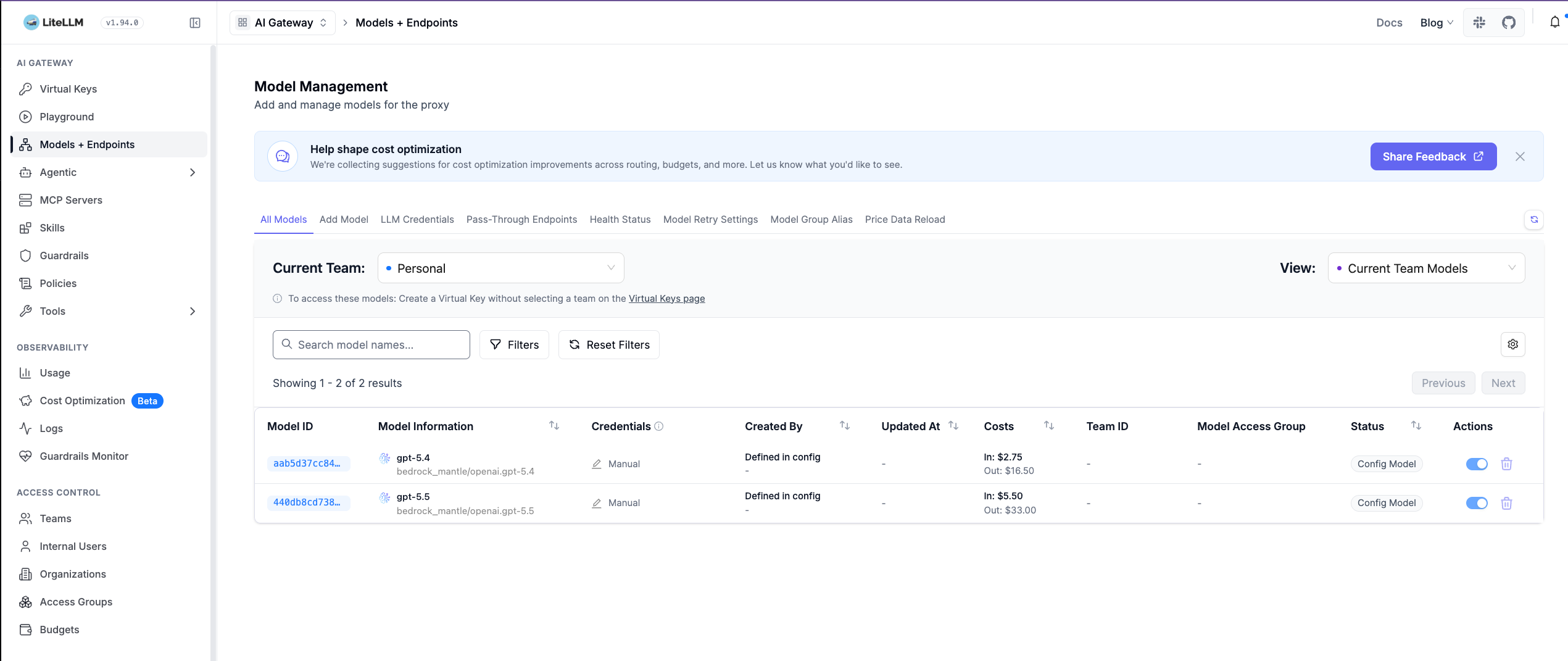
Figure 2: The model management view shows the gpt-5.4 and gpt-5.5 aliases and their Amazon Bedrock Mantle mappings
Test Codex through LiteLLM
Start a new interactive Codex session and use /status to verify that litellm-gateway is the selected provider. For a repeatable non-interactive test, first run a minimal smoke request:
codex exec --sandbox read-only --ephemeral \
"Reply with exactly LITELLM_GATEWAY_OK and no other text."
The command should exit successfully and print LITELLM_GATEWAY_OK. Next, exercise the agent loop with a task that requires both model inference and a local tool:
codex exec --sandbox read-only --ephemeral \
"Read README.md with shell tools and summarize the deployment architecture. Do not modify files."
Codex sends the task and tool definitions through LiteLLM. If the model asks to read the file, Codex runs that command locally and returns the tool result through the same gateway.
Open Logs in the LiteLLM administration UI, select Request Logs, and filter to the test window. Verify:
- the requests have a
Successstatus. - the key alias identifies the dedicated walkthrough or developer key.
- the model resolves to the expected Amazon Bedrock mapping.
- token count, request duration, and cost are populated.
- the tool-using task creates multiple rows as Codex sends tool results in subsequent Responses requests.
A 403 response before a row appears in LiteLLM commonly indicates an upstream network or AWS WAF block. A 401 response indicates missing or invalid gateway authentication. Don’t publish prompts, responses, raw keys, full request IDs, or real employee identities in screenshots.
The following figure shows the LiteLLM Request Logs page after several successful Codex requests have passed through the gateway. Use this page to confirm that requests are reaching Amazon Bedrock and to troubleshoot errors by status code.
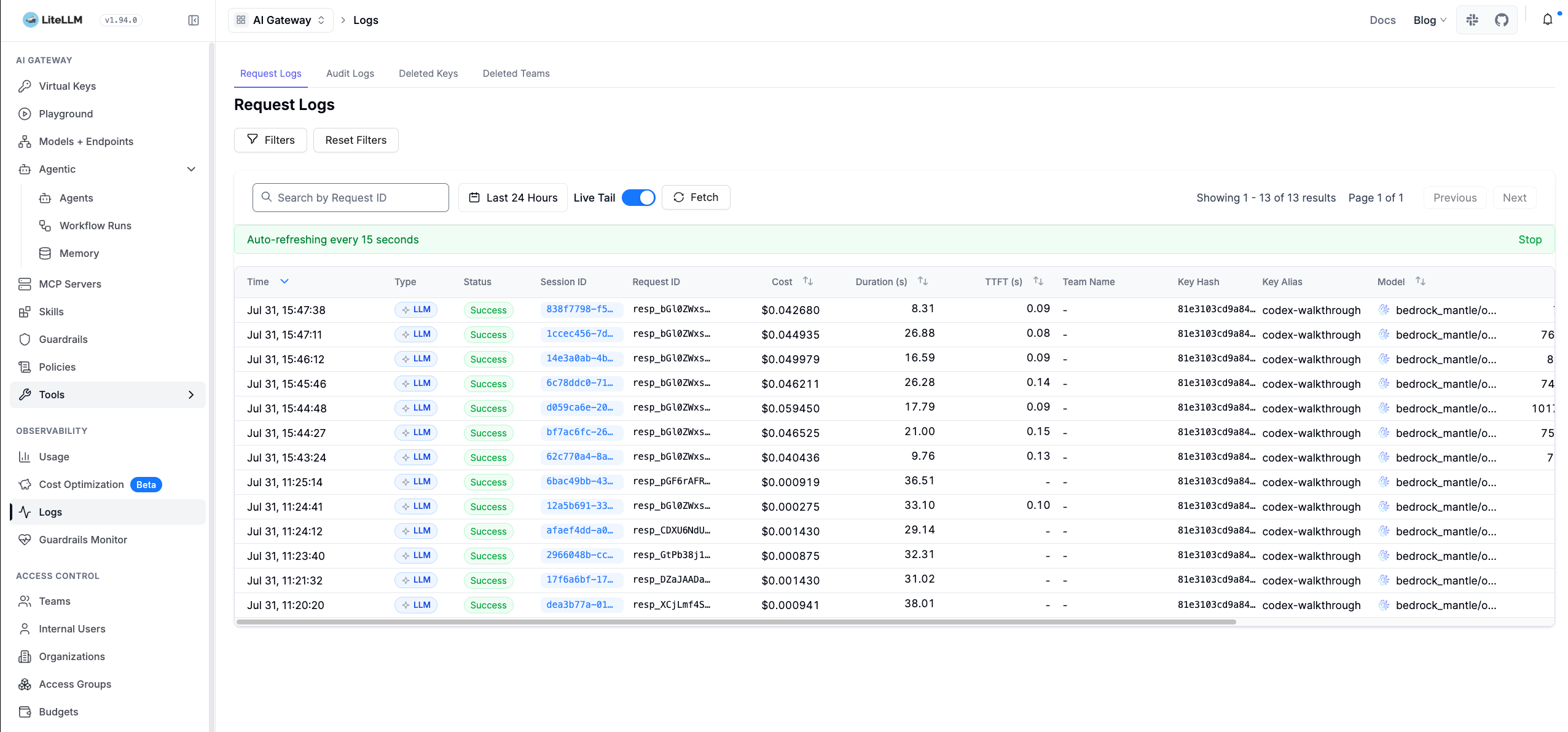
Figure 3: The request log shows successful Codex turns attributed to the codex-walkthrough key alias, including model, cost, duration, and time to first token
Validate the Responses API contract
A successful text prompt does not prove that an agent workflow is compatible. Codex relies on more than a basic chat-completions response. Run the included strict probe:
make litellm-validate
# Direct helper invocation used by Make:
# deployment/scripts/litellm-stack.sh validate
The helper resolves the scoped key into a child-process environment and runs deployment/scripts/validate-responses-contract.py against the deployed gateway.
The probe verifies:
- required Responses object fields and output shape.
- semantic continuation with
previous_response_id. - server-sent event streaming with a completed terminal response.
- a forced function-tool call with a call ID.
The continuation test records a unique test marker in the first response and verifies that it can be recalled in a follow-up response. This catches gateways that accept previous_response_id syntactically but do not preserve the prior response state.
The live deployment passed the complete contract. CloudFormation completed successfully, the ECS service reached its desired task count, the deployment rollout completed, the ALB target was healthy, and the encrypted PostgreSQL database was available and not publicly accessible.
The following figure shows the end-to-end deployment validation dashboa