Amazon SageMaker HyperPod gives machine learning (ML) teams access to large pools of accelerated compute for training and fine-tuning models. When several teams share one cluster, the technical setup is usually straightforward. The challenging part is governance. You must decide which teams can use the cluster, how much capacity each team gets, what happens when one team’s workload competes with another’s, and who is accountable when usage drifts from policy. Amazon SageMaker Unified Studio adds another consideration: You can connect a SageMaker HyperPod cluster to a project so team members can launch workloads from their project workspace. That convenience is valuable, but after multiple teams share visibility into the same cluster, the controls that govern who can do what become even more important. In this post, we show how to administer SageMaker HyperPod through SageMaker Unified Studio while preserving the underlying governance controls. We cover the four layers of control: organization, project, cluster, and workload. We also explain how to design identity, capacity, and observability policies across them. By the end, you will have a repeatable model for offering approved SageMaker HyperPod compute to ML teams in their project context while keeping cluster operations with the infrastructure team.
Amazon SageMaker HyperPod is a capability of Amazon SageMaker AI. Amazon SageMaker Unified Studio is the data and AI development environment where teams build with their data and tools. With SageMaker Unified Studio, you can connect a project to an existing SageMaker HyperPod cluster. Members can then launch machine learning workloads, review cluster and task information, and open a JupyterLab workflow. You continue to manage clusters through Amazon SageMaker AI interfaces and APIs.
This separation gives infrastructure teams a useful operating model. You can manage cluster infrastructure through established cloud operations processes. At the same time, you can present approved compute to machine learning teams in their project context. In this post, we describe how you can design infrastructure boundaries, govern access, allocate shared capacity, and operate SageMaker HyperPod consistently through SageMaker Unified Studio.
Understand the administrative boundaries
A well-governed environment separates organizational administration, project access, and cluster operations. Each layer answers a different question and uses a different control. The following table summarizes each boundary, its primary controls, and its administrative purpose.
| Boundary | Primary controls | Administrative purpose |
| Organization | SageMaker Unified Studio domains, domain units, associated accounts, project profiles, and authorization policies | Determines who can create projects, which accounts and Regions projects can use, and which tools are available |
| Project | Project membership, project roles, and SageMaker HyperPod connections | Defines the collaboration context and the AWS resources that project members can access |
| Cluster | SageMaker HyperPod cluster admin roles, Amazon EKS access entries, role-based access control (RBAC), and EKS Pod Identity, or Slurm controls | Governs cluster configuration, scheduler access, namespaces, tasks, and infrastructure operations |
| Workload | Compute allocations, priority classes, lending and borrowing policies, and task permissions | Controls who can submit work and how shared capacity is assigned |
Treat these controls as layers. A SageMaker HyperPod connection adds an approved cluster to a project. It doesn’t replace the cluster’s AWS Identity and Access Management (IAM), Amazon Elastic Kubernetes Service (Amazon EKS), or Slurm controls. Review the project role, connection access role, EKS access entries and RBAC or Slurm controls, workload identity, data and AWS Key Management Service (AWS KMS) key policies, network policy, task-view restrictions, and scheduler policy together. Make the cluster available only after those controls are aligned.
These controls form four layers, shown in the following figure.
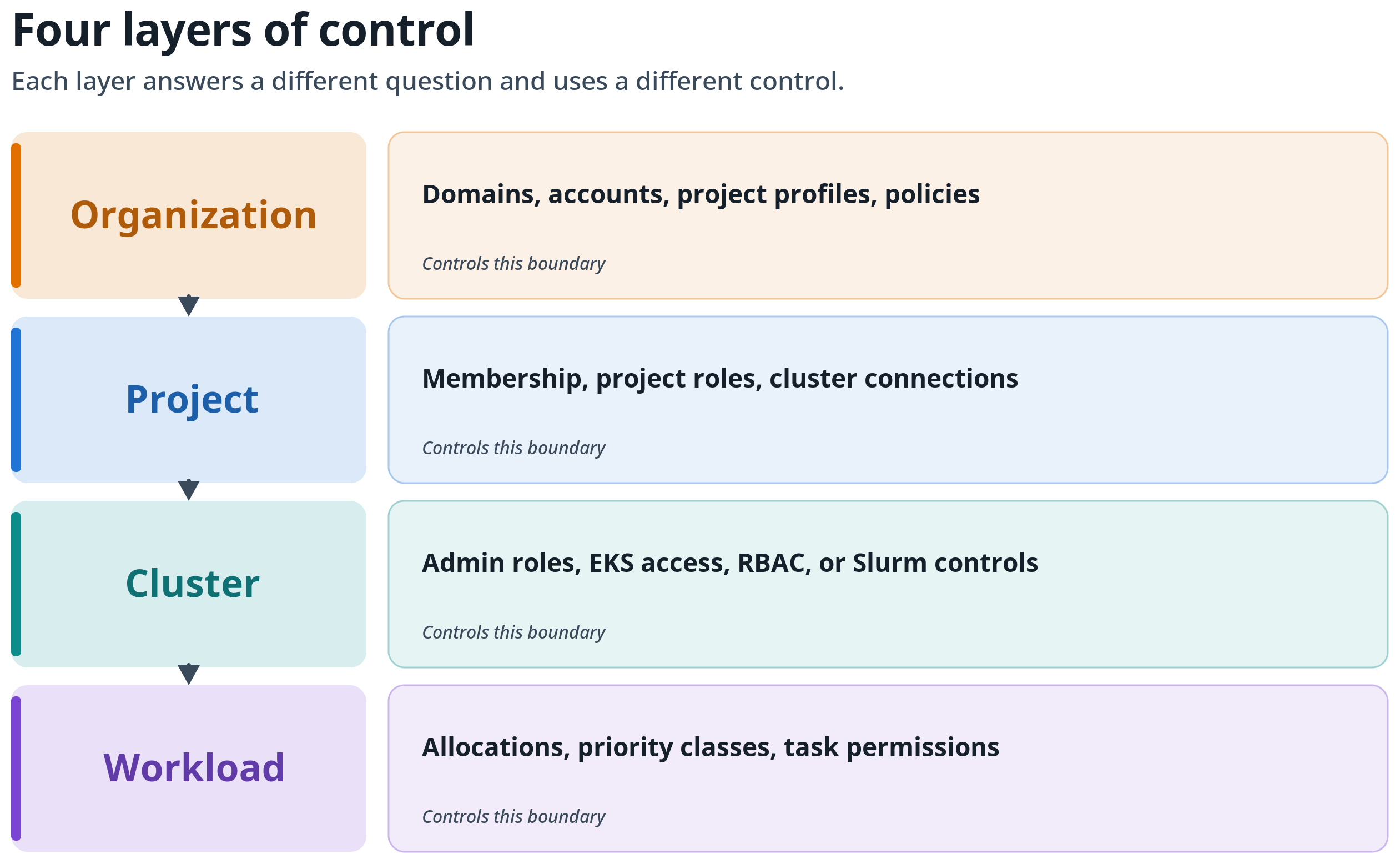
Figure 1: The four layers of control: organization, project, cluster, and workload. Each layer answers a different question and uses a different control, so review each at its own boundary.
SageMaker Unified Studio projects are collaboration boundaries. They aren’t strong runtime security boundaries. Keep the SageMaker HyperPod cluster, scheduler, and scarce accelerator capacity under one designated capacity account. Approved users and datasets can remain in the same account or in separate consumer and data accounts. AWS documents multi-account support for SageMaker HyperPod task governance on Amazon EKS clusters. Although On-Demand Capacity Reservations can be shared across accounts, centralize SageMaker HyperPod cluster ownership and capacity administration in the capacity account. Use approved cross-account access rather than making each consumer account an independent capacity administrator.
- For Amazon EKS, use a namespace per tenant together with RBAC, per-tenant service accounts and EKS Pod Identity roles, default-deny network policies, and tenant-specific storage and AWS KMS permissions. For Slurm, use Slurm accounting with hierarchical accounts and associations, quality of service (QoS), priority and fair-share policies, and partitions. Also use operating-system identity and file permissions, network controls, and tenant-specific data paths.
- Use IAM roles and resource policies, rather than project membership alone, to control access to Amazon Simple Storage Service (Amazon S3) buckets, AWS KMS keys, secrets, container registries, and other data services. Use project and domain-unit policies for collaboration and delegation.
- For Amazon EKS clusters, use SageMaker HyperPod task governance, including quotas, priority classes, lending and borrowing, and preemption, to share the central accelerator pool fairly. For Slurm clusters, use native partitions, quality of service (QoS), priority, fair-share, and preemption controls. Slurm doesn’t provide the same lending-and-borrowing model. These scheduling controls determine when an authorized workload receives compute. They don’t grant namespace or data access.
For stronger isolation within a cluster, use dedicated nodes or node groups and admission controls where appropriate. Use a separate cluster or account when legal, regulatory, or security requirements demand hard infrastructure isolation. Cross-account consumer access can preserve account-level ownership without duplicating the central SageMaker HyperPod cluster. Within the capacity account, use project profiles and domain units with project authorization policies to delegate project creation and ownership.
The following figure shows centralized capacity with tenant-specific workload, identity, data, network, and visibility controls.
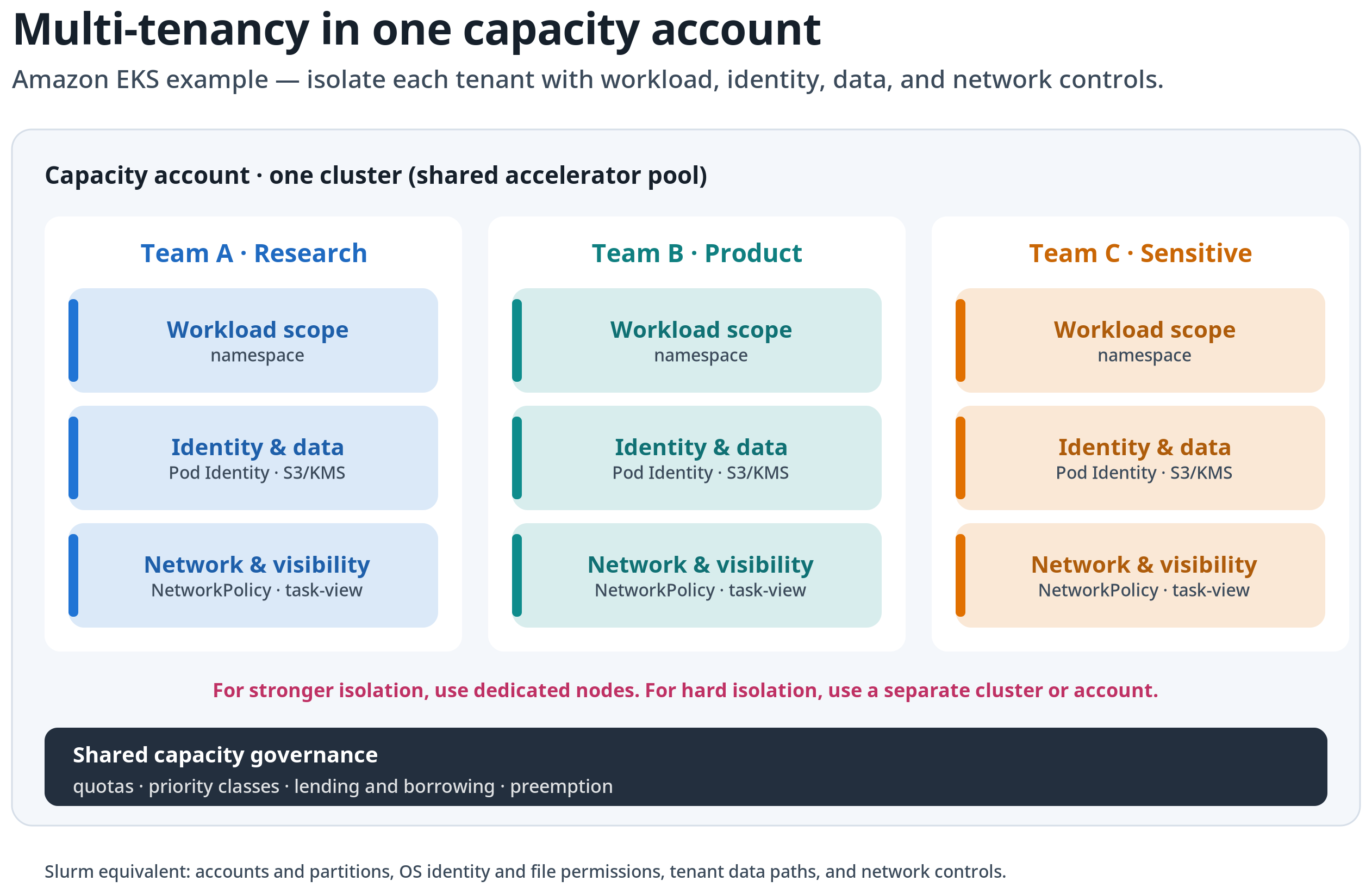
Figure 2: Centralized SageMaker HyperPod capacity. The cluster and scheduler remain in one capacity account. Each tenant receives workload, identity, data, network, and task-visibility controls. Hard-isolation requirements use dedicated infrastructure.
Figure 3 shows how those boundaries connect when SageMaker Unified Studio exposes approved SageMaker HyperPod compute to project members.
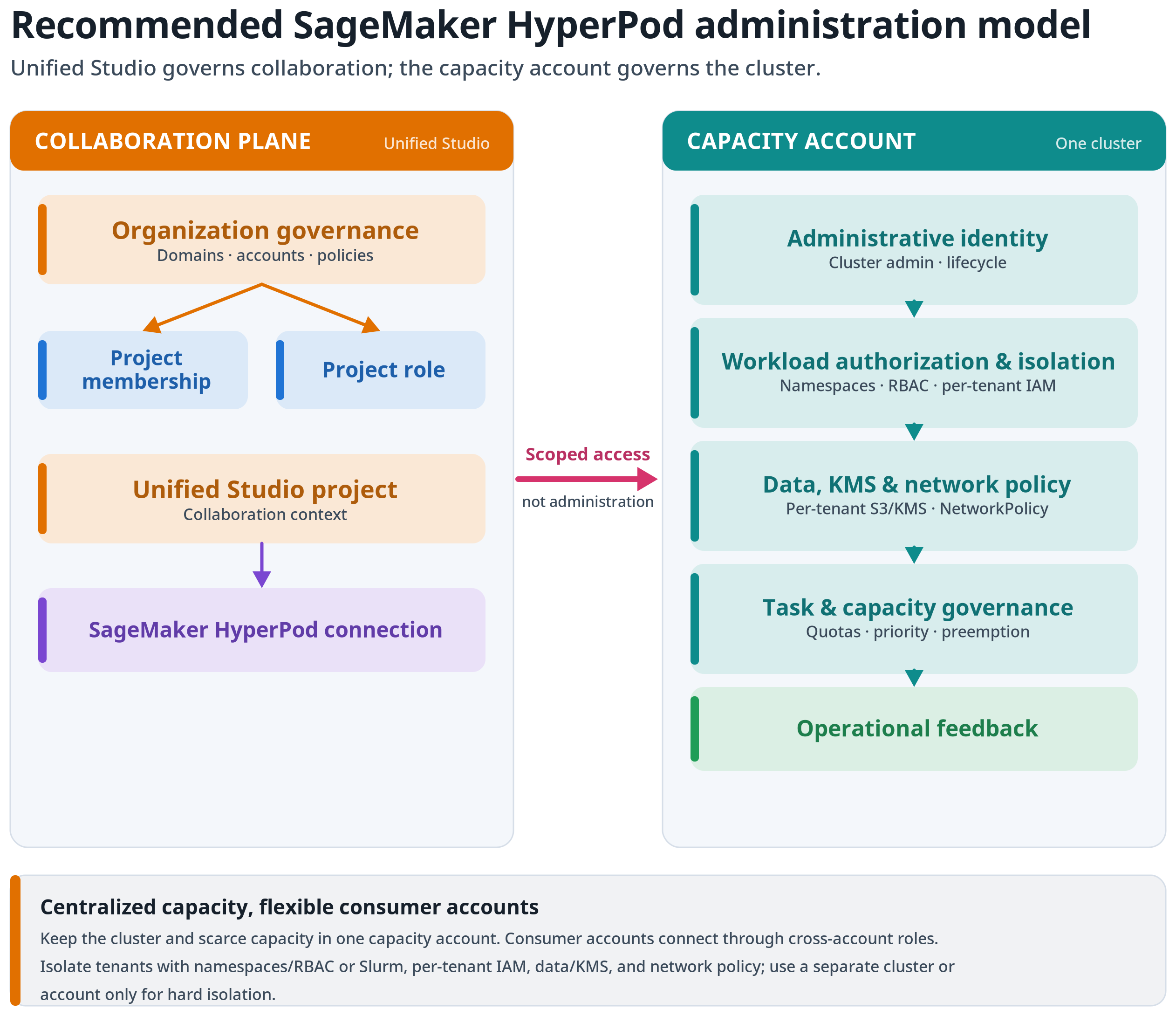
Figure 3: Recommended SageMaker HyperPod administration model. SageMaker Unified Studio governs the collaboration context, while cluster identity, workload authorization, scheduler policy, and operational controls remain separate.
Decide when SageMaker Unified Studio is the right administrative experience
With SageMaker Unified Studio, machine learning teams that already work in a project can follow an approved path to shared SageMaker HyperPod compute. Members can find connected clusters, review status and metadata, inspect supported tasks and metrics, and move into JupyterLab without using a separate infrastructure inventory.
This experience doesn’t replace cluster administration. The following table shows how each persona should use SageMaker Unified Studio alongside the service-specific interfaces.
| Persona | Use SageMaker Unified Studio for | Continue using service-specific tools for |
| Domain or infrastructure administrator | Domain units, project creation policy, project profiles, membership policy, and account placement | Organization-level controls, account provisioning, and infrastructure automation |
| SageMaker HyperPod cluster administrator | Presenting approved cluster connections and reviewing cluster, task, settings, and metadata views | Cluster creation, updates, resiliency configuration, add-ons, EKS or Slurm administration, and incident response |
| Project owner | Managing project membership and giving users a consistent project context for approved compute | Requesting infrastructure changes and approving business-specific access requirements |
| ML engineer or data scientist | Finding approved compute, reviewing workload status, and opening the JupyterLab workflow | Submitting and managing detailed workloads through the SageMaker HyperPod CLI, kubectl, or Slurm tools as appropriate |
Use SageMaker Unified Studio when project membership, data access, development tools, and compute need a common context. For cluster changes and repeatable automation, continue using SageMaker AI APIs, infrastructure as code, and orchestrator tools. For reference implementations and integrations, refer to the AI on SageMaker HyperPod site.
Make infrastructure decisions before connecting a cluster
Before approving a connection, document the capacity account, any consumer or data accounts, AWS Region, network paths, identities, owners, workload boundaries, and isolation requirements. If you need guidance creating a cluster, refer to the Amazon SageMaker HyperPod documentation or the AI on SageMaker HyperPod site.
Separate administrative and workload identities. Preserve the SageMaker HyperPod distinction between cluster administrators and data scientist users when creating project and access roles. A project-facing role shouldn’t receive cluster lifecycle permissions solely because its users run workloads. Refer to AWS Identity and Access Management for SageMaker HyperPod for the supported permission model.
Treat networking as an end-to-end control. Restrict Amazon EKS Kubernetes API endpoint access to approved administrative network paths, control pod ingress and egress, and verify that the project, connection role, workload role, and cluster network support only the intended data paths. For orchestrator-specific configuration, refer to Orchestrating SageMaker HyperPod clusters with Amazon EKS.
For example, configure private access to the Amazon EKS API endpoint and allow it only from approved administrator or workload subnets. Apply a default-deny Kubernetes NetworkPolicy and explicitly allow required service-to-service and egress paths. Use virtual private cloud (VPC) endpoints for services such as Amazon S3, Amazon Elastic Container Registry (Amazon ECR), and Amazon CloudWatch where appropriate, and give each tenant a dedicated workload role for data access.
Create a connection contract. A connection contract is a customer-managed governance record, such as a wiki page, ticket, service-catalog record, or file tracked in an infrastructure-as-code repository. It isn’t a platform feature. Record the following information for every approved project-to-cluster connection:
- Business owner, operations owner, and cost owner.
- SageMaker Unified Studio domain unit and project.
- Cluster account, Region, name, and orchestrator.
- Project role and the access role Amazon Resource Name (ARN) used by the connection.
- Approved workload types and data classification.
- EKS namespaces or Slurm access scope.
- Scheduling policy and exception owner.
- Monitoring, support, and decommissioning expectations.
This contract gives reviewers one record for evaluating and approving the complete access path.
Govern identity and task visibility
Control both actions and visibility. Improper setup of task names, namespaces, resource requests, and usage patterns can reveal information about another team’s work.
Use groups rather than individual grants for project membership and cluster access where possible. Review each role at its own boundary instead of creating one broad role that spans the domain, project, cluster, and workload policy.
The following workflow shows how to separate what a user can see from what a user can do.
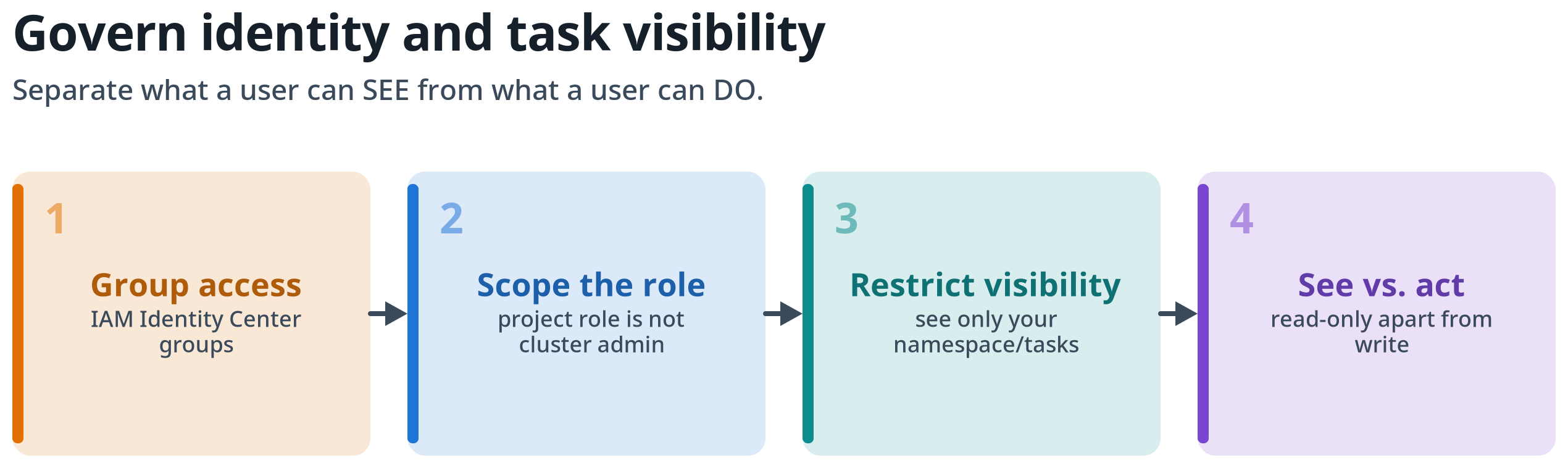
Figure 4: Governing identity and task visibility. Assign access through groups, scope each role to its boundary, restrict task visibility, and separate the ability to see work from the ability to act on it.
Review default task visibility before onboarding users. The documentation for SageMaker HyperPod in SageMaker AI Studio explains that SageMaker AI Studio users can see all Amazon EKS cluster tasks by default. For Slurm clusters, every SageMaker AI Studio user can view, manage, and interact with available tasks. Configure task-view restrictions before onboarding multiple teams: see Restrict task view in Studio for EKS clusters for Amazon EKS and Restrict task view in Studio for Slurm clusters for Slurm. Project membership isn’t a cluster-level security boundary.
For Amazon EKS clusters, map each team to an approved namespace and RBAC permissions, and map each workload service account to a tenant-specific IAM role. For cross-account data access, associate the service account with an EKS Pod Identity role in the capacity (cluster) account and set a target IAM role on the association (targetRoleArn). EKS Pod Identity then performs the cross-account role assumption automatically, so application code doesn’t need to call