Amazon Textract is a fully managed machine learning (ML) service that automatically extracts text, handwriting, layout elements, and structured data from scanned documents. Organizations use Amazon Textract to automate document processing workflows such as invoice processing, mortgage application intake, insurance claim handling, and identity verification, eliminating manual data entry and accelerating downstream decision-making. Amazon Textract Custom Queries adapters extend this capability so you can fine-tune extraction for your specific document types, improving accuracy on forms with unique layouts or domain-specific terminology. For more information, see the Amazon Textract Custom Queries documentation.
While this post uses Custom Queries adapters for its examples and API calls, the lifecycle management patterns such as solution architecture, promotion strategies, and security configurations are adapter-type agnostic and apply equally to Forms and Tables adapters. In this post, you will find infrastructure templates (AWS CloudFormation and Terraform), a documented process for promoting adapters across accounts, production security configurations, and a pre-classification pattern for document routing. By externalizing adapter IDs into AWS Systems Manager Parameter Store, you can update production adapter references with zero downtime and no application redeployment, so a change that once took hours or days of coordination takes seconds.
Moving document extraction workloads from proof of concept to production requires a structured approach to adapter lifecycle management. Amazon Textract adapters extend the pre-trained Amazon Textract deep learning model as modular components, customizing its output for your specific document types. To create an adapter, you upload sample documents, annotate them with queries and expected responses, and train the adapter to recognize your document’s unique layout patterns. This improves extraction accuracy for your specific forms. You do not need to build custom ML models.
However, once you move past proof of concept, three core challenges emerge:
Adapter promotion: How do you move trained adapters from training to production across AWS accounts? The process currently requires AWS Support tickets, and only trained model weights transfer. Query definitions and training data do not transfer. Without automation, this becomes a manual bottleneck that slows your release cadence.
Document routing: Amazon Textract supports one adapter per AnalyzeDocument API call per page per feature type. If you process multiple form versions (and most enterprises do), you need a routing mechanism upstream of your Amazon Textract calls to select the correct adapter for each document.
Production security: Regulated industries require encryption at rest and in transit, network isolation, least-privilege AWS Identity and Access Management (IAM), comprehensive audit logging, and compliance certifications. The following security controls further harden your Amazon Textract deployment and confirm it is production-ready for regulated workloads.
Note: Supported formats and API constraints
Amazon Textract supports JPEG, PNG, PDF, and TIFF file formats. The synchronous AnalyzeDocument API processes single-page documents (or the first page of multi-page files), while the asynchronous StartDocumentAnalysis API handles multi-page PDFs and TIFFs up to 3,000 pages. XFA-based PDFs are not supported. For the full list of quotas, see Set Quotas in Amazon Textract.
Solution overview
You implement a multi-stage processing pipeline that separates concerns between document classification, adapter selection, and extraction:
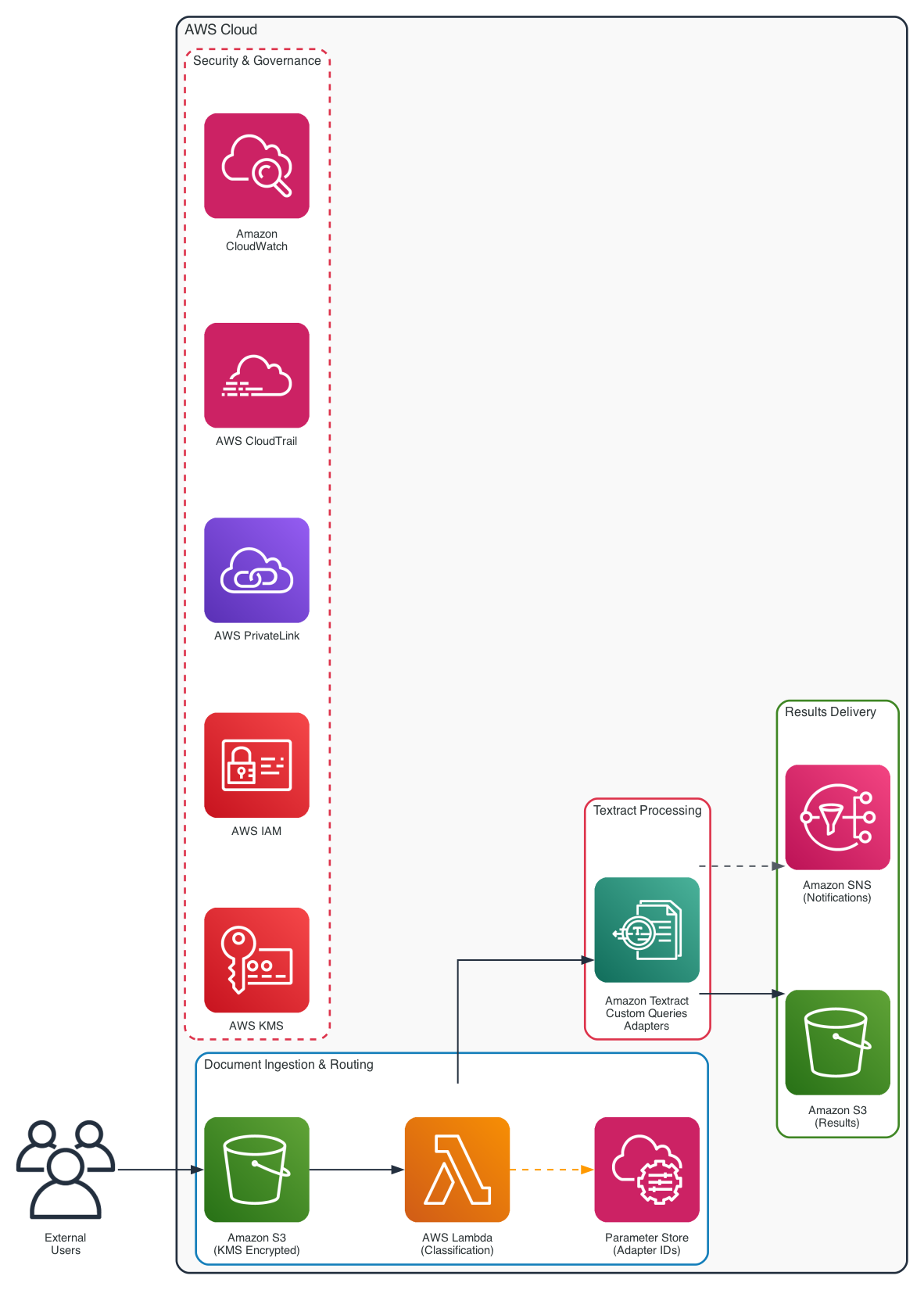
Figure 1: Amazon Textract adapter lifecycle architecture showing the document processing pipeline
- Document ingestion. Documents arrive in an Amazon Simple Storage Service (Amazon S3) bucket encrypted with server-side encryption. The sample code in this post uses S3-managed encryption (AES256) for simplicity. For production workloads, use AWS Key Management Service (AWS KMS) customer managed keys to gain full control over key rotation and access policies.
- Pre-classification. For each incoming document (in any supported format), a lightweight routing step extracts raw text using DetectDocumentText, then identifies the document version by scanning for text markers (form titles, version identifiers, field labels).
- Adapter selection. Based on the classification result, the correct adapter ID is retrieved from AWS Systems Manager Parameter Store (Parameter Store).
- Amazon Textract processing. The AnalyzeDocument or StartDocumentAnalysis API is called with the selected Custom Queries adapter.
- Results delivery. Extracted key-value pairs flow to downstream processing systems (databases, workflow engines, or human review queues).
For production deployments, route API calls through AWS PrivateLink for network isolation. IAM enforces least-privilege access. AWS CloudTrail provides API audit logging and Amazon CloudWatch handles operational monitoring and alerting.
This architecture decouples adapter management from application logic. When you train a new adapter version or promote an adapter to a new environment, you update only the SSM parameter. No application code changes or redeployments are required.
Multi-environment topology
The adapter lifecycle described here spans four environments as a recommended best practice for production workloads. However, a multi-environment setup is not mandatory. You can adapt this model to match your organization’s existing account structure and operational maturity.
For smaller teams or early-stage implementations, you can start with as few as two environments (training and production) in a single AWS account, using naming conventions, tags, and separate S3 buckets to isolate workloads. As your adapter portfolio grows, you can expand to dedicated accounts. The following environments represent logical stages, not a strict requirement for separate AWS accounts. Many organizations map these stages to their existing AWS account strategy (for example, an AWS Organizations structure with workload OUs), while others run multiple stages within a single account using resource-level isolation:
- Training: Adapter creation, training, and annotation.
- Validation: Testing against diverse test document sets. Regression testing.
- Pre-production: Integration testing with downstream systems. Performance benchmarking.
- Production: Live document processing with full security controls.
Promotion strategies
Two architectural approaches exist for moving adapters between environments:
Approach 1: Cross-Account Copy (Standard). You train the adapter in your training account (the account where adapters are created and trained), then copy it to each downstream account through an AWS Support ticket. Each environment maintains its own adapter ID. This approach is more straightforward for organizations with a small number of adapters (fewer than 10) and infrequent updates.
Approach 2: Centralized Hub Account. You train all adapters in a single dedicated hub account. Environments (training, validation, pre-production, production) invoke Amazon Textract in the hub account through cross-account IAM roles. This eliminates repeated support tickets and adapter copying entirely. This approach reduces operational overhead for organizations managing many adapters with frequent updates, though it introduces cross-account networking complexity.
You can choose either approach based on your requirements. The right selection depends on your organization’s adapter count, update frequency, and networking constraints.
Technical implementation
This section walks through the infrastructure setup, environment promotion process, and API call patterns needed to operationalize your adapter pipeline.
Prerequisites
To follow along with this post, you need the following:
- An AWS account.
- IAM permissions to create and manage Amazon Textract adapters, Amazon S3 buckets, AWS KMS keys, and AWS Systems Manager Parameter Store (Parameter Store) parameters.
The following IAM policy provides the minimum permissions needed to create and manage adapters, process documents, and read and write the associated S3 and Parameter Store resources:
{
    "Version": "2012-10-17",
    "Statement": [
        {
            "Sid": "TextractAdapterReadOnly",
            "Effect": "Allow",
            "Action": [
                "textract:GetAdapter",
                "textract:GetAdapterVersion",
                "textract:ListAdapters",
                "textract:ListAdapterVersions",
                "textract:ListTagsForResource"
            ],
            "Resource": "arn:aws:textract:*:*:adapter/*"
        },
        {
            "Sid": "TextractAdapterCreate",
            "Effect": "Allow",
            "Action": [
                "textract:CreateAdapter",
                "textract:CreateAdapterVersion",
                "textract:UpdateAdapter",
                "textract:TagResource",
                "textract:UntagResource"
            ],
            "Resource": "arn:aws:textract:*:*:adapter/*"
        },
        {
            "Sid": "TextractAdapterDelete",
            "Effect": "Allow",
            "Action": [
                "textract:DeleteAdapter",
                "textract:DeleteAdapterVersion"
            ],
            "Resource": "arn:aws:textract:*:*:adapter/*"
        },
        {
            "Sid": "TextractDocumentProcessing",
            "Effect": "Allow",
            "Action": [
                "textract:AnalyzeDocument",
                "textract:StartDocumentAnalysis",
                "textract:GetDocumentAnalysis",
                "textract:DetectDocumentText"
            ],
            "Resource": "*"
        },
        {
            "Sid": "S3DocumentAccess",
            "Effect": "Allow",
            "Action": [
                "s3:GetObject"
            ],
            "Resource": "arn:aws:s3:::amzn-s3-demo-source-bucket/*"
        },
        {
            "Sid": "S3ResultsAccess",
            "Effect": "Allow",
            "Action": [
                "s3:PutObject"
            ],
            "Resource": "arn:aws:s3:::amzn-s3-demo-destination-bucket/*"
        },
        {
            "Sid": "SSMParameterAccess",
            "Effect": "Allow",
            "Action": [
                "ssm:GetParameter",
                "ssm:PutParameter"
            ],
            "Resource": "arn:aws:ssm:*:*:parameter/textract/adapters/*"
        }
    ]
}
If you use AWS KMS encryption on your S3 buckets, add kms:Decrypt for the source bucket key and kms:GenerateDataKey for the output bucket key.
- AWS CLI v2 installed and configured.
- Sample documents (minimum 5 training and 5 test documents) for adapter training.
- For multi-account promotion: access to both source and destination AWS accounts in the same Region.
- (Optional) AWS CloudFormation or Terraform (version 1.4 or later, required for the terraform_data resource) for infrastructure as code deployment.
Infrastructure as code
Amazon Textract is a fully managed service with no servers to provision or clusters to configure. You can create and manage adapters through the AWS Management Console, the AWS CLI, or the AWS SDKs. This post focuses on CLI and infrastructure-as-code approaches to enable repeatable, automated deployments. Supporting infrastructure (IAM roles, S3 buckets, KMS keys, SSM parameters, CloudWatch alarms) is managed through CloudFormation or Terraform. Create adapters using the AWS CLI. You can wrap the CLI call in a CloudFormation custom resource backed by AWS Lambda, or run it as a step in your continuous integration and continuous delivery (CI/CD) pipeline.
Supporting infrastructure (AWS CloudFormation)
This CloudFormation template provisions the core supporting infrastructure for an Amazon Textract adapter workload
Adapter creation with the AWS CLI
Since adapters cannot be created via CloudFormation natively, use the AWS CLI. This can be wrapped in a CloudFormation Custom Resource backed by Lambda, or executed as a step in your CI/CD pipeline:
# Create a new adapter
aws textract create-adapter \
    --adapter-name "<your-adapter-name>" \
    --feature-types '["QUERIES"]' \
    --auto-update "ENABLED" \
    --tags '{"Environment":"<your-environment>","FormType":"<your-form type>","Version":"<your-version>"}'

# After training completes, store the adapter ID in Parameter Store
aws ssm put-parameter \
    --name "/textract/adapters/<your-adapter-name>/id" \
    --type "String" \
    --value "<adapter-id-from-create-response>" \
    --overwrite
See create-adapter.sh for the full implementation and to explore further CLI command reference.
Alternative: Terraform with terraform_data
For organizations using Terraform, use terraform_data (introduced in Terraform 1.4 as the successor to the deprecated null_resource) with local-exec provisioners. Per AWS Prescriptive Guidance, consider this a temporary solution and regularly check if native Terraform provider support has been added for Amazon Textract adapter resources.
A Terraform equivalent for the supporting infrastructure is available under Terraform module. Alternatively, you create adapters with the AWS CLI as shown earlier.
Environment promotion with CI/CD
Adapter promotion between AWS accounts follows a three-step process based on the official AWS documentation for copying adapters. Understanding this process is critical because it differs significantly from how you promote other AWS resources.
An adapter learns the structure and field layout of a document type. It does not learn the content of any individual document. Once trained on a representative sample in development, the same adapter accurately extracts data from any new document of that type in production.
For example, you train an adapter on 10 sample ABC forms so it learns the layout and fields. In production, that same adapter processes 18,000 different ABC forms of that type.
Step 1: Prepare
- Gather the following information before initiating a copy request:
- Source adapter ID and version number.
- Source AWS account ID and Region.
- Destination AWS account ID (must be in the same Region).
- Adapter name and feature type.
How the copy process works:
- Source and destination accounts must be in the same AWS Region. Submit a separate request for each Region as needed.
- Each adapter version requires its own copy request, giving you control over which versions to promote.
- Only trained model weights are transferred. Maintain query definitions and training data in your own configuration store (such as Parameter Store or a version-controlled file).
- You must maintain your own records of query configurations per adapter externally.
Step 2: Request a copy through AWS Support
Open an AWS Support case requesting an adapter copy. Include all details from Step 1: Region, source AWS account, adapter ID, adapter version, destination AWS account, and adapter ID.
You must have already created an adapter in the destination account using the console or API. You are not required to train an adapter version in the destination. Only the metadata (adapter name and description) must exist. Submit the request through AWS Support and monitor your case for completion notification.
Step 3: Validate in the destination
After the copy completes, run your test document set through the copied adapter to verify extraction accuracy matches your baseline:
aws textract analyze-document \
    --document '{"S3Object":{"Bucket":"<your-destination-bucket>","Name":"<your-test-document>"}}' \
    --feature-types QUERIES \
    --adapters-config '{"Adapters":[{"AdapterId":"<your-adapter-id>","Version":"<your-adapter-version>","Pages":["*"]}]}' \
    --queries-config '{"Queries":[{"Text":"<your-query>","Alias":"<your-alias>","Pages":["*"]}]}'
Alternative: Centralized hub account
If you manage many adapters with frequent updates, consider a centralized hub account:
- Train all adapters in a single dedicated hub account.
- Environments (training, validation, pre-production, production) invoke Amazon Textract in the hub account through cross-account IAM roles.
- This eliminates the need for repeated support tickets and adapter copying.
This approach trades cross-account networking complexity for operational simplicity in adapter management. It works particularly well when you have a dedicated ML platform team that owns adapter training and quality.
Cross-account IAM role trust policy
In the hub account, create a role that workload accounts can assume to invoke Amazon Textract. The following trust policy allows the specified workload accounts